2001 CHEVROLET IMPALA buttons
[x] Cancel search: buttonsPage 179 of 392

3-9
Audio Systems
Your audio system has been designed to operate easily
and give years of listening pleasure. You will get the
most enjoyment out of it if you acquaint yourself with it
first. Find out what your audio system can do and how
to operate all its controls, to be sure you're getting the
most out of the advanced engineering that went into it.
Setting the Clock
Press and hold the HR or MIN arrow for two seconds.
Then press the HR arrow until the correct hour appears.
Press and hold the MIN arrow until the correct minute
appears. The clock may be set with the ignition on
or off.
Setting the Clock for Systems with
Radio Data System
Press and hold the HR or MN buttons, located below the
tune knob, for two seconds. Then press and hold HR
until the correct hour appears. AM or PM will appear on
the display. Press and hold MN until the correct minute
appears. The clock may be set with the ignition on or
off. The clock symbol will appear on the display in
time
-set mode.
To set the clock to the time of an FM station
broadcasting Radio Data System (RDS) information,
press and hold HR and MN at the same time for
two seconds until UPDATED and the clock symbol
appear on the display. If the time is not available
from the station, NO UPDAT will appear on the
display instead.
Page 180 of 392
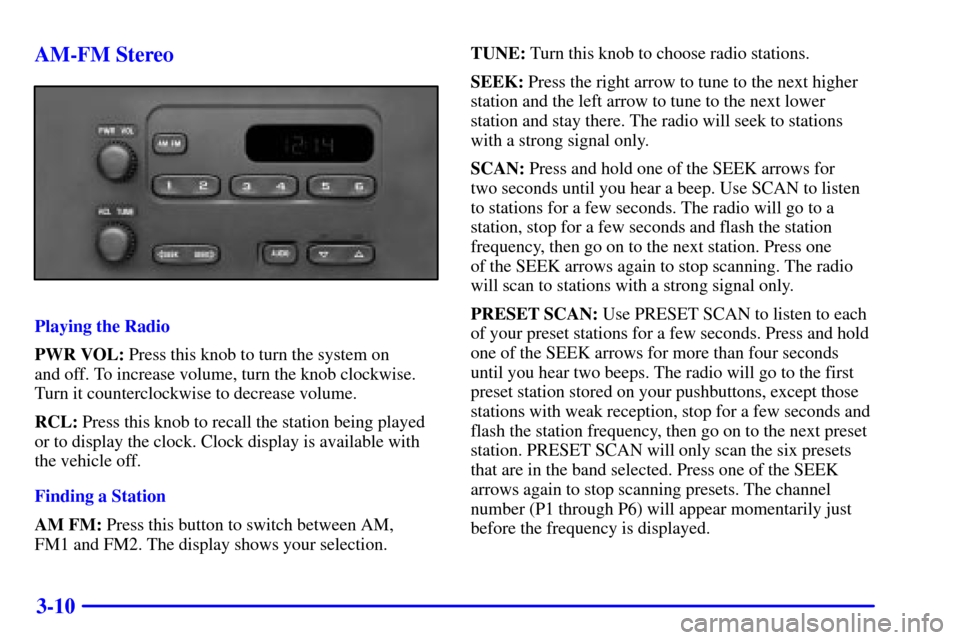
3-10 AM-FM Stereo
Playing the Radio
PWR VOL: Press this knob to turn the system on
and off. To increase volume, turn the knob clockwise.
Turn it counterclockwise to decrease volume.
RCL: Press this knob to recall the station being played
or to display the clock. Clock display is available with
the vehicle off.
Finding a Station
AM FM: Press this button to switch between AM,
FM1 and FM2. The display shows your selection.TUNE: Turn this knob to choose radio stations.
SEEK: Press the right arrow to tune to the next higher
station and the left arrow to tune to the next lower
station and stay there. The radio will seek to stations
with a strong signal only.
SCAN: Press and hold one of the SEEK arrows for
two seconds until you hear a beep. Use SCAN to listen
to stations for a few seconds. The radio will go to a
station, stop for a few seconds and flash the station
frequency, then go on to the next station. Press one
of the SEEK arrows again to stop scanning. The radio
will scan to stations with a strong signal only.
PRESET SCAN: Use PRESET SCAN to listen to each
of your preset stations for a few seconds. Press and hold
one of the SEEK arrows for more than four seconds
until you hear two beeps. The radio will go to the first
preset station stored on your pushbuttons, except those
stations with weak reception, stop for a few seconds and
flash the station frequency, then go on to the next preset
station. PRESET SCAN will only scan the six presets
that are in the band selected. Press one of the SEEK
arrows again to stop scanning presets. The channel
number (P1 through P6) will appear momentarily just
before the frequency is displayed.
Page 181 of 392

3-11
PUSHBUTTONS: The six numbered pushbuttons
let you return to your favorite stations. You can set up
to 18 stations (six AM, six FM1 and six FM2) by
performing the following steps:
1. Turn the radio on.
2. Press AM FM to select the band.
3. Tune in the desired station.
4. Press and hold one of the six numbered buttons until
you hear a beep. Whenever you press that numbered
button, the station you set will return.
5. Repeat the steps for each pushbutton.
Setting the Tone
BASS: Press and release AUDIO repeatedly until
BAS appears on the display. Then press and hold the
up arrow to increase bass. ªBº and a positive number
will appear on the display. Press and hold the down
arrow to decrease bass. B and a negative number will
appear on the display. B and a zero will appear on the
display when the bass level is set to the middle position.
Release the up or down arrow when you find the bass
level you want or when the maximum or minimum level
is reached.TREBLE: Press and release AUDIO until TRE appears
on the display. Then press and hold the up arrow to
increase treble. ªTº and a positive number will appear
on the display. Press and hold the down arrow to
decrease treble. T and a negative number will appear
on the display. T and a zero will appear on the display
when the treble level is set to the middle position.
Release the up or down arrow when you find the treble
level you want or when the maximum or minimum level
is reached. If a station is weak or noisy, you may want
to decrease the treble.
To set BASS or TREBLE to the middle position,
select the desired tone control. Then press and hold
AUDIO for more than two seconds until you hear a
beep. B and a zero or T and a zero will appear on the
display. To set all of the tone controls and speaker
controls to the middle position, end out of audio mode.
Then press and hold AUDIO for more than two seconds
until you hear a beep. CEN will appear on the display.
Page 184 of 392

3-14
PUSHBUTTONS: The six numbered pushbuttons
let you return to your favorite stations. You can set
up to 18 stations (six AM, six FM1 and six FM2) by
performing the following steps:
1. Turn the radio on.
2. Press AM FM to select the band.
3. Tune in the desired station.
4. Press AUTO TONE to select the equalization that
best suits the type of station selected.
5. Press and hold one of the six numbered buttons.
The radio will produce one beep. Whenever you
press that numbered button, the station you set
will return and the AUTO TONE equalization that
you selected will also be automatically selected for
that button.
6. Repeat the steps for each pushbutton.
P SCAN: Press and hold one of the arrows for more
than two seconds. The radio will produce one beep.
Use P SCAN to listen to each of your favorite stations
stored on your pushbuttons for a few seconds. The radio
will scan through each of the stations stored on your
pushbuttons, except those stations with weak reception. The AUTO TONE setting stored for that pushbutton
will be automatically chosen. Press P SCAN or one of
the pushbuttons again to stop scanning. SCAN will be
displayed whenever the tuner is in the P SCAN mode.
The channel number (P1 through P6) will appear with
the frequency. In FM mode, this function will scan
through the current band such as FM1 or FM2.
Setting the Tone
BASS: Press and release the P
-TYPE LIST/AUDIO
knob until BASS appears on the display. Then turn the
knob clockwise to increase bass and counterclockwise
to decrease bass. The display will show the bass level.
When you use this control, the radio's AUTO TONE
setting will switch to manual. To set bass to the middle
position, select the control and press and hold the
P
-TYPE LIST/AUDIO knob. The radio will produce
one beep and set the display level to the middle position.
To set all tone and speaker controls to the middle
position, press and hold the P
-TYPE LIST/AUDIO
knob when no tone or speaker control is active. The
radio will produce one beep and display ALL with
the level display in the middle position.
Page 185 of 392

3-15
TREBLE: Press and release the P-TYPE LIST/AUDIO
knob until TREB appears on the display. Turn the knob
clockwise to increase treble and counterclockwise to
decrease treble. The display will show the treble level.
When you use this control, the radio's AUTO TONE
setting will switch to manual. If a station is weak or
noisy, you may want to decrease the treble. To set treble
to the middle position, select the control and press and
hold the P
-TYPE LIST/AUDIO knob. The radio
will produce one beep and set the display level to the
middle position. To set all tone and speaker controls
to the middle position, press and hold the P
-TYPE
LIST/AUDIO knob when no tone or speaker control
is active. The radio will produce one beep and display
ALL with the level display in the middle position.
AUTO TONE: This feature allows you to choose
preset bass and treble equalization settings designed
for ROCK, NEWS, POP, JAZZ, CLASSICAL and
COUNTRY stations. TONE and the preset equalization
setting will appear on the display when you press AUTO
TONE. Each time you press it, another setting will
appear on the display. The manual setting allows tone
control to return to the BASS and TREB controls.
Use PUSHBUTTONS and AUTO TONE button to
program AUTO TONE for station presets.Adjusting the Speakers
BALANCE: Press and release the P
-TYPE
LIST/AUDIO knob until BAL appears on the display.
Turn the knob clockwise to move the sound to the right
speakers and counterclockwise to move the sound to the
left speakers. The middle position balances the sound
between the speakers. The display will show the speaker
balance. To set the balance to the middle position,
select the control and press and hold the P
-TYPE
LIST/AUDIO knob. The radio will produce one beep
and set the display level to the middle position. To set
all tone and speaker controls to the middle position,
press and hold the P
-TYPE LIST/AUDIO knob
when no tone or speaker control is active. The radio
will produce one beep and display ALL with the level
display in the middle position.
Page 193 of 392

3-23
AUTO VOL: Your system has a feature called
Speed
-Compensated Volume (SCV). With SCV, your
audio system adjusts automatically to make up for road
and wind noise as you drive. Set the volume at the
desired level. Press AUTO VOL to adjust the SCV.
AVOL will appear on the display. Each time you press
AUTO VOL, another volume setting (LOW, MEDIUM
or HIGH) will appear on the display. NONE will appear
on the display if the radio cannot find out the vehicle
speed. Then, as you drive, SCV automatically increases
the volume, as necessary, to overcome noise at any
particular speed. The volume level should always sound
the same to you as you drive. If you don't want to use
SCV, select OFF. Each volume setting allows for more
volume compensation at faster vehicle speeds.
Finding a Station
AM FM: Press this button to switch between AM,
FM1 and FM2. The display shows your selection.
TUNE: Turn this knob to choose radio stations.
SEEK: Press the right arrow to tune to the next higher
station and the left arrow to tune to the next lower
station and stay there. The radio will seek to stations
with a strong signal only.PUSHBUTTONS: The six numbered pushbuttons
let you return to your favorite stations. You can set up
to 18 stations (six AM, six FM1 and six FM2) by
performing the following steps:
1. Turn the radio on.
2. Press AM FM to select the band.
3. Tune in the desired station.
4. Press AUTO TONE to select the equalization that
best suits the type of station selected.
5. Press and hold one of the six numbered buttons.
The radio will produce one beep. Whenever you
press that numbered button, the station you set
will return and the AUTO TONE equalization that
you selected will also be automatically selected for
that button.
6. Repeat the steps for each pushbutton.
Page 194 of 392

3-24
P SCAN: Press and hold one of the arrows for more
than two seconds. The radio will produce one beep.
Use P SCAN to listen to each of your favorite stations
stored on your pushbuttons for a few seconds. The radio
will scan through each of the stations stored on your
pushbuttons, except those stations with weak reception.
The AUTO TONE setting stored for that pushbutton
will be automatically chosen. Press P SCAN or one of
the pushbuttons again to stop scanning. SCAN will be
displayed whenever the tuner is in the P SCAN mode.
The channel number (P1 through P6) will appear with
the frequency. In FM mode, this function will scan
through the current band such as FM1 or FM2.
Setting the Tone
BASS: Press and release the P
-TYPE LIST/AUDIO
knob until BASS appears on the display. Then turn the
knob clockwise to increase bass and counterclockwise
to decrease bass. The display will show the bass level.
When you use this control, the radio's AUTO TONE
setting will switch to manual. To set bass to the middle
position, select the control and press and hold the
P
-TYPE LIST/AUDIO knob. The radio will produce one beep and set the display
level to the middle position. To set all tone and speaker
controls to the middle position, press and hold the
P
-TYPE LIST/AUDIO knob when no tone or
speaker control is active. The radio will produce
one beep and display ALL with the level display in
the middle position.
TREBLE: Press and release the P
-TYPE LIST/AUDIO
knob until TREB appears on the display. Turn the knob
clockwise to increase treble and counterclockwise to
decrease treble. The display will show the treble level.
When you use this control, the radio's AUTO TONE
setting will switch to manual. If a station is weak or
noisy, you may want to decrease the treble. To set treble
to the middle position, select the control and press and
hold the P
-TYPE LIST/AUDIO knob. The radio
will produce one beep and set the display level to the
middle position. To set all tone and speaker controls
to the middle position, press and hold the P
-TYPE
LIST/AUDIO knob when no tone or speaker control
is active. The radio will produce one beep and display
ALL with the level display in the middle position.
Page 195 of 392

3-25
AUTO TONE: This feature allows you to choose
preset bass and treble equalization settings designed
for ROCK, NEWS, POP, JAZZ, CLASSICAL and
COUNTRY stations. TONE and the preset equalization
setting will appear on the display when you press AUTO
TONE. Each time you press it, another setting will
appear on the display. The manual setting allows tone
control to return to the BASS and TREB controls.
Use PUSHBUTTONS and AUTO TONE button to
program AUTO TONE for station presets.
Adjusting the Speakers
BALANCE: Press and release the P
-TYPE
LIST/AUDIO knob until BAL appears on the display.
Turn the knob clockwise to move the sound to the right
speakers and counterclockwise to move the sound to the
left speakers. The middle position balances the sound
between the speakers. The display will show the speaker
balance. To set the balance to the middle position,
select the control and press and hold the P
-TYPE
LIST/AUDIO knob. The radio will produce one beep
and set the display level to the middle position. To set
all tone and speaker controls to the middle position,
press and hold the P
-TYPE LIST/AUDIO knob
when no tone or speaker control is active. The radio
will produce one beep and display ALL with the level
display in the middle position.FADE: Press and release the P
-TYPE LIST/AUDIO
knob until FADE appears on the display. Turn the knob
clockwise to move the sound to the front speakers
and counterclockwise to move the sound to the rear
speakers. The middle position balances the sound
between the speakers. The display will show the speaker
balance. To set the fade to the middle position, select the
control and press and hold the P
-TYPE LIST/AUDIO
knob. The radio will produce one beep and set the
display level to the middle position. To set all tone and
speaker controls to the middle position, press and hold
the P
-TYPE LIST/AUDIO knob when no tone or
speaker control is active. The radio will produce one
beep and display ALL with the level display in the
middle position.