Page 4 of 383
Windows
Keys and Door Locks
Remote Keyless Entry (RKE) System
Hatch/Trunk Lid Release
Automatic Transmission
Manual Transmission
Parking Brake
Tilt Wheel
Turn Signal/Multifunction Lever
Windshield WipersCruise Control
Exterior and Interior Lamps
Mirrors
Storage Compartments
Convenience Net
Accessory Power Outlet
Instrument Panel, Warning Lights and Gages
Driver Information Center
Head-Up Display Seats and Seat Controls
Safety BeltsAir Bag System
Restraint Systems for Children
Section
1
Section
2
Seats and Restraint Systems
Features and Controls
ii
Table of Contents
Page 63 of 383
2-
2-1
Section 2 Features and Controls
Here you can learn about the many standard and optional features on your vehicle, and information on starting,
shifting and braking. Also explained are the instrument panel and the warning systems that tell you if everything is
working properly
-- and what to do if you have a problem.
2
-2 Windows
2
-4 Keys
2
-6 Door Locks
2
-7 Memory (Option)
2
-9 Remote Keyless Entry (RKE) System
2
-14 Hatch/Trunk Lid Release
2
-19 Theft-Deterrent System
2
-20 PASS-Key�
2-21 New Vehicle ªBreak-Inº
2
-22 Ignition Switch
2
-24 Starting Your Engine
2
-26 Engine Coolant Heater (Canada Only)
2
-28 Automatic Transmission Operation
2
-31 Manual Transmission Operation
2
-35 Parking Brake
2
-36 Shifting Into PARK (P)
(Automatic Transmission Only)
2
-38 Shifting Out of PARK (P)
(Automatic Transmission)2
-38 Parking Your Vehicle (Manual Transmission
Models Only)
2
-39 Parking Over Things That Burn
2
-39 Engine Exhaust
2
-40 Running Your Engine While You're Parked
(Automatic Transmission)
2
-40 Limited-Slip Rear Axle
2
-41 Selective Real Time Damping (SRTD) (Option)
2
-43 Turn Signal/Multifunction Lever
2
-51 Exterior Lamps
2
-53 Interior Lamps
2
-54 Mirrors
2
-57 Storage Compartments
2
-62 Roof Panel (If Equipped)
2
-69 Convertible Top (Option)
2
-76 The Instrument Panel -- Your
Information System
2
-80 Warning Lights, Gages and Messages
2
-93 Driver Information Center (DIC)
Page 70 of 383

2-8
The MEMORY buttons are located on the driver's door,
above the power mirror controls. The MEMORY
buttons can store and recall settings for up to three
drivers. Use button ª1º to store the settings for the
first driver, button ª2º for a second driver or press
buttons 1 and 2 at the same time for a third driver.
To store your memory settings:
1. Adjust your settings for the driver's seat position,
outside rearview mirror positions, and telescopic
steering wheel (if equipped).
2. Press and hold a MEMORY button. The light above
the MEMORY button will glow steady for one
second and then flash once when the settings are
complete. Then the light will go off.
3. Set the climate control temperature, fan speed and
mode settings, radio presets, tone, volume, playback
mode (AM/FM, tape or CD), tape direction and
compact disc position.
Your memory settings are now programmed. Any
changes that are made to the audio system and climate
controls while driving will be automatically stored when
the ignition key is turned off.When first entering your vehicle, after pressing the
unlock button on your remote keyless entry transmitter
or a MEMORY button, a recall of your settings will
occur when the door is closed and the ignition key is in
the ignition switch. As the memory settings are recalled,
the light above the button will flash until the correct
settings are achieved, then glow for five seconds
when complete.
A memory recall can be stopped by pressing any
memory seat, mirror or steering column position button.
When your remote keyless entry transmitter has been
programmed to driver 1, 2 or 3, and you insert the key into
the ignition, memory will also occur. Drivers 1, 2 and
3 correspond to the order in which your remote keyless
entry transmitters were programmed. See ªFob Trainingº
in the Index for more information.
Memory recall will not work if the vehicle is moving.
Memory recall will be temporarily interrupted during
engine crank.
Page 118 of 383
2-56
Power/Heated Remote Control Mirrors
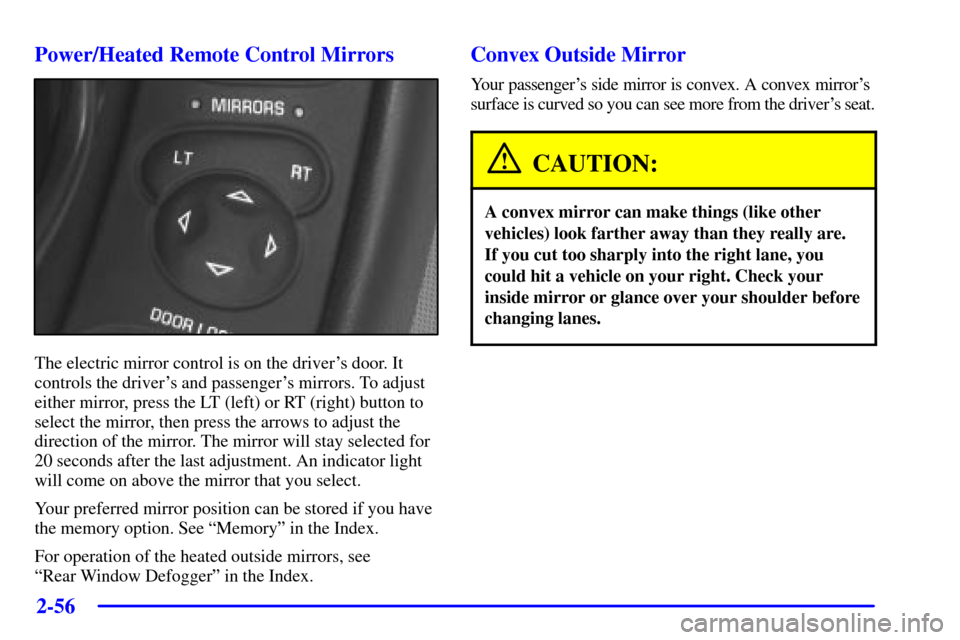
The electric mirror control is on the driver's door. It
controls the driver's and passenger's mirrors. To adjust
either mirror, press the LT (left) or RT (right) button to
select the mirror, then press the arrows to adjust the
direction of the mirror. The mirror will stay selected for
20 seconds after the last adjustment. An indicator light
will come on above the mirror that you select.
Your preferred mirror position can be stored if you have
the memory option. See ªMemoryº in the Index.
For operation of the heated outside mirrors, see
ªRear Window Defoggerº in the Index.
Convex Outside Mirror
Your passenger's side mirror is convex. A convex mirror's
surface is curved so you can see more from the driver's seat.
CAUTION:
A convex mirror can make things (like other
vehicles) look farther away than they really are.
If you cut too sharply into the right lane, you
could hit a vehicle on your right. Check your
inside mirror or glance over your shoulder before
changing lanes.
Page 339 of 383
6-70
Minifuse Usage
1 Console Cigarette Lighter
2 Monitored (Inadvertent)
Load Control
3 Lumbar Seat
4 Driver Seat Control Module
5 Radio, Compact Disc Player
6 Parking Lamps, TaillampsMinifuse Usage
7 Cigarette Lighter
8 Stoplamp, Hazard Flashers
9 Body Control Module
10 Windshield Wiper/Washer
11 Accessory Power
12 Blank
13 Body Control Module
- Ignition 1
14 Crank
15 Hazard/Turn Signal
16 Air Bag
17 Tonneau Release
18 HVAC Controls
19 Instrument Panel Control
20 Cruise Control
21 Automatic Transmission Shift
Lock Control System and Inside
Rearview Mirror
22 Body Control Module
- Ignition 3
23 Body Control Module
- Ignition 2
24 Radio Antenna