Page 6 of 383
Table of Contents (cont'd)
Maintenance Schedule Service and Appearance Care
Section
7
Section
6
Scheduled Maintenance
Owner Checks and Services
Periodic Maintenance InspectionsRecommended Fluids and Lubricants
Maintenance Records Fuel
Checking Fluids and Lubricants
GM Oil Life System™
Engine Air Cleaner/Filter
Brakes
Bulb ReplacementWindshield Wiper Blade Replacement
Tires and Wheels
Appearance Care
Electrical System/Fuses and Circuit Breakers
Capacities and Specifications
Normal Maintenance Replacement Parts
iv
Page 45 of 383
1-27
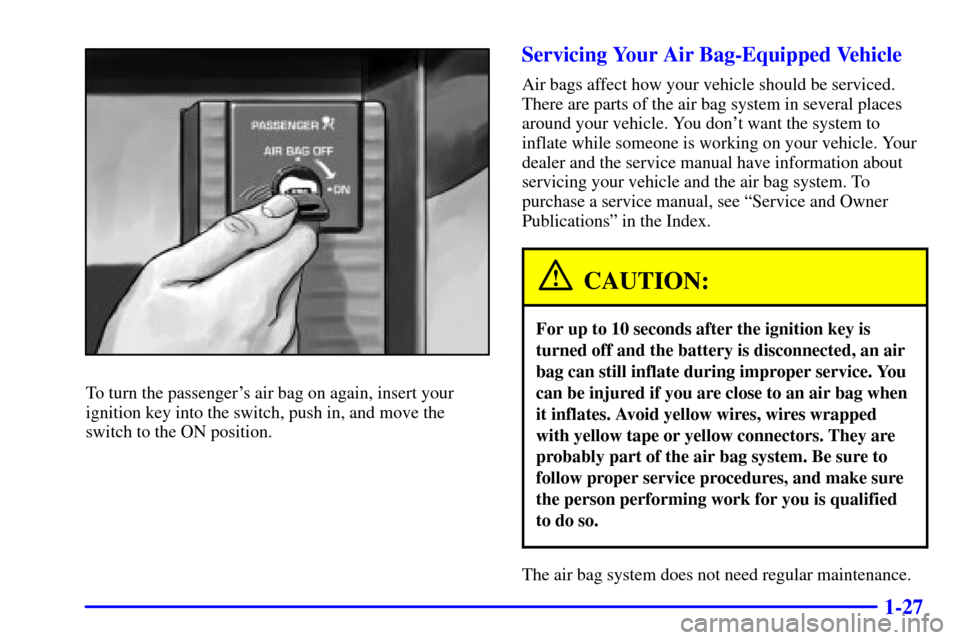
To turn the passenger's air bag on again, insert your
ignition key into the switch, push in, and move the
switch to the ON position.
Servicing Your Air Bag-Equipped Vehicle
Air bags affect how your vehicle should be serviced.
There are parts of the air bag system in several places
around your vehicle. You don't want the system to
inflate while someone is working on your vehicle. Your
dealer and the service manual have information about
servicing your vehicle and the air bag system. To
purchase a service manual, see ªService and Owner
Publicationsº in the Index.
CAUTION:
For up to 10 seconds after the ignition key is
turned off and the battery is disconnected, an air
bag can still inflate during improper service. You
can be injured if you are close to an air bag when
it inflates. Avoid yellow wires, wires wrapped
with yellow tape or yellow connectors. They are
probably part of the air bag system. Be sure to
follow proper service procedures, and make sure
the person performing work for you is qualified
to do so.
The air bag system does not need regular maintenance.
Page 61 of 383

1-43
Safety Belt Extender
If the vehicle's safety belt will fasten around you, you
should use it.
But if a safety belt isn't long enough to fasten, your
dealer will order you an extender. It's free. When you go
in to order it, take the heaviest coat you will wear, so the
extender will be long enough for you. The extender will
be just for you, and just for the seat in your vehicle that
you choose. Don't let someone else use it, and use it
only for the seat it is made to fit. To wear it, just attach it
to the regular safety belt.
Checking Your Restraint Systems
Now and then, make sure the safety belt reminder light
and all your belts, buckles, latch plates, retractors and
anchorages are working properly. Look for any other
loose or damaged safety belt system parts. If you see
anything that might keep a safety belt system from
doing its job, have it repaired.
Torn or frayed safety belts may not protect you in a
crash. They can rip apart under impact forces. If a belt is
torn or frayed, get a new one right away.
Also look for any opened or broken air bag covers, and
have them repaired or replaced. (The air bag system
does not need regular maintenance.)
Page 150 of 383
2-88
NOTICE:
If you keep driving your vehicle with this light
on, after a while, your emission controls may not
work as well, your fuel economy may not be as
good and your engine may not run as smoothly.
This could lead to costly repairs that may not be
covered by your warranty.
NOTICE:
Modifications made to the engine, transmission,
exhaust, intake or fuel system of your vehicle or
the replacement of the original tires with other
than those of the same Tire Performance Criteria
(TPC) can affect your vehicle's emission controls
and may cause the CHECK ENGINE light to
come on. Modifications to these systems could
lead to costly repairs not covered by your
warranty. This may also result in a failure to pass
a required Emission Inspection/Maintenance test.
This light should come on, as a check to show you it is
working, when the ignition is on and the engine is not
running. If the light doesn't come on, have it repaired.
This light will also come on during a malfunction in one
of two ways:
�Light Flashing
-- A misfire condition has been
detected. A misfire increases vehicle emissions and
may damage the emission control system on your
vehicle. Dealer or qualified service center diagnosis
and service may be required.
�Light On Steady
-- An emission control system
malfunction has been detected on your vehicle.
Dealer or qualified service center diagnosis and
service may be required.
If the Light Is Flashing
The following may prevent more serious damage to
your vehicle:
�Reducing vehicle speed.
�Avoiding hard accelerations.
�Avoiding steep uphill grades.
If the light stops flashing and remains on steady, see
ªIf the Light Is On Steadyº following.
Page 152 of 383

2-90
Emissions Inspection and Maintenance Programs
Some state/provincial and local governments have or
may begin programs to inspect the emission control
equipment on your vehicle. Failure to pass this
inspection could prevent you from getting a
vehicle registration.
Here are some things you need to know in order to help
your vehicle pass an inspection:
Your vehicle will not pass this inspection if the
CHECK ENGINE light is on or not working properly.
Your vehicle will not pass this inspection if the
OBD (on
-board diagnostic) system determines that
critical emission control systems have not been
completely diagnosed by the system. The vehicle would
be considered not ready for inspection. This can happen
if you have recently replaced your battery or if your
battery has run down. The diagnostic system is designed
to evaluate critical emission control systems during
normal driving. This may take several days of routine
driving. If you have done this and your vehicle still does
not pass the inspection for lack of OBD system
readiness, see your dealer or qualified service center to
prepare the vehicle for inspection.
Engine Oil Pressure Gage
United States Canada
The engine oil pressure gage shows the engine oil
pressure in psi (pounds per square inch) or
kPa (kilopascals) when the engine is running.
Oil pressure should be 20 to 80 psi (140 to 550 kPa).
In certain situations such as long, extended idles on hot
days, it could read as low as 6 psi (40 kPa) and still be
considered normal. It may vary with engine speed,
outside temperature and oil viscosity, but readings above
the shaded area show the normal operating range.
Readings in the shaded area tell you that the engine is
low on oil, or that you might have some other oil
problem. See ªEngine Oilº in the Index.
Page 159 of 383
2-97 3 TRIP
The TRIP button allows you to scroll through the
functions listed below when you press it.
Odometer
The odometer shows how far your vehicle has been
driven in either miles or kilometers. Press the TRIP
button to display odometer readings such as:
�ODOMETER 12345 MI or
�ODOMETER 20008 km
Without the keys in the ignition, you can also display the
odometer by turning on the parking lamps.
Trip Odometers
There are two trip odometers. Press the TRIP button and
TRIP A will be displayed. Press it again and TRIP B
will be displayed. TRIP A could be used to track the
distance to a destination. TRIP B could be used to track
maintenance periods.
�TRIP A 130.5 MI or
�TRIP A 209.9 km
�TRIP B 300.5 MI or
�TRIP B 483.5 km
The trip odometers can be reset by pushing the RESET
button on the DIC. Both of the trip odometers can be
used simultaneously.
Page 161 of 383

2-99
Remember, you must reset the OIL LIFE yourself after
each oil change. It will not reset itself. Also, be careful
not to reset the OIL LIFE accidentally at any time other
than when the oil has just been changed. It can't be reset
accurately until the next oil change.
To reset the system, see ªHow to Reset the Change Oil
Soon Messageº in the Index.
Also, see ªEngine Oil, When to Changeº and
ªMaintenance Scheduleº in the Index.
4 OPTIONS
This button allows you to choose personal options that
may be available on your vehicle, depending on the
options your vehicle is equipped with. Some of these
functions work along with the remote keyless
entry transmitter.
When returning to the options menu, the first item of the
options list will always be displayed, not the one you
were last in when you changed buttons.
The following are the options listed under the
OPTIONS button:
Twilight (Optional, Standard in Canada)
Press the OPTIONS button until TWILIGHT
- OFF
appears on the display, then use the RESET button to
page through the following selections:
�TWILIGHT
- ON
�TWILIGHT
- OFF
Page 270 of 383

6-
6-1
Section 6 Service and Appearance Care
Here you will find information about the care of your vehicle. This section begins with service and fuel information,
and then it shows how to check important fluid and lubricant levels. There is also technical information about your
vehicle, and a part devoted to its appearance care.
6
-2 Service
6
-3 Fuel
6
-5 Filling Your Tank
6
-9 Checking Things Under the Hood
6
-12 Engine Oil
6
-17 Engine Air Cleaner/Filter
6
-19 Automatic Transmission Fluid
6
-19 Manual Transmission Fluid
6
-21 Hydraulic Clutch
6
-22 Rear Axle
6
-23 Engine Coolant
6
-26 Surge Tank Pressure Cap
6
-26 Power Steering Fluid
6
-27 Windshield Washer Fluid
6
-29 Brakes
6
-32 Battery
6
-33 Bulb Replacement
6
-38 Windshield Wiper Blade Replacement6
-40 Tires
6
-53 Lifting Your Corvette
6
-57 Appearance Care
6
-57 Cleaning the Inside of Your Vehicle
6
-60 Cleaning a Removable Roof Panel
6
-60 Cleaning the Outside of Your Vehicle
6
-62 Cleaning Your Convertible Top
6
-62 Cleaning Aluminum Wheels
6
-63 Cleaning Tires
6
-63 Finish Damage
6
-63 Underbody Maintenance
6
-65 GM Vehicle Care/Appearance Materials
6
-66 Vehicle Identification Number (VIN)
6
-66 Service Parts Identification Label
6
-67 Electrical System
6
-74 Replacement Bulbs
6
-75 Capacities and Specifications
6
-76 Normal Maintenance Replacement Parts