Page 164 of 335
3-12
Setting the Tone
BASS: Press this knob lightly so it extends. Turn the
knob clockwise to increase and counterclockwise to
decrease bass.
TREB: Press this knob lightly so it extends. Turn the
knob clockwise to increase and counterclockwise to
decrease treble. If a station is weak or noisy, you may
want to decrease the treble.
Push these knobs back into their stored positions
when you're not using them.
Adjusting the Speakers
BAL: Press this knob lightly so it extends. Turn the
knob clockwise to adjust sound to the right speakers
and counterclockwise for the left speakers. The middle
position balances the sound between the speakers.
FADE: Press this knob lightly so it extends. Turn the
knob clockwise to adjust the sound to the front speakers
and counterclockwise for the rear speakers. The middle
position balances the sound between the speakers.
Push these knobs back into their stored positions when
you're not using them.Playing a Cassette Tape
With the radio on, insert a cassette tape. The tape will begin
playing as soon as it is inserted. When one side of your
cassette tape is done playing, auto reverse plays the other
side of your cassette tape. If you want to insert a cassette
tape when the ignition is off, first press the eject button.
While the tape is playing, use the VOL, FADE, BAL,
BASS and TREB controls just as you do for the radio.
Other controls may have different functions when a tape
is inserted. The display will show TAPE with an arrow to
indicate which side of the tape is playing. PLAY will
appear on the display temporarily when a tape is playing.
The display will then revert back to showing the time.
If an error occurs while trying to play a cassette tape,
it could be that:
�The cassette tape is tight and the cassette player
cannot turn the hubs of the tape. Hold the cassette
tape with the open end down and try turning the
right hub counterclockwise with a pencil. Flip the
tape over and repeat. If the hubs do not turn easily,
your cassette tape may be damaged and should not
be used in the player. Try a new tape to be sure your
player is working properly.
�The cassette tape is broken. (Check to see if your
tape is broken. Try a new tape.)
Page 173 of 335

3-21
�LIVE: This setting is used to enhance the
stereo effect.
�AUDITORIUM: This setting is used to make
the listening space seem larger.
Adjusting the Speakers
TONE: Press and release this button until the desired
BALANCE or FADE control is found.
LEVEL: After selecting the desired BALANCE or
FADE control, press the plus (+) or minus (
-) symbol
on this button to select the desired level.
Playing a Cassette Tape
With the radio on, insert a cassette tape. The tape will
begin playing as soon as it is inserted. When one side of
your cassette tape is done playing, auto reverse plays the
other side of your cassette tape. Cassette tapes may be
loaded with the radio off but they will not start playing
until the radio is on. If you want to insert a cassette tape
when the ignition is off, first press the eject button.While the tape is playing, use the VOL, TONE, LEVEL
and DSP controls just as you do for the radio. Other
controls may have different functions when a tape is
inserted. The display will show an underlined tape
symbol. TAPE PLAY will appear on the display when
a tape is playing, with an arrow to indicate which side
of the tape is playing.
If an error occurs while trying to play a cassette tape,
it could be that:
�The cassette tape is tight and the cassette player
cannot turn the hubs of the tape. Hold the cassette
tape with the open end down and try turning the
right hub counterclockwise with a pencil. Flip the
tape over and repeat. If the hubs do not turn easily,
your cassette tape may be damaged and should not
be used in the player. Try a new tape to be sure your
player is working properly.
�The cassette tape is broken. (Check to see if your
tape is broken. Try a new tape.)
Page 183 of 335
3-31 Audio Steering Wheel Controls
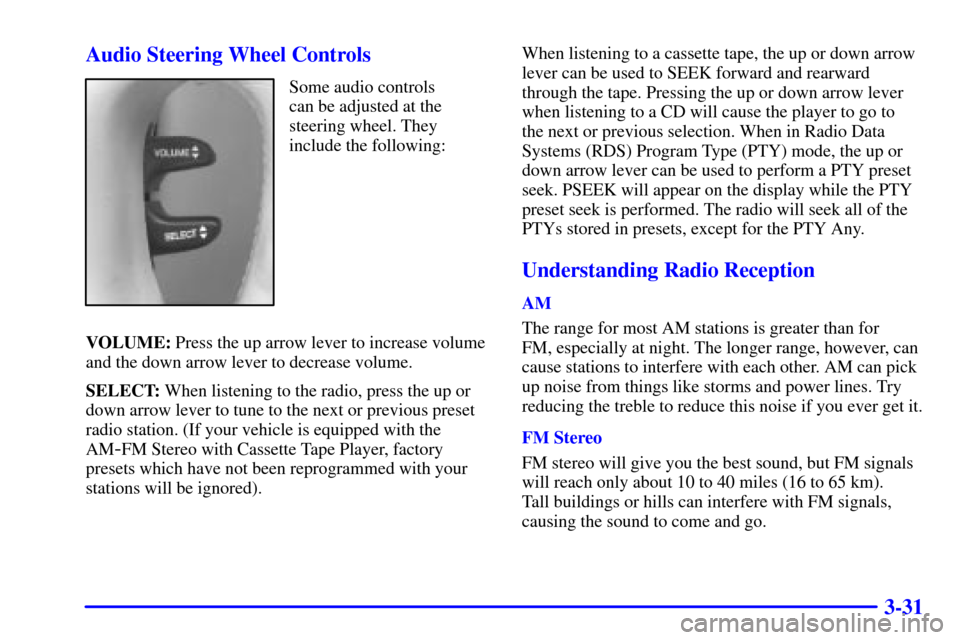
Some audio controls
can be adjusted at the
steering wheel. They
include the following:
VOLUME: Press the up arrow lever to increase volume
and the down arrow lever to decrease volume.
SELECT: When listening to the radio, press the up or
down arrow lever to tune to the next or previous preset
radio station. (If your vehicle is equipped with the
AM
-FM Stereo with Cassette Tape Player, factory
presets which have not been reprogrammed with your
stations will be ignored). When listening to a cassette tape, the up or down arrow
lever can be used to SEEK forward and rearward
through the tape. Pressing the up or down arrow lever
when listening to a CD will cause the player to go to
the next or previous selection. When in Radio Data
Systems (RDS) Program Type (PTY) mode, the up or
down arrow lever can be used to perform a PTY preset
seek. PSEEK will appear on the display while the PTY
preset seek is performed. The radio will seek all of the
PTYs stored in presets, except for the PTY Any.
Understanding Radio Reception
AM
The range for most AM stations is greater than for
FM, especially at night. The longer range, however, can
cause stations to interfere with each other. AM can pick
up noise from things like storms and power lines. Try
reducing the treble to reduce this noise if you ever get it.
FM Stereo
FM stereo will give you the best sound, but FM signals
will reach only about 10 to 40 miles (16 to 65 km).
Tall buildings or hills can interfere with FM signals,
causing the sound to come and go.
Page 320 of 335

6-66
Fuse Usage
RADIO/PHONE Radio Receiver, Radio Interface
Module (RIM) (Optional), Phone,
RAP Relay, Trunk Release Relay,
Fuel Door Release Relay,
High/Low
-Beam Relay
CLUSTER Steering Wheel Controls, Cluster
ACC PZM, Electrochromic Mirror,
Rain Sensor (Optional),
Accessory Relay
HTD MIR Right and Left Outside
Heated Mirror
HTD SEAT R Passenger Heated Seat
Relay (Optional)
HTD SEAT L Driver Heated Seat
Relay (Optional)
PULL DOWN Trunk Pull
-Down Motor
ANTENNA Power Mast Antenna
RSS Damper Relay (ETC Only)Fuse Usage
CONVENC Trunk Release Relay, Trunk
Release Solenoid, Fuel Door
Release Relay, Fuel Filler Door
Release Solenoid, Door Lock
Relay, Left and Right Door
Motors, PZM, Door Unlock Relay
BATT Driver and Passenger Seat Lumbar
Switch (Optional), Driver and
Passenger Seat Belt Comfort
Solenoid, Memory Seat
Module (Optional)
RSS Road Sensing Suspension (RSS)
Module (ETC Only)
RT PARK Headlamp Switch, Right Front
Parking Lamp, Right Front and
Rear Sidemarker Lamps,
Right Turn/Stop/Tail Lamps
LT PARK Left Front and Rear Sidemarker
Lamps, Left Front Parking Lamp,
Left Turn/Stop/Tail Lamps,
Right and Left License Lamps,
Underhood Lamp