Page 10 of 223

Contents
Overview
Controls and features
Cockpit 16
Instrument cluster 18
Indicator and warning lamps 22
Multifunction steering wheel 26
Sports steering wheel 27
Hazard warning flashers 28
Warning triangle 28
First-aid kit 28
Refueling 29
Fuel specifications 30
Tire inflation pressure 30
Locks and security systems:
Keys34
Electronic vehicle immobilizer 35
Central locking system 36
Opening and closing – from the outside 36
Using the key 36
Using the remote control 37
Opening and closing – from the inside 40
Liftgate 41
Tailgate 41
Alarm system 43
Electric power windows 45
Sliding/Tilt sunroof with glass moonroof 46
Adjustments:
Seats48
Steering wheel 52
Mirrors 53
Seat, mirror and steering wheel memory 55
Car Memory, Key Memory 56
Passenger safety systems:
Safety belts57
Airbags 58
Transporting children safely 61
Driving:
Steering/Ignition lock64
Starting the engine 64
Switching off the engine 65
Parking brake 66
Manual transmission 67
Automatic transmission with Steptronic 68
Turn signal indicator/Headlamp flasher 70
Washer/Wiper system 71
Rear window defroster 73
Cruise control 74
Everything under control:
Odometer, outside temperature
display 76
Tachometer 77
Energy control 77
Fuel gauge 77
Coolant temperature gauge 78
Service Interval Display 78
Check Control 79
Computer 82
Multi-Information display (MID) 84
Digital clock in the MID 85
Computer in the MID 88
Contents
Page 19 of 223

Index
Data
Technology
Repairs
Car care
Controls
Overview
19n
Instrument cluster
There are two versions, depending on
the equipment on your vehicle.
1 Fuel gauge with indicator lamp for fuel reserve 77
2 Indicator lamp for turn signals 25
3 Speedometer
4 Indicator lamp for high beams 25
5 Tachometer and Energy Control 77
6 Coolant temperature gauge with "Coolant temperature too high"
indicator 78
7 Indicator and warning lamps (clockwise) for:
>
Parking brake/Brake hydraulic
system, Dynamic Brake Control
(DBC) 22, 24
>
Antilock Brake System (ABS) 23
>
Brake pads24
>
Airbags23
>
Automatic transmission
*
24
>
Please fasten safety belts 23
>
Cruise control25
8 Selector lever and program display for automatic transmission
*
68
9 Service Interval Display 7810 Computer display –
operation via the turn signal lever,
refer to page 82:
>
Outside temperature
>
Average fuel consumption
>
Cruising range
>
Average speed
11 Indicator lamp for Dynamic Stability Control (DSC) 24
12 Indicator lamp for level control system
*
24
13 Odometer and trip odometer 76
14 Indicator for Check Control 79
15 Reset button for trip odometer 76
16 Indicator and warning lamps (clockwise) for:
>
Fog lamps 25
>
Battery charge current 22
>
Engine oil level/Engine oil
pressure22, 24
>
Engine Power Control 24
>
Service Engine Soon24
Page 21 of 223

Index
Data
Technology
Repairs
Car care
Controls
Overview
21n
Instrument cluster
*
There are two versions, depending on
the equipment on your vehicle. 1 Fuel gauge with indicator lamp for fuel reserve 77
2 Indicator lamp for turn signals 25
3 Speedometer
4 Indicator lamp for high beams 25
5 Tachometer and Energy Control 77
6 Engine coolant temperature gauge 78
7 Indicator and warning lamps (clockwise) for:
>
Parking brake 23
>
Brake hydraulic system/Dynamic
Brake Control (DBC) 22, 24
>
Antilock Brake System (ABS) 23
>
Airbags23
>
Please fasten safety belts 23
>
Cruise control25
8 CHECK button 79
9 Selector lever and program display for automatic transmission
*
68 10 Outside temperature display
76
11 Indicator lamp for Dynamic Stability Control (DSC) 24
12 Trip odometer 76
13 Indicator for Check Control
*
79
14 Odometer 76
15 Service Interval Display 78
16 Reset button for trip odometer 76
17 Indicator and warning lamps (clockwise) for:
>
Fog lamps 25
>
Battery charge current 22
>
Engine oil pressure22
>
Service Engine Soon 24
Page 32 of 223

32n
Locks and security systems:
Keys 34
Electronic vehicle immobilizer 35
Central locking system 36
Opening and closing – from the outside 36
Using the key 36
Using the remote control 37
Opening and closing – from the inside 40
Liftgate 41
Tailgate 41
Alarm system 43
Electric power windows 45
Sliding/Tilt sunroof with glass moonroof 46
Adjustments:
Seats 48
Steering wheel 52
Mirrors 53
Seat, mirror and steering wheel memory 55
Car Memory, Key Memory 56
Passenger safety systems:
Safety belts 57
Airbags 58
Transporting children safely 61Driving:
Steering/Ignition lock
64
Starting the engine 64
Switching off the engine 65
Parking brake 66
Manual transmission 67
Automatic transmission with Steptronic 68
Turn signal indicator/Headlamp flasher 70
Washer/Wiper system/Rain sensor 71
Rear window defroster 73
Cruise control 74
Everything under control:
Odometer, outside temperature display 76
Tachometer 77
Energy control 77
Fuel gauge 77
Coolant temperature gauge 78
Service Interval Display 78
Check Control 79
Computer 82
Multi-Information Display
(MID) 84
Digital clock in the MID 85
Computer in the MID 88
Controls
Page 84 of 223

84n
Multi-Information Display (MID)
*
Central displayThe MID serves as the central display
and operation for the following onboard
systems:
>Digital clock (e. g. time display, date)
>Audio systems (radio, cassette, CD)
>Computer ( e.g. fuel consumption,
cruising range)
>Cellular phone ( e.g. dialing).
You will find explanations and notes
for operating the digital clock and the
computer on the following pages.
Please refer to the separate Owner's
Manuals for operating the audio
systems, the cellular phone and the
Onboard Computer.
Any unrealistic numerical entries
will not be accepted.
All stored data will be lost if the power
supply is interrupted. Time display,
switch-on times for independent
heating and ventilation, distance and
cruise control speed limit may have to
be reset once the power supply has
been re-established.<
1 Function button for audio systems
2 Function button for the cellular
phone
*
3 Indicator lamp for independent
ventilation
*
>remains on if switch-on time is
active
>flashes while operating
4 Function button for the digital clock
and computer
5 Indicator display for the various
computer systems390us705
6 Display for the entry and query but-
tons. Depending on the operating
mode, the functions and alternatives
that can be selected at the buttons
are displayed here
7 Entry and query buttons for operating
the various computer systems
Page 85 of 223

IndexDataTechnologyRepairsCar careControlsOverview
85n
Digital clock in the MID
*
Only make inputs when the vehi-
cle is standing still – to avoid
endangering yourself or other road
users.<
To call up time or datePress the left side of the button.
Display shows:
You can have the time displayed in
12 or 24 hours.
To change the display:
Press the left side of the button.
If the 12-hour time display is in use, AM
or PM appears after the time.
Changing the time displayPress the left side of the button.
Press the right side of the button:
The dots flash in the display.
To alter the setting:
Press on the left or right, or hold the
button down.
To store the input:
Press the right side of the button.
To change the datePress the left side of the button.
Press.
Press the right side of the button:
The dots and the DATE display flash.
To alter the setting:
Press on left or right, or hold the button
down.
To store the input:
Press the right side of the button.
The clock takes leap years into account
and therefore does not have to be reset
manually.
Page 86 of 223
86n
Digital clock in the MID
*
Reminder signalYou can program a reminder signal
(Memo) to be heard every hour, so that
you are sure not to miss a news
broadcast .
Press the left side of the button.
Press.
MEMO OFF appears in the display for
entry and query buttons, and the tone
symbol will appear in the upper right of
the display.
A signal is then heard 15 seconds be-
fore each hour.
Timer Press the left side of the button.
Press.
Display shows:
To start the stopwatch function:
Press the right side of the button.
To take an intermediate time reading:
Press.
Press.
The stopwatch display can be seen
counting up; the stopwatch continues
to run.
To halt the stopwatch:
Press the right side of the button.
The stopwatch is halted when the
ignition switch is turned back to 0,
but starts to run again when the ignition
key is turned to 1.<
Page 87 of 223
IndexDataTechnologyRepairsCar careControlsOverview
87n
Digital clock in the MID
*
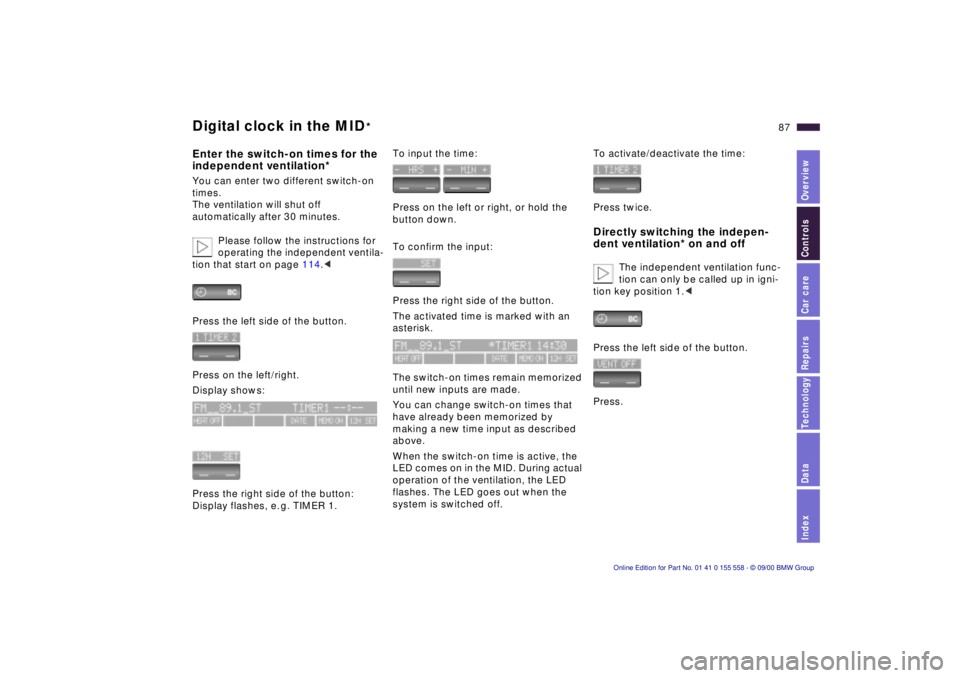
Enter the switch-on times for the
independent ventilation*You can enter two different switch-on
times.
The ventilation will shut off
automatically after 30 minutes.
Please follow the instructions for
operating the independent ventila-
tion that start on page 114.<
Press the left side of the button.
Press on the left/right.
Display shows:
Press the right side of the button:
Display flashes, e. g. TIMER 1.
To input the time:
Press on the left or right, or hold the
button down.
To confirm the input:
Press the right side of the button.
The activated time is marked with an
asterisk.
The switch-on times remain memorized
until new inputs are made.
You can change switch-on times that
have already been memorized by
making a new time input as described
above.
When the switch-on time is active, the
LED comes on in the MID. During actual
operation of the ventilation, the LED
flashes. The LED goes out when the
system is switched off.
To activate/deactivate the time:
Press twice.Directly switching the indepen-
dent ventilation* on and off
The independent ventilation func-
tion can only be called up in igni-
tion key position 1.<
Press the left side of the button.
Press.
