2001 BMW 525i Flex disc
[x] Cancel search: Flex discPage 607 of 1002

Downloaded from www.Manualslib.com manuals search engine
................. General ............................ 260-2 Driveshaft. installing 260-10
.................. Special tools ........................ .26 0.2 Flex.disc. replacing 260-1 1
..... Driveshaft description ................. .26 0.3 Center bearing assembly. replacing 260-12
........ Troubleshooting ..................... .26 0.3 Front centering guide. replacing 260-13
Constant velocity
(CV) joint. replacing .... 260-14 Driveshaft Service ................. .26 0.6
Driveshaft. aligning
................... .26 0.7
Driveshaft. removing
................. .26 0.8
Page 608 of 1002

Downloaded from www.Manualslib.com manuals search engine
260-2
1 Driveshaft
This repair group covers repair and replacement of the
driveshaft and driveshaft components.
Driveshaft repairs consist of replacement of front flex-disc.
center mount or rear
CV joint. If the driveshaft joint is defec-
tive, replace the complete driveshaft.
Drive axle repairs are covered in
331 Final Drive
Special tools
BMW suggests the use of certain special tools in removing,
installing or servicing the driveshaft or its components.
4 Transmission jack
(Tool No. BMW 00 2 030)
4 Transmission support (for use with transmission jack)
/ (Tool NO. BMW 23 0 040)
24 0 170
1
4 Transmission support (for use with transmission jack,
A5S 560Z transmission)
(Tool No. BMW 24
0 170)
24 0 250
I
4 Transmission support (for use with transmission jack,
A5S
4402 transmission)
(Tool No. BMW 24
0 250)
4 Drlveshaft center mount allgnlng yg
Tool No. BMW 26 1 000)
Page 609 of 1002

Downloaded from www.Manualslib.com manuals search engine
Driveshaft
4 Driveshaft center slide nut spanner
(Tool No. BMW
26 1 040)
7, 25 1 Ho 4 cv joint removal tool
(Tool No. BMW 26 1 11 0)
support assembly
Driveshaft description
4 The two-piece driveshaft is connected to the transmission by
a rubber flex-disc and to the rear final drive by a constant ve-
locity (CV) joint.
A universal joint is used at the center of the driveshaft and
the shaft is supported in the middle by a center support
bearing. The bearing is mounted in rubber to isolate vibra-
tion.
- The rear constant velocity joint compensates for fore and
aft movement of the drive line.
Troubleshooting
The source of driveline vibrations and noise can be difficultto pin-
point. Engine, transmission, rear axle, or wheel vibrations can be
transmitted through thedriveshaftto the car body. Noises from
thecar may be caused by final drive problems, or by faulty wheel
bearings, drive axles, or even
wom or improperly inflated tires.
NOTE-
For drive axle repair information, see 331 Final Drive
Driveshaft noise or vibration may be caused by worn
ordam-
aged components. Check the universal joint for play. With the
driveshaft installed, pull and twist the driveshaft while watch-
ing the joint. The
BMW specification for play is very small, so
almost any noticeable play could indicate a problem.
Check the torque of the fasteners at the flange connections.
Check the rubber of the flex-disc and center bearing for dete-
rioration or tearing. Check the driveshaft for broken or miss-
ing balance weights. The weights are welded tabs on the
driveshaft tubes. In addition to inspecting for faulty driveshaft
parts, the installed angles of the driveshaft should also be
considered.
Page 611 of 1002

Downloaded from www.Manualslib.com manuals search engine
Driveshaft
Driveshaft problems and causes
Symptom Probable cause Corrective action
Vibration when starting off Center bearing rubber deteriorated. Inspect center bearing and rubber. Replace if necessary.
(forward or reverse)
Flex-disc damaged or worn.
Inspect flex-disc. Replace
if necessary.
Engine or transmission mounts
faulty. Inspect engine and transmission mounts. Align or
replace, if necessary.
Front centering guide worn, or driveshaft
Checic front centering guide and replace
if necessary.
mounting flanges out of round.
Check
runout of driveshaft flanges.
Universal joint worn or seized.
Check universal joint play and movement. Replace
driveshaft if necessary.
Driveshaft misaligned. Check driveshaft alignment.
Noise during onloff throttle Final
drive components worn or damaged
Remove final drive and repair. 331 Final Drive
or when engaging clutch. (excessive pinion-to-ring-gear clearance).
Drive axle or CV joint faulty.
Inspect drive axles and CV joints. Repair or replace as
necessary.
331 Final Drive
Vibration at 25 to
30 mph
Front centering guide worn, or driveshaft
Check front centering guide and replace if necessary.
(40 to 50
kmlh). mounting flanges out of round or damaged.
Check runout of driveshaft mounting flanges.
Universal joint worn or seized.
Check universal joint play and movement. Replace
driveshaft if necessary.
Flex-disc damaged or worn.
Inspect flex-disc. Replace if necessary.
Center bearing rubber deteriorated.
Inspect center bearing. Replace if necessary.
Misaligned installed position. Check driveshaft alignment.
Vibration, audible rumble Front centering guide worn, or driveshaft
Check front centering guide and replace
if necessary.
over
35 mph (60 kmlh). mounting flanges out of rouncl or damaged.
Check runout of driveshaft mounting flanges. - -
Mounting flange bolts loose or holes worn.
Remove driveshaft and check transmission output flange
and final drive input flange. Replace if necessary.
Driveshaft unbalanced. Check driveshaft for loose or missing balance weights.
Have driveshaft rebalanced or replace if necessary.
Universal ioint worn or seized.
Check universal ioint
~lav and movement. Reolace ' .. driveshaft if necessary.
Center bearing faulty.
Replace center bearing.
.
Final drive rubber mount faulty.
Inspect final drive rubber mount and repiace if necessary.
Driveshaft misaligned.
Check driveshaft alignment.
Page 614 of 1002

Downloaded from www.Manualslib.com manuals search engine
-.- .
/ Driveshaft Driveshaft, removing
CAUTION-
. Be sure the wheels are off the ground before removing the
driveshak Set the parl(ing brake before removing the
driveshaft.
Once the driveshaft has been removed, the vehicle can
roll regardless of whether the transmission is in gear or
not.
The driveshaft is mounted to the transmission and final
drive
with self-locliing nuts. These nuts are designed to
be used only once and should be replaced during reas-
sembly.
Remove complete exhaust system. See
180 Exhaust
System.
- Remove exhaust heat shields.
- Support transmission with transmission jack.
< Loosen transmission mount nuts (arrows) on real
transmission support crossmember.
- Release wiring harness retainers from rear transmission
support crossmember.
< Remove mounting bolts (arrows) for rear transmission sup-
port crossmember. Slide crossmember rearward to remove.
- Matchmark front and rear driveshaft halves to corresponding
transmission output and final drive input flanges.
4 Remove nuts securing driveshaft mounting bolts at transmis-
sion output flange. Counterhold bolts (arrows) at transmis-
sion flex-disc. Discard old nuts.
- Hang driveshaft front section from body using stiff wire.
Page 616 of 1002

Downloaded from www.Manualslib.com manuals search engine
260-1 0
/ Driveshaft
Driveshaft, installing
- Prepare CV joint for reinstallation:
Extend joint to limit.
Clean off old grease and fill with fresh grease
Install new seal.
- Bend driveshaft slightly at center universal joint to install
CAUTION-
Do not allow CVjoint seal to become displaced.
- Align matchmarlts on driveshaft to matchmarks on final drive
and transmission flanges.
- Fit constant velocity joint to final drive input flange. Alternate-
ly tighten two opposite nuts to draw constant velocity joint
evenly into the final drive input flange. Once seated, tighten
down remaining nuts.
I CAUTION-
I Do not reuse self-locking nuts. These nuts are designed to be /
I used onlv once. 1
- Insert bolts in front of driveshafl to transmission output
flange. Counterhold each bolt while tightening nut.
CAUTION-
. Do not reuse self-locking nuts. These nuts are designed to
be used only once.
Avoid stressing the flex-disc when torquing the bolts.
Do this by counterholding the bolts and turning the nuts
on the flange side.
- Position center support bearing and install mounting nuts.
Use new self-locking nuts.
- Install heat shields.
- Install rear transmission support crossmember.
- Install exhaust system. See 180 Exhaust System.
Reconnect oxygen sensor wiring harnesses and reattach
wiring harness retainers to rear transmission support
crossrnernber.
Page 617 of 1002

Downloaded from www.Manualslib.com manuals search engine
Driveshaft
- Road test vehicle to check for noise or vibration
CAUTION-
Do not reuse self-locking nuts. These nuts are designed to
be used only once.
Avoid stressing the flex-disc when torquing the bolts.
Do this by counterholding the bolts and turning the nuts
on the flange side.
Tightening torques
Alunlinum driveshaft to flex-disc
- MI2 (use coated washers)
90 Nm (66 ft-lb)
Driveshaft
CV joint to final drive flange
Mi0 (Tom bolt)
70 Nm (51 ft-lb)
M8 (compression nut) 32 Nm (24 ft-lb)
Flex-disc to transmission flange or driveshaft
MI0 (8.8 grade) 48 Nm (35 ft-lb)
MI 0 (1 0.9 grade) 60 Nm (44 ft-lb)
- Mi2 (8.8 grade)
81 Nm (60 ft-lb)
- MI2 (10.9 grade) I00 Nm (74 ft-lb)
MI4 140 Nm (103 ft-lb)
Transmission
crossmember
to transmission (ME) 21 Nm (15 ft-lb)
. to chassis (M10) 42 Nm (30 ft-lb)
NOTE-
Boltgrade is marked on the bolt head. When replacing bolts,
only use bolts of the same strength and hardness as the orig-
inals installed.
Flex-disc, replacing
- Checlc flex-disc between front section of driveshafl and trans-
mission output flange for craclts, tears, missing pieces, or
distortion. Check for worn bolt hole bores in flange.
- If flex-disc needs replacement, remove driveshafl as de-
scribed earlier.
- Unbolt flex-disc from driveshaft.
NOTE-
Removal andinstallation of the bolts may be made easier by
placing a large hose clamp around the flex-disc, and tighten-
ing the clamp slightly to compress the rubber.
Page 618 of 1002
Downloaded from www.Manualslib.com manuals search engine
260-1 2
1 Driveshaft
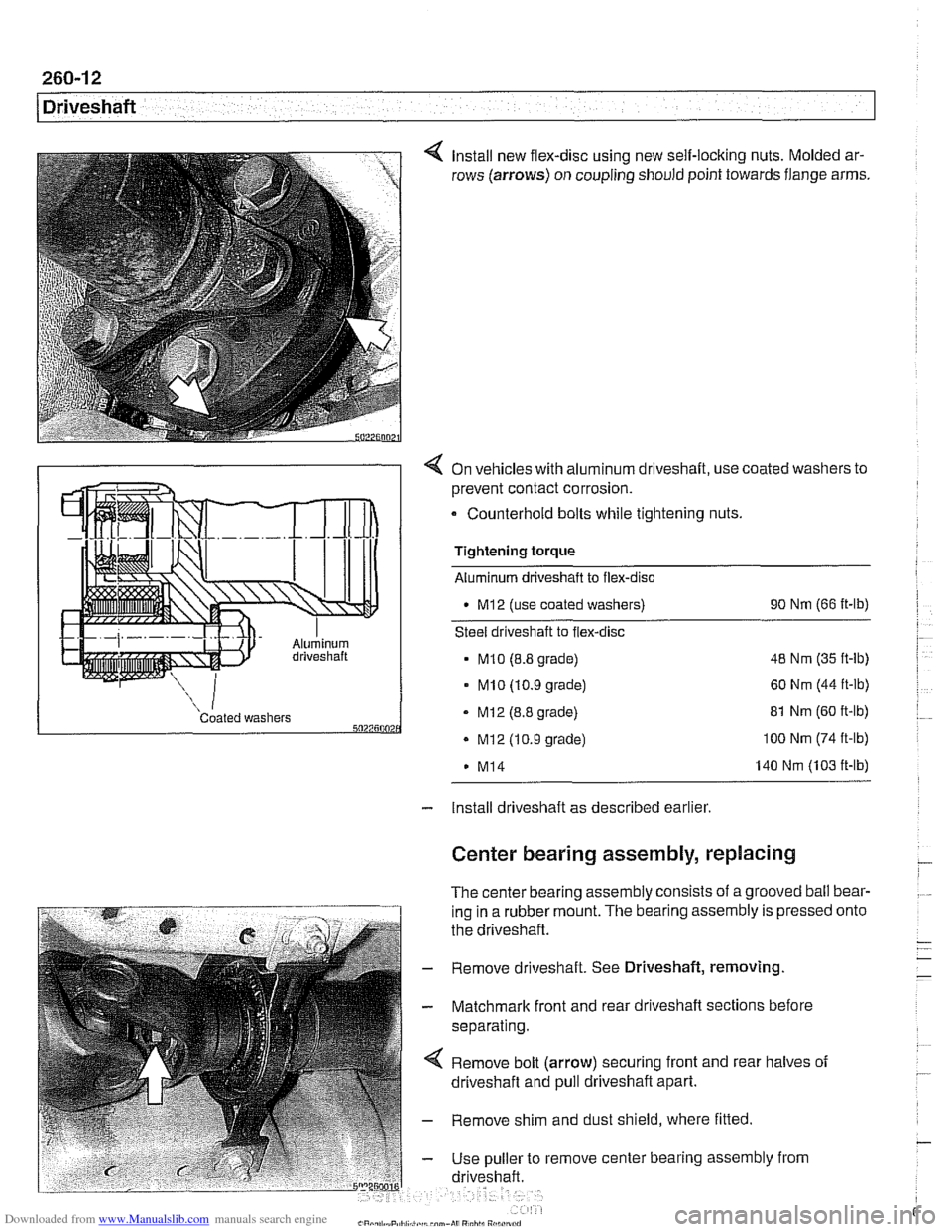
Install new flex-disc using new self-locking nuts. Molded ar-
rows (arrows) on coupling should point towards flange arms.
4 On vehicles with aluminum driveshaft, use coated washers to
prevent contact corrosion.
- Counterhold bolts while tightening nuts.
Tightening torque
Aluminum driveshaft to flex-disc
M12 (use coated washers) 90
Nm (66 ft-lb)
Steel driveshaft to flex-disc
MI0 (8.8 grade) 48
Nm (35 ft-lb)
- MI0 (10.9 grade) 60 Nm (44 ft-lb)
Coated washers - MI2 (8.8 grade) 5027500 . Mi2 (10.9 grade)
M14 81
Nm (60 ft-lb) 100 Nm (74 ft-lb)
140 Nm (103 ft-lb)
- Install driveshaft as described earlier
Center bearing assembly, replacing
The center bearing assembly consists of a grooved ball bear-
ing in a rubber mount. The bearing assembly is pressed
the driveshaft.
- Remove driveshaft. See Driveshaft, removing
- Matchmark front and rear driveshaft sections before
separating.
Remove bolt (arrow) securing front and rear halves of
driveshaft and pull driveshaft apart.
- Remove shim and dust shield, where fitted
- Use puller to remove center bearing assembly from
driveshaft. onto