2001 Acura RL parking brake
[x] Cancel search: parking brakePage 54 of 333

Instruments and Controls
This section gives information about the controls and displays thatcontribute to the daily operation of
your Acura. All the essential controls are within easy reach.
Control Locations............................ 52
Indicator Lights................................ 53 Gauges.............................................. 58 Speedometer................................ 58
Tachometer.................................. 58
Odometer...................................... 59
Trip Meter/Outside Temperature Indicator............ 59
Temperature Gauge.................... 60 Fuel Gauge................................... 60
Maintenance Required Indicator.................................... 61
Controls Near the Steering Wheel........ 62
Headlights.................................... 63
Automatic Lighting..................... 64 Daytime Running Lights............. 65
Instrument Panel Brightness..... 66
Turn Signals................................. 66
Fog Lights.................................... 67
Windshield Wipers...................... 68 Windshield Washers................... 70
Hazard Warning........................... 70
Rear Window Defogger.............. 71
Steering Wheel Adjustments..... 71
Steering Wheel Controls ................ 73
Cruise Control.............................. 73
Remote Audio Controls .............. 76
Keys and Locks................................ 77
Keys...............................................77
Immobilizer System..................... 78
Ignition Switch............................. 80
Power Door Locks....................... 81
Remote Transmitter.................... 82
Childproof Door Locks............... 85
Trunk............................................ 86
Emergency Trunk Opener......... 87Glove Box..................................... 88
HomeLink Universal Transmitter......... 89
Customer Assistance.................. 89
Important Safety Precautions.... 89
Training the Transmitter............ 90
Training With a Rolling Code
System.......................................92
Erasing Codes.............................. 93
Seat Adjustments............................. 94 Driver's Seat Adjustments.......... 94
Driver's Lumbar Support............ 96
Front Passenger's SeatAdjustments............................. 96
Head Restraints........................... 96
Armrest............................................. 97
Mirrors.............................................. 99
Adjusting the Power Mirrors..... 99
Driving Position Memory
System......................................... 101
Seat Heaters................................... 103
Ski Sleeve........................................ 104
Power Windows............................. 106
Moonroof........................................ 107
Parking Brake................................ 109
Digital Clock................................... 109Sunglasses Holder......................... 111
Beverage Holder............................ 112Console Compartment.................. 113
Coin Box......................................... 113
Sun Visor......................................... 114
Vanity Mirror................................. 114
Accessory Power Socket.............. 115 Cigarette Lighter........................... 116
Ashtrays.......................................... 117 Ceiling Lights................................. 118
Courtesy Lights............................. 119
Instruments and Controls
Page 56 of 333

Indicator Lights
*The U.S. instrunment panel is shown.Differences for the Canadian models are noted in the text.
Instruments and Controls
MALFUNCTION
INDICATOR
LAMP
(P.287)
LIGHTS ON
INDICATOR
(P.55) PARKING BRAKE AND
BRAKE SYSTEM
INDICATOR*
(P.54)
VSA ACTIVATION
INDICATOR(P.56)
SIDEAIRBAG
INDICATOR (P.55) CRUISE CONTROL INDICATOR
(P.55)
VEHICLE STABILITY ASSISTSYSTEM INDICATOR(P.56)
ANTI-LOCK BRAKE
SYSTEM INDICATOR*(P.56)
LOW OIL
PRESSURE
INDICATOR
(P-54)
CHARGING SYSTEM
INDICATOR (P.54) IMMOBILIZER
SYSTEM INDICATOR
(P.55) HIGH BEAM
INDICATOR
(P.57) LOW FUEL
INDICATOR
(P.57)
DOOR AND BRAKE
LAMP MONITOR
(P.57) SEAT BELT
REMINDERLIGHT (P.54)
SUPPLEMENTAL
RESTRAINT SYSTEM
INDICATOR (P.55)
Page 57 of 333

Indicator Lights
The instrument panel has many indicators to give you important
information about your car.
Seat Belt Reminder Light
This indicator lights when you turn the ignition switch ON (II). It is a
reminder to you and your passengers
to protect yourselves by fastening
the seat belts. A beeper also sounds
if you have not fastened your seat
belt.
If you do not fasten your seat belt,
the beeper will stop after a few seconds but the light stays on until
you do. Both the light and the beeper stay off if you fasten your seat belt
before turning on the ignition. Low Oil Pressure
Indicator
The engine can be severely damaged if this light flashes or stays on when
the engine is running. For complete
information, see page 285.
Charging System
Indicator
If this light comes on when the
engine is running, the battery is not
being charged. For complete
information, see page 286.
U.S.
Canada
Parking Brake and Brake System
Indicator
This light has two functions:
1. This indicator comes on when you turn the ignition switch ON (II). It
is a reminder to check the parking
brake. Driving with the parking
brake not fully released candamage the brakes and tires.
2. If the indicator remains lit after you have fully released theparking brake while the engine isrunning, or if it comes on whiledriving, it can indicate a problem
in the brake system. For complete
information, see page 289 .
Instruments and Controls
BRAKE
Page 60 of 333

Indicator Lights
Door and Brake Lamp Monitor
The appropriate light comes on in this display if the trunk or any door
is not closed tightly. If a brake light
does not work, the BRAKE LAMP
indicator comes on when you push
the brake pedal with the ignition switch ON (II).
A burned out brake light is a hazard when drivers behind you cannot tell
you are braking. Have your brake lights repaired right away.
All the lights in the monitor display come on for a few seconds when you
turn the ignition switch ON (II). Turn Signal and
Hazard Warning
Indicators
The left or right turn signal light blinks when you signal a lane changeor turn. If the light does not blink or
blinks rapidly, it usually means one of the turn signal bulbs is burned out (see page 250 ). Replace the bulb as
soon as possible, since other drivers
cannot see that you are signalling.
When you turn on the Hazard
Warning switch, both turn signal lights blink. All turn signals on theoutside of the vehicle should flash.
Low Fuel Indicator
This light comes on as a reminder that you must refuel soon. High Beam Indicator
This light comes on with the high beam headlights. See page 63 forinformation on the headlight
controls.
On Canadian models, this indicator
comes on with reduced brightness
when the Daytime Running Lights (DRL) are on (see page 65 ).
"Daytime Running
Lights" Indicator
Canadian models only
This indicator lights when you turn the ignition switch to ON (II) with
the headlight switch off and the
parking brake set. It should go off if
you turn on the headlights or release the parking brake. If it comes on at
any other time, it means there is a
problem with the DRL. There may also be a problem with the high
beam headlights.
Instruments and Controls
D R L
Page 68 of 333

Controls Near the Steering Wheel
Do not leave the light switch in
AUTO if you will not be driving the car for an extended period (a week
or more). You should also turn off
the lights if you plan to leave the
engine idling or the engine off for a
long time. This will prevent the
battery from discharging.
The automatic lighting feature iscontrolled by a sensor located on top
of the dashboard. Do not cover this
sensor or spill liquids on it. Daytime Running Lights
(Canadian Models)
With the headlight switch off, the high beam headlights come on withreduced brightness when you turn
the ignition switch to ON (II) and release the parking brake. They
remain on until you turn the ignition
off, even if you set the parking brake.
The headlights revert to normal operation when you turn them on
with the switch.
Instruments and Controls
LIGHT
SENSOR
Page 105 of 333
Driving Position Memory System
Doing any of the following after
pressing the MEMO button will cancel the storing procedure. Not pressing a memory button
within 5 seconds. Readjusting the seat or steering
position. Readjusting the outside mirror
position.
Each memory button stores only one driving position. Storing a new
position erases the previous setting stored in that button's memory. If
you want to add a new position while retaining the current one, use the
other memory button.
All stored driving positions will be lost if your car's battery goes dead or
is disconnected.
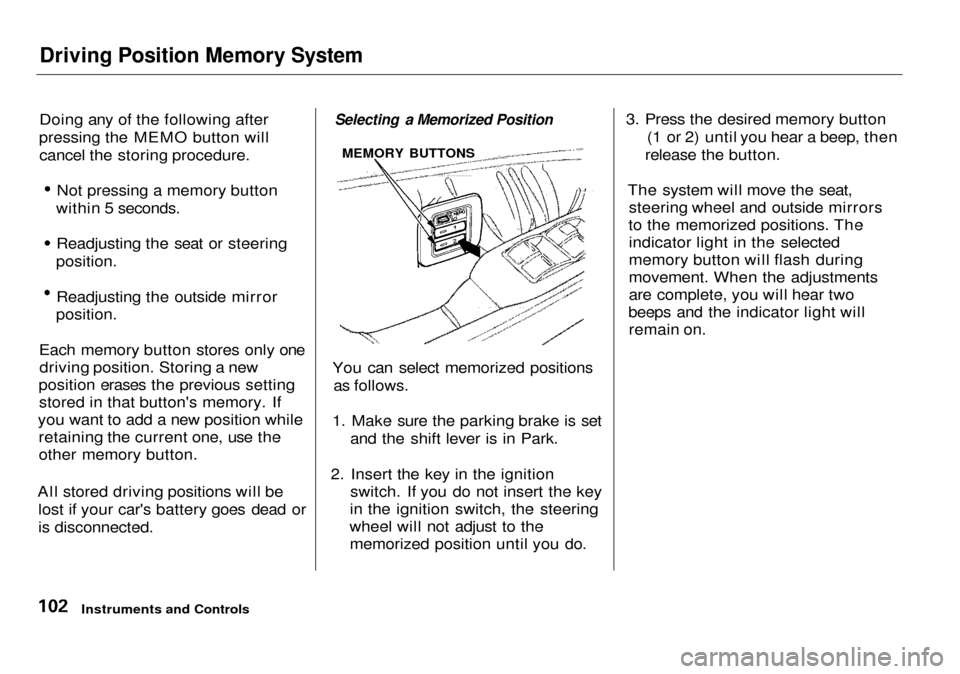
Selecting a Memorized Position
You can select memorized positions as follows.
1. Make sure the parking brake is set and the shift lever is in Park.
2. Insert the key in the ignition switch. If you do not insert the key
in the ignition switch, the steering
wheel will not adjust to the memorized position until you do. 3. Press the desired memory button
(1 or 2) until you hear a beep, then
release the button.
The system will move the seat, steering wheel and outside mirrors
to the memorized positions. The indicator light in the selected
memory button will flash during
movement. When the adjustments
are complete, you will hear two
beeps and the indicator light will remain on.
Instruments and Controls
MEMORY BUTTONS
Page 112 of 333

Parking Brake, Digital Clock
Parking Brake
To apply the parking brake, depress the pedal fully. To release it, pull the
release lever. The parking brake
light on the instrument panel should
go out when the parking brake is
fully released with the engine
running (see page 54). If you try to drive the car without releasing the
parking brake, the ABS indicator
may come on, and the ABS may not
work properly. The VSA system
indicator will also come on along
with the ABS indicator (see page
189).
Driving the car with the parking brake
applied can damage the rear brakes
and axles.
Digital Clock
3.5 RL without Navigation System
The digital clock displays the time with the ignition switch ON (II). To see the time with the ignition off,
press and hold the wide button to the right of the clock.
CONTINUED
Instruments and Controls
NOTICE
RELEASE LEVER
PARKING
BRAKE PEDAL
Page 168 of 333

Security System
The security system helps to protect your car and valuables from theft.
The horn sounds and a combination of headlights, parking lights, side
marker lights and taillights flashes if someone attempts to break into your
car or remove the radio. This alarm
continues for two minutes, then the system resets. To reset an alarming
system before the two minutes have
elapsed, unlock either front door
with the key or the remote
transmitter.
The security system sets auto- matically fifteen seconds after you
lock the doors, hood, and trunk. For
the system to activate, you must lock
the doors from the outside with the
key, lock tab, door lock switch, or
remote transmitter. The security system light next to the driver's door
lock starts blinking immediately to show you the system is setting itself. Once the security system is set,
opening any door (without using the
key or the remote transmitter), or
the hood, will cause it to alarm. It also alarms if the radio is removed
from the dashboard or the wiring is
cut.
With the system set, you can still
open the trunk with the master key
or the remote transmitter without
triggering the alarm. The alarm will sound if the trunk lock is forced, or
the trunk is opened with the trunk
release button on the driver's door.
The security system will not set if the hood, trunk, or any door is not
fully closed. If the system will not set,check the Door and Brake Lamp
Monitor on the instrument panel (see page 57), to see if the doors
and trunk are fully closed. Since it is not part of the monitor display,
manually check the hood.
Do not attempt to alter this system
or add other devices to it.
Comfort and Convenience Features
SECURITY SYSTEM LIGHT