Page 57 of 285

Indicato
r Light s
The instrument panel has many indicators to give you important
information about your car. Lo
w Fue l Indicato r
This light comes on as a reminder that you must refuel soon.
Seat Bel t Reminde r Ligh t
This indicator lights when you turn the ignition switch ON (II). It is areminder to you and your passengers
to protect yourselves by fastening
the seat belts. A beeper also sounds
if you have not fastened your seat
belt.
If you do not fasten your seat belt,
the beeper will stop after a few seconds but the light stays on until
you do. Both the light and the beeper stay off if you fasten your seat belt
before turning on the ignition. Parkin
g Brak e
an d Brak e
Syste m
Indicato r
This light has two functions:
1. This indicator comes on when you turn the ignition switch ON (II). It
is a reminder to check the parking
brake. Driving with the parking
brake not fully released can damage the brakes and tires.
2. If the indicator remains lit after you have fully released theparking brake while the engine is
running, or if it comes on whiledriving, it can indicate a problem
in the brake system. For complete
information, see page 241.
Instrument s an d Control s
Canad
a
U.S
.
BRAK E
Page 64 of 285
Control
s Nea r th e Steerin g Whee l
The two levers on the steering column contain controls for driving
features you use most often. The left
lever controls the turn signals, headlights, and high beams. The
right lever controls the windshield
washers and wipers.
The controls on the dashboard to the right of the steering column are for
the instrument panel brightness,
hazard warning lights and rear
window defogger.
The moonroof switch and cruise control switch are to the left of the
steering column.
The tilt adjustment lever on the underside of the steering columnallows you to tilt the steering wheel.
Instruments an d Control s
CRUIS
E
CONTRO L
INSTRUMEN
T PANE L
BRIGHTNES S HAZAR
D WARNIN G
LIGHT S REA
R WINDO W
DEFOGGE R
MOONROO F
HEADLIGHTS /
TUR N SIGNAL S HOR
N
BUTTON S
TIL T ADJUSTMEN T
WINDSHIEL
D
WIPERS/WASHER S
Page 65 of 285

Control
s Nea r th e Steerin g Whee l
Headlight s
The rotating switch on the left lever controls the lights. Turning this
switch to the position turns
on the parking lights, taillights,
instrument panel lights, side-marker
lights, and rear license plate lights. Turning the switch to the
position turns on the headlights. If you leave the lights on with the
ignition switch in ACCESSORY (I) or LOCK (0), you will hear a
reminder beeper when you open the driver's door.
To change between low beams and high beams, pull the turn signal lever
until you hear a click, then let go.
The blue high beam indicator will light (see page 57). To flash the high beams, pull the
turn signal lever back lightly, then
release it. The high beams will come
on and go off.
The high beams will stay on for as long as you hold the lever back, no
matter what position the headlightswitch is in.
Daytim e Runnin g Light s
(Canadia n Models )
With the headlight switch off, the
high bea
m headlights come on with
reduced brightness when you turn
the ignition switch to ON (II) and
release the parking brake. They
remain on until you turn the ignition off, even if you set the parking brake.
The headlights revert to normal operation when you turn them on
with the switch.
Instrument s an d Control s
Page 66 of 285
Control
s Nea r th e Steerin g Whee l
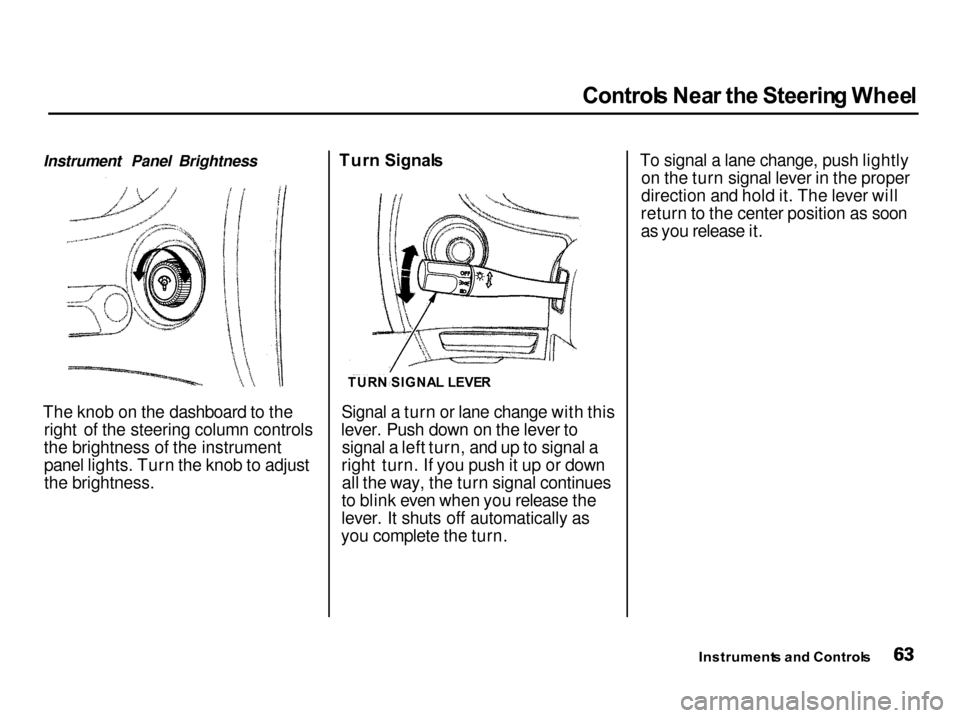
Instrument Panel Brightness
The knob on the dashboard to the right of the steering column controls
the brightness of the instrument panel lights. Turn the knob to adjust
the brightness. Tur
n Signal s
Signal a turn or lane change with this
lever. Push down on the lever to signal a left turn, and up to signal a
right turn. If you push it up or down all the way, the turn signal continues
to blink even when you release the
lever. It shuts off automatically as
you complete the turn. To signal a lane change, push lightly
on the turn signal lever in the proper
direction and hold it. The lever will
return to the center position as soon
as you release it.
Instrument s an d Control s
TUR
N SIGNA L LEVE R
Page 68 of 285

Control
s Nea r th e Steerin g Whee l
Rea r Windo w Wipe r an d Washe r
To turn on the rear window wiper, turn the ring clockwise to ON. Toalso use the rear window washer,
turn the ring clockwise past ON. The
washer will spray as long as you hold
the ring in this position. If you turn
the ring counterclockwise from the OFF position, the washer will spray
without activating the rear window
wiper. Hazar
d Warnin g
Push the red button under the center air vent to turn on the hazard warn-
ing lights (four-way flashers). This
causes all four outside turn signals and both indicators in the instrument
panel to flash. Use the hazard
warning lights if you need to park in a dangerous area near heavy traffic,
or if your car is disabled. Rea
r Windo w Defogge r
The rear window defogger will clear fog, frost, and thin ice from the
window. Push the defogger button to turn it on and off. The light in the
button lights to show the defogger ison. If you do not turn it off, the
defogger will shut itself off after
about 25 minutes. It also shuts off
when you turn off the ignition. You have to turn it on again when you
restart the car.
Instrument s an d Control s
CONTINUED
WIPER/WASHE
R
Page 70 of 285

Control
s Nea r th e Steerin g Wheel , Steerin g Whee l Control s
2. Move the steering wheel to the desired position, making sure the
wheel points toward your chest, not toward your face. Make sure
you can see the instrument panel gauges and the indicator lights.
3. Push the lever up to lock the steering wheel in that position.
4. Make sure you have securely locked the steering wheel in place
by trying to move it up and down. Cruis
e Contro l
LS, GS and GS-R models
Cruise control allows you to maintain
a set speed above 25 mph (40 km/h)
without keeping your foot on the accelerator pedal. It should be used
for cruising on straight, open
highways. It is not recommended for conditions such as city driving,
winding roads, slippery roads, heavy rain, or bad weather. You should
have full control of the car under
those conditions.
The cruise control, as it operates,
moves the accelerator pedal. You can
damage your car's accelerator
mechanism by resting your foot under the pedal and blocking the movement.
CONTINUED
Instrument s an d Control s
NOTIC
E
Improper use of the cruise
control can lead to a crash.
Use the cruise control only
when traveling on open
highways in good weather.
Page 71 of 285
Steerin
g Whee l Control s
Using the Cruise Control
1. Push in the Cruise Control Master Switch to the left of the steering
column. The indicator in theswitch will light.
2. Accelerate to the desired cruising speed above 25 mph (40 km/h). 3. Press and release the SET/decel
button on the steering wheel. TheCRUISE CONTROL light on the
instrument panel comes on to show the system is now activated. The cruise control may not hold the
set speed when you are going up and
down hills. If your speed increases
going down a hill, use the brakes to slow down to the desired speed. This
will cancel the cruise control. To
resume the set speed, press the RESUME/accel button. TheCRUISE CONTROL light on the
instrument panel comes on.
When climbing a steep hill, the automatic transmission may
downshift to hold the set speed.
Instrument s an d Control s
RESUME
/
acce l
SET/dece l
Page 72 of 285

Steerin
g Whee l Control s
Changing the Set Speed
You can increase the set cruising speed in either of two ways: Press and hold the RESUME/
accel button. The car will acceler-
ate. When you reach the desired
cruising speed, release the button. Push on the accelerator pedal. Ac-
celerate to the desired cruising
speed and press the SET/decel
button.
You can decrease the set cruising
speed in either of two ways: Press and hold the SET/decel
button. The car will decelerate. Release the button when you
reach the desired speed. Tap the brake or clutch pedal
lightly with your foot. TheCRUISE CONTROL light on the
instrument panel will go out.
When the car slows to the desired speed, press the SET/decel button.
The car will then maintain the desired speed. Even with the cruise control turned
on, you can still use the accelerator
pedal to speed up for passing. After completing the pass, take your foot
off the accelerator pedal. The car
will return to the set cruising speed.
Resting your foot on the brake or
clutch pedal will cause the cruise
control to cancel.
CONTINUED
Instrument s an d Control s