Page 3 of 283
TUNDRA (34413U)
3
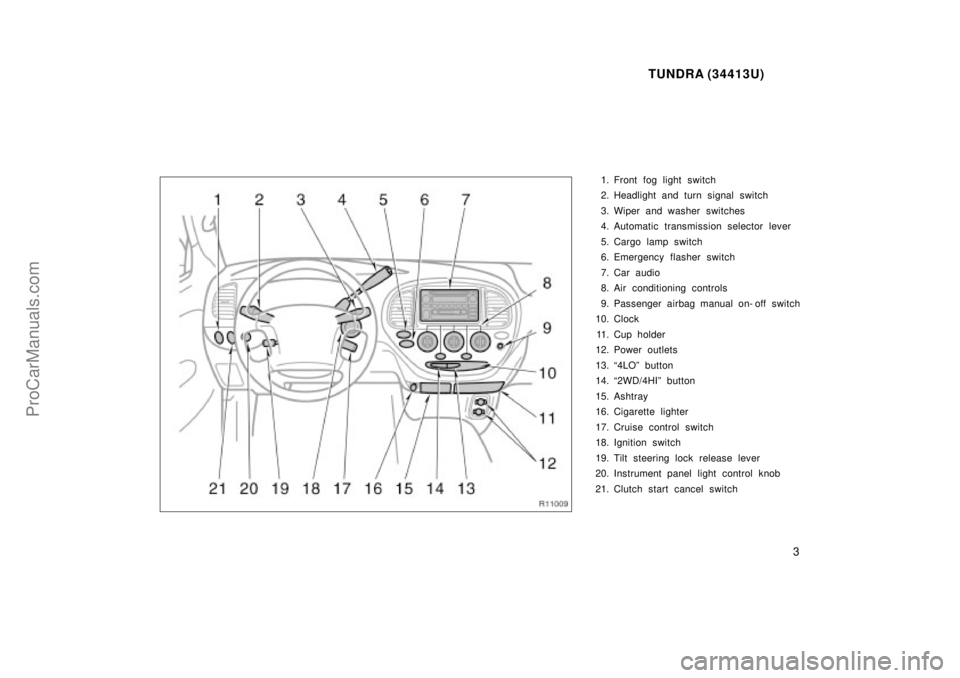
1. Front fog light switch
2. Headlight and turn signal switch
3. Wiper and washer switches
4. Automatic transmission selector lever
5. Cargo lamp switch
6. Emergency flasher switch
7. Car audio
8. Air conditioning controls
9. Passenger airbag manual on- off switch
10. Clock
11. Cup holder
12. Power outlets
13. 4LOº button
14. 2WD/4HIº button
15. Ashtray
16. Cigarette lighter
17. Cruise control switch
18. Ignition switch
19. Tilt steering lock release lever
20. Instrument panel light control knob
21. Clutch start cancel switch
ProCarManuals.com
Page 10 of 283
TUNDRA (34413U)
10
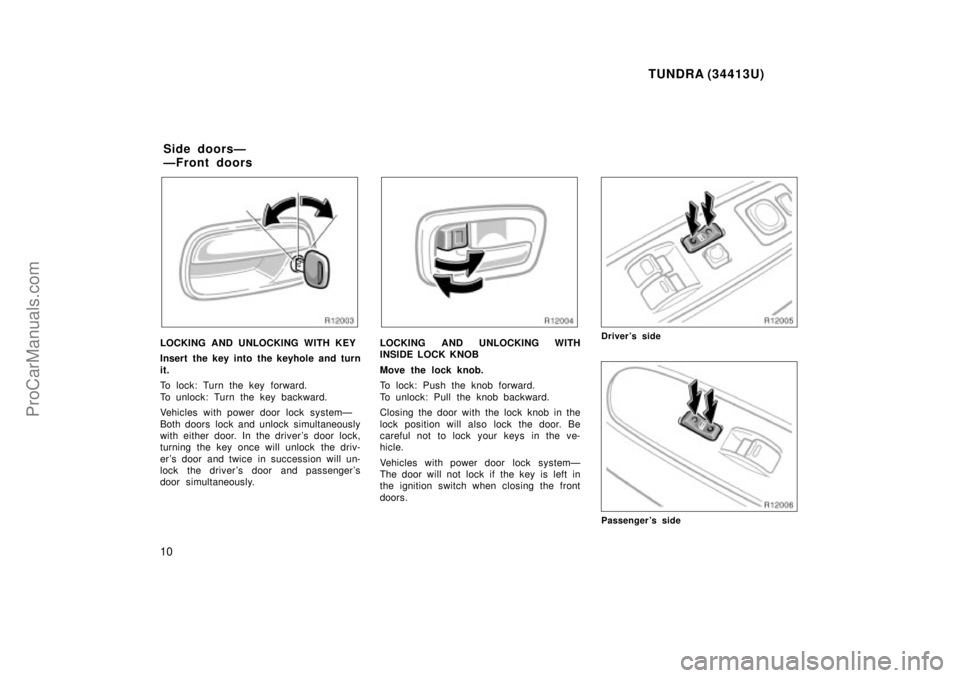
LOCKING AND UNLOCKING WITH KEY
Insert the key into the keyhole and turn
it.
To lock: Turn the key forward.
To unlock: Turn the key backward.
Vehicles with power door lock systemÐ
Both doors lock and unlock simultaneously
with either door. In the driver's door lock,
turning the key once will unlock the driv-
er's door and twice in succession will un-
lock the driver 's door and passenger 's
door simultaneously.LOCKING AND UNLOCKING WITH
INSIDE LOCK KNOB
Move the lock knob.
To lock: Push the knob forward.
To unlock: Pull the knob backward.
Closing the door with the lock knob in the
lock position will also lock the door. Be
careful not to lock your keys in the ve-
hicle.
Vehicles with power door lock systemÐ
The door will not lock if the key is left in
the ignition switch when closing the front
doors.Driver's side
Passenger's side
Side doorsÐ
ÐFront doors
ProCarManuals.com
Page 12 of 283
TUNDRA (34413U)
12
Power windows
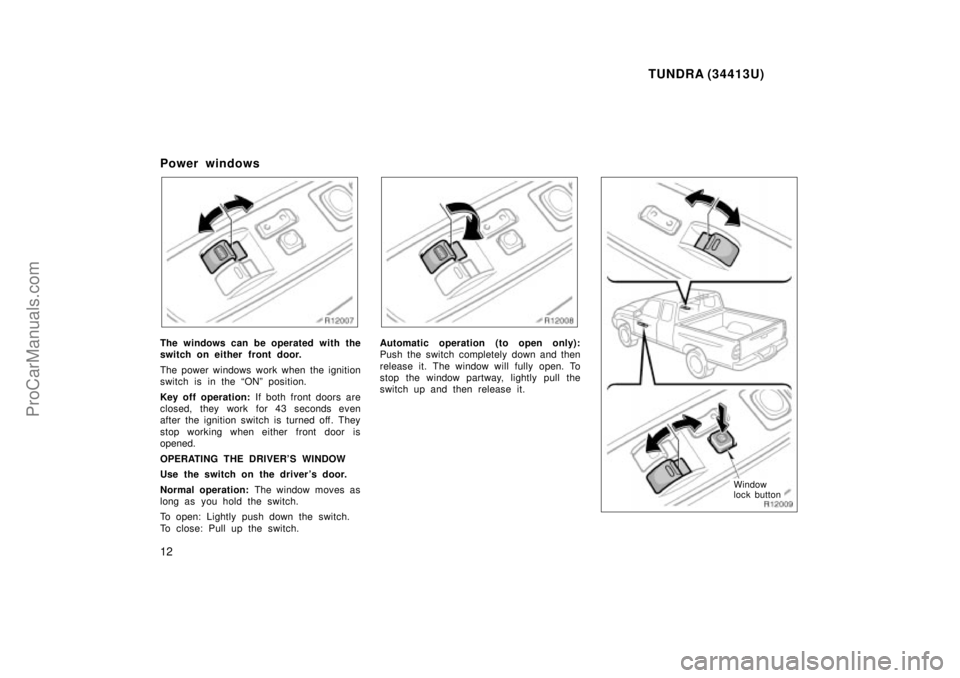
The windows can be operated with the
switch on either front door.
The power windows work when the ignition
switch is in the ONº position.
Key off operation: If both front doors are
closed, they work for 43 seconds even
after the ignition switch is turned off. They
stop working when either front door is
opened.
OPERATING THE DRIVER'S WINDOW
Use the switch on the driver's door.
Normal operation: The window moves as
long as you hold the switch.
To open: Lightly push down the switch.
To close: Pull up the switch.Automatic operation (to open only):
Push the switch completely down and then
release it. The window will fully open. To
stop the window partway, lightly pull the
switch up and then release it.
Window
lock button
ProCarManuals.com
Page 35 of 283

TUNDRA (34413U)
35
This front seat belt pretensioner system
has a service reminder indicator to inform
the driver of operating problems. If either
of the following conditions occurs, this
indicates a malfunction of the airbags or
pretensioners. Contact your Toyota dealer
as soon as possible to service the
vehicle.
�The light does not come on when the
ignition key is turned to the ACCº or
ONº position, or remains on.
�The light comes on or flashes while
driving.
�If either front seat belt does not retract
or cannot be pulled out due to a mal-
function or activation of the pretension-
er.
�The front seat belt pretensioner assem-
bly or surrounding area has been dam-
aged.
�The front part of the vehicle (shaded
in the illustration) was involved in an
accident that did not cause the seat
belt pretensioners to operate.
�The front seat belt pretensioner assem-
bly is scratched, cracked, or otherwise
damaged.
The SRS (Supplemental Restraint Sys-
tem) airbags are designed to provide
further protection for the driver and
front passenger when added to the pri-
mary protection provided by the seat
belts.
In response to a severe frontal impact,
the SRS airbags work together with the
seat belts to help prevent or reduce injury
by inflating, in order to decrease the likeli-
hood of the driver 's or front passenger 's
head or chest directly hitting the steering
wheel or dashboard. When the passenger
airbag manual on- off switch is in the ONº
position, the passenger airbag is activated
even with no passenger in the front seat.
Be sure to wear your seat belt.
SRS driver and front
passenger airbags
ProCarManuals.com
Page 43 of 283

TUNDRA (34413U)
43
�
Do not modify or remove any wir-
ing. Do not modify, remove, strike
or open any components such as
the steering wheel pad, steering
wheel, column cover, front passen-
ger airbag cover, front passenger
airbag or airbag sensor assembly.
Doing any of these may cause sud-
den SRS airbag inflation or disable
the system, which could result in
death or serious injury.
Failure to follow these instructions
can result in death or serious inju-
ries.NOTICE
Do not perform any of the following changes without consulting yourToyota dealer. Such changes caninterfere with proper operation of the
SRS airbag system in some cases.
�Installation of electronic items suchas a mobile two- way radio, cassette
tape player or compact disc player
�Modification of the suspension sys-tem
�Modification of the front end struc-ture
�Attachment of a grille guard (bullbar, kangaroo bar, etc.), snowplow,
winches or any other equipment tothe front end
�Repairs made on or near the frontfenders, front end structure, con-sole, steering column, steering
wheel or dashboard near the frontpassenger airbag
This SRS airbag system has a service
reminder indicator to inform the driver of
operating problems. If either of the follow-
ing conditions occurs, this indicates a
malfunction of the airbags. Contact your
Toyota dealer as soon as possible to
service the vehicle.
�The light does not come on when the
ignition key is turned to the ACCº or
ONº position, or remains on.
�The light comes on while driving.
ProCarManuals.com
Page 77 of 283
TUNDRA (34413U)
77
Part 1
OPERATION OF
INSTRUMENTS AND
CONTROLSÐ
Chapter 1- 4
Lights and Wipers
�Headlights and turn signals
� Emergency flashers
� Instrument panel light control
� Front fog lights
� Interior light
� Personal lights
� Ignition switch and step lights
� Cargo lamp
� Windshield wipers and washer
Headlights and turn signals
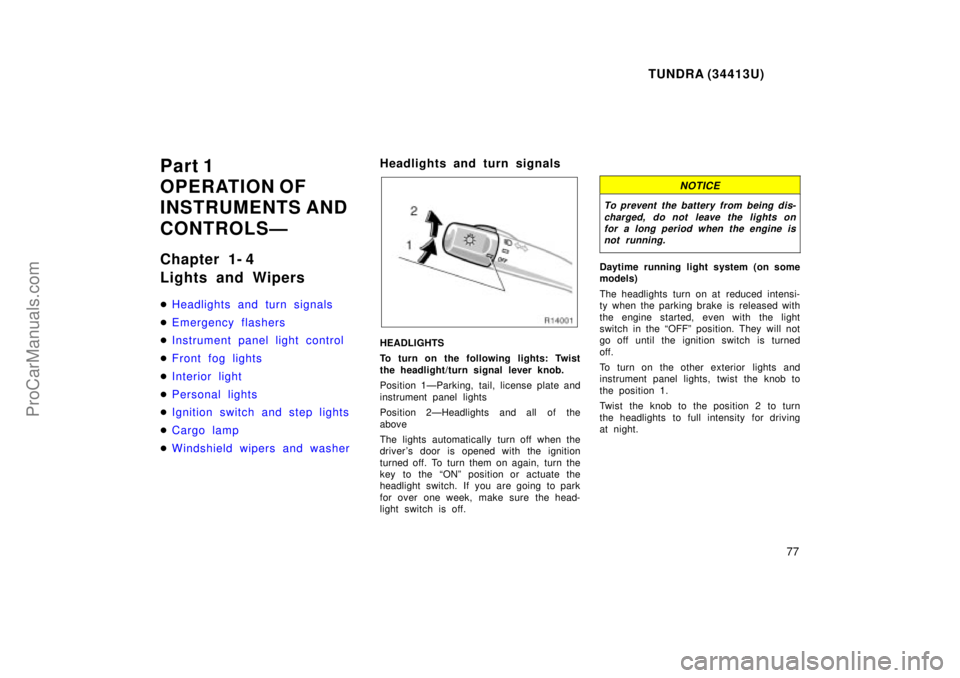
HEADLIGHTS
To turn on the following lights: Twist
the headlight/turn signal lever knob.
Position 1ÐParking, tail, license plate and
instrument panel lights
Position 2ÐHeadlights and all of the
above
The lights automatically turn off when the
driver 's door is opened with the ignition
turned off. To turn them on again, turn the
key to the ONº position or actuate the
headlight switch. If you are going to park
for over one week, make sure the head-
light switch is off.
NOTICE
To prevent the battery from being dis-
charged, do not leave the lights onfor a long period when the engine isnot running.
Daytime running light system (on some
models)
The headlights turn on at reduced intensi-
ty when the parking brake is released with
the engine started, even with the light
switch in the OFFº position. They will not
go off until the ignition switch is turned
off.
To turn on the other exterior lights and
instrument panel lights, twist the knob to
the position 1.
Twist the knob to the position 2 to turn
the headlights to full intensity for driving
at night.
ProCarManuals.com
Page 80 of 283
TUNDRA (34413U)
80
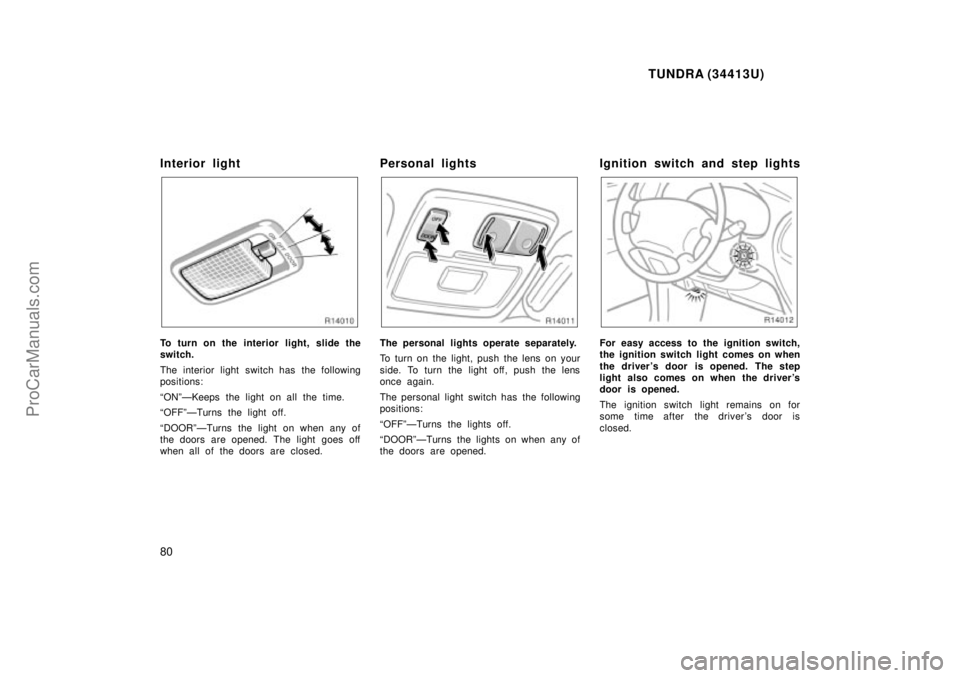
Interior light
To turn on the interior light, slide the
switch.
The interior light switch has the following
positions:
ONºÐKeeps the light on all the time.
OFFºÐTurns the light off.
DOORºÐTurns the light on when any of
the doors are opened. The light goes off
when all of the doors are closed.
Personal lights
The personal lights operate separately.
To turn on the light, push the lens on your
side. To turn the light off, push the lens
once again.
The personal light switch has the following
positions:
OFFºÐTurns the lights off.
DOORºÐTurns the lights on when any of
the doors are opened.
Ignition switch and step lights
For easy access to the ignition switch,
the ignition switch light comes on when
the driver's door is opened. The step
light also comes on when the driver's
door is opened.
The ignition switch light remains on for
some time after the driver's door is
closed.
ProCarManuals.com
Page 81 of 283
TUNDRA (34413U)
81
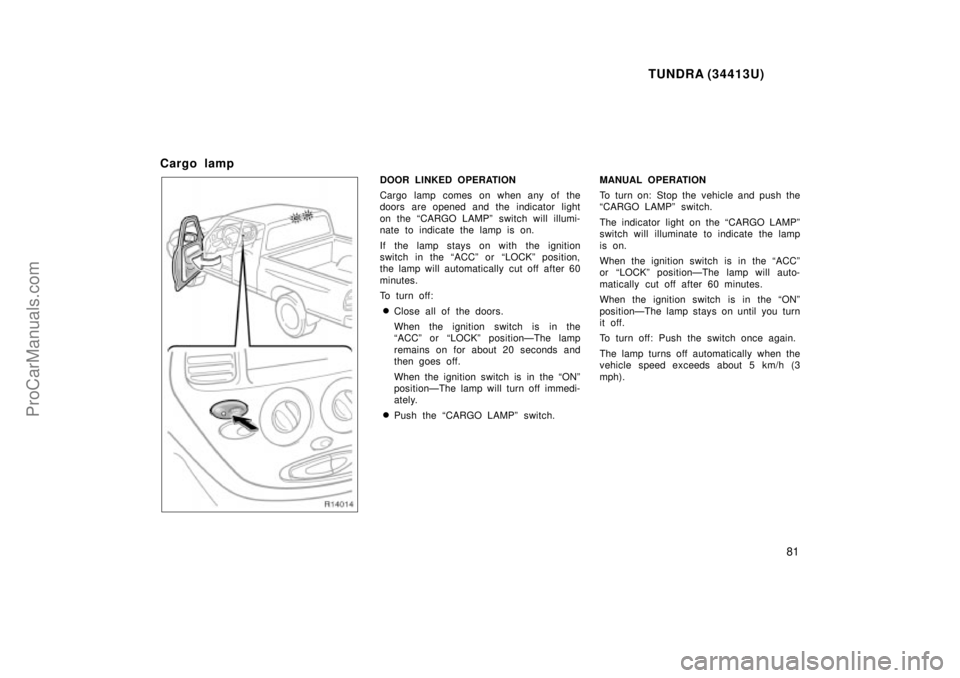
Cargo lamp
DOOR LINKED OPERATION
Cargo lamp comes on when any of the
doors are opened and the indicator light
on the CARGO LAMPº switch will illumi-
nate to indicate the lamp is on.
If the lamp stays on with the ignition
switch in the ACCº or LOCKº position,
the lamp will automatically cut off after 60
minutes.
To turn off:
�Close all of the doors.
When the ignition switch is in the
ACCº or LOCKº positionÐThe lamp
remains on for about 20 seconds and
then goes off.
When the ignition switch is in the ONº
positionÐThe lamp will turn off immedi-
ately.
�Push the CARGO LAMPº switch.MANUAL OPERATION
To turn on: Stop the vehicle and push the
CARGO LAMPº switch.
The indicator light on the CARGO LAMPº
switch will illuminate to indicate the lamp
is on.
When the ignition switch is in the ACCº
or LOCKº positionÐThe lamp will auto-
matically cut off after 60 minutes.
When the ignition switch is in the ONº
positionÐThe lamp stays on until you turn
it off.
To turn off: Push the switch once again.
The lamp turns off automatically when the
vehicle speed exceeds about 5 km/h (3
mph).
ProCarManuals.com