Page 195 of 352
'00 AVALON U (L/O 9908)
194�
If moisture gets into your compact disc
player, you may not hear any sound
even though your compact disc player
appears to be working. Remove the
disc from the player and wait until it
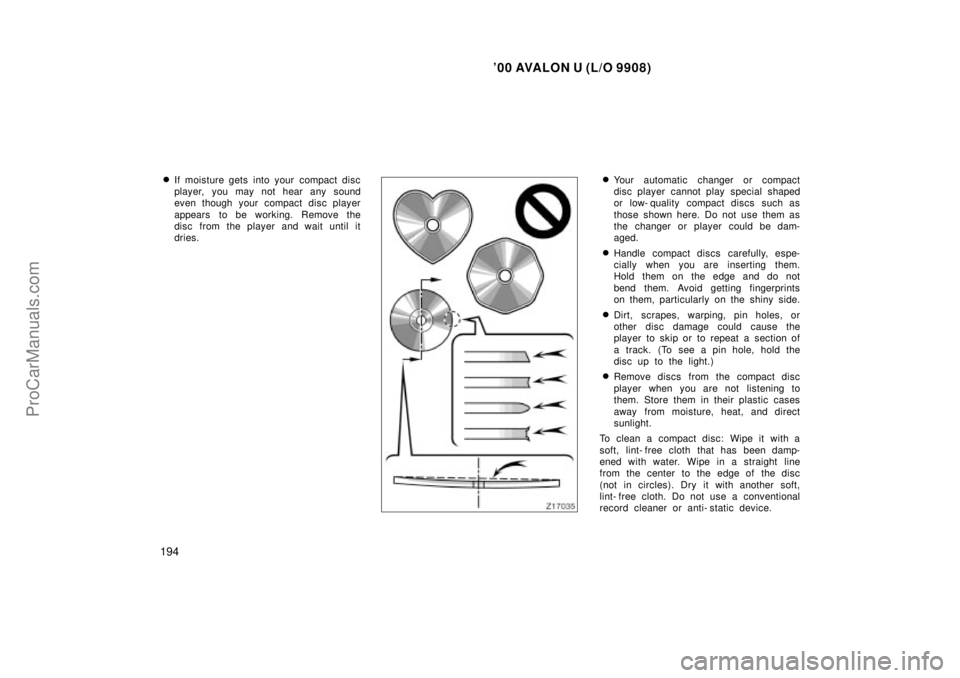
dries.�Your automatic changer or compact
disc player cannot play special shaped
or low- quality compact discs such as
those shown here. Do not use them as
the changer or player could be dam-
aged.
�Handle compact discs carefully, espe-
cially when you are inserting them.
Hold them on the edge and do not
bend them. Avoid getting fingerprints
on them, particularly on the shiny side.
�Dirt, scrapes, warping, pin holes, or
other disc damage could cause the
player to skip or to repeat a section of
a track. (To see a pin hole, hold the
disc up to the light.)
�Remove discs from the compact disc
player when you are not listening to
them. Store them in their plastic cases
away from moisture, heat, and direct
sunlight.
To clean a compact disc: Wipe it with a
soft, lint- free cloth that has been damp-
ened with water. Wipe in a straight line
from the center to the edge of the disc
(not in circles). Dry it with another soft,
lint- free cloth. Do not use a conventional
record cleaner or anti- static device.
ProCarManuals.com
Page 200 of 352

'00 AVALON U (L/O9908)
199
4. Floor/WindshieldÐAir flows mainly
from the floor vents and windshield
vents.
Turning the air flow selector to the
floor/windshield position turns on the
defogging function with the purpose of
clearing the front view.
This position allows the air intake to
select FRESH automatically. This is to
clean up the front view more quickly.
If you want to return the setting to
RECIRCULATE mode, press the air in-
take selector button once again.
Press the A/Cº button for dehumidified
heating or cooling. This setting clears
the front view more quickly.
5. WindshieldÐ Air flows mainly from the
windshield vents.
Turning the air flow selector to the
windshield position turns on the defog-
ging function with the purpose of clear-
ing the front view.
This position allows the air intake to
select FRESH automatically. This is to
clean up the front view more quickly.
If you want to return the setting to
RECIRCULATE mode, press the air in-
take selector button once again. Press the A/Cº button for dehumidified
heating or cooling. This setting clears
the front view more quickly.
For details about air flow selector settings,
see ÐAir flow selector settingsº de-
scribed below.
Air intake selector
Press the button to select the air source.
An indicator light will illuminate to show
which air intake mode is being selected. 1. RecirculateÐ Recirculates the air inside
the vehicle.
2. FreshÐ Draws outside air into the sys-
tem.
To prevent fogging up of the windshield,
the air intake mode may change automati-
cally to FRESH depending on the condi-
tion of the air conditioning system.
ProCarManuals.com
Page 215 of 352

214
OPERATION OF INSTRUMENTS AND
CONTROLS
Other equipment
Clock215
. . . . . . . . . . . . . . . . . . . . . . . . . . . . . . . . . . . . .\
. . . . . . . . . . . . . . .")
'00 AVALON U (L/O 9908)
214
OPERATION OF INSTRUMENTS AND
CONTROLS
Other equipment
Clock215
. . . . . . . . . . . . . . . . . . . . . . . . . . . . . . . . . . . . .\
. . . . . . . . . . . . . . . . .
Outside temperature gauge 215
. . . . . . . . . . . . . . . . . . . . . . . . . . . . . . . . . .
Cigarette lighter and ashtray 216
. . . . . . . . . . . . . . . . . . . . . . . . . . . . . . . . .
Power outlet 217
. . . . . . . . . . . . . . . . . . . . . . . . . . . . . . . . . . . . \
. . . . . . . . . . .
Glove box 219
. . . . . . . . . . . . . . . . . . . . . . . . . . . . . . . . . . . . \
. . . . . . . . . . . . . .
Garage door opener 220
. . . . . . . . . . . . . . . . . . . . . . . . . . . . . . . . . . . . \
. . . .
Auxiliary box 221
. . . . . . . . . . . . . . . . . . . . . . . . . . . . . . . . . . . . \
. . . . . . . . . . .
Coin holder 223
. . . . . . . . . . . . . . . . . . . . . . . . . . . . . . . . . . . . \
. . . . . . . . . . . .
Front cup holder 224
. . . . . . . . . . . . . . . . . . . . . . . . . . . . . . . . . . . . \
. . . . . . . .
Rear cup holder 225
. . . . . . . . . . . . . . . . . . . . . . . . . . . . . . . . . . . . \
. . . . . . . .
Floor mat 227
. . . . . . . . . . . . . . . . . . . . . . . . . . . . . . . . . . . . \
. . . . . . . . . . . . . .
SECTION 1- 9
ProCarManuals.com
Page 216 of 352
'00 AVALON U (L/O9908)
215
Clock (type A)
The digital clock indicates the time.
The key must be in the ONº position.
To reset the hour: Push the MODEº but-
ton until the hour display blinks. Then
push the ADJº button.
To reset the minutes: Push the MODEº
button until the minute display blinks.
Then push the ADJº button.
If the electrical power source has been
disconnected from the clock, the time dis-
play will automatically be set to 1:00 (one
o'clock).
When the instrument panel lights are
turned on, the brightness of the time in-
dication will be reduced.
Clock (type B)
For details, see Multi- information dis-
playк in Section 1- 5.
Outside temperature gauge
Ty p e A
Ty p e B
ProCarManuals.com
Page 217 of 352
'00 AVALON U (L/O 9908)
216
The outside temperature gauge indi-
cates the outside air temperatures with
the ignition key at the ONº position.
When the instrument panel lights are
turned on, the brightness of the display
will be reduced.
Type AÐTo change the display between
� Cº to �Fº, push the MODEº button until
the display blinks. Then push the ADJº
button to select �Cº or �Fº.
Type BÐFor details, see Multi- information
displayк in Section 1- 5.
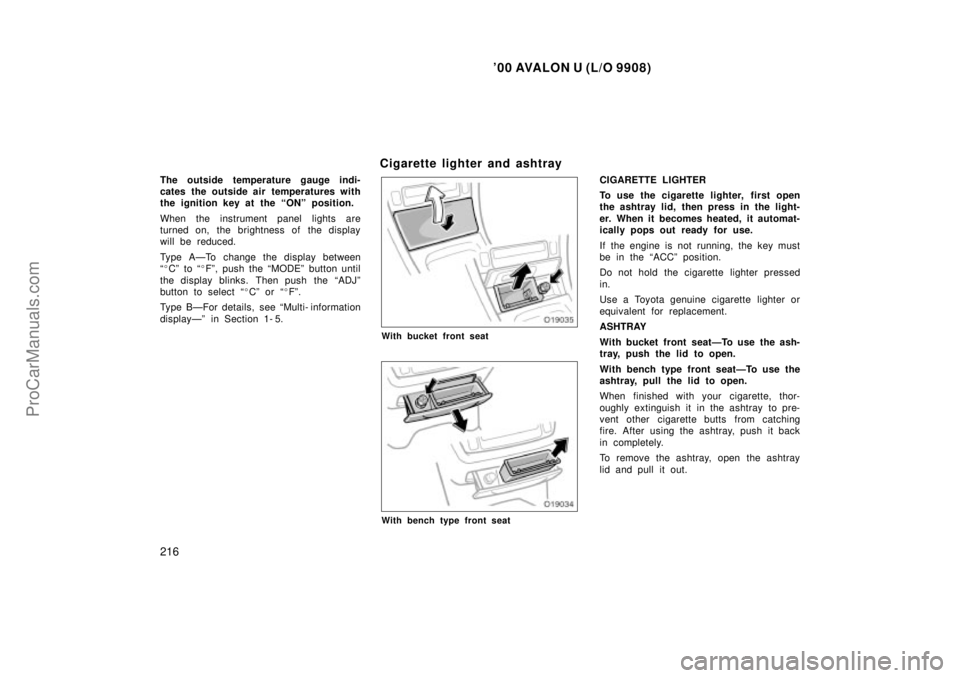
Cigarette lighter and ashtray
With bucket front seat
With bench type front seat
CIGARETTE LIGHTER
To use the cigarette lighter, first open
the ashtray lid, then press in the light-
er. When it becomes heated, it automat-
ically pops out ready for use.
If the engine is not running, the key must
be in the ACCº position.
Do not hold the cigarette lighter pressed
in.
Use a Toyota genuine cigarette lighter or
equivalent for replacement.
ASHTRAY
With bucket front seatÐTo use the ash-
tray, push the lid to open.
With bench type front seatÐTo use the
ashtray, pull the lid to open.
When finished with your cigarette, thor-
oughly extinguish it in the ashtray to pre-
vent other cigarette butts from catching
fire. After using the ashtray, push it back
in completely.
To remove the ashtray, open the ashtray
lid and pull it out.
ProCarManuals.com
Page 219 of 352
'00 AVALON U (L/O 9908)
218
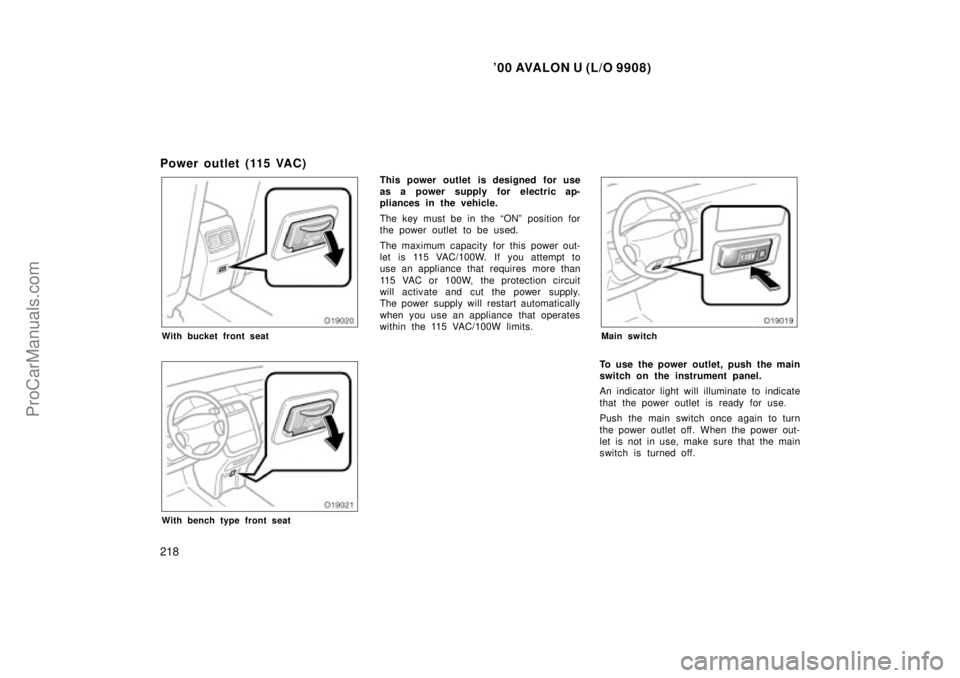
Power outlet (115 VAC)
With bucket front seat
With bench type front seat
This power outlet is designed for use
as a power supply for electric ap-
pliances in the vehicle.
The key must be in the ONº position for
the power outlet to be used.
The maximum capacity for this power out-
let is 115 VAC/100W. If you attempt to
use an appliance that requires more than
115 VAC or 100W, the protection circuit
will activate and cut the power supply.
The power supply will restart automatically
when you use an appliance that operates
within the 115 VAC/100W limits.
Main switch
To use the power outlet, push the main
switch on the instrument panel.
An indicator light will illuminate to indicate
that the power outlet is ready for use.
Push the main switch once again to turn
the power outlet off. When the power out-
let is not in use, make sure that the main
switch is turned off.
ProCarManuals.com
Page 220 of 352

'00 AVALON U (L/O9908)
219
NOTICE
�To prevent the battery from beingdischarged, do not use the poweroutlet longer than necessary whenthe engine is not running.
�Close the power outlet lid when thepower outlet is not in use. Insertinga foreign object other than the ap-
propriate plug that fits the outletmay cause electrical failure or shortcircuits.
The power outlet is not designed for
the following electric appliances even
though their power consumption is un-
der 115 VAC/100W. These appliances
may not operate properly.
�Appliances with high initial peak watt-
age: cathode- ray tube type televisions,
compressor- driven refrigerators, electric
pumps, electric tools, etc.
�Measuring devices which process pre-
cise data: medical equipment, measur-
ing instruments, etc.
�Other appliances requiring an extremely
stable power supply: microcomputer-
controlled electric blankets, touch sen-
sor lamps, etc.
Certain electrical appliances may cause
radio noise.
Glo ve bo x
To use the glove box, do this.
To open: Pull the lever.
With the instrument panel lights on, the
glove box light will come on when the
glove box is open.
To lock: Insert the master key and turn it
clockwise.
CAUTION
To reduce the chance of injury in
case of an accident or a sudden stop,
always keep the glove box door
closed while driving.
ProCarManuals.com
Page 221 of 352

'00 AVALON U (L/O 9908)
220
Garage door opener
Garage door openers manufactured un-
der the license from HomeLink� and
can be programmed to operate garage
doors, estate gates, security lighting,
etc. PROGRAMMING THE GARAGE DOOR
OPENER
This garage door opener has 3 buttons
and you can store one program for each
button.
1. Decide which one of the 3 buttons you want to program. Push and hold down
one of the buttons until the indicator
light begins to flash.
2. While holding this button, bring the original garage door opener closer to
the garage door opener equipped on
the vehicle within about 25 mm (1 in.)
and push the button on the original
garage door opener. This signal from
the original garage door opener is sent
to the one to be programmed.
3. When the frequency and code is regis- tered, the indicator light flashes rapidly.
Then you can release both buttons.
4. If you wish, repeat the procedure for each remaining button for another ga-
rage door opener.
If you want to write a new program over
the program set already, select a button
you want to program and repeat the pro-
cedure from step 1. The previous program
is erased and a new program will be set. If the transmitter has a rolling c
odeº fea-
ture, it is necessary to program the ga-
rage door opener receiver on the garage
after programming the garage door opener
on the vehicle. For the setting of the re-
ceiver, refer to the instruction manual for
the receiver.
After setting the receiver, push the pro-
grammed button on the vehicle for about
1 to 2 seconds within the operational
range.
The old- type garage door openers
manufactured before 1982 cannot be pro-
grammed with this system.
CAUTION
When programming or operating the
garage door opener, make sure there
is no one around the moving door. It
is dangerous if someone is caught.
OPERATING THE GARAGE DOOR
OPENER
Push the appropriate button to activate the
garage door opener. The indicator light
comes on. The garage door opener contin-
ues to send the signal for up to 20 sec-
onds as long as the button is pushed.
ProCarManuals.com