Page 5 of 318
iii
Section
3
Comfort Controls and Audio Systems
Section
4
Your Driving and the Road
Section
5
Table of Contents (cont'd)
Defensive Driving
Drunken Driving
Control of a Vehicle
Braking
Enhanced Traction SystemSteering
Driving Tips for Various Road Conditions
Recreational Vehicle Towing
Loading Your Vehicle
Towing a Trailer Heating and Air Conditioning
Setting the Radio Clock
Radio/Cassette Player/CD PlayerRadio Theft-Deterrent Feature
Steering Wheel Controls (If Equipped)
Hazard Warning Flashers
Jump Starting
Towing Your VehicleEngine Overheating
Changing a Flat Tire
If You're Stuck
Problems on the Road
Page 17 of 318
1-5 Manual Lumbar Support (If Equipped)
Turn the knob on the right front of the driver's seat
cushion to the clockwise or counterclockwise to adjust
support of the lower back.
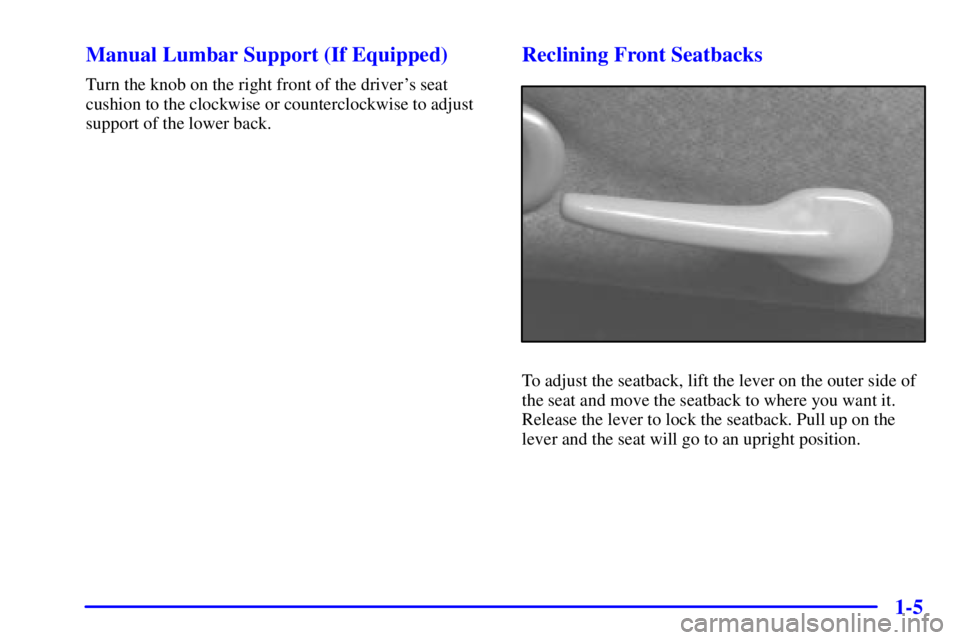
Reclining Front Seatbacks
To adjust the seatback, lift the lever on the outer side of
the seat and move the seatback to where you want it.
Release the lever to lock the seatback. Pull up on the
lever and the seat will go to an upright position.
Page 82 of 318

2-17
ACC (Accessory) (B): This position unlocks the
transaxle. It also lets you use things like the radio and
windshield wipers when the engine is not running. To
use ACC, turn the key clockwise to the first position.
Use this position if your vehicle must be pushed or
towed, but never try to push
-start your vehicle.
ON (C): This position is where the key returns after
you start your engine and release the switch. The switch
stays in ON when the engine is running. But even when
the engine is not running, you can use ON to operate
your electrical power accessories and to display some
instrument panel warning lights.
START (D): This position starts the engine. When the
engine starts, release the key. The ignition switch will
return to ON for normal driving.
NOTICE:
If your key seems stuck in OFF and you can't
turn it, be sure you are using the correct key; if
so, is it all the way in? Turn the key only with
your hand. Using a tool to force it could break
the key or the ignition switch. If none of this
works, then your vehicle needs service.
Starting Your Engine
Automatic Transaxle
Move your shift lever to PARK (P) or NEUTRAL (N).
Your engine won't start in any other position
-- that's a
safety feature. To restart when you're already moving,
use NEUTRAL (N) only.
NOTICE:
Don't try to shift to PARK (P) if your vehicle
is moving. If you do, you could damage the
transaxle. Shift to PARK (P) only when your
vehicle is stopped.
Manual Transaxle
The gear selector should be in NEUTRAL and the
parking brake engaged. Hold the clutch pedal to the
floor and start the engine. Your vehicle won't start
if the clutch pedal is not all the way down
-- that's a
safety feature.
Page 133 of 318
3-
3-1
Section 3 Comfort Controls and Audio Systems
In this section, you'll find out how to operate the comfort control and audio systems offered with your vehicle.
Be sure to read about the particular systems supplied with your vehicle.
3
-2 Comfort Controls
3
-2 Climate Control System with Air Conditioning
3
-3 Air Conditioning
3
-4 Heating
3
-4 Defogging and Defrosting Windows
3
-5 Rear Window Defogger
3
-5 Ventilation System
3
-6 Audio Systems
3
-6 Setting the Clock for All Systems Except
AM
-FM Stereo
3
-7AM-FM Stereo with Cassette Tape Player3
-10 AM-FM Stereo with Compact Disc Player
and Equalizer (If Equipped)
3
-13 Remote Cassette Tape Player (If Equipped)
3
-14 Theft-Deterrent Feature (If Equipped)
3
-17 Audio Steering Wheel Controls (If Equipped)
3
-18 Understanding Radio Reception
3
-18 Tips About Your Audio System
3
-19 Care of Your Cassette Tape Player
3
-20 Care of Your Compact Discs
3
-20 Care of Your Compact Disc Player
3
-20 Fixed Mast Antenna
Page 138 of 318

3-6
Ventilation Tips
�Keep the hood and front air inlet free of ice, snow or
any other obstruction, such as leaves. The heater and
defroster will work far better, reducing the chance of
fogging the inside of your windows.
�When you enter a vehicle in cold weather, adjust the
mode knob to FLOOR and the fan to the highest
speed for a few moments before driving off. This
helps clear the intake ducts of snow and moisture
and reduces the chance of fogging the inside of
your windows.
�Keep the air path under the front seats clear
of objects. This helps air circulate throughout
your vehicle.Audio Systems
Your audio system has been designed to operate easily
and give years of listening pleasure. You will get the
most enjoyment out of it if you acquaint yourself with it
first. Find out what your audio system can do and how
to operate all its controls, to be sure you're getting the
most out of the advanced engineering that went into it.
Setting the Clock for All Systems
Except AM-FM Stereo
Press and hold HR until the correct hour appears.
Press and hold MIN until the correct minute appears.
There will be a two
-second delay before the clock goes
into time
-set mode, and the colon on the display will
blink while in this mode.
Page 139 of 318
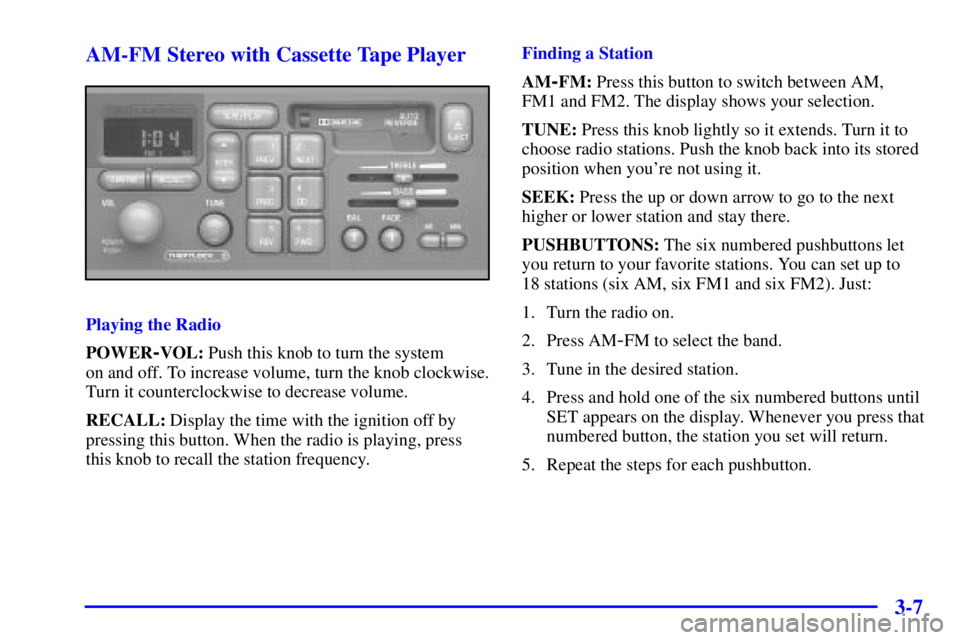
3-7 AM-FM Stereo with Cassette Tape Player
Playing the Radio
POWER
-VOL: Push this knob to turn the system
on and off. To increase volume, turn the knob clockwise.
Turn it counterclockwise to decrease volume.
RECALL: Display the time with the ignition off by
pressing this button. When the radio is playing, press
this knob to recall the station frequency.Finding a Station
AM
-FM: Press this button to switch between AM,
FM1 and FM2. The display shows your selection.
TUNE: Press this knob lightly so it extends. Turn it to
choose radio stations. Push the knob back into its stored
position when you're not using it.
SEEK: Press the up or down arrow to go to the next
higher or lower station and stay there.
PUSHBUTTONS: The six numbered pushbuttons let
you return to your favorite stations. You can set up to
18 stations (six AM, six FM1 and six FM2). Just:
1. Turn the radio on.
2. Press AM
-FM to select the band.
3. Tune in the desired station.
4. Press and hold one of the six numbered buttons until
SET appears on the display. Whenever you press that
numbered button, the station you set will return.
5. Repeat the steps for each pushbutton.
Page 140 of 318

3-8
Setting the Tone
BASS: Slide the lever to the right or left to increase or
decrease bass.
TREBLE: Slide the lever to the right or left to increase
or decrease treble. If a station is weak or noisy, you may
want to decrease the treble.
Adjusting the Speakers
BAL: Press this knob lightly so it extends. Turn this
knob to move the sound to the left or right speakers.
The middle position balances the sound between
the speakers.
FADE: Press this knob lightly so it extends. Turn this
knob to move the sound to the front or rear speakers.
The middle position balances the sound between
the speakers.
Push these knobs back into their stored positions when
you're not using them.
Playing a Cassette Tape
Your tape player is built to work best with tapes that
are up to 30 to 45 minutes long on each side. Tapes
longer than that are so thin they may not work well
in this player.While the tape is playing, use the VOL, FADE, BAL,
BASS and TREB controls just as you do for the radio.
The display will show an arrow to show which side of
the tape is playing. When the down indicator arrow is
lit, selections listed on the bottom side of the cassette
are playing. When the up arrow is lit, selections listed on
the top side of the cassette are playing. The tape player
automatically begins playing the other side when it
reaches the end of the tape.
If E and a number appear on the radio display, the tape
won't play because of an error.
�E10: The tape is tight and the player can't turn
the tape hubs. Remove the tape. Hold the tape with
the open end down and try to turn the right hub
counterclockwise with a pencil. Turn the tape over
and repeat. If the hubs do not turn easily, your tape
may be damaged and should not be used in the
player. Try a new tape to make sure your player
is working properly.
�E11: The tape is broken. Try a new tape.
If any error occurs repeatedly or if an error can't be
corrected, please contact your dealer. If your radio
displays an error number, write it down and provide
it to your dealer when reporting the problem.
Page 142 of 318
3-10
CLN: If this message appears on the display, the cassette
tape player needs to be cleaned. It will still play tapes, but
you should clean it as soon as possible to prevent damage
to the tapes and player. See ªCare of Your Cassette Tape
Playerº in the Index. After you clean the player, press and
hold EJECT for five seconds to reset the CLN indicator.
The radio will display
--- to show the indicator was reset.
CD Adapter Kits
It is possible to use a portable CD player adapter kit
with your cassette tape player after activating the bypass
feature on your tape player.
To activate the bypass feature, use the following steps:
1. Turn the ignition to ON or ACC.
2. Turn the radio off.
3. Press and hold the TAPE/PLAY button for three
seconds. The tape symbol on the display will flash
for two seconds, indicating the feature is active.
4. Insert the adapter into the cassette slot. It will
power up the radio and begin playing.
This override routine will remain active until EJECT
is pressed.
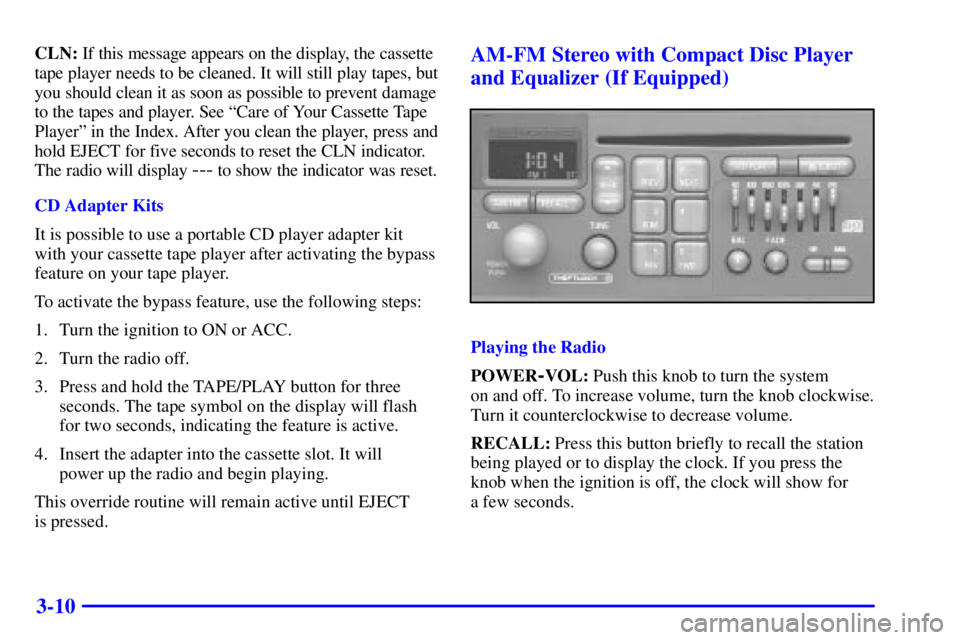
AM-FM Stereo with Compact Disc Player
and Equalizer (If Equipped)
Playing the Radio
POWER
-VOL: Push this knob to turn the system
on and off. To increase volume, turn the knob clockwise.
Turn it counterclockwise to decrease volume.
RECALL: Press this button briefly to recall the station
being played or to display the clock. If you press the
knob when the ignition is off, the clock will show for
a few seconds.