Page 81 of 240

BATTERY REPLACEMENT
Replace the battery in the multi-remote con-
troller as follows:
1. Open the lid using a coin.
2. Remove the battery.3. Install a new battery.
Recommended battery: Sanyo CR2025
or equivalent.
4.
Close the lid securely.
5. Press the LOCK button, then the UN-
LOCK button two or three times to checkthe multi-remote controller operation.
If the battery is removed for any reason
other than replacement, perform step five.
cAn improperly disposed battery can
hurt the environment. Always confirm
local regulations for battery disposal.
cThe multi-remote controller is water-
resistant; however, if it does get wet,
immediately wipe completely dry.
cThe operational range of the multi-
remote controller extends to approxi-
mately 49 ft (15 m) from the vehicle.
This range may vary with conditions.
FCC Notice:
Changes or modifications not expressly
approved by the manufacturer for com-
pliance could void the user's authority to
operate the equipment.
This device complies with Part 15 of the
FCC Rules and RSS-210 of Industry
Canada.
Operation is subject to the following two
conditions: (1) This device may not
cause harmful interference, and (2) this
device must accept any interference re-
ceived, including interference that may
cause undesired operation of the device.
WPD0023
3-8Pre-driving checks and adjustments
ZX
Page 82 of 240
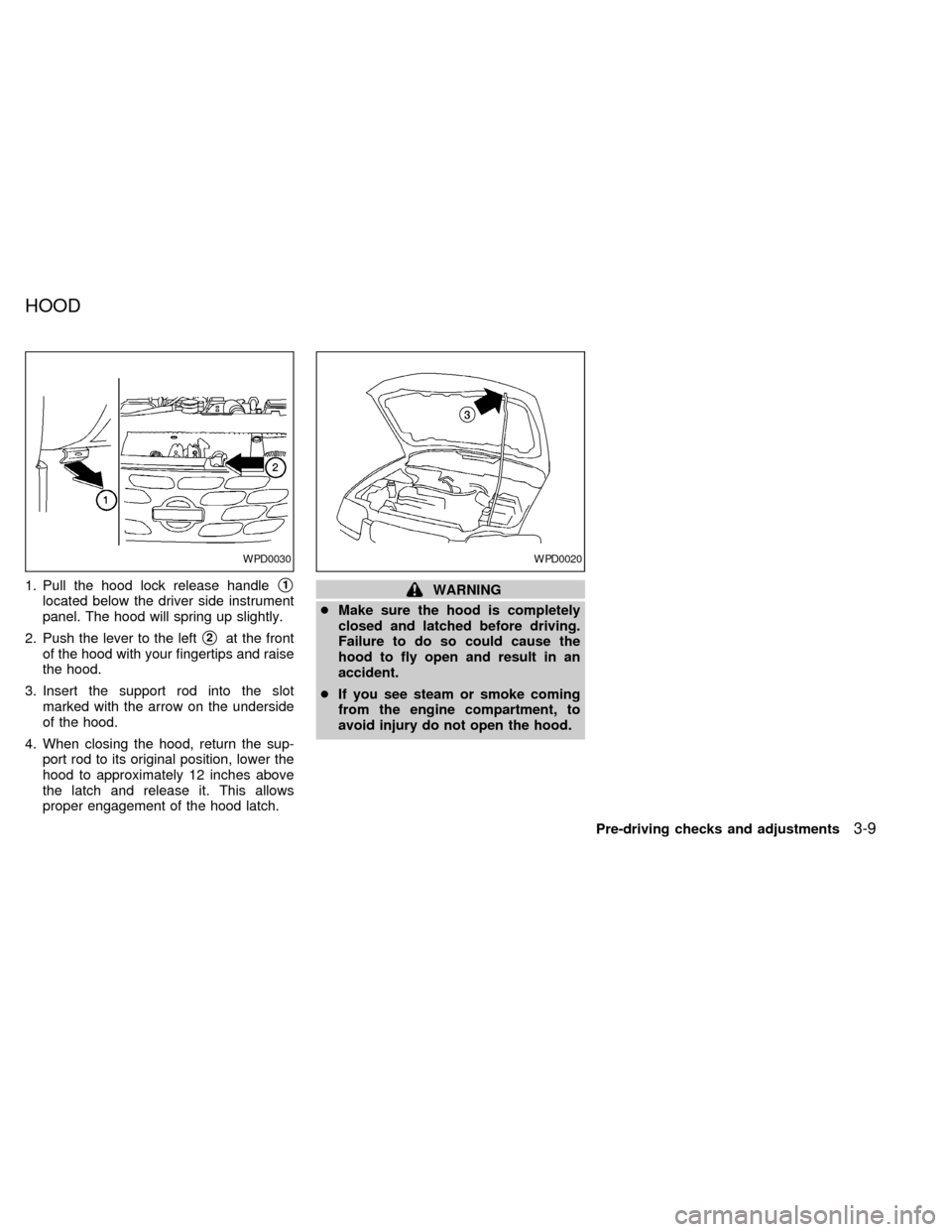
1. Pull the hood lock release handles1
located below the driver side instrument
panel. The hood will spring up slightly.
2. Push the lever to the left
s2at the front
of the hood with your fingertips and raise
the hood.
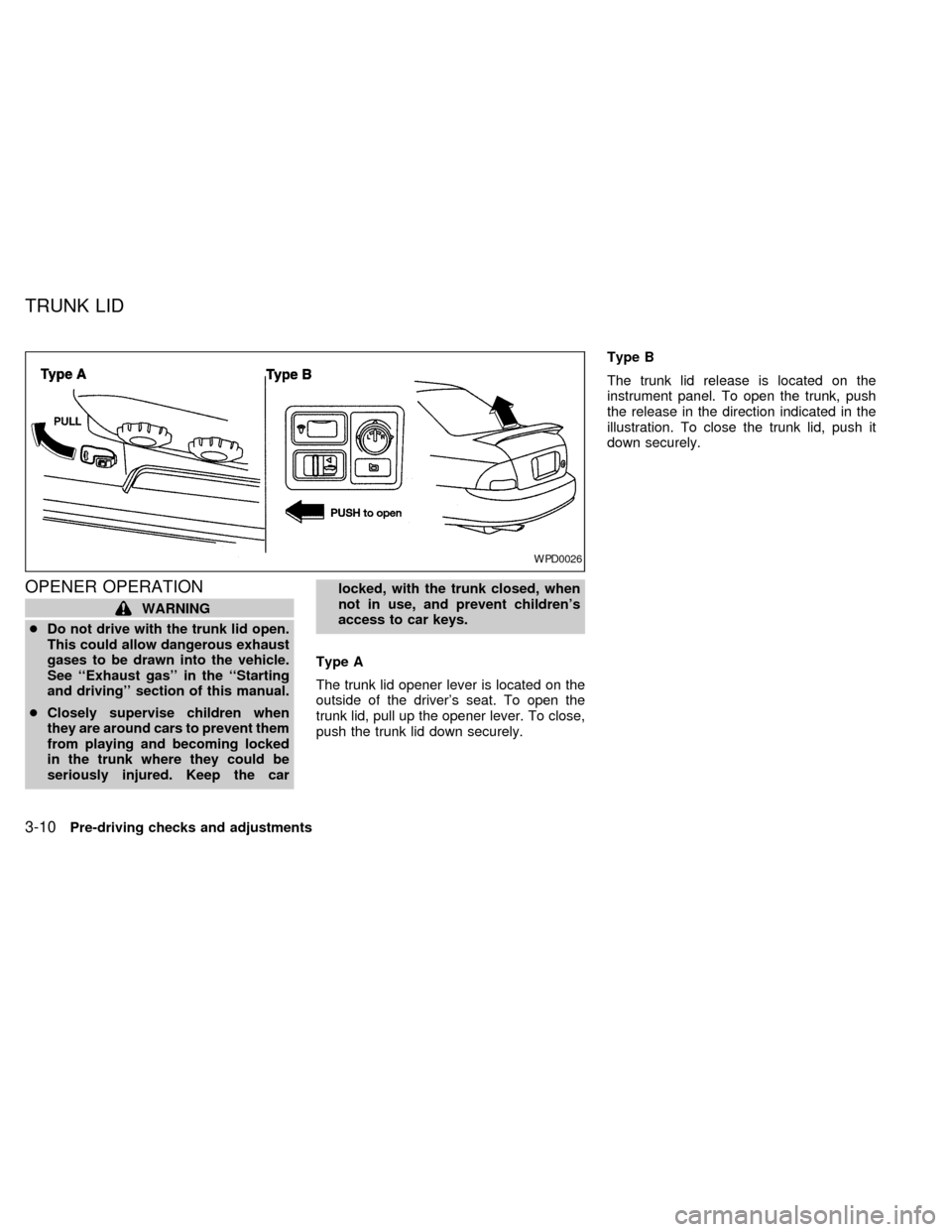
3. Insert the support rod into the slot
marked with the arrow on the underside
of the hood.
4. When closing the hood, return the sup-
port rod to its original position, lower the
hood to approximately 12 inches above
the latch and release it. This allows
proper engagement of the hood latch.
WARNING
cMake sure the hood is completely
closed and latched before driving.
Failure to do so could cause the
hood to fly open and result in an
accident.
cIf you see steam or smoke coming
from the engine compartment, to
avoid injury do not open the hood.
WPD0030WPD0020
HOOD
Pre-driving checks and adjustments3-9
ZX
Page 83 of 240
OPENER OPERATION
WARNING
cDo not drive with the trunk lid open.
This could allow dangerous exhaust
gases to be drawn into the vehicle.
See ``Exhaust gas'' in the ``Starting
and driving'' section of this manual.
cClosely supervise children when
they are around cars to prevent them
from playing and becoming locked
in the trunk where they could be
seriously injured. Keep the carlocked, with the trunk closed, when
not in use, and prevent children's
access to car keys.
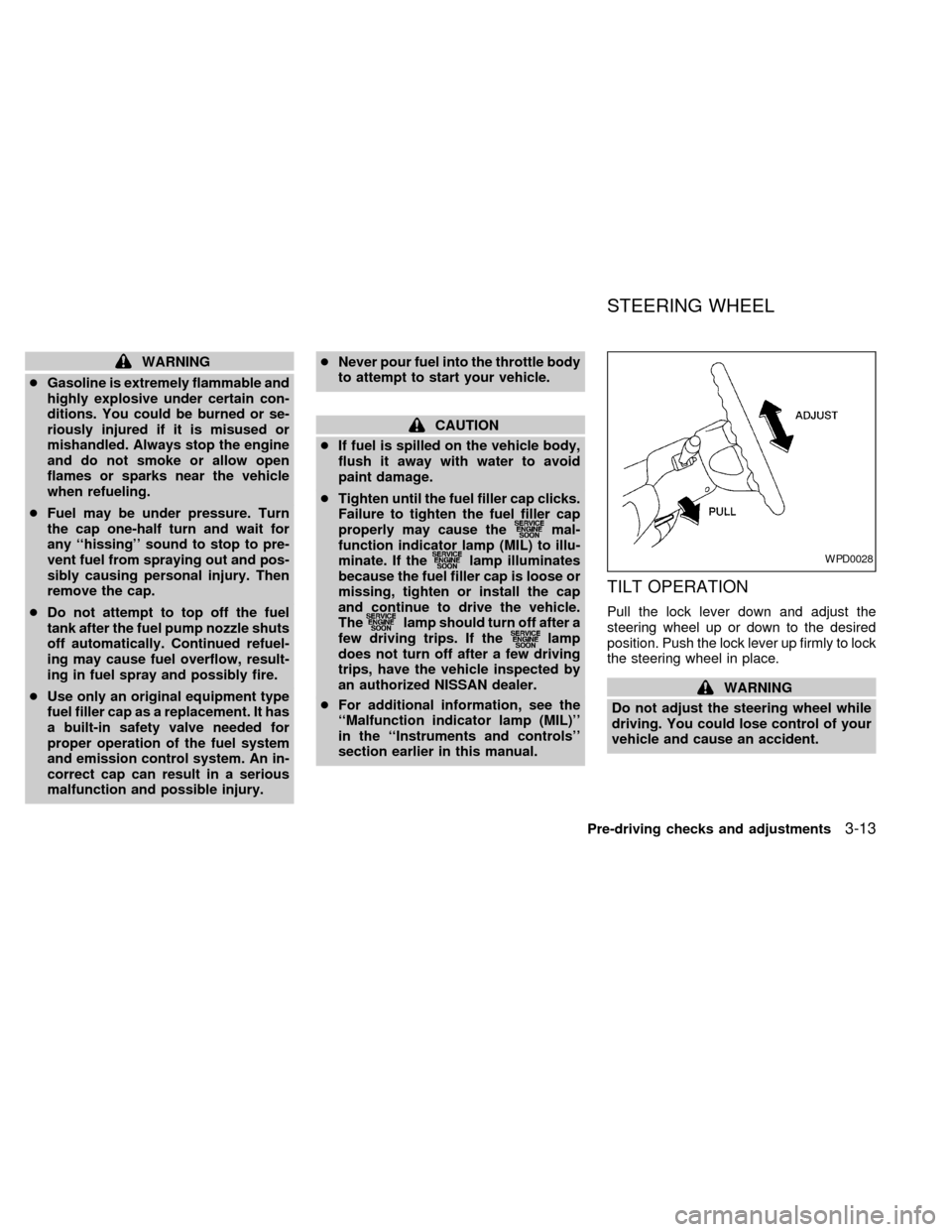
Type A
The trunk lid opener lever is located on the
outside of the driver's seat. To open the
trunk lid, pull up the opener lever. To close,
push the trunk lid down securely.Type B
The trunk lid release is located on the
instrument panel. To open the trunk, push
the release in the direction indicated in the
illustration. To close the trunk lid, push it
down securely.
WPD0026
TRUNK LID
3-10Pre-driving checks and adjustments
ZX
Page 84 of 240
Cancel lever
When the lever is in the cancel position, the
trunk lid cannot be opened with the trunk lid
opener lever. It can be opened only with the
key.
KEY OPERATION
To open the trunk lid from outside the
vehicle, turn the key clockwise. To close the
trunk lid, push the trunk lid down securely.
WPD0021APD1110
Pre-driving checks and adjustments3-11
ZX
Page 85 of 240
OPENER OPERATION
To open the fuel filler lid, pull up the opener
lever. To lock, close the fuel filler lid se-
curely.
FUEL FILLER CAP
The fuel filler cap is a screw-on ratcheting
type. Tighten the cap clockwise until ratch-
eting clicks are heard.
WPD0027WPD0035
FUEL FILLER LID
3-12Pre-driving checks and adjustments
ZX
Page 86 of 240
WARNING
cGasoline is extremely flammable and
highly explosive under certain con-
ditions. You could be burned or se-
riously injured if it is misused or
mishandled. Always stop the engine
and do not smoke or allow open
flames or sparks near the vehicle
when refueling.
cFuel may be under pressure. Turn
the cap one-half turn and wait for
any ``hissing'' sound to stop to pre-
vent fuel from spraying out and pos-
sibly causing personal injury. Then
remove the cap.
cDo not attempt to top off the fuel
tank after the fuel pump nozzle shuts
off automatically. Continued refuel-
ing may cause fuel overflow, result-
ing in fuel spray and possibly fire.
cUse only an original equipment type
fuel filler cap as a replacement. It has
a built-in safety valve needed for
proper operation of the fuel system
and emission control system. An in-
correct cap can result in a serious
malfunction and possible injury.cNever pour fuel into the throttle body
to attempt to start your vehicle.
CAUTION
cIf fuel is spilled on the vehicle body,
flush it away with water to avoid
paint damage.
cTighten until the fuel filler cap clicks.
Failure to tighten the fuel filler cap
properly may cause the
mal-
function indicator lamp (MIL) to illu-
minate. If the
lamp illuminates
because the fuel filler cap is loose or
missing, tighten or install the cap
and continue to drive the vehicle.
The
lamp should turn off after a
few driving trips. If thelamp
does not turn off after a few driving
trips, have the vehicle inspected by
an authorized NISSAN dealer.
cFor additional information, see the
``Malfunction indicator lamp (MIL)''
in the ``Instruments and controls''
section earlier in this manual.
TILT OPERATION
Pull the lock lever down and adjust the
steering wheel up or down to the desired
position. Push the lock lever up firmly to lock
the steering wheel in place.
WARNING
Do not adjust the steering wheel while
driving. You could lose control of your
vehicle and cause an accident.
WPD0028
STEERING WHEEL
Pre-driving checks and adjustments3-13
ZX
Page 100 of 240

Turn the ONzOFF/VOL control knob to ad-
just the volume.
Adjusting tone quality and speaker bal-
ance
To adjust BASSzTREBzFADERzBAL (Bass,
Treble, Fader, Balance), press the AUDIO
button until the desired mode (BAS, TRE,
FAD or BAL) appears in the display.
Press the
orbutton to adjust
Bass (BAS) and Treble (TRE) to the desired
level. Use the
orbutton to ad-
just Fader or Balance modes. Fader adjusts
the sound level between the front and rear
speakers and Balance (BAL) adjusts the
sound level between the right and left
speakers.After 10 seconds, the radio or cassette tape
display reappears. Once the sound quality
is set to the desired level, press the AUDIO
button repeatedly until the radio or cassette
tape display appears.
Clock operation
Pressing the CLOCK button alternates the
clock and the radio/cassette tape options in
the display.
Clock set
Depressing the CLOCK and thebuttons
together sets hours. Depressing the CLOCK
and
buttons together sets minutes.
Clock priority mode
In this mode the clock is shown in the
display. If any radio or cassette tape func-
tions are activated, the radio (or cassette
tape) display illuminates for 10 seconds
then returns to the clock mode.
NOTE:
After clock adjustment, the radio is in the
clock priority mode.
AHA1027
Heater, air conditioner and audio systems4-11
ZX
Page 103 of 240

window to indicate the side of program play.
FF (Fast Forward), REW
(Rewind)
Push either the
orbutton for the
desired direction.
The FF or REW symbol illuminates in the
display.
To stop the FF or REW function, press the
oragain, or thebutton.
APS (Automatic Pro-
gram Search) FF, APS
REW
Push either the
orbutton while
the cassette tape is playing. The tape runs
quickly, stops, then plays the next selection
from the beginning. Either the FF or REW
symbol flashes in the display while search-
ing for the selection.
This system searches for the blank intervals
between selections. If there is a blank inter-
val within one selection or there is no inter-
val between selections, the system may not
stop in the desired or expected location.Dolby NR (noise reduction)
Push the
button for Dolby NR en-
coded tapes to reduce high frequency tape
noise. The
symbol illuminates in the
display.
If the display is in the clock priority mode
when the
button is pressed,and TAPE illuminate in the display
window for about 10 seconds. The clock
mode then returns to the display window.
Dolby NR is manufactured under license
from Dolby Laboratories Licensing Corpora-
tion. DOLBY NR and the double-D symbol
are trademarks of Dolby Laboratories Li-
censing Corporation.
Metal or chrome tape usage
The cassette player is automatically set to
high performance play when playing a metal
or chrome cassette tape.
Tape Eject
Push the
button. The cassette tape
automatically comes out.
4-14Heater, air conditioner and audio systems
ZX