2000 NISSAN MAXIMA fuse
[x] Cancel search: fusePage 47 of 239

Windshield wiper/washer switch (P.2-15)
Instrument brightness control switch (P.2-18)Meters/gauges (P.2-3)Security indicator light (P.2-12) Cruise control main switch (P.5-14)
Headlight, fog light (if so equipped)
and turn signal switch (P.2-17)
Outside mirror remote control (P.3-13)Fuse box cover (P.8-23)
Tilting steering wheel lock lever (P.3-12) Driver supplemental air bag (P.1-8)
Ignition switch/steering lock (P.5-4) Cruise control set switch (P.5-14)
Power outlet (P.2-22) or cigarette lighter (accessory) (P.2-23)
Hazard warning flasher switch (P.2-20)Ventilator (P.4-2)
Heater/air conditioner control (P.4-3)
Clock (P.2-30)
Radio/cassette player (P.4-14)/CD player (P.4-19) Rear window and outside mirror (if so equipped) defogger switch (P.2-16)
Passenger supplemental air bag (P.1-8)
Glove box (P.2-25)
Tray (P.2-23) or ashtray (accessory) (P.2-23)
SIC1225
See the page indicated in parentheses for operating details.
Traction control system (TCS) cancel switch (if so equipped) (P.2-22)
INSTRUMENT PANEL2-2
Instruments and controls
Z
00.1.17/A33-D/V5.0
X
Page 67 of 239
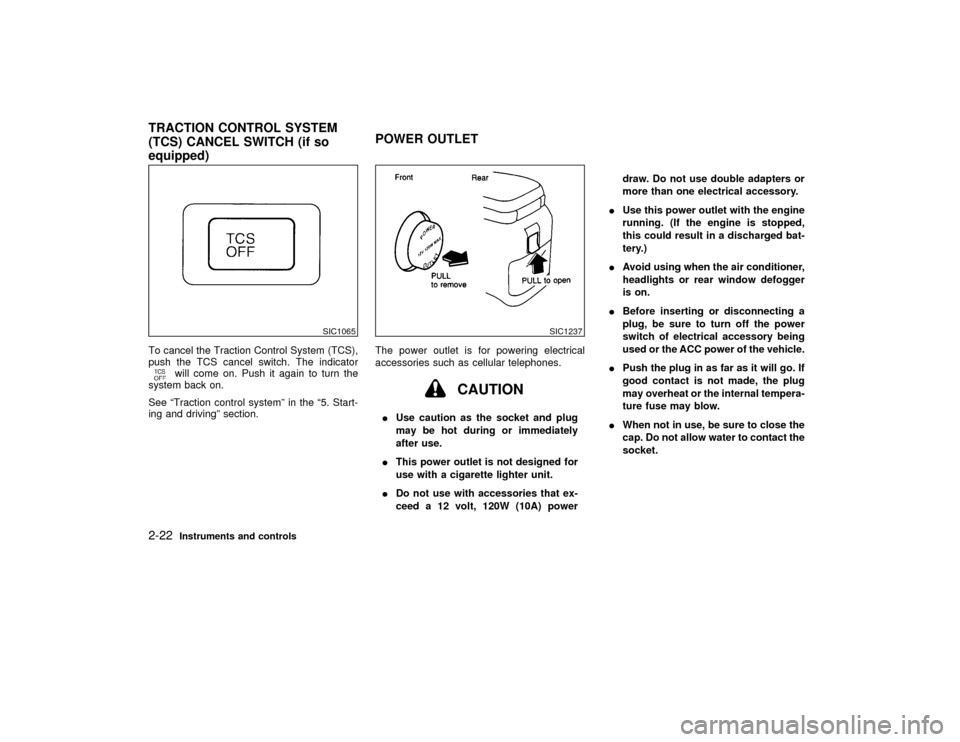
To cancel the Traction Control System (TCS),
push the TCS cancel switch. The indicator
will come on. Push it again to turn the
system back on.
See ªTraction control systemº in the ª5. Start-
ing and drivingº section.The power outlet is for powering electrical
accessories such as cellular telephones.
CAUTION
IUse caution as the socket and plug
may be hot during or immediately
after use.
IThis power outlet is not designed for
use with a cigarette lighter unit.
IDo not use with accessories that ex-
ceed a 12 volt, 120W (10A) powerdraw. Do not use double adapters or
more than one electrical accessory.
IUse this power outlet with the engine
running. (If the engine is stopped,
this could result in a discharged bat-
tery.)
IAvoid using when the air conditioner,
headlights or rear window defogger
is on.
IBefore inserting or disconnecting a
plug, be sure to turn off the power
switch of electrical accessory being
used or the ACC power of the vehicle.
IPush the plug in as far as it will go. If
good contact is not made, the plug
may overheat or the internal tempera-
ture fuse may blow.
IWhen not in use, be sure to close the
cap. Do not allow water to contact the
socket.
SIC1065
SIC1237
TRACTION CONTROL SYSTEM
(TCS) CANCEL SWITCH (if so
equipped)POWER OUTLET2-22
Instruments and controls
Z
00.1.17/A33-D/V5.0
X
Page 111 of 239

tion. Pushing the button again continues the
SEEK function. Once the highest broadcasting
station is reached, the radio continues in the
SEEK mode at the lowest broadcast station.
Push the SEEK/SCAN tuning button
or
for more than 1.5 seconds. SCAN illu-
minates in the display window. SCAN tuning
begins from high to low or low to high frequen-
cies and stops at each broadcasting station for
5 seconds. Pushing the button again during
this 5 second period stops SCAN tuning and
the radio remains tuned to that station.Station memory operations:
Six stations can be set for the AM band. 12
stations can be set for the FM band (six for
FM1, six for FM2).
1. Push the FM-AM band select button to
select AM, FM1, or FM2. The selected band
illuminates in the display.
2. Tune to the desired station.
3. Push the desired select button for more
than 1.5 seconds. For example, in the
illustrations ch2 is to be memorized. The
radio mutes when the select button is
pushed.
4. When the sound resumes, memorizing is
complete.
5. Other station select buttons can be set in
the same manner.
If the battery cable is disconnected, or if the
radio fuse opens, the radio memory is can-
celled. In that case, reset the desired stations.
Cassette tape player operationTurn the ignition key to ACC or ON, then
carefully insert a cassette tape into the tape
door.
The cassette tape automatically pulls into the
player. The word TAPE and moving digital
SAA0264
4-16
Heater, air conditioner and audio systems
Z
00.1.17/A33-D/V5.0
X
Page 116 of 239
TUNE buttons down for more than 0.5 sec-
onds.
SEEK/SCAN tuning:
SEEK tuning:
Push the SEEK/SCAN tuning button
or
for less than 1.5 seconds. SEEK tuning
begins from high to low or low to high frequen-
cies and stops at the next broadcasting sta-
tion.
SCAN tuning:
Push the SEEK/SCAN tuning button
or
for more than 1.5 seconds. SCAN tuning
begins from high to low or low to high frequen-
cies and stops at each broadcasting station for
10 seconds. Pushing the button again during
this 10 seconds period will stop SCAN tuning
and the radio will remain tuned to that station.
If the SEEK/SCAN tuning button is not pushed
within 10 seconds, SCAN tuning moves to the
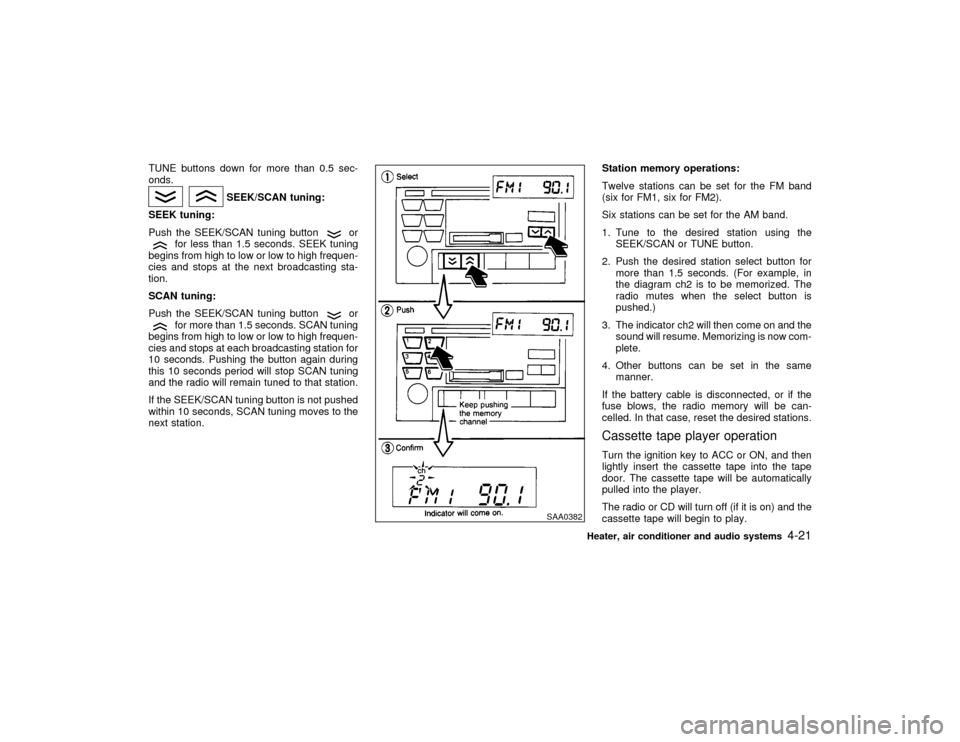
next station.Station memory operations:
Twelve stations can be set for the FM band
(six for FM1, six for FM2).
Six stations can be set for the AM band.
1. Tune to the desired station using the
SEEK/SCAN or TUNE button.
2. Push the desired station select button for
more than 1.5 seconds. (For example, in
the diagram ch2 is to be memorized. The
radio mutes when the select button is
pushed.)
3. The indicator ch2 will then come on and the
sound will resume. Memorizing is now com-
plete.
4. Other buttons can be set in the same
manner.
If the battery cable is disconnected, or if the
fuse blows, the radio memory will be can-
celled. In that case, reset the desired stations.
Cassette tape player operationTurn the ignition key to ACC or ON, and then
lightly insert the cassette tape into the tape
door. The cassette tape will be automatically
pulled into the player.
The radio or CD will turn off (if it is on) and the
cassette tape will begin to play.
SAA0382
Heater, air conditioner and audio systems
4-21
Z
00.1.17/A33-D/V5.0
X
Page 164 of 239

8 Do-it-yourselfMaintenance precautions .......................................... 8-2
Engine compartment check locations ....................... 8-4
Engine cooling system .............................................. 8-5
Checking engine coolant level .................................. 8-5
Changing engine coolant .......................................... 8-6
Engine oil .................................................................. 8-7
Checking engine oil level .......................................... 8-7
Changing engine oil .................................................. 8-8
Changing engine oil filter .......................................... 8-9
Automatic transmission fluid ................................... 8-10
Temperature conditions for checking ...................... 8-10
Power steering fluid ................................................ 8-11
Brake and clutch fluid ............................................. 8-12
Window washer fluid ............................................... 8-12
Battery ..................................................................... 8-13
Drive belts ............................................................... 8-15
Spark plugs ............................................................. 8-15
Replacing spark plugs ............................................. 8-16
Air cleaner ............................................................... 8-17
Windshield wiper blades ......................................... 8-18Cleaning .................................................................. 8-18
Replacement ........................................................... 8-19
Parking brake and brake pedal ............................... 8-20
Checking parking brake .......................................... 8-20
Checking brake pedal ............................................. 8-20
Brake booster .......................................................... 8-21
Clutch pedal ............................................................ 8-21
Fuses....................................................................... 8-21
Engine compartment ............................................... 8-22
Passenger compartment ......................................... 8-23
Multi-remote controller battery replacement ........... 8-24
Lights ....................................................................... 8-25
Headlights ............................................................... 8-26
Exterior and interior lights ....................................... 8-27
Tires and wheels ..................................................... 8-32
Tire pressure ........................................................... 8-32
Types of tires .......................................................... 8-32
Tire chains............................................................... 8-33
Changing tires and wheels...................................... 8-34
Z
00.1.17/A33-D/V5.0
X
Page 184 of 239

BRAKE BOOSTERCheck the brake booster function as follows:
1. With the engine off, press and release the
brake pedal several times. When brake
pedal movement (distance of travel) re-
mains the same from one pedal application
to the next, continue on to the next step.
2. While depressing the brake pedal, start the
engine. The pedal height should drop a
little.
3. With the brake pedal depressed, stop the
engine. Keeping the pedal depressed for
about 30 seconds, the pedal height should
not change.
4. Run the engine for one minute without
depressing the brake pedal, then turn it off.
Depress the brake pedal several times. The
pedal travel distance will decrease gradu-
ally with each depression as the vacuum is
released from the booster.
If the brakes do not operate properly, see your
NISSAN dealer.Press the pedal by hand and be sure the free
travel is within the limits shown above. If free
travel is too little or too much, see your
NISSAN dealer.
CAUTION
Never use a fuse of higher amperage
rating than that specified on the fuse
box cover. This could damage the elec-
trical system or cause a fire.
DI1021MC
CLUTCH PEDAL FUSES
Do-it-yourself
8-21
Z
00.1.17/A33-D/V5.0
X
Page 185 of 239

ENGINE COMPARTMENTIf any electrical equipment does not operate,
check for an open fuse.
1. Be sure the ignition key and headlight
switch are OFF.
2. Open the engine hood.
3. Remove the fusible link cover.
4. Remove the fuse with the fuse puller.
5. If the fuse is open, replace it with a new
fuse.
6. If a new fuse also opens, have the electricalsystem checked and repaired by your
NISSAN dealer.
Fusible linksIf any electrical equipment does not operate
and fuses are in good condition, check the
fusible links. If any of these fusible links are
melted, replace only with genuine NISSAN
parts.
SDI0964
SDI0965
8-22
Do-it-yourself
Z
00.1.17/A33-D/V5.0
X
Page 186 of 239

PASSENGER COMPARTMENTIf any electrical equipment does not operate,
check for an open fuse.
1. Be sure the ignition key and the headlight
switch are OFF.
2. Pull to open the fuse box lid.
3. Remove the fuse with the fuse puller.
4. If the fuse is open, replace it with a new
fuse.
5. If a new fuse also opens, have the electrical
system checked and repaired by your
NISSAN dealer.
SDI0966
Do-it-yourself
8-23
Z
00.1.17/A33-D/V5.0
X