2000 NISSAN MAXIMA door lock
[x] Cancel search: door lockPage 52 of 239
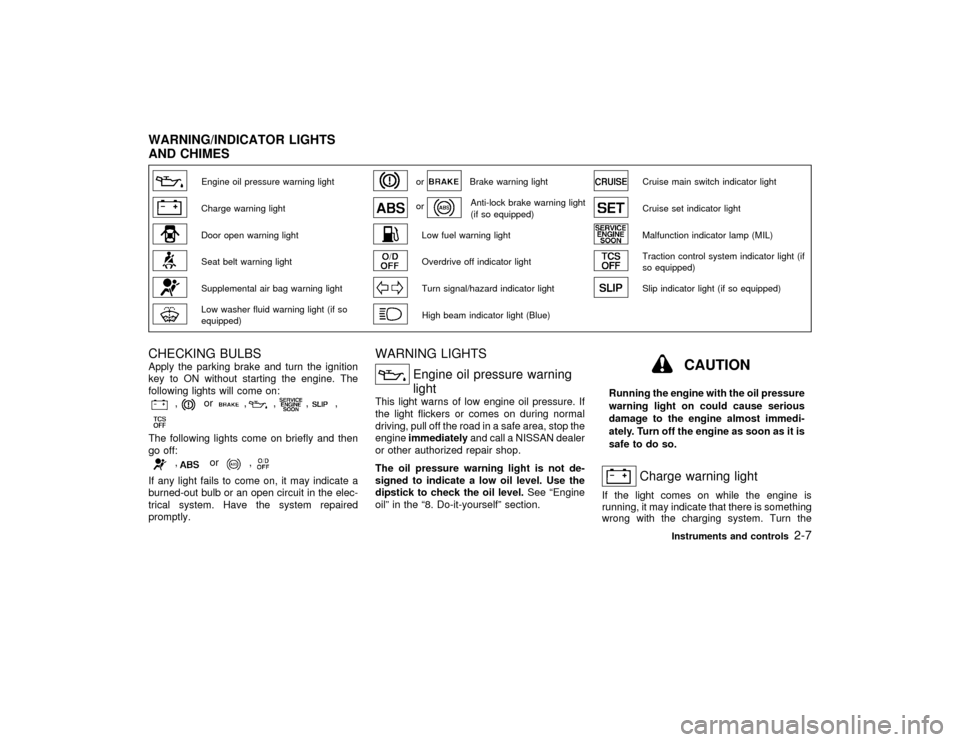
Engine oil pressure warning light
or
Brake warning light
Cruise main switch indicator light
Charge warning light
or
Anti-lock brake warning light
(if so equipped)
Cruise set indicator light
Door open warning light
Low fuel warning light
Malfunction indicator lamp (MIL)
Seat belt warning light
Overdrive off indicator light
Traction control system indicator light (if
so equipped)
Supplemental air bag warning light
Turn signal/hazard indicator light
Slip indicator light (if so equipped)
Low washer fluid warning light (if so
equipped)
High beam indicator light (Blue)
CHECKING BULBSApply the parking brake and turn the ignition
key to ON without starting the engine. The
following lights will come on:
,
or
,
,
,
,
The following lights come on briefly and then
go off:
,
or
,
If any light fails to come on, it may indicate a
burned-out bulb or an open circuit in the elec-
trical system. Have the system repaired
promptly.
WARNING LIGHTS
Engine oil pressure warning
light
This light warns of low engine oil pressure. If
the light flickers or comes on during normal
driving, pull off the road in a safe area, stop the
engineimmediatelyand call a NISSAN dealer
or other authorized repair shop.
The oil pressure warning light is not de-
signed to indicate a low oil level. Use the
dipstick to check the oil level.See ªEngine
oilº in the ª8. Do-it-yourselfº section.
CAUTION
Running the engine with the oil pressure
warning light on could cause serious
damage to the engine almost immedi-
ately. Turn off the engine as soon as it is
safe to do so.
Charge warning light
If the light comes on while the engine is
running, it may indicate that there is something
wrong with the charging system. Turn the
WARNING/INDICATOR LIGHTS
AND CHIMES
Instruments and controls
2-7
Z
00.1.17/A33-D/V5.0
X
Page 58 of 239

The system can be activated even if the
windows are open.
2. Remove the key from the ignition switch.
3. Close and lock all doors, hood and trunk lid.
The doors can be locked either with or
without the key.
Multi-remote controller equipped models:
Close and lock all doors, hood and trunk lid.
Lock all doors by the key or pressing the
LOCK button on the multi-remote controller.
At this time, the hazard indicators flash
twice to indicate all doors are locked.
4. Confirm that the SECURITY indicator light
comes on. The SECURITY light glows for
about 30 seconds and then blink. The sys-
tem is now activated. If, during this 30
second time period, the door is unlocked by
the key or the multi-remote controller, or the
ignition key is turned to ACC or ON, the
system will not activate.
IIf the key is turned slowly toward the
front of the vehicle when locking the
door, the system may not activate. If the
key is returned beyond the vertical po-
sition toward the rear of the vehicle to
remove the key, the system may be
deactivated. If the indicator light fails to
glow for 30 seconds, unlock the dooronce and lock it again.
IEven when the driver and/or passengers
are in the vehicle, the system will acti-
vate with all doors, hood and trunk lid
locked and ignition key off. Turn the
ignition key to ACC to turn the system
off.
Theft warning system operationThe warning system will give the following
alarm:
IThe headlights blink and the horn sounds
intermittently.
IThe alarm automatically turns off after 2 to
3 minutes. However, the alarm reactivates
if the vehicle is tampered with again. The
alarm can be shut off by unlocking a door or
trunk lid with the key, or by pressing the
UNLOCK button on the multi-remote con-
troller.
The alarm is activated by:
IOpening the door without using the key or
multi-remote controller.
IOpening the trunk lid without using the key
or multi-remote controller or opening the
trunk lid by operating the opener release
button.IOpening the hood.
How to stop alarmThe alarm will stop only by unlocking a door or
trunk lid with the key, or by pressing the
UNLOCK button on multi-remote controller.
The alarm will not stop if the ignition switch is
turned to ACC or ON.
If the system does not operate as de-
scribed above, have it checked by your
NISSAN dealer.NISSAN VEHICLE IMMOBILIZER
SYSTEMThe Nissan Vehicle Immobilizer System will
not allow the engine to start without the use of
the registered Nissan Vehicle Immobilizer Sys-
tem key.
If the engine fails to start using the registered
Nissan Vehicle Immobilizer System key, it may
be due to interference caused by another
Nissan Vehicle Immobilizer System key, an
automated toll road device or automated pay-
ment device on the key ring. Restart the en-
gine using the following procedures:
1. Leave the ignition switch in the ON position
for approximately 5 seconds.
2. Turn the ignition switch to the OFF or LOCK
Instruments and controls
2-13
Z
00.1.17/A33-D/V5.0
X
Page 63 of 239

Be sure not to put anything on top of the
photo sensor located on the top left-hand
side of the instrument panel. The photo
sensor controls the autolamp; if it is cov-
ered, the photo sensor reacts as if it is dark
and the headlights will illuminate.Battery saver systemIWhen the headlight switch is in the
or
position while the ignition switch is in
the ON position, the lights (including the
front fog light) will automatically turn off 45
seconds after the ignition switch has been
turned to the OFF position. However, the
lights will turn off if the driver's or frontpassenger's door is opened in this condi-
tion.
IWhen the headlight switch remains in the
or
position after the lights auto-
matically turn off, the lights will turn on
when the ignition switch is turned to the ON
position from the OFF position.CAUTION
IWhen you turn on the headlight
switch after the lights automatically
turn off, the lights will not turn off
automatically. Be sure to turn the
light switch to the OFF position when
you leave the vehicle for extended
periods of time, otherwise the battery
will go dead.
INever leave the light switch on when
the engine is not running for ex-
tended periods of time.
Instrument brightness controlThe instrument brightness control operates
when the light switch is in the
or
position.
Turn the control to adjust the brightness of
instrument panel lights (except clock) and
power window switch lights.
When the control is turned to the right until a
click sound is heard, the light intensity will be
at maximum. When the control is turned to the
left until a click sound is heard, the light will be
turned off.
SIC1230
IC1284MA
2-18
Instruments and controls
Z
00.1.17/A33-D/V5.0
X
Page 72 of 239

WARNING
IProperly secure all cargo to help pre-
vent it from sliding or shifting.
IBe sure to secure hooks into the
retainers. The cargo restrained in the
net must not exceed 30 lb (13.6 kg) or
the net may not stay secured.
POWER WINDOWS
WARNING
IMake sure that all passengers have
their hands, etc. inside the vehicle
before closing the windows. Use the
window lock switch to prevent unex-
pected use of the power windows.
IDo not leave children unattended in-
side the vehicle. They could unknow-
ingly activate switches or controlsand become trapped in a window.
Unattended children could become
involved in serious accidents.
The power windows operate when the ignition
key is in the ON position and for about 45
seconds, after the ignition key is turned to the
OFF position. If the driver's door or the front
passenger's door is opened during this period
of about 45 seconds, power to the windows is
canceled.
To open or close the window, push down or
pull up the switch and hold it. The main switch
(driver side switches) will open or close all the
windows.
SIC0929
WINDOWS
Instruments and controls
2-27
Z
00.1.17/A33-D/V5.0
X
Page 75 of 239

WARNING
IIn an accident you could be thrown
from the vehicle through an open
sunroof. Always use seat belts and
child restraints.
IDo not allow anyone to stand up or
extend any portion of their body out
of the opening while the vehicle is in
motion or while the sunroof is clos-
ing.
CAUTION
IRemove water drops, snow, ice or
sand from the sunroof before open-
ing.
IDo not place any heavy object on the
sunroof or surrounding area.If the sunroof does not closeHave your NISSAN dealer check and repair
the sunroof.The digital clock displays time when the igni-
tion key is in ACC or ON.
If the power supply is disconnected, the clock
will not indicate the correct time. Readjust the
time.
ADJUSTING THE TIMEPush theHbutton to adjust the hour.
Push theMbutton to adjust the minute.
CEILINGThe ceiling light has a three-position switch.
When the switch is in the centerqposition, the
light will illuminate when a door is opened.
The light will stay on for about 30 seconds
when:
IThe doors are unlocked by the multi-remote
controller while all doors are closed and
locked with the key in the ignition switch.
IThe driver's door is unlocked while the key
is removed from the ignition switch and all
doors are closed and locked.
SIC0910
IC1226
CLOCK INTERIOR LIGHT
2-30
Instruments and controls
Z
00.1.17/A33-D/V5.0
X
Page 76 of 239

IThe driver's door is opened and then closed
while the key is removed from the ignition
switch.
IThe key is removed from the ignition switch
while all doors are closed.
The ceiling light will turn off while the 30
second timer is activated, when:
IThe driver's door is locked either with the
multi-remote controller, a key, the door lock
knob, or the lock-unlock switch.
IThe ignition switch is turned ON.
When the interior light switch or personal
light switch is in the ON position, the inte-
rior, personal, vanity mirror and trunk
lights will automatically turn off 10 minutes
after the ignition switch has been turned to
the OFF position. To turn on the light again,
insert the key into the ignition switch and
move it to the ON position.
After the above procedure, the interior, per-
sonal, vanity mirror or trunk lights will auto-
matically turn off 10 minutes after the latest
operation of the following with the ignition
switch in the ACC or OFF position:
IOpening or closing any door or trunk lid
ILocking or unlocking the driver's doorIInserting or removing a key from the ignition
switch
These lights will turn on again when any of the
above operations is performed after the lights
have turned off automatically. (The lights will
turn off 10 minutes after the latest operation of
the above as well.)
CAUTION
ITurn off the interior, personal and
vanity mirror lights when you leave
the vehicle.
IDo not use for extended periods of
time with the engine stopped. This
could result in a discharged battery.When the interior light or the personal light
switch is in the ON position, the interior,
personal, vanity mirror and trunk lights will
automatically turn off 10 minutes after the
ignition switch has been turned to the OFF
position. To turn on the light again, insert
the key into the ignition switch and move it
to the ON position.
After the above procedure, the interior, per-
sonal, vanity mirror or trunk lights will auto-
matically turn off 10 minutes after the latest
operation of the following with the ignition
switch in the ACC or OFF position:
IOpening or closing any door or trunk lid
IC1019-B
PERSONAL LIGHT
Instruments and controls
2-31
Z
00.1.17/A33-D/V5.0
X
Page 77 of 239

ILocking or unlocking the driver's door
IInserting or removing a key from the ignition
switch
These lights will turn on again when any of the
above operations is performed after the lights
have turned off automatically. (The lights will
turn off 10 minutes after the latest operation of
the above as well.)
CAUTION
ITurn off the interior, personal andvanity mirror lights when you leave
the vehicle.
IDo not use for extended periods of
time with the engine stopped. This
could result in a discharged battery.
The light on the vanity mirror will turn on when
the cover on the vanity mirror is opened.
When the interior light or the personal light
switch is in the ON position, the interior,
personal, vanity mirror and trunk lights will
automatically turn off 10 minutes after the
ignition switch has been turned to the OFF
position. To turn on the light again, insert
the key into the ignition switch and move it
to the ON position.
IC1163-B
SIC0186
VANITY MIRROR LIGHT (if so
equipped)
2-32
Instruments and controls
Z
00.1.17/A33-D/V5.0
X
Page 78 of 239

The light illuminates when the trunk lid is
opened. When the trunk lid is closed, the light
will go off.
When the interior light or the personal light
switch is in the ON position, the interior,
personal, vanity mirror and trunk lights will
automatically turn off 10 minutes after the
ignition switch has been turned to the OFF
position. To turn on the light again, insert
the key into the ignition switch and move it
to the ON position.The Integrated HomeLink
Universal Trans-
ceiver provides a convenient way to consoli-
date the functions of up to three individual
hand-held transmitters into one built-in device.
Integrated HomeLink
Universal Transceiver:
IWill operate most Radio Frequency (RF)
devices such as garage doors, gates, home
and office lighting, entry door locks and
security systems.
IIs powered by your vehicle's battery. No
separate batteries are required. If the vehi-
cle's battery is discharged or is discon-
nected, HomeLinkwill retain all program-
ming.
Once the Integrated HomeLink
Universal
Transceiver is programmed, retain the
original transmitter for future programming
procedures (i.e., new vehicle purchases).
Upon sale of the vehicle, the programmed
Integrated HomeLink
Universal Trans-
ceiver buttons should be erased for secu-
rity purposes. For additional information,
refer to ªProgramming HomeLink
º later in
this section.
WARNING
IDo not use the Integrated HomeLink
Universal Transceiver with any ga-
rage door opener that lacks safety
stop and reverse features as required
by federal safety standards. (These
standards became effective for
opener models manufactured after
April 1, 1982). A garage door opener
which cannot detect an object in the
path of a closing garage door and
then automatically stop and reverse,
does not meet current federal safety
standards. Using a garage door
opener without these features in-
creases the risk of serious injury or
death.
IDuring programming, your garage
door or gate may open or close. Make
sure that people and objects are clear
of the garage door or gate that you
are programming.
IYour vehicle's engine should be
turned off while programming the In-
TRUNK LIGHTINTEGRATED HomeLink
UNIVERSAL TRANSCEIVER (if so
equipped)
Instruments and controls
2-33
Z
00.1.17/A33-D/V5.0
X