2000 NISSAN MAXIMA Caution lights
[x] Cancel search: Caution lightsPage 52 of 239
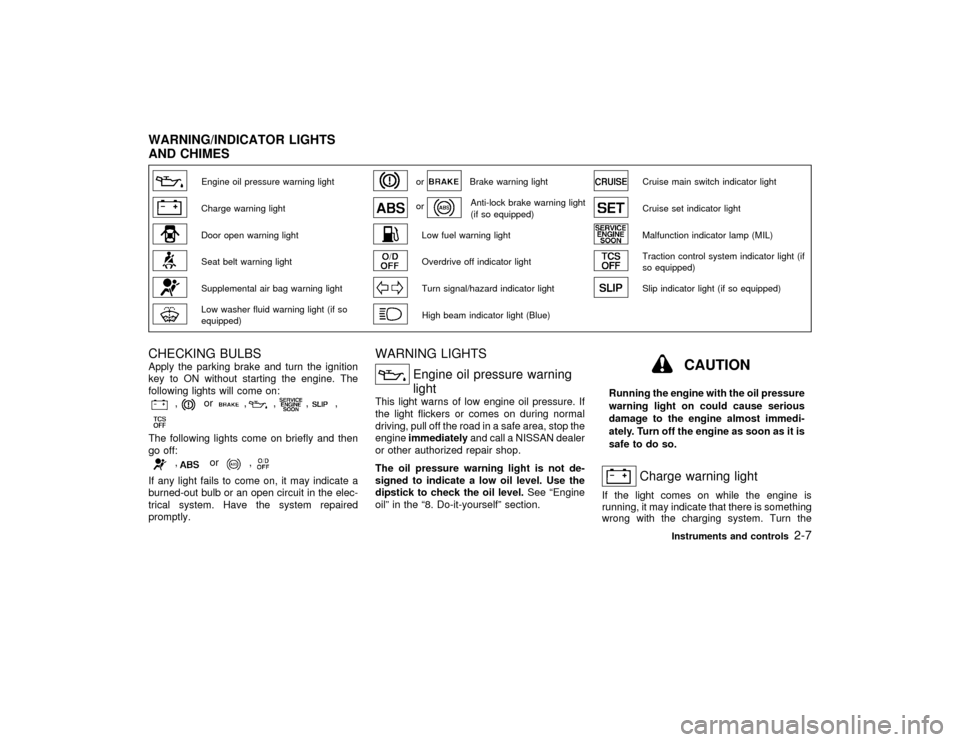
Engine oil pressure warning light
or
Brake warning light
Cruise main switch indicator light
Charge warning light
or
Anti-lock brake warning light
(if so equipped)
Cruise set indicator light
Door open warning light
Low fuel warning light
Malfunction indicator lamp (MIL)
Seat belt warning light
Overdrive off indicator light
Traction control system indicator light (if
so equipped)
Supplemental air bag warning light
Turn signal/hazard indicator light
Slip indicator light (if so equipped)
Low washer fluid warning light (if so
equipped)
High beam indicator light (Blue)
CHECKING BULBSApply the parking brake and turn the ignition
key to ON without starting the engine. The
following lights will come on:
,
or
,
,
,
,
The following lights come on briefly and then
go off:
,
or
,
If any light fails to come on, it may indicate a
burned-out bulb or an open circuit in the elec-
trical system. Have the system repaired
promptly.
WARNING LIGHTS
Engine oil pressure warning
light
This light warns of low engine oil pressure. If
the light flickers or comes on during normal
driving, pull off the road in a safe area, stop the
engineimmediatelyand call a NISSAN dealer
or other authorized repair shop.
The oil pressure warning light is not de-
signed to indicate a low oil level. Use the
dipstick to check the oil level.See ªEngine
oilº in the ª8. Do-it-yourselfº section.
CAUTION
Running the engine with the oil pressure
warning light on could cause serious
damage to the engine almost immedi-
ately. Turn off the engine as soon as it is
safe to do so.
Charge warning light
If the light comes on while the engine is
running, it may indicate that there is something
wrong with the charging system. Turn the
WARNING/INDICATOR LIGHTS
AND CHIMES
Instruments and controls
2-7
Z
00.1.17/A33-D/V5.0
X
Page 55 of 239

occurs, the gears automatically engage and
lock into third gear.
See the ªDriving the vehicleº in the ª5. Starting
and drivingº section for fail-safe before visiting
your NISSAN dealer.
Turn signal/hazard indicator
lights
The light flashes when the turn signal switch
lever or hazard switch is turned on.
High beam indicator light
(Blue)
This light comes on when the headlight high
beam is on and goes out when the low beam is
selected.
Cruise main switch indicator
light
The light comes on when the cruise control
main switch is pushed. The light goes out
when the main switch is pushed again. When
the cruise main switch indicator light comes
on, the cruise control system is operational.
Cruise set indicator light
The light comes on while the vehicle speed is
controlled by the cruise control system. If the
light blinks while the engine is running, it mayindicate there is something wrong with the
cruise control system. Have the system
checked by your NISSAN dealer.
Malfunction indicator lamp
(MIL)
If the malfunction indicator lamp comes on
steady or blinks while the engine is running, it
may indicate a potential emission control prob-
lem.
The malfunction indicator lamp may also come
on steady if the fuel filler cap is loose or
missing, or if the vehicle runs out of fuel.
Check to make sure the fuel filler cap is
installed and closed tightly, and that the ve-
hicle has at least three gallons of fuel in the
fuel tank.
After a few driving trips, the
lamp should
turn off if no other potential emission control
system problem exists.
Operation
The malfunction indicator lamp will come on in
one of two ways:
IMalfunction indicator lamp on steady Ð An
emission control system malfunction has
been detected. Check the fuel filler cap. If
the fuel filler cap is loose or missing, tighten
or install the cap and continue to drive thevehicle. The
lamp should turn off after
a few driving trips. If the
lamp does
not turn off after a few driving trips, have the
vehicle inspected by an authorized NISSAN
dealer. You do not need to have your
vehicle towed to the dealer.
IMalfunction indicator lamp blinking Ð An
engine misfire has been detected which
may damage the emission control system.
To reduce or avoid emission control system
damage:
a) Do not drive at speeds above 45 MPH
(72 km/h).
b) Avoid hard acceleration or deceleration.
c) Avoid steep uphill grades.
d) If possible, reduce the amount of cargo
being hauled or towed.
The malfunction indicator lamp may stop
blinking and come on steady.
Have the vehicle inspected by an autho-
rized NISSAN dealer. You do not need to
have your vehicle towed to the dealer.
CAUTION
Continued vehicle operation without
2-10
Instruments and controls
Z
00.1.17/A33-D/V5.0
X
Page 63 of 239

Be sure not to put anything on top of the
photo sensor located on the top left-hand
side of the instrument panel. The photo
sensor controls the autolamp; if it is cov-
ered, the photo sensor reacts as if it is dark
and the headlights will illuminate.Battery saver systemIWhen the headlight switch is in the
or
position while the ignition switch is in
the ON position, the lights (including the
front fog light) will automatically turn off 45
seconds after the ignition switch has been
turned to the OFF position. However, the
lights will turn off if the driver's or frontpassenger's door is opened in this condi-
tion.
IWhen the headlight switch remains in the
or
position after the lights auto-
matically turn off, the lights will turn on
when the ignition switch is turned to the ON
position from the OFF position.CAUTION
IWhen you turn on the headlight
switch after the lights automatically
turn off, the lights will not turn off
automatically. Be sure to turn the
light switch to the OFF position when
you leave the vehicle for extended
periods of time, otherwise the battery
will go dead.
INever leave the light switch on when
the engine is not running for ex-
tended periods of time.
Instrument brightness controlThe instrument brightness control operates
when the light switch is in the
or
position.
Turn the control to adjust the brightness of
instrument panel lights (except clock) and
power window switch lights.
When the control is turned to the right until a
click sound is heard, the light intensity will be
at maximum. When the control is turned to the
left until a click sound is heard, the light will be
turned off.
SIC1230
IC1284MA
2-18
Instruments and controls
Z
00.1.17/A33-D/V5.0
X
Page 67 of 239

To cancel the Traction Control System (TCS),
push the TCS cancel switch. The indicator
will come on. Push it again to turn the
system back on.
See ªTraction control systemº in the ª5. Start-
ing and drivingº section.The power outlet is for powering electrical
accessories such as cellular telephones.
CAUTION
IUse caution as the socket and plug
may be hot during or immediately
after use.
IThis power outlet is not designed for
use with a cigarette lighter unit.
IDo not use with accessories that ex-
ceed a 12 volt, 120W (10A) powerdraw. Do not use double adapters or
more than one electrical accessory.
IUse this power outlet with the engine
running. (If the engine is stopped,
this could result in a discharged bat-
tery.)
IAvoid using when the air conditioner,
headlights or rear window defogger
is on.
IBefore inserting or disconnecting a
plug, be sure to turn off the power
switch of electrical accessory being
used or the ACC power of the vehicle.
IPush the plug in as far as it will go. If
good contact is not made, the plug
may overheat or the internal tempera-
ture fuse may blow.
IWhen not in use, be sure to close the
cap. Do not allow water to contact the
socket.
SIC1065
SIC1237
TRACTION CONTROL SYSTEM
(TCS) CANCEL SWITCH (if so
equipped)POWER OUTLET2-22
Instruments and controls
Z
00.1.17/A33-D/V5.0
X
Page 76 of 239

IThe driver's door is opened and then closed
while the key is removed from the ignition
switch.
IThe key is removed from the ignition switch
while all doors are closed.
The ceiling light will turn off while the 30
second timer is activated, when:
IThe driver's door is locked either with the
multi-remote controller, a key, the door lock
knob, or the lock-unlock switch.
IThe ignition switch is turned ON.
When the interior light switch or personal
light switch is in the ON position, the inte-
rior, personal, vanity mirror and trunk
lights will automatically turn off 10 minutes
after the ignition switch has been turned to
the OFF position. To turn on the light again,
insert the key into the ignition switch and
move it to the ON position.
After the above procedure, the interior, per-
sonal, vanity mirror or trunk lights will auto-
matically turn off 10 minutes after the latest
operation of the following with the ignition
switch in the ACC or OFF position:
IOpening or closing any door or trunk lid
ILocking or unlocking the driver's doorIInserting or removing a key from the ignition
switch
These lights will turn on again when any of the
above operations is performed after the lights
have turned off automatically. (The lights will
turn off 10 minutes after the latest operation of
the above as well.)
CAUTION
ITurn off the interior, personal and
vanity mirror lights when you leave
the vehicle.
IDo not use for extended periods of
time with the engine stopped. This
could result in a discharged battery.When the interior light or the personal light
switch is in the ON position, the interior,
personal, vanity mirror and trunk lights will
automatically turn off 10 minutes after the
ignition switch has been turned to the OFF
position. To turn on the light again, insert
the key into the ignition switch and move it
to the ON position.
After the above procedure, the interior, per-
sonal, vanity mirror or trunk lights will auto-
matically turn off 10 minutes after the latest
operation of the following with the ignition
switch in the ACC or OFF position:
IOpening or closing any door or trunk lid
IC1019-B
PERSONAL LIGHT
Instruments and controls
2-31
Z
00.1.17/A33-D/V5.0
X
Page 77 of 239

ILocking or unlocking the driver's door
IInserting or removing a key from the ignition
switch
These lights will turn on again when any of the
above operations is performed after the lights
have turned off automatically. (The lights will
turn off 10 minutes after the latest operation of
the above as well.)
CAUTION
ITurn off the interior, personal andvanity mirror lights when you leave
the vehicle.
IDo not use for extended periods of
time with the engine stopped. This
could result in a discharged battery.
The light on the vanity mirror will turn on when
the cover on the vanity mirror is opened.
When the interior light or the personal light
switch is in the ON position, the interior,
personal, vanity mirror and trunk lights will
automatically turn off 10 minutes after the
ignition switch has been turned to the OFF
position. To turn on the light again, insert
the key into the ignition switch and move it
to the ON position.
IC1163-B
SIC0186
VANITY MIRROR LIGHT (if so
equipped)
2-32
Instruments and controls
Z
00.1.17/A33-D/V5.0
X
Page 128 of 239

IMake sure the area around the vehicle is
clear.
IMaintenance items listed here should be
checked periodically, e.g., each time you
check engine oil.
ICheck that all windows and lights are clean.
IVisually inspect tires for their appearance
and condition. Also check tires for proper
inflation.
ILock all doors.
IPosition seat and adjust head restraints.
IAdjust inside and outside mirrors.
IFasten seat belts and ask all passengers to
do likewise.
ICheck the operation of warning lights when
key is turned to the ON (3) position.1. Apply the parking brake.
2.Automatic transmission:
Move the selector lever to P (Park) or N
(Neutral). (P preferred.)
The selector lever cannot be moved out of
P (Park) position and into any of the other
gear positions if the key is removed from
the switch.
The starter is designed not to operate if the
selector lever is in one of the driving posi-
tions.
Manual transmission:
Move the shift lever to N (Neutral) position,
and depress the clutch pedal to the floor
while cranking the engine.
The starter is designed not to operate un-
less the clutch pedal is fully depressed.
3. Crank the enginewith your foot off the
accelerator pedalby turning the ignition
key to START. Release the key when the
engine starts. If the engine starts, but fails
to run, repeat the above procedure.
IIf the engine is very hard to start in
extremely cold or hot weather, de-
press the accelerator pedal and hold it
to help start the engine.IIn the summer, when restarting the
engine within 30 minutes after it has
been stopped, keep the accelerator
pedal fully depressed while starting.
CAUTION
Do not operate the starter for more than
10 seconds at a time. If the engine does
not start, turn the key off and wait 10
seconds before cranking again, other-
wise the starter could be damaged.
4.Warm-up
Allow the engine to idle for at least 30
seconds after starting. Drive at moderate
speed for a short distance first, especially in
cold weather.
BEFORE STARTING THE ENGINE STARTING THE ENGINE
Starting and driving
5-7
Z
00.1.17/A33-D/V5.0
X
Page 141 of 239

cidents resulting from careless or dan-
gerous driving techniques. It can help
maintain vehicle control during braking
on slippery surfaces, but remember that
the stopping distance on slippery sur-
faces will be longer than on normal
surfaces, even with the anti-lock sys-
tem. Stopping distances may also be
longer on rough, gravel or snow covered
roads, or if you are using tire chains.
Always maintain a safe distance from
the vehicle in front of you. Ultimately,
the responsibility for safety of self and
others rests in the hands of the driver.
Tire type and condition of tires may also
affect braking effectiveness.
IWhen replacing tires, install the
specified size of tires on all four
wheels.
IWhen installing a spare tire, make
sure it is the proper size and type as
specified on the tire placard. See ªVe-
hicle identificationº in the ª10. Tech-
nical and consumer informationº sec-
tion for tire placard location.On slippery surfaces such as wet asphalt
roads, vehicle wheels may spin when the
vehicle is accelerated. This wheel spin re-
duces acceleration, or causes the vehicle to
swerve, thus decreasing vehicle stability.
The traction control system helps limit wheel
spin on slippery roads. The system operates
only if it senses one or both of the front wheels
spinning or beginning to lose traction. When
this happens, the system reduces engine
power and may also upshift the transmission
to help limit wheel spin.
IIndicator light
If a malfunction occurs in the traction con-
trol system, the SLIP and
indicator
lights come on in the meter panel.
As long as these warning lights are on, the
traction control function is canceled. The
vehicle will behaves like a model without
the traction control system.
CAUTION
IThe traction control system is most
effective when the transmission gear
selector is in the D position.
IIf you drive in gear 1 or 2 with the TCSon, this could cause the three way
catalyst to overheat and be damaged.
To avoid this, the TCS will automati-
cally turn off. Shifting the gear selec-
tor to D will reactivate the TCS.
WARNING
This system is designed to prevent the
wheels from spinning. However, it does
not prevent vehicle slipping or spinning
due to abrupt steering operation at high
speeds or by careless or dangerous
driving techniques. Be especially care-
ful when driving on slippery surfaces
and always drive safely.
TRACTION CONTROL SYSTEM (if
so equipped)
5-20
Starting and driving
Z
00.1.17/A33-D/V5.0
X