2000 MITSUBISHI CARISMA CD changer
[x] Cancel search: CD changerPage 142 of 280

FOR PLEASANT DRIVING
6–2
H11A319d
UKW/MW/LW electronic tuning radio with tape player*EH30A-AeThe audio system can be used when the
ignition switch is in the “ON” or “ACC” posi-
tion.
A– Display window
B– Audio system
NOTE
(1) The MITSUBISHI Genuine CD player or
CD autochanger can be connected to
this audio system. The CD player or the
CD autochanger can be operated by
the switch on the audio body. Refer to
“Connection of a CD player or a CD
autochanger” on page 6–13.(2) To listen to the audio system while the
engine is stopped, turn the ignition key
to the “ACC” position.
(3) When a cellular phone is used inside
the vehicle, noise may be produced
from the audio equipment. This does
not mean that something is wrong with
the audio equipment. In such a case,
use the cellular phone at a place as far
as possible from the audio equipment.(4) In the case of misuse (entry of a foreign
object or water, smoke or odor, etc.), im-
mediately stop the operation and have
the audio system checked at an author-
ized MITSUBISHI dealer. Never try to
repair it by yourself. Avoid continuous
usage without inspection by a qualified
person.
(5) The audio system’s control panel can
be removed to deter thieves. For details,
refer to the section entitled “Audio sys-
tem anti-theft feature” on page 6–26.
Page 153 of 280
FOR PLEASANT DRIVING
6–13
H11A259d
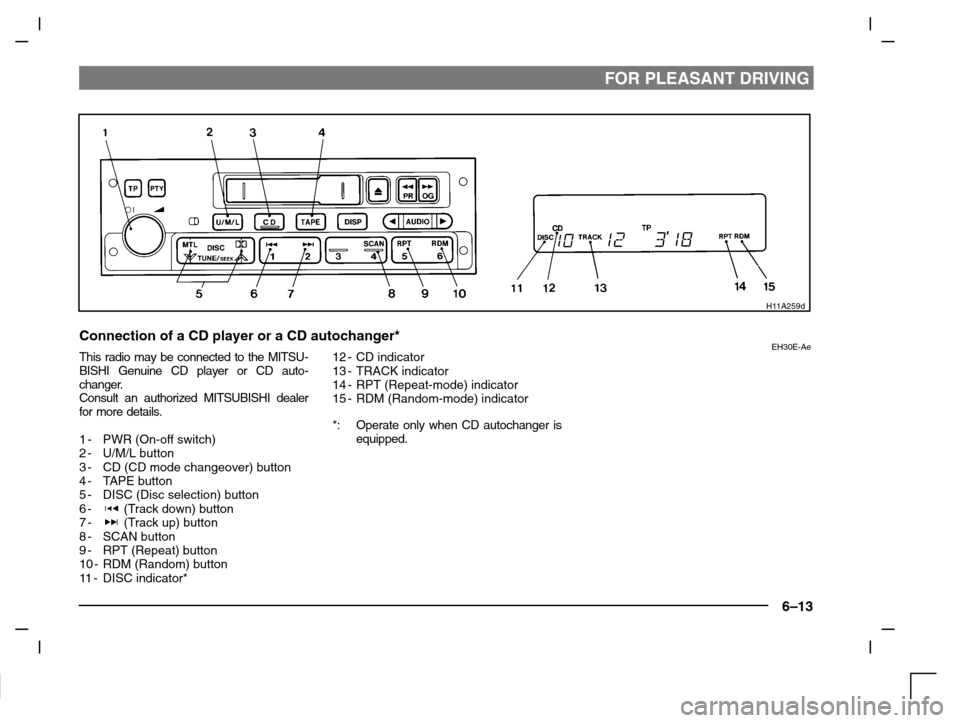
Connection of a CD player or a CD autochanger*EH30E-AeThis radio may be connected to the MITSU-
BISHI Genuine CD player or CD auto-
changer.
Consult an authorized MITSUBISHI dealer
for more details.
1-PWR (On-off switch)
2-U/M/L button
3-CD (CD mode changeover) button
4-TAPE button
5-DISC (Disc selection) button
6-
(Track down) button
7- (Track up) button
8-SCAN button
9-RPT (Repeat) button
10 - RDM (Random) button
11-DISC indicator*12 - CD indicator
13 - TRACK indicator
14 - RPT (Repeat-mode) indicator
15 - RDM (Random-mode) indicator
*: Operate only when CD autochanger is
equipped.
Page 154 of 280

FOR PLEASANT DRIVING
6–14
To listen to a CD
1. Press the CD button (3) and the CD
mode will be selected, starting play-
back.
NOTE
If the system is equipped with CD auto-
changer, press the DISC button (5), to select
another disc. Every time the
side of the
DISC button is pressed, the next disc is se-
lected. Every time the
side of the button is
pressed, changeover to the previous disc is
made.
2. To adjust the volume and tone, refer to
the section “How to adjust the volume”
and “How to adjust the tone” on page
6–4.
3. To stop the CD, turn off the power by
pressing the PWR switch (1) or make
changeover to the other mode by
pressing the TAPE button (4) or U/M/L
button (2).
4. For information concerning the handl-
ing of compact discs, refer to the sec-
tion “Handling of compact discs” on
page 6–27.
To find the start of a desired track
The start of each track on a disc can be
found by using the
or button (6 or 7).
Track up:Press the button (7) the number of tracks
to skip over.
The frequency-display window will display
the number of tracks thus selected.
Track down:Press the button (6) the number of tracks
to skip over.
The frequency-display window will display
the number of tracks thus selected.
How to repeat the same track
You can repeatedly listen to the same track
by pressing the RPT button (9).
Press the RPT button, and the RPT indicator
(14) will come on.
To r e lease, press the button again.
To change the order of tracks
played back (For CD player)
Press the RDM button (10), and the RDM
indicator (15) will illuminate and tracks for
playback will be randomly selected. To re-
lease, press the button again.
To change the order of discs
played back (For CD autochanger)
Press the RDM button (10), and the RDM
indicator (15) will illuminate and random
tracks for playback will be selected randomly
from all discs loaded into the autochanger.
To r e lease, press the button again.
How to use the SCAN button
Use the SCAN button (8) to search for a par-
ticular track, etc. When this button is
pressed, the first 10 seconds of each track
on the disc will be played.
The disc will advance at fast-forward speed
between each 10-second played in this way.
Press the SCAN button again, to play the
track ordinary. After completion of this scan-
ning of tracks, the disc will begin ordinary
play.
Page 155 of 280

FOR PLEASANT DRIVING
6–15
H11A320d
UKW/MW/LW electronic tuning radio with CD player*EH30A-BcThe audio system can be used when the
ignition switch is in the “ON” or “ACC” posi-
tion.
A– Display window
B– Audio system
NOTE
(1) The MITSUBISHI Genuine CD auto-
changer can be connected to this audio
system. The CD autochanger can be
operated by the switch on the audio
body. Refer to “To listen to a CD auto-
changer” on page 6–24.(2) To listen to the audio system while the
engine is stopped, turn the ignition
switch to the “ACC” postion.
(3) When a cellular phone is used inside
the vehicle, noise may be produced
from the audio equipment. This does
not mean that something is wrong with
the audio equipment. In such a case,
use the cellular phone at a place as far
as possible from the audio equipment.(4) In case of misuse (entry of a foreign ob-
ject or water, smoke or odour, etc.), im-
mediately stop the operation and have
the audio system checked at an author-
ized MITSUBISHI dealer. Never try to
repair it by yourself. Avoid continuous
usage without inspection by a qualified
person.
(5) The audio system’s control panel can
be removed to deter thieves. For details,
refer to section entitled “Audio system
anti-theft feature” on page 6–26.
Page 164 of 280
FOR PLEASANT DRIVING
6–24
H11A349d
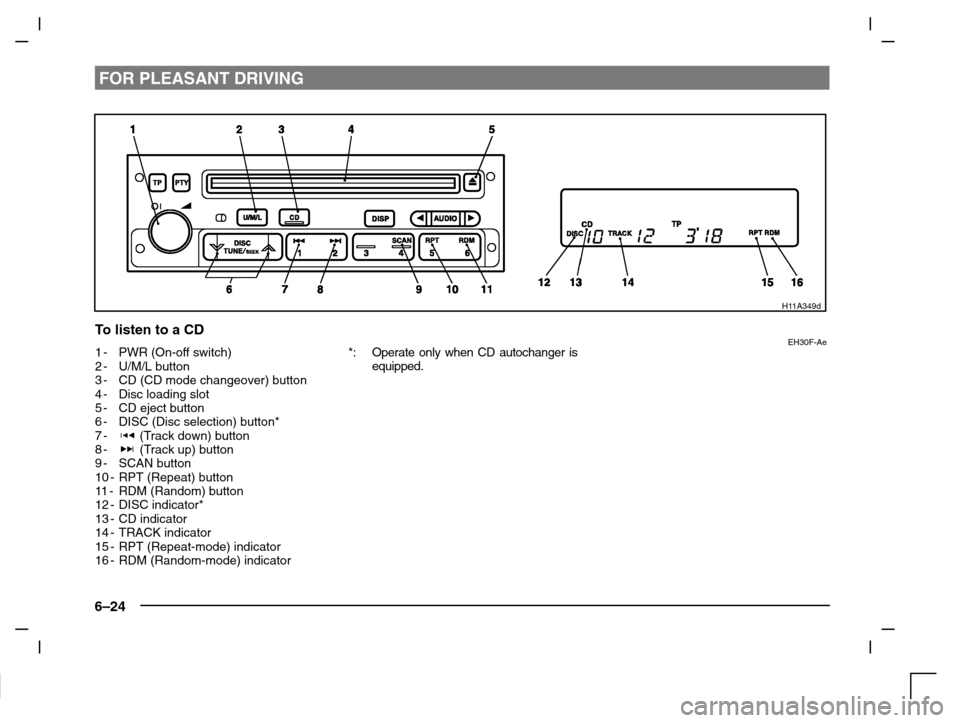
To listen to a CDEH30F-Ae1-PWR (On-off switch)
2-U/M/L button
3-CD (CD mode changeover) button
4-Disc loading slot
5-CD eject button
6-DISC (Disc selection) button*
7-
(Track down) button
8- (Track up) button
9-SCAN button
10 - RPT (Repeat) button
11-RDM (Random) button
12 - DISC indicator*
13 - CD indicator
14 - TRACK indicator
15 - RPT (Repeat-mode) indicator
16 - RDM (Random-mode) indicator*: Operate only when CD autochanger is
equipped.
Page 165 of 280
![MITSUBISHI CARISMA 2000 1.G Owners Manual FOR PLEASANT DRIVING
6–25
To listen to a CD
[With a CD player]
1. Insert the disc with the label facing up-
ward.
When a disc is inserted, the CD player
will begin playing even if the radio or
tape](/manual-img/19/7563/w960_7563-164.png "MITSUBISHI CARISMA 2000 1.G Owners Manual FOR PLEASANT DRIVING
6–25
To listen to a CD
[With a CD player]
1. Insert the disc with the label facing up-
ward.
When a disc is inserted, the CD player
will begin playing even if the radio or
tape")
FOR PLEASANT DRIVING
6–25
To listen to a CD
[With a CD player]
1. Insert the disc with the label facing up-
ward.
When a disc is inserted, the CD player
will begin playing even if the radio or
tape player is being used.
The CD player will also start the play-
back when the CD button (3) is
pressed with a disc in the player even
if the radio or tape player is being
used.
NOTE
If the system is equipped with CD auto-
changer, the system operation is changed
over from the CD player mode to the CD
autochanger mode and vice versa each time
the CD button (3) is pressed.
2. To adjust the volume and tone, refer to
the section “How to adjust the volume”
and “How to adjust the tone” on page
6–17.
3. When the CD eject button (5) on the
CD player is pressed, the disc will
automatically stop and be ejected.
4. When a 3-inch compact disc is used,
playback can be made without using
the adapter. Insert the disc about in the
centre of the discloading slot.5. For information concerning the handl-
ing of compact discs, refer to the sec-
tion “Handling of compact discs” on
page 6–27.
[With a CD autochanger]
1. Press the CD button (3), and the CD
autochanger mode will be selected,
starting a playback. Each time the CD
button is pressed, one in the auto-
changer is played back alternately.
NOTE
To l i s t e n to another disc in the CD auto-
changer, press the DISC button (6), to select
the disc. Every time the
side of the DISC
button is pressed, the next disc is selected.
Every time the
side of the button is
pressed, changeover to the previous disc is
made.
2. To adjust the volume and tone, refer to
the section “How to adjust the volume”
and “How to adjust the tone” on page
6–17.
3. To stop the CD, turn off the power by
pressing the PWR switch (1) or make
changeover to the other mode by
pressing the U/M/L button (2).
4. For information concerning the handl-
ing of compact discs, refer to the sec-
tion “Handling of compact discs” on
page 6–27.
To find the start of a desired track
The start of each track on a disc can be
found by using the
or button (7 or 8).
Track up:Press the button (8) the number of tracks
to skip over.
The frequency-display window will display
the number of tracks thus selected.
Track down:Press the button (7) the number of tracks
to skip over.
The frequency-display window will display
the number of tracks thus selected.
How to repeat the same track
You can repeatedly listen to the same track
by pressing the RPT button (10).
Press the RPT button, and the RPT indicator
(15) will come on.
To r e lease, press the button again.
Page 166 of 280

FOR PLEASANT DRIVING
6–26
How to use the SCAN button
Use the SCAN button (9) to search for a par-
ticular track, etc. When this button is
pressed, the first 10 seconds of each track
on the disc will be played.
The disc will advance at fast-forward speed
between each 10-second played in this way.
Press the SCAN button again, to play the
track ordinary. After completion of this scan-
ning of tracks, the disc will begin ordinary
play.
To change the order of tracks
played back (For CD player)
Press the RDM button (11), and the RDM
indicator (16) will illuminate and will be ran-
domly selected, tracks for playback. To re-
lease, press the button again.
To change the order of discs
played back (For CD autochanger)
Press the RDM button (11), and the RDM
indicator (16) will illuminate and tracks for
playback will be selected randomly from all
discs loaded into the changer.
To r e lease, press the button again.
H11F032a
Audio system anti-theft
feature
EH11F-Ed
To prevent theft of the audio system, the con-
trol panel can be removed. Always remove
the control panel when you leave the ve-
hicle.
Removing the control panel
Turn the ignition switch to the OFF position.
Then slide the release button (A) to the left
and remove the control panel from the audio
system. (When sliding the release button,
place one hand on the control panel to pre-
vent it from falling out.) The lamp (B) will start
flashing.
H11F033a
Refitting the control panel
Insert the control panel into the latches at the
right-hand side of the cutout on the audio
system. Then, press the left-hand side of the
control panel into the cutout until it locks in
position. The lamp (B) will stop flashing.
Next, turn the ignition switch to the ON posi-
tion.
NOTE
(1) Do not leave the control panel in any
place where it may become hot (for
example, the dashboard) or in any
place where it may become wet.
(2) If you lose the control panel, contact an
authorized MITSUBISHI dealer.