Page 4 of 272
These are some of the symbols you may see on your vehicle.
Vehicle Symbol Glossary
Safety Alert
See Owner's Guide
Fasten Safety BeltAir Bag-Front
Air Bag-SideChild Seat
Child Seat Installation
WarningChild Seat Tether
Anchorage
Brake SystemAnti-Lock Brake System
Brake Fluid -
Non-Petroleum BasedTraction Control
Master Lighting SwitchHazard Warning Flasher
Fog Lamps-FrontFuse Compartment
Fuel Pump ResetWindshield Wash/Wipe
Windshield
Defrost/DemistRear Window
Defrost/Demist
Power Windows
Front/RearPower Window Lockout
Introduction
4
Page 5 of 272
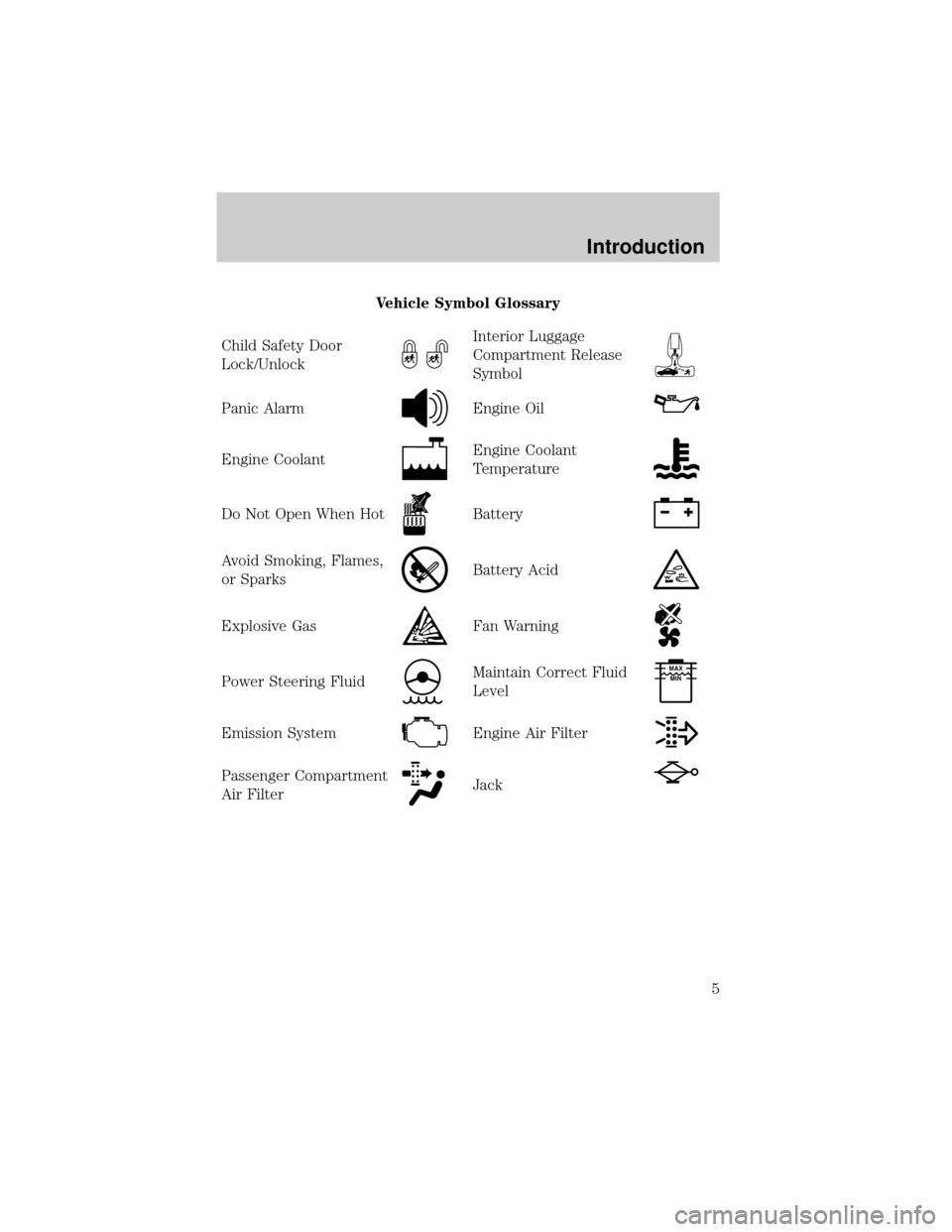
Vehicle Symbol Glossary
Child Safety Door
Lock/Unlock
Interior Luggage
Compartment Release
Symbol
Panic AlarmEngine Oil
Engine CoolantEngine Coolant
Temperature
Do Not Open When HotBattery
Avoid Smoking, Flames,
or SparksBattery Acid
Explosive GasFan Warning
Power Steering FluidMaintain Correct Fluid
LevelMAX
MIN
Emission SystemEngine Air Filter
Passenger Compartment
Air FilterJack
Introduction
5
Page 10 of 272

Anti-lock brake system (ABS)
Momentarily illuminates when the
ignition is turned to the RUN
position. If the light remains on,
continues to flash or fails to
illuminate, have the system serviced
immediately. With the ABS light on, the anti-lock brake system is
disabled and normal braking is still effective unless the brake warning
light also remains illuminated with the parking brake released.
Turn signal
Illuminates when the left or right
turn signal or the hazard lights are
turned on. If one or both of the
indicators flash faster, check for a
burned-out turn signal bulb. Refer
toExterior bulbsin theMaintenance and carechapter.
High beams
Illuminates when the high beam
headlamps are turned on.
Brake system warning
Momentarily illuminates when the
ignition is turned to the RUN
position. Also illuminates if the
parking brake is engaged. If the
brake warning lamp does not
illuminate at these times, or remains on after releasing the parking brake,
seek service immediately.
One of the following conditions may exist:
²low brake fluid level in the reservoir.
²Brake force distribution system failure. The ABS light will also
illuminate if this condition is present.
ABS
P!
BRAKE
Instrumentation
10
Page 13 of 272

Steering column lock (if equipped)
Momentarily illuminates when the
ignition is turned to the RUN
position. If this light stays
illuminated, steering column will be
locked, and the vehicle will not
start. Have the vehicle serviced immediately.
Speed control
This light comes on when the
vehicle speed control is engaged and
actively controlling the vehicle
speed. It turns off when the speed
control OFF or CANCEL controls
are pressed or the brake is applied.
Door ajar (if equipped)
Illuminates when the ignition is in
the RUN or START position and any
door or the trunk is open.
Transmission PRNDL indicator
Your vehicle is equipped with a
transmission PRNDL indicator. This
character appears with the key in
the RUN position and displays the
gear selected on the gearshift floor console.
If an ªEº character is displayed, this indicates a transmission malfunction.
If the ªEº character flashes or remains on, contact your dealer
immediately. Operating the transmission with the ªEº character
illuminated may cause additional damage to the transmission.
Headlamps on warning chime
Sounds when the headlamps or parking lamps are on, the ignition is off
(and the key is not in the ignition) and the driver's door is opened.
Safety belt warning chime
Sounds to remind you to fasten your safety belts.
TRIP
kmiles
A
BD
5
Instrumentation
13
Page 14 of 272
For information on the safety belt warning chime, refer to theSeating
and safety restraintschapter.
Supplemental restraint system (SRS) warning chime
For information on the SRS warning chime, refer to theSeating and
safety restraintschapter.
Key-in-ignition warning chime
Sounds when the key is left in the ignition in the OFF/LOCK or ACC
position and the driver's door is opened.
Turn signal chime
Sounds when the turn signal lever has been activated to signal a turn
and not turned off after the vehicle is driven more than 0.8 km (1/2
mile).
GAUGES
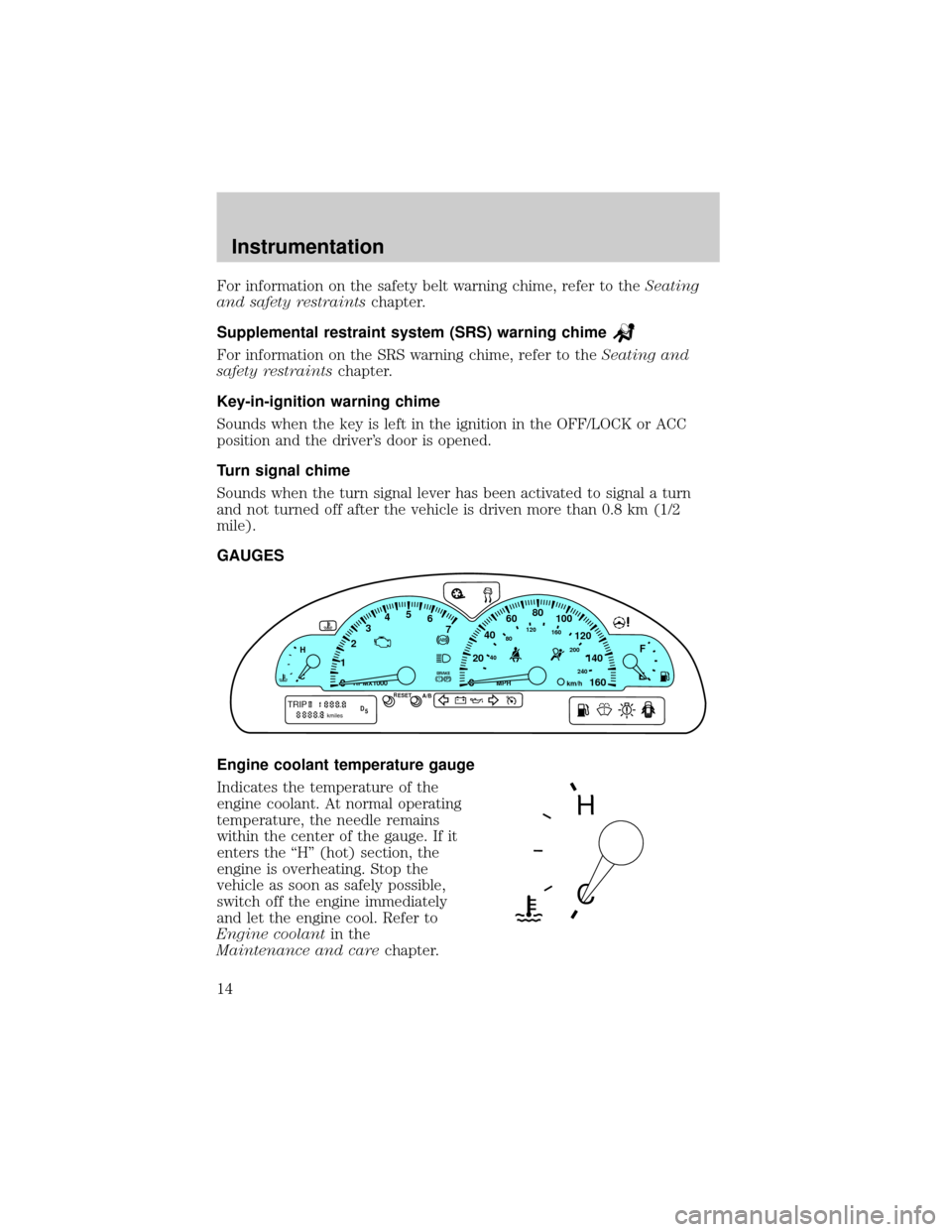
Engine coolant temperature gauge
Indicates the temperature of the
engine coolant. At normal operating
temperature, the needle remains
within the center of the gauge. If it
enters the ªHº (hot) section, the
engine is overheating. Stop the
vehicle as soon as safely possible,
switch off the engine immediately
and let the engine cool. Refer to
Engine coolantin the
Maintenance and carechapter.
P! BRAKE
H
C
40
80120160
200
240km/hRPMX1000RESETMPHA/B
F
E0020406080
100
120
140
160 12345
6
7
TRIPkmilesABD
5
H
C
Instrumentation
14
Page 17 of 272
Operator Selectable features
These features are controlled by the message center controls located
above the radio.
FUEL
Press this control for the following displays:
²Distance to Empty
²Average Fuel Economy
²Display On/Off
RESET
Press this control to select and reset functions shown in the FUEL,
SETUP and STATUS controls.
SETUP
Press this control for the following displays:
²Language
²Units (English/Metric)
²Autolocks
²Easy Entry/Exit (if equipped)
²Lock Chirp (if equipped)
STATUS
Selecting this function from the STATUS control causes the message
center to cycle through each of the systems being monitored. For each
of the monitored systems, the message center will indicate either an OK
message or a warning message for four seconds.
The sequence of the status check report is as follows:
²oil life in XX%
²AC (cabin) filter XX%
²charging system
²engine temperature
²brake fluid level
²washer fluid level
FUEL
RESET
SETUP
STATUS
Instrumentation
17
Page 20 of 272
2. Pressing the RESET control
cycles the message center through
each of the language choices.
3. Press and hold the RESET
control to set the language choice.
Units (English/Metric)
1. Select this function from the
SETUP control for the current units
to be displayed.
2. Press the RESET control to
change from English to Metric.
Autolocks
1. Select this function from the
SETUP control for the current
display mode.
2. Press the RESET control to turn
the autolocks ON or OFF.
Easy entry/exit (if equipped)
1. Select this function from the
SETUP control for the current
display mode.
2. Press the RESET control to turn
the easy entry/exit ON or OFF.
Lock chirp (if equipped)
1. Select this function from the
SETUP control for the current
display mode.
2. Press the RESET control to turn
the lock chirp ON or OFF.
>
>
>
>
Instrumentation
20
Page 29 of 272
AUTOLAMP CONTROL
The autolamp system provides light
sensitive automatic on-off control of
the exterior lights normally
controlled by the headlamp control.
The autolamp system also keeps the
lights on for a preselected period of
time after the ignition switch is
turned to OFF.
²To turn autolamps on, rotate the
control counterclockwise. The
preselected time lapse is adjustable up to approximately three minutes
by continuing to rotate the control counterclockwise.
²To turn autolamps off, rotate the control clockwise to OFF.
PANEL DIMMER CONTROL
Use to adjust the brightness of the
instrument panel during parklamp,
headlamp, and autolamp operation.
²Rotate up to brighten.
²Rotate down to dim.
²Rotate fully up to turn on the
interior lights.
POWER SIDE VIEW MIRRORS
The power mirrors can be operated at any time.
To adjust your mirrors:
1. Select L to adjust the left mirror
or R to adjust the right mirror.
AUTO
LR
Controls and features
29