Page 73 of 352
Controls Nea r th e Steerin g Whee l
Windshiel d Washer s
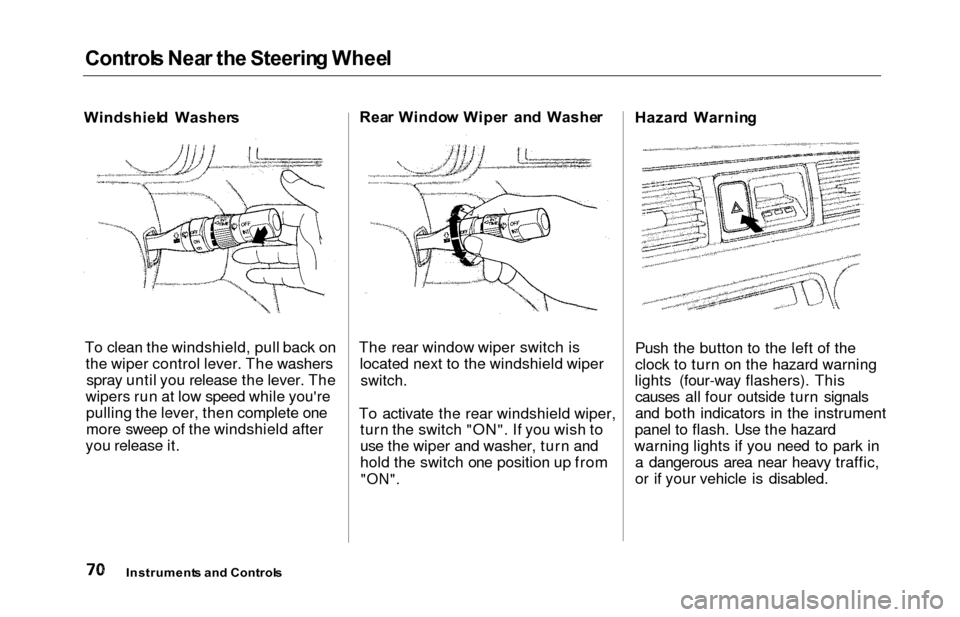
To clean the windshield, pull back on the wiper control lever. The washersspray until you release the lever. The
wipers run at low speed while you're pulling the lever, then complete one
more sweep of the windshield after
you release it. Rea
r Windo w Wipe r an d Washe r
The rear window wiper switch is located next to the windshield wiper
switch.
To activate the rear windshield wiper, turn the switch "ON". If you wish to
use the wiper and washer, turn and
hold the switch one position up from
"ON".
Hazar d Warnin g
Push the button to the left of the
clock to turn on the hazard warning
lights (four-way flashers). This causes all four outside turn signals
and both indicators in the instrument
panel to flash. Use the hazard
warning lights if you need to park in a dangerous area near heavy traffic,
or if your vehicle is disabled.
Instrument s an d Control s
Page 76 of 352
Steering Whee l Control s
Cruise Contro l
Cruise control allows you to maintain
a set speed above 25 mph (40 km/h)
without keeping your foot on the accelerator pedal. It should be used for cruising on straight, open
highways. It is not recommended for conditions such as city driving,
winding roads, slippery roads, heavy rain, or bad weather. You should
have full control of the vehicle under
those conditions.Using the Cruise Control
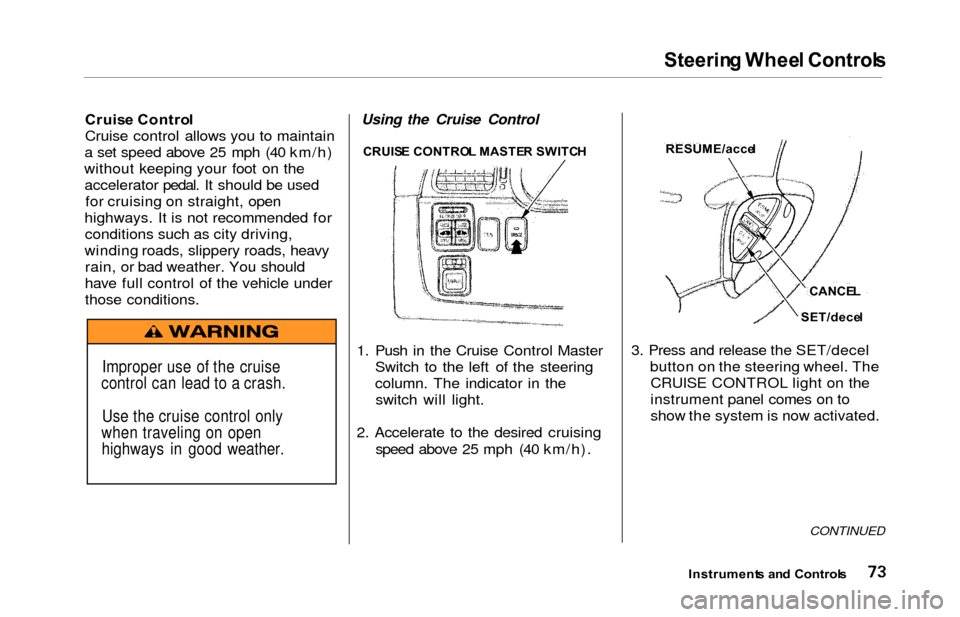
1. Push in the Cruise Control Master Switch to the left of the steering
column. The indicator in theswitch will light.
2. Accelerate to the desired cruising speed above 25 mph (40 km/h). 3. Press and release the SET/decel
button on the steering wheel. TheCRUISE CONTROL light on the
instrument panel comes on to
show the system is now activated.
CONTINUED
Instrument s an d Control s
Improper use of the cruise
control can lead to a crash.
Use the cruise control only
when traveling on open highways in good weather.
CRUIS E CONTRO L MASTE R SWITC HRESUME/acce l
CANCEL
SET/dece l
Page 78 of 352
Steering Whee l Control s
Even with the cruise control turned
on, you can still use the accelerator
pedal to speed up for passing. After completing the pass, take your foot
off the accelerator pedal. The vehicle
will return to the set cruising speed.
Resting your foot on the brake pedal
will cause the cruise control to
cancel.
Cancelling the Cruise Control
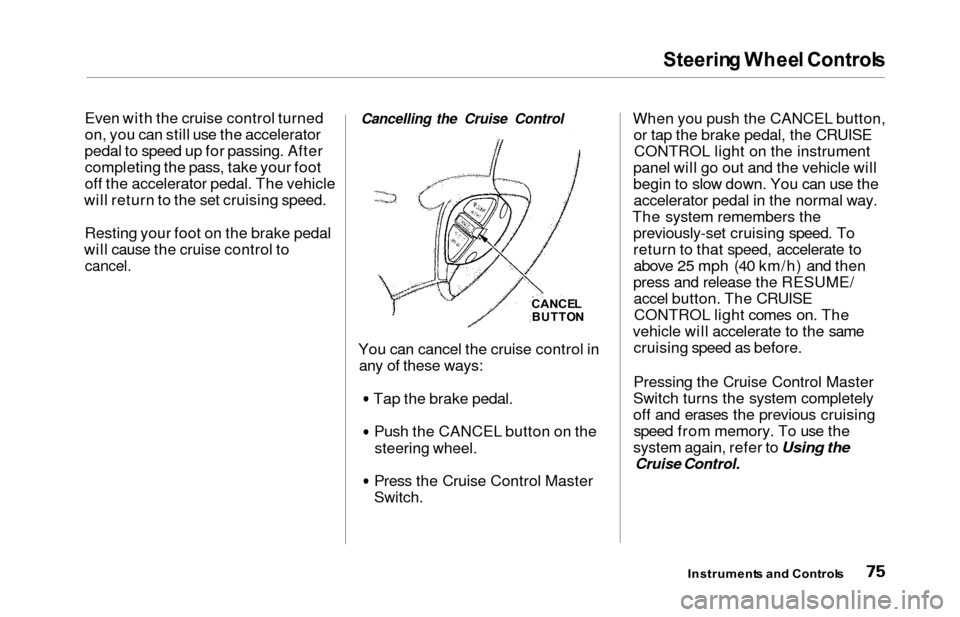
You can cancel the cruise control in any of these ways:
Tap the brake pedal.Push the CANCEL button on the
steering wheel.
Press the Cruise Control Master
Switch.
When you push the CANCEL button,or tap the brake pedal, the CRUISECONTROL light on the instrument
panel will go out and the vehicle will
begin to slow down. You can use the accelerator pedal in the normal way.
The system remembers the previously-set cruising speed. To
return to that speed, accelerate toabove 25 mph (40 km/h) and then
press and release the RESUME/ accel button. The CRUISECONTROL light comes on. The
vehicle will accelerate to the same cruising speed as before.
Pressing the Cruise Control Master
Switch turns the system completely
off and erases the previous cruising speed from memory. To use the
system again, refer to Using the
Cruise Control.
Instrument s an d Control s
CANCEL
BUTTO N
Page 80 of 352

Keys an d Lock s
These keys contain electronic
circuits that are activated by the
Immobilizer System. They will not
work to start the engine if the circuits are damaged.
Protect the keys from directsunlight, high temperature, and
high humidity.
Do not drop the keys or set heavy
objects on them.
Keep the keys away from liquids.
If they get wet, dry them immedi-
ately with a soft cloth.
The keys do not contain batteries. Do not try to take them apart.
Remote Transmitter
Some models also come with a
remote transmitter; see page 81 for
an explanation of its operation. Immobilize
r Syste m
The Immobilizer System protects
your vehicle from theft. A properly- coded master or valet key must be
used in the ignition switch for theengine to start. If an improperly-
coded key (or other device) is used,
the engine's fuel system is disabled.
When you turn the ignition switch to ON (II), the Immobilizer System
indicator should come on for a few seconds, then go out. If the indicator
starts to blink, it means the system
does not recognize the coding of the
key. Turn the ignition switch to LOCK (0), remove the key, reinsert
it, and turn the switch to ON (II)
again.
The system may not recognize your key's coding if another immobilizer
key or other metal object is near the ignition switch when you insert the
key. To make sure the system recognizes the key code: Do not keep other immobilizer
keys on the same key ring.
Use a plastic or leather key fob,
not metal.
Keep other keys away from your
vehicle's key and the ignition switch while trying to start the
engine.
If the system repeatedly does not
recognize the coding of your key,
contact your Honda dealer.
This indicator will also blink several
times when you turn the ignitionswitch from ON (II) to ACCESSORY (I) or LOCK (0).
Do not attempt to alter this system
or add other devices to it. Electrical
problems could result that may make
your vehicle undriveable. If you have lost your key and you
cannot start the engine, contact your
Honda dealer.
Instrument s an d Control s
CONTINUED
Page 81 of 352
Keys an d Lock s
As required by the FCC:
This device complies with Part 15 of the
FCC rules. Operation is subject to the
following two conditions: (1) This device may not cause harmful interference, and (2) this device must accept any
interference received, including
interference that may cause undesired operation.
Changes or modifications not expressly
approved by the party responsible for compliance could void the user's
authority to operate the equipment.
This device complies with Industry
Canada Standard RSS-210.
Operation is subject to the following two
conditions: (1) this device may not cause
interference, and (2) this device must accept any interference that may cause undesired operation of the device.
Ignitio n Switc h
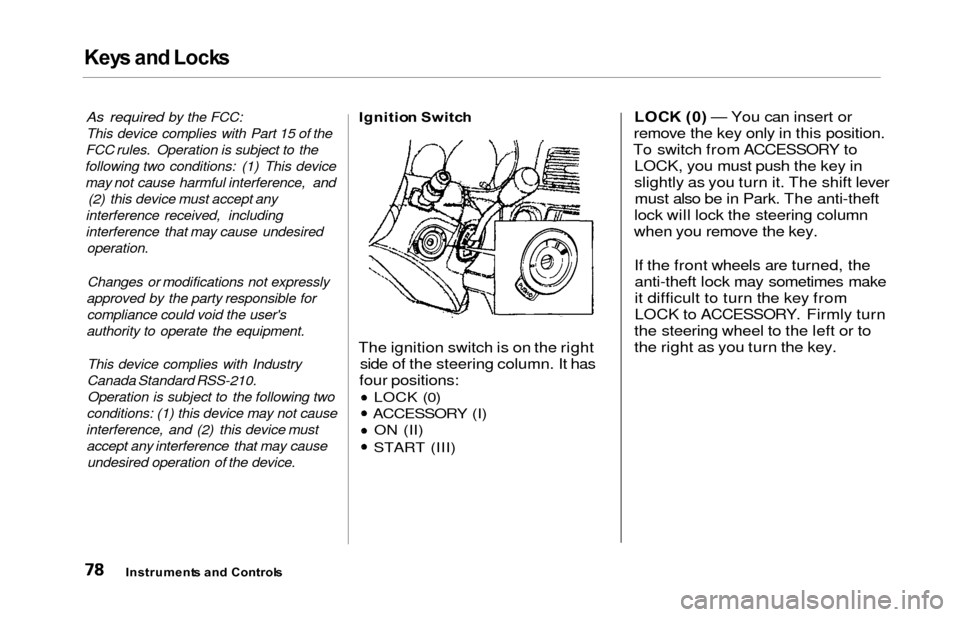
The ignition switch is on the right
side of the steering column. It has
four positions:
LOCK (0)
ACCESSORY (I) ON (II)
START (III)
LOC K (0 ) — You can insert or
remove the key only in this position.
To switch from ACCESSORY to LOCK, you must push the key in
slightly as you turn it. The shift levermust also be in Park. The anti-theft
lock will lock the steering column
when you remove the key.
If the front wheels are turned, theanti-theft lock may sometimes make
it difficult to turn the key from
LOCK to ACCESSORY. Firmly turn
the steering wheel to the left or to
the right as you turn the key.
Instrument s an d Control s
Page 82 of 352
Keys an d Lock s
ACCESSOR Y (I ) — In this position,
you can operate the audio system and the accessory power socket.
O N (II ) — This is the normal key
position when driving. All features and accessories on the vehicle are
usable. Several of the lights on the instrument panel come on as a test
when you turn the ignition switch from ACCESSORY to ON. STAR
T (III ) — Use this position
only to start the engine. The switch
returns to ON (II) when you let go of
the key.
The engine will not start if the Immobilizer System does not
recognize the key's coding (see page
77).
You will hear a reminder beeper if
you leave the key in the ignition
switch in the LOCK (0) or
ACCESSORY (I) position and open the driver's door. Remove the key toturn off the beeper. Powe
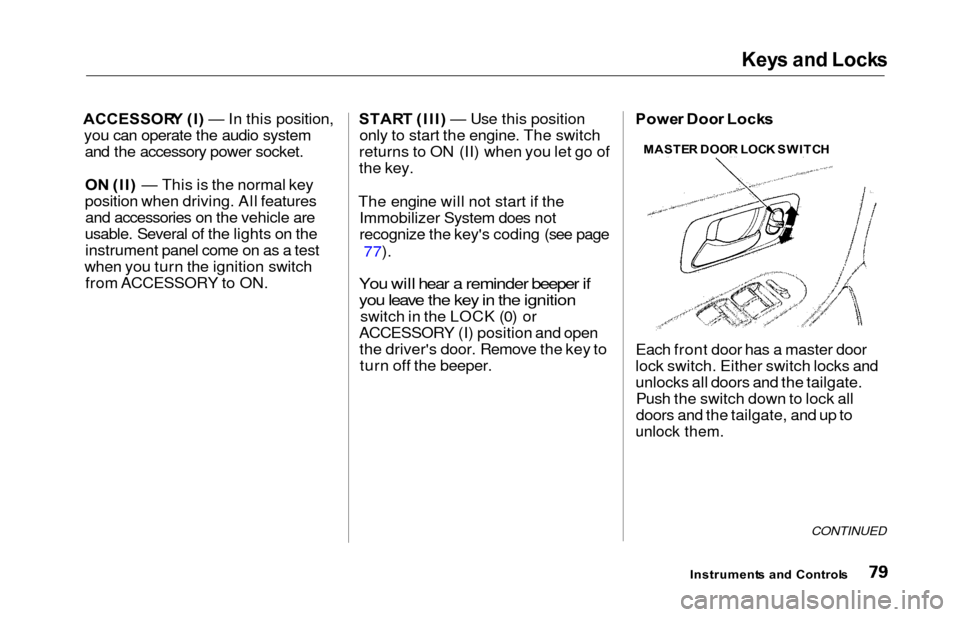
r Doo r Lock s
Each front door has a master door
lock switch. Either switch locks and
unlocks all doors and the tailgate. Push the switch down to lock all
doors and the tailgate, and up to
unlock them.
CONTINUED
Instrument s an d Control s
MASTE
R DOO R LOC K SWITC H
Page 83 of 352
Keys and Locks
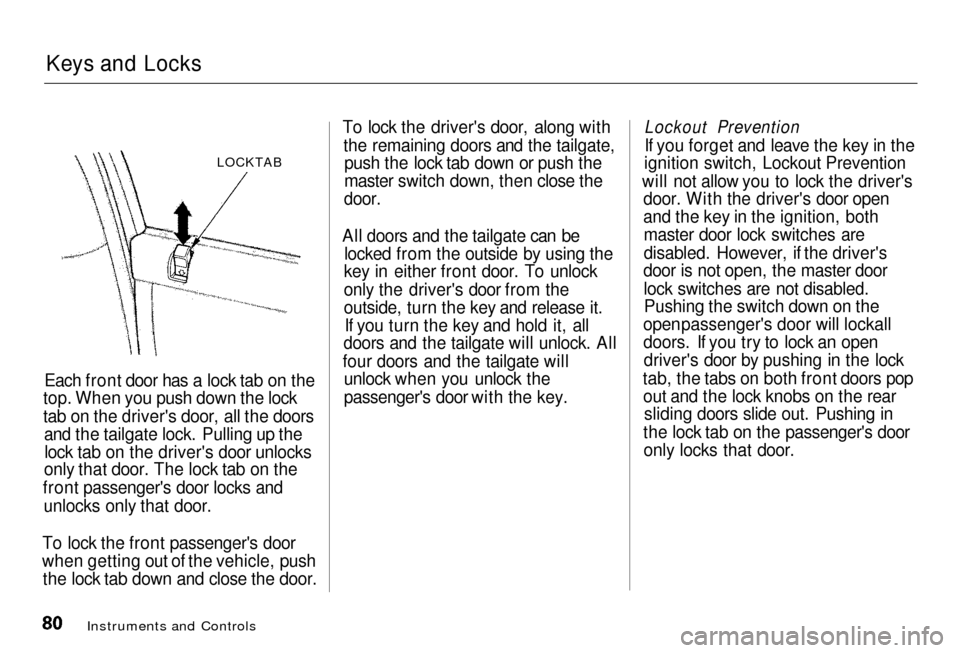
LOCKTAB
Each front door has a lock tab on the
top.
When you push down the lock
tab on the driver's door, all the doors and the tailgate lock. Pulling up the
lock tab on the driver's door unlocks
only
that door. The lock tab on the
front
passenger's door locks and
unlocks only that door.
To lock the front passenger's door
when getting out of the vehicle, push
the
lock tab down and close the door. To lock the driver's door, along with
the
remaining doors and the tailgate,
push the lock tab down or push the
master
switch down, then close the
door.
All doors and the tailgate can be locked from the outside by using the
key
in either front door. To unlock
only
the driver's door from the
outside,
turn the key and release it.
If you turn the key and hold it, all
doors
and the tailgate will unlock. All
four doors and the tailgate will unloc
k when you unlock the
passenger's door with the key.
Instruments and Controls
Lockout Prevention
I
f you forget and leave the key in the
ignition
switch, Lockout Prevention
will
not allow you to lock the driver's
door.
With the driver's door open
and
the key in the ignition, both
master
door lock switches are
disabled. However, if the driver's
door is not open, the master door
lock switches are not disabled.Pushin
g the switch down on the
open
passenger's door will lockall
doors. If you try to lock an open driver's
door by pushing in the lock
tab, the tabs on both front doors pop out
and the lock knobs on the rear
sliding doors slide out. Pushing in
the lock tab on the passenger's door only
locks that door.
Page 84 of 352
Keys an d Lock s
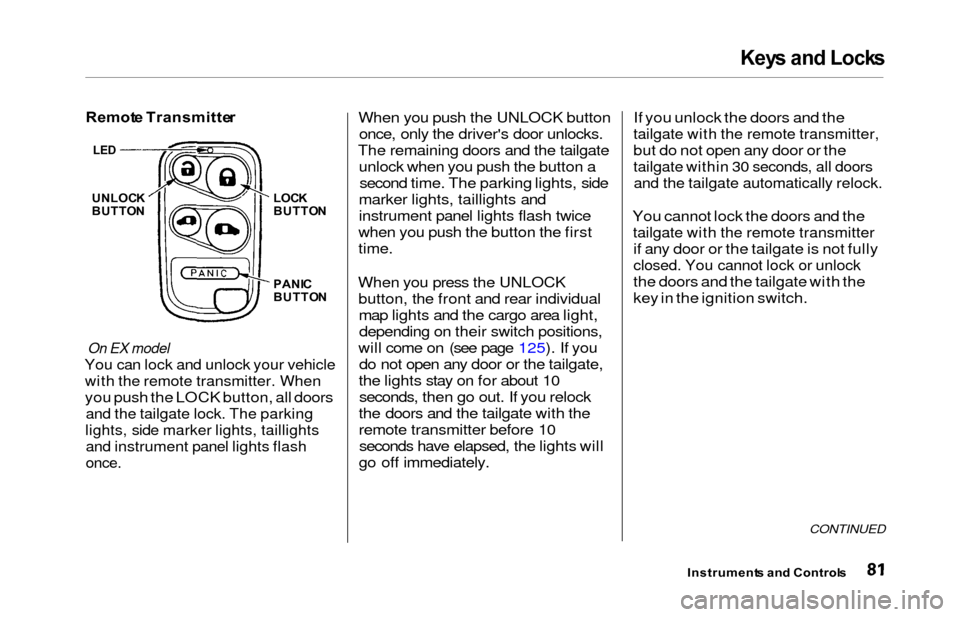
Remot e Transmitte r
On EX model
You can lock and unlock your vehicle
with the remote transmitter. When
you push the LOCK button, all doors
and the tailgate lock. The parking
lights, side marker lights, taillights
and instrument panel lights flash
once.
When you push the UNLOCK button
once, only the driver's door unlocks.
The remaining doors and the tailgate unlock when you push the button asecond time. The parking lights, side
marker lights, taillights and
instrument panel lights flash twice
when you push the button the first
time.
When you press the UNLOCK button, the front and rear individualmap lights and the cargo area light,depending on their switch positions,
will come on (see page 125). If you do not open any door or the tailgate,
the lights stay on for about 10 seconds, then go out. If you relock
the doors and the tailgate with the
remote transmitter before 10 seconds have elapsed, the lights will
go off immediately. If you unlock the doors and the
tailgate with the remote transmitter,
but do not open any door or the
tailgate within 30 seconds, all doors
and the tailgate automatically relock.
You cannot lock the doors and the
tailgate with the remote transmitter
if any door or the tailgate is not fully
closed. You cannot lock or unlock
the doors and the tailgate with the
key in the ignition switch.
CONTINUED
Instrument
s an d Control s
UNLOCK
BUTTO N LOC
K
BUTTO N
PANI C
BUTTO N
LED