Page 49 of 352
Additional Informatio n Abou t You r Sea t Belt s
The seat belts in all positions except
the driver's and the center positionof the third seat have an additional
locking mechanism that must be activated to secure a child seat. (See
pages 31 and 36 for instructions on
how to secure child seats with this
type of seat belt.)
If the shoulder part of the belt is
pulled all the way out, the locking
mechanism will activate. The belt
will retract, but it will not allow thepassenger to move freely.
To deactivate the locking
mechanism, unlatch the buckle and
let the seat belt fully retract. To
refasten the belt, pull it out only as
far as needed.
See page 15 for instructions on how
to wear the lap/shoulder belt
properly.
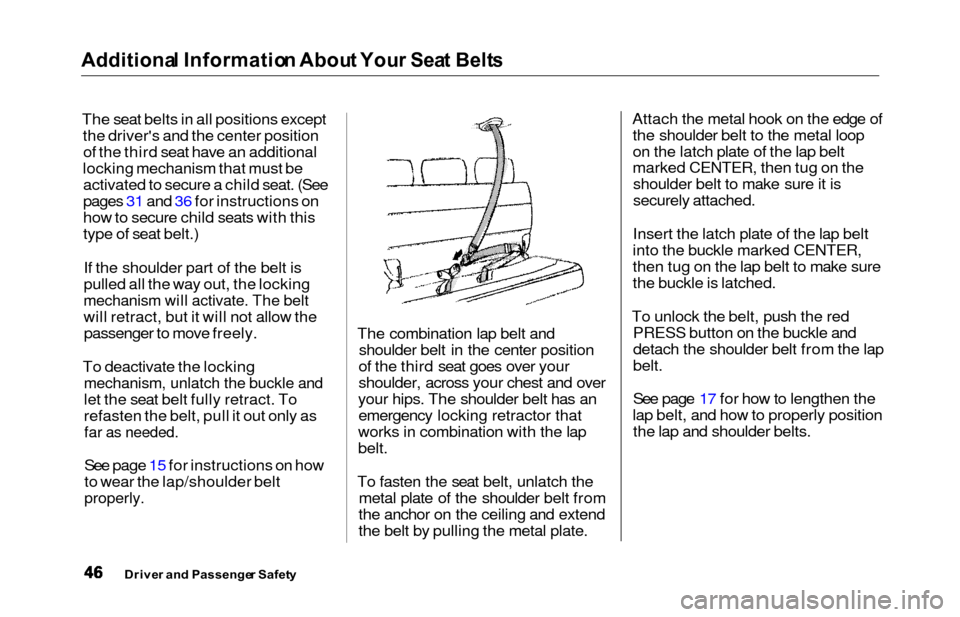
The combination lap belt and shoulder belt in the center position
of the third seat goes over your
shoulder, across your chest and over
your hips. The shoulder belt has an emergency locking retractor that
works in combination with the lap
belt.
To fasten the seat belt, unlatch the metal plate of the shoulder belt from
the anchor on the ceiling and extend
the belt by pulling the metal plate. Attach the metal hook on the edge of
the shoulder belt to the metal loop
on the latch plate of the lap belt
marked CENTER, then tug on theshoulder belt to make sure it is
securely attached.
Insert the latch plate of the lap belt
into the buckle marked CENTER,
then tug on the lap belt to make sure
the buckle is latched.
To unlock the belt, push the red PRESS button on the buckle and
detach the shoulder belt from the lap
belt.
See page 17 for how to lengthen the
lap belt, and how to properly position the lap and shoulder belts.
Drive r an d Passenge r Safet y
Page 75 of 352
Controls Nea r th e Steerin g Whee l
Steerin g Whee l Adjustmen t
See page 19 for important safety
information about how to properly
position the steering wheel.
Make any steering wheel adjustment
before you start driving.
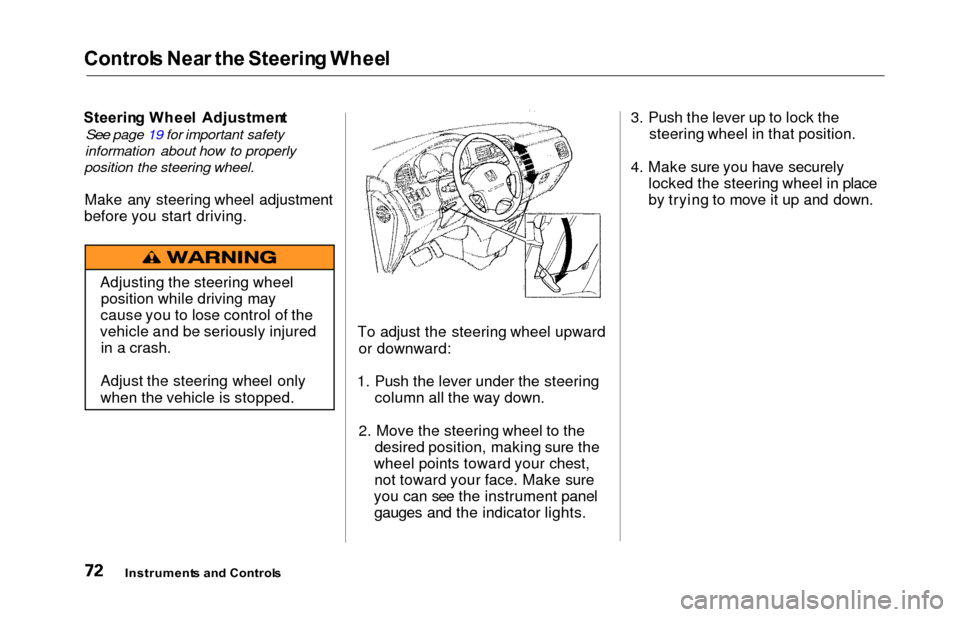
To adjust the steering wheel upwardor downward:
1. Push the lever under the steering column all the way down.
2. Move the steering wheel to the desired position, making sure the
wheel points toward your chest, not toward your face. Make sure
you can see the instrument panel gauges and the indicator lights. 3. Push the lever up to lock the
steering wheel in that position.
4. Make sure you have securely locked the steering wheel in place
by trying to move it up and down.
Instrument s an d Control s
Adjusting the steering wheel
position while driving may
cause you to lose control of the
vehicle and be seriously injured in a crash.
Adjust the steering wheel only
when the vehicle is stopped.
Page 91 of 352
Manual Slidin g Door s (L X Model )
Your Honda is equipped with dual
sliding doors. Be sure all passengers
are clear of the sliding doors before
closing them.
Opening and Closing the Doors
INSID E
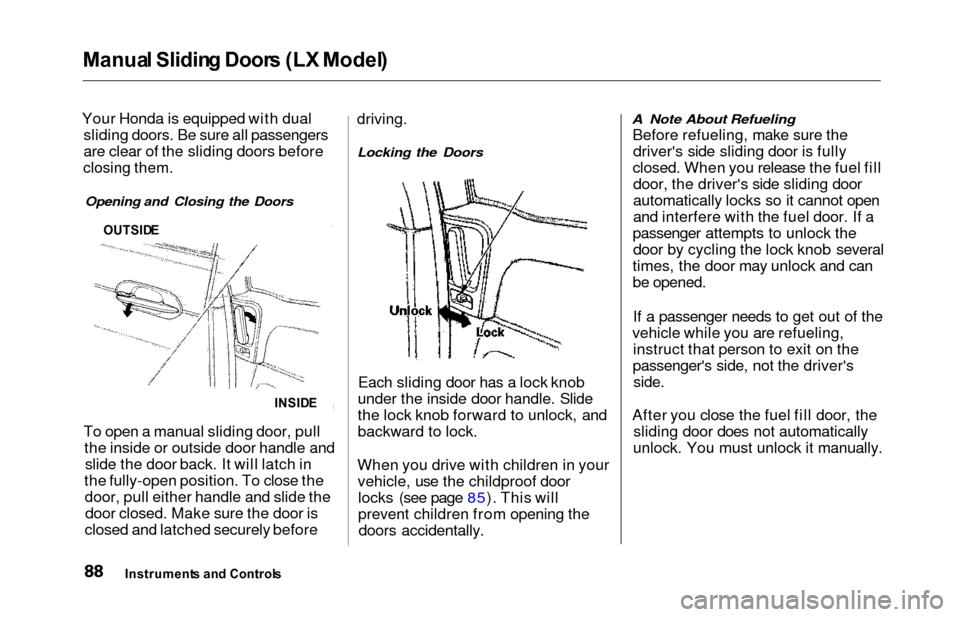
To open a manual sliding door, pull
the inside or outside door handle andslide the door back. It will latch in
the fully-open position. To close the door, pull either handle and slide thedoor closed. Make sure the door is
closed and latched securely before driving.
Locking the Doors
Each sliding door has a lock knob
under the inside door handle. Slide
the lock knob forward to unlock, and
backward to lock.
When you drive with children in your vehicle, use the childproof doorlocks (see page 85). This will
prevent children from opening thedoors accidentally.
A Note About Refueling
Before refueling, make sure thedriver's side sliding door is fully
closed. When you release the fuel fill door, the driver's side sliding door
automatically locks so it cannot open
and interfere with the fuel door. If a
passenger attempts to unlock the door by cycling the lock knob several
times, the door may unlock and can
be opened.
If a passenger needs to get out of the
vehicle while you are refueling, instruct that person to exit on the
passenger's side, not the driver's
side.
After you close the fuel fill door, the sliding door does not automatically
unlock. You must unlock it manually.
Instrument s an d Control s
OUTSIDE
Page 98 of 352

HomeLink Universa l Transmitte r
On EX model
The HomeLink Universal
Transmitter built into your vehicle
can be programmed to operate
remotely controlled devices around
your home, such as garage doors, lighting, or home security systems.
It can replace up to three remote
transmitters.
Custome r Assistanc e
If you have problems with training
the HomeLink Universal Transmitter,
or would like information on home
products that can be operated by the
transmitter, call (800) 355-3515. On
the internet, go to
www.homelink.jci.com.
Importan t Safet y Precaution s
Always refer to the operating
instructions and safety information
that came with your garage door
opener or other equipment you
intend to operate with the HomeLink Universal Transmitter.
If you do not have this information,
you should contact the
manufacturer of the equipment.
While training or using the transmitter, make sure you have a
clear view of the garage door or
gate, and that no one will be injured
by its movement.
Genera l Informatio n
If you are training the transmitter to
operate a garage door or gate, it is
recommended that you unplug the
motor for that device during
training. Repeatedly pressing the
remote control button could burn
out the motor.
The HomeLink transmitter stores the code in a permanent memory.
There should be no need to retrain
the transmitter if your vehicle's
battery goes dead or is
disconnected.
If your garage door opener was manufactured before April 1982,
you may not be able to program the
HomeLink Universal Transmitter tooperate it. Garage door openers
manufactured before that date do
not have a safety feature that
causes them to stop and reverse ifan obstacle is detected during
closing, increasing the risk of injury. If you have questions, call(800) 355-3515.
Trainin g th e Transmitte r
Before you can use the HomeLink
Universal Transmitter to operate devices around your home, it must
"learn" the proper codes. For
example, to train the transmitter to
open and close the garage door:
CONTINUED
Instrument s an d Control s
Page 100 of 352
HomeLink Universa l Transmitte r
rolling code garage door
opener. Test this by pressing
and holding the HomeLink
transmitter button you just
trained. If the red light blinks
for two seconds, then stays on,
you have a rolling code garage
door opener. You may be able
to verify this with the
manufacturer's documentation.
Go to "Training With a Rolling
Code System."
8. Repeat these steps to train the other two transmitter buttons tooperate any other remotely-
controlled devices around your
home (lighting, automatic gate, security system, etc.).
Trainin g Wit h a Rollin g Cod e
Syste m
For security purposes, newer
garage door opening systems use a
"rolling" or variable code.
Information from the remote control and the garage door opener
are needed before the HomeLink
transmitter can operate the garage
door opener. The "Training the
Transmitter" procedure trains the
HomeLink transmitter to the proper garage door opener code. The
following procedure synchronizes the HomeLink transmitter to the
garage door opener so they sendand receive the correct codes.
It may be helpful to have someone assist you with this procedure.
1. Make sure you have properly completed the "Training the
Transmitter" procedure.
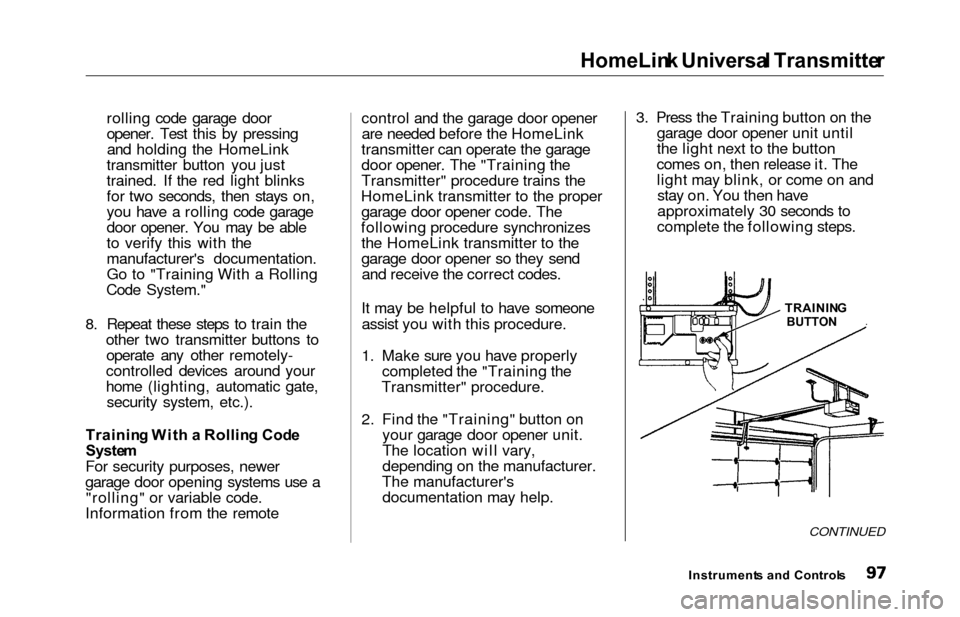
2. Find the "Training" button on your garage door opener unit.
The location will vary,
depending on the manufacturer.
The manufacturer's documentation may help. 3. Press the Training button on the
garage door opener unit until
the light next to the button
comes on, then release it. The light may blink, or come on andstay on. You then have
approximately 30 seconds to
complete the following steps.
CONTINUED
Instrument s an d Control s
TRAININ
G
BUTTON
Page 109 of 352
Seats
Movin g th e Secon d Ro w Bucke t
Sea t
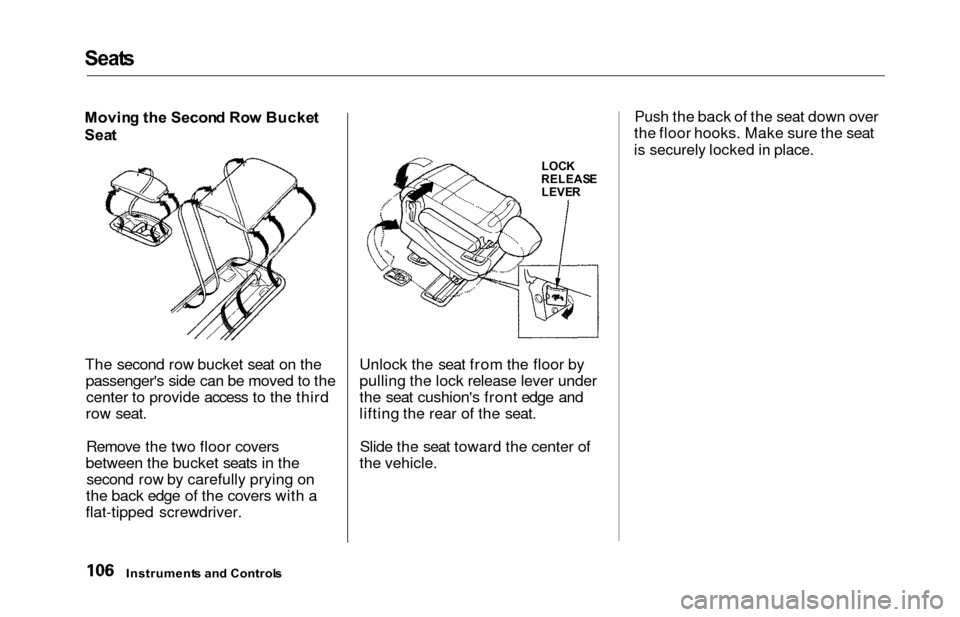
The second row bucket seat on the passenger's side can be moved to thecenter to provide access to the third
row seat.
Remove the two floor covers
between the bucket seats in the second row by carefully prying on
the back edge of the covers with a
flat-tipped screwdriver. Unlock the seat from the floor by
pulling the lock release lever under
the seat cushion's front edge and
lifting the rear of the seat.
Slide the seat toward the center of
the vehicle. Push the back of the seat down over
the floor hooks. Make sure the seat
is securely locked in place.
Instrument s an d Control s
LOCK
RELEAS E
LEVE R
Page 110 of 352
Seats
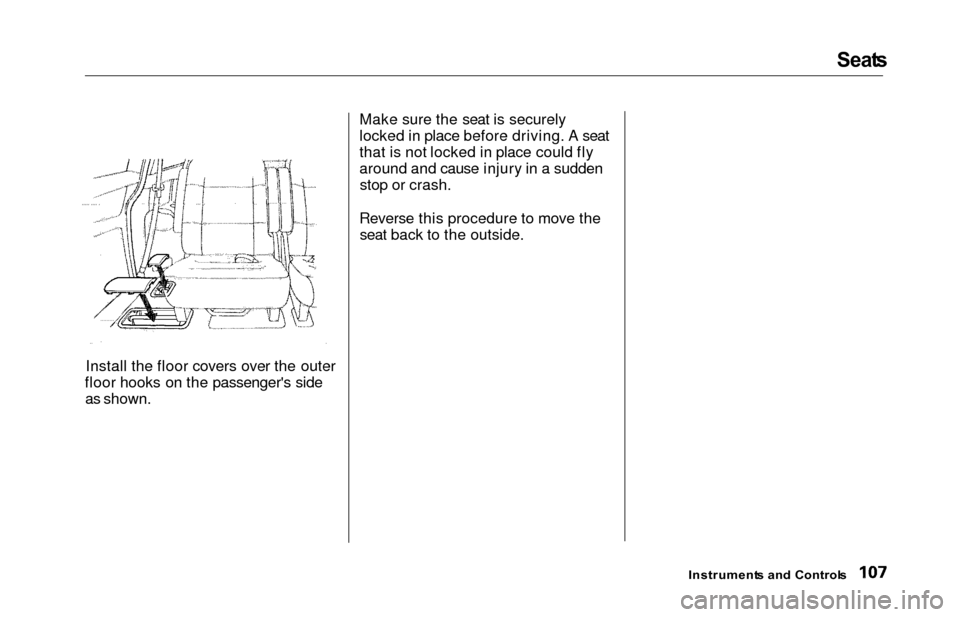
Install the floor covers over the outer
floor hooks on the passenger's side as shown. Make sure the seat is securely
locked in place before driving. A seat
that is not locked in place could fly
around and cause injury in a sudden
stop or crash.
Reverse this procedure to move the seat back to the outside.
Instrument s an d Control s
Page 111 of 352
Seats
Removin g th e Bucke t Seat s in th e
Secon d Ro w
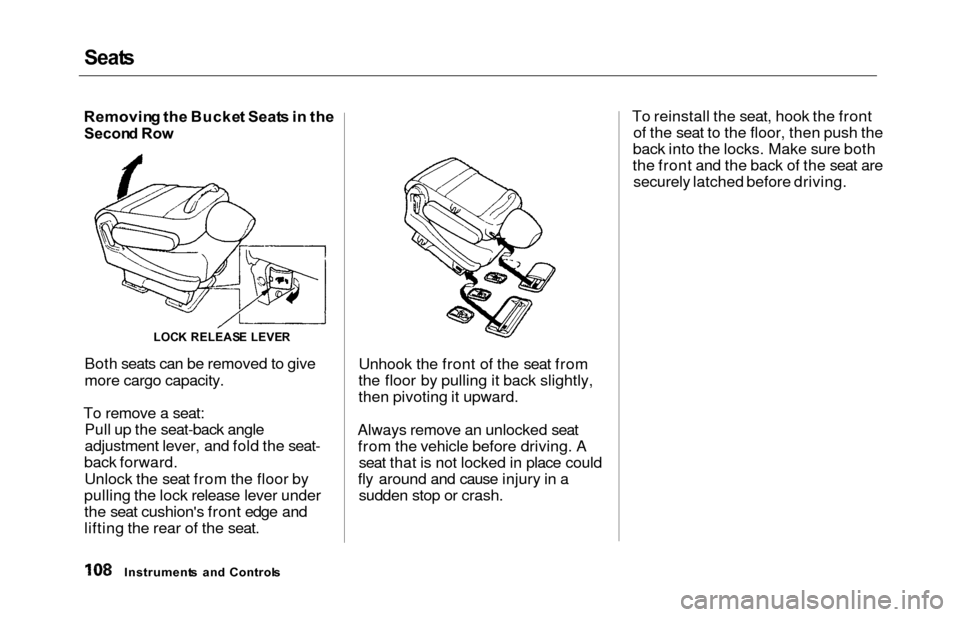
Both seats can be removed to give
more cargo capacity.
To remove a seat: Pull up the seat-back angle
adjustment lever, and fold the seat-
back forward.
Unlock the seat from the floor by
pulling the lock release lever under
the seat cushion's front edge and
lifting the rear of the seat. Unhook the front of the seat from
the floor by pulling it back slightly,
then pivoting it upward.
Always remove an unlocked seat from the vehicle before driving. A seat that is not locked in place could
fly around and cause injury in a sudden stop or crash. To reinstall the seat, hook the front
of the seat to the floor, then push the
back into the locks. Make sure both
the front and the back of the seat are securely latched before driving.
Instrument s an d Control s
LOCK RELEAS E LEVE R