2000 HONDA CR-V ECO mode
[x] Cancel search: ECO modePage 77 of 322

Key
s an d Lock s
Panic Mode
Pani c mod e allow s yo u t o remotel y
activat e you r vehicle' s securit y
syste m to attrac t attention . Whe n
activated , th e hor n wil l soun d fo r
abou t 3 0 seconds . T o activat e pani c
mode , pres s an d hol d th e PANI C
butto n fo r abou t on e second .
T o cance l Pani c mod e befor e 3 0
seconds , pres s an y butto n o n th e
remot e transmitter . Yo u ca n als o
tur n th e ignitio n switc h t o O N (II) .
Pani c mod e wil l no t activat e if th e
ke y is i n th e ignitio n switch .
Replacing the Battery
Whe n th e remot e transmitter' s
batter y begin s t o ge t weak , i t ma y
tak e severa l pushe s o n th e butto n to
loc k o r unloc k th e doors , an d th e
LE D wil l ge t dim . Replac e th e
batter y a s soo n a s possible .
Batter y type : CR202 5
To replac e th e battery , remov e the
roun d cove r o n th e bac k o f th e trans -
mitte r b y turnin g i t counterclockwis e
wit h a coin .
Instrument s an d Control s
Clos
e
Ope
n
CONTINUED
Page 99 of 322

Interio
r Light s
Spotlight s
Tur n o n th e spotligh t b y pushin g th e
butto n nex t t o eac h light . Pus h th e
butto n agai n t o tur n i t oil . Yo u ca n
us e th e spotlight s a t al l times .
On EX model
Th e ceilin g ligh t (wit h th e switc h i n
th e cente r position ) als o come s o n
whe n yo u unloc k th e doo r wit h th e
remot e transmitte r (se e pag e 7 2 ) . Carg
o Are a Ligh t
Th e carg o are a ligh t ha s a three -
positio n switch . I n th e OF F position ,
th e ligh t doe s no t com e on . I n th e
cente r position , th e ligh t come s o n
whe n yo u ope n th e tailgate . I n th e
O N position , th e ligh t stay s o n
continuously . Ignitio
n Switc h Ligh t
Th e ignitio n switc h ligh t come s o n
whe n yo u ope n th e driver' s door , an d
stay s o n severa l second s afte r yo u
clos e th e door .
Instrument s an d Control s
DOO
R ACTIVATE D
IGNITIO
N SWITC H LIGH T
Page 113 of 322
Audi
o Syste m
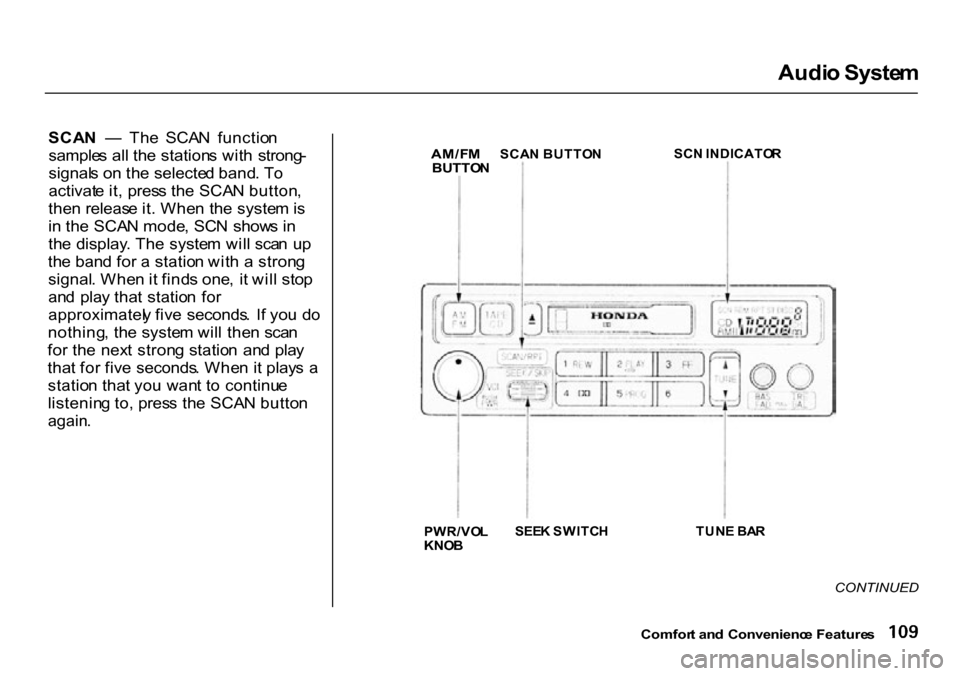
SCA N — Th e SCA N functio n
sample s al l th e station s wit h strong -
signal s o n th e selecte d band . T o
activat e it , pres s th e SCA N button ,
the n releas e it . Whe n th e syste m is
i n th e SCA N mode , SC N show s i n
th e display . Th e syste m wil l sca n u p
th e ban d fo r a statio n wit h a stron g
signal . Whe n it find s one , i t wil l sto p
an d pla y tha t statio n fo r
approximatel y fiv e seconds . I f yo u d o
nothing , th e syste m wil l the n sca n
fo r th e nex t stron g statio n an d pla y
tha t fo r fiv e seconds . Whe n it play s a
statio n tha t yo u wan t t o continu e
listenin g to , pres s th e SCA N butto n
again .
SC
N INDICATO R
TUN E BA R
CONTINUED
Comfor t an d Convenienc e Feature s
PWR/VO
L
KNO B
SEE
K SWITC H
AM/F
M
BUTTO N
SCA
N BUTTO N
Page 116 of 322

Audi
o Syste m
Audi o Syste m Lightin g
Yo u ca n us e th e instrumen t pane l
brightnes s contro l kno b t o adjus t th e
illuminatio n o f th e audi o syste m (se e
pag e 61 ). Th e audi o syste m
illuminate s whe n th e parkin g light s
ar e on , eve n if th e radi o i s turne d off .
Operatin g th e Cassett e Playe r
Tur n th e audi o syste m ON . Mak e
sur e the tape openin g o n th e cassett e
i s facin g t o th e right , the n inser t th e
cassett e mos t o f the way int o th e slot .
Th e syste m wil l pul l i t i n the rest o f
the way , an d begi n t o play .
Th e tap e directio n indicato r wil l ligh t
t o sho w yo u whic h sid e o f th e cassett
e is playing . Th e indicate s
th e sid e yo u inserte d lacin g upwar d
i s no w playing . I f yo u wan t t o pla y
th e othe r side , pres s the PRO G
button . Dolb
y B nois e reductio n turn s o n
whe n yo u inser t a cassette . I f th e
tap e wa s no t recorde d wit h Dolb y B
nois e reduction , tur n i t of f b y pressin
g th e button .
Whe n th e syste m reache s th e en d o f
th e tape , i t wil l automaticall y revers e
directio n an d pla y th e othe r side . I f
yo u wan t t o remov e th e cassett e
fro m th e drive , pres s th e EJEC T
button .
Tap e Searc h Function s
Wit h a cassett e playing , yo u ca n us e
th e FF , REW , SKIP , o r REPEA T
functio n t o fin d a desire d program .
FF/RE W — Fas t Forwar d an d Re -
win d mov e th e tap e rapidly . T o re -
win d th e tape , pus h th e RE W button .
Yo u wil l se e RE W in th e display . T o
fas t forwar d th e tape , pus h th e F F
button . Yo u wil l se e F F displayed .
Pres s th e PLA Y butto n t o tak e th e
syste m ou t o f rewin d o r fas t forward .I
f th e syste m reache s th e en d o f th e
tap e whil e in fas t forwar d o r rewind ,
i t automaticall y stop s tha t function ,
reverse s direction , an d begin s t o play .
SKI P — Th e Ski p Functio n allow s
yo u t o fin d th e beginnin g o f a son g
o r passage . T o fin d th e beginnin g o f
th e son g o r passag e currentl y
playing , pus h th e SKI P switc h clown .
Yo u wil l se e RE W flashin g in th e
displa y a s th e tap e rewinds . T o fin d
th e beginnin g o f th e nex t song , pus h
th e SKI P switc h up . Yo u wil l se e F F
flashin g in th e displa y a s th e tap e
fas t forwards . Whe n th e syste m
find s th e beginnin g o f a son g o r
passage , i t goe s bac k t o PLA Y mode .
Comfor t an d Convenienc e Feature s
Page 125 of 322

Audi
o Syste m
SCA N — Th e SCA N functio n
sample s al l th e station s wit h stron g
signal s o n th e selecte d band . T o
activat e it , pres s th e SCA N button ,
the n releas e it . Whe n th e syste m is
i n th e SCA N mode , SCA N show s i n
th e display . Th e syste m wil l sca n u p
th e ban d fo r a statio n wit h a stron g
signal . Whe n it find s one , i t wil l sto p
an d pla y tha t statio n fo r
approximatel y fiv e seconds . I f yo u d o
nothing , th e syste m wil l the n sca n
fo r th e nex t stron g statio n an d pla y
tha t fo r fiv e seconds . Whe n it play s a
statio n tha t yo u wan t t o continu e
listenin g to , pres s th e SCA N butto n
again .
Prese t — Yo u Ca n stor e th e
frequencie s o f you r favorit e radi o
station s i n th e si x prese t buttons .
Eac h butto n wil l stor e on e frequenc y
o n th e A M band , an d tw o
frequencie s o n th e F M band .
Comfort an d Convenienc e Feature s
AM/F
M BUTTO N
STEREO INDICATO R
PRESE T BUTTON S
SCA
N
BUTTO N
SEE K BA R
TUN
E BA R
PWR/VO
L
KNO B
CONTINUED
Page 132 of 322

Audi
o Syste m
Yo u ca n switc h to th e radi o whil e a
C D is playin g b y pressin g th e AM /
F M button . Pres s th e C D butto n to
retur n to playin g th e CD . Th e C D
wil l begi n playin g wher e it lef t off .
I f yo u tur n th e syste m of f whil e a C D
i s playing , eithe r wit h th e PWR/VO L
kno b o r b y turnin g of f th e ignition ,
th e dis c wil l sta y in th e drive . Whe n
yo u tur n th e syste m bac k on , th e C D
wil l begi n playin g wher e it lef t off .
Pres s th e ejec t butto n to remov e th e
dis c fro m th e drive .
If yo u ejec t th e disc , bu t do not
remov e it fro m th e slot , th e syste m
wil l automaticall y reloa d th e dis c
afte r 1 5 second s an d pu t th e C D
playe r i n paus e mode . T o begi n
playin g th e disc , pres s th e C D button .
Yo
u ca n us e th e TUN E an d SEEK /
SKI P bar s whil e a dis c is playin g to
selec t passage s an d chang e tracks .
T o mov e rapidl y withi n a track , pres s
an d hol d th e TUN E bar . Pres s th e
sid
e t o mov e forward . Yo u wil l
se e CU E in th e display . Pres s th e
sid
e to mov e backward . Yo u
wil l se e RE W displayed . Releas e th e
ba r whe n th e syste m reache s th e
poin t yo u want .
Eac
h tim e yo u pres s th e sid e o f
th e SEEK/SKI P bar , th e syste m
skip s forwar d t o th e beginnin g o f th e nex
t track . Pres s th e sid e to
ski p backwar d to th e beginnin g o f
th e curren t track . Pres s i t agai n t o
ski p t o th e beginnin g o f th e previou s
track . REPEA
T — To activat e th e Repea t
feature , pres s an d releas e th e RP T
button . Yo u wil l se e RP T in th e
display . Th e syste m continuousl y
replay s th e curren t track . Pres s th e
RP T butto n agai n to tur n it off .
RANDO M PLA Y — Thi s feature ,
whe n activated , play s th e track s o n
th e C D in rando m order , rathe r tha n
i n th e orde r the y ar e recorde d o n th e
CD . T o activat e Rando m Play , pres s
an d releas e th e A . SEL/RD M button .
Yo u wil l se e RD M in th e display . Th e
syste m wil l the n selec t an d pla y
track s randomly . Thi s continue s
unti l yo u deactivat e Rando m Pla y b y
pressin g A . SEL/RD M again .
I f th e syste m is in Repea t mode , yo u
mus t tur n it of f b y pressin g th e RF F
butto n befor e selectin g Rando m Play .
Comfor t an d Convenienc e Feature s
Page 138 of 322

Audi
o Syste m
Th e tap e directio n indicato r wil l ligh t
t o sho w yo u whic h sid e o f th e cassett
e is playing . Th e indicate s
th e sid e yo u inserte d facin g upwar d
i s no w playing . I f yo u wan t t o pla y
th e othe r side , pres s th e PRO G
button .
Dolb y B nois e reductio n turn s o n
whe n yo u inser t a cassette . I f th e
tap e wa s no t recorde d wit h Dolb y B
nois e reduction , tur n i t of f b y
pressin g th e N R button .
Dolb y remain s of f unti l yo u tur n i t o n
b y pressin g th e butto n again .
Whe n th e syste m reache s th e en d o f
th e tape , i t wil l automaticall y revers e
directio n an d pla y th e othe r side . I f
yo u wan t t o remov e th e cassett e
fro m th e drive , pres s th e EJEC T
butto n o n th e cassett e player . I
f yo u tur n th e syste m of f whil e a
tap e i s playing , eithe r wit h th e PWR /
VO L kno b o r b y turnin g of f th e
ignition , th e cassett e wil l remai n i n
th e drive . Whe n yo u tur n th e syste m
bac k on , th e cassett e playe r wil l b e in
paus e mode . T o begi n playing , pres s
th e PLA Y button .
T o switc h t o th e radi o o r C D playe r
whil e a tap e is playing , pres s th e
AM/EM , o r C D button . T o chang e
bac k t o th e cassett e player , pus h th e
C D button .
Tap
e Searc h Function s
Wit h a cassett e playing , yo u ca n us e
th e FF , REW , SKIP , o r REPEA T
functio n to fin d a desire d program .
FF/RE W — Fas t Forwar d an d
Rewin d mov e th e tap e rapidly . Pres s an
d releas e th e sid e o f th e
TUN E ba r t o fas t forwar d th e tape , o
r th e sid e to rewind . Yo u wil l
se e F F o r RE W flashin g in th e
display . T o sto p fas t forwar d o r
rewind , pres s eithe r sid e o f th e
TUN E ba r o r th e PLA Y button . I f th e
syste m reache s th e en d o f th e tap e
whil e in fas t forwar d o r rewind , i t
automaticall y stop s tha t function ,
reverse s direction , an d begin s t o play .
Comfor t an d Convenienc e Feature s
Page 140 of 322

Audi
o Syste m
Carin g fo r th e Cassett e Playe r
Th e cassett e playe r pick s u p dir t an d
oxide s fro m th e tape . Thi s contami -
natio n build s u p ove r tim e an d
cause s th e soun d qualit y to degrade .
T o preven t this , yo u shoul d clea n th e
playe r afte r ever y 3 0 hour s o f use .
You r deale r ha s a cleanin g ki t
available .
I f yo u d o no t clea n th e cassett e
playe r regularly , i t ma y eventuall y
becom e impossibl e to remov e th e
contaminatio n wit h a norma l
cleanin g kit .
Us e 100-minut e o r shorte r cassettes .
Cassette s longe r tha n tha t us e
thinne r tap e tha t ma y brea k o r ja m
th e drive . Loo
k a t th e cassett e befor e yo u
inser t it . I f th e tap e is loose , tighte n
i t b y turnin g a hu b wit h a penci l o r
you r finger .
I f th e labe l i s peelin g off , remov e it
fro m th e cassett e o r i t coul d caus e
th e cassett e t o ja m in th e player .
Neve r tr y t o inser t a warpe d o r
damage d cassett e in th e player .
Whe n the y ar e no t i n use , stor e
cassette s i n thei r case s t o protec t
the m fro m dus t an d moisture . Neve r
plac e cassette s wher e the y wil l b e
expose d t o direc t sunlight , hig h heat ,
o r hig h humidity . I f a cassett e is
expose d to extrem e hea t o r cold , le t
i t reac h a moderat e temperatur e
befor e insertin g it i n th e player .
Neve r tr y t o inser t foreig n object s
int o th e cassett e player . I
f yo u se e th e erro r indicatio n (L
X model) /
(E X model ) o n th e display , pres s th e
EJEC T butto n an d remov e th e
cassett e fro m th e unit . Mak e sur e
th e tap e is no t damaged . I f th e
cassett e wil l no t ejec t o r th e erro r
indicatio n stay s o n afte r th e cassett e
ejects , tak e th e vehicl e to you r
Hond a dealer .
On LX model
I f a proble m develop s in th e connec -
tio n betwee n th e cassett e playe r an d
th
e radio , yo u wil l se e i n
th e display . Tak e th e vehicl e to you r
Hond a dealer .
Comfor t an d Convenienc e Feature s