Page 118 of 421

yellowblue
2-40
CAUTION:
It can be dangerous to get out of your vehicle if
the shift lever is not fully in PARK (P) with the
parking brake firmly set. Your vehicle can roll.
Don't leave your vehicle when the engine is
running unless you have to. If you've left the
engine running, the vehicle can move suddenly.
You or others could be injured. To be sure your
vehicle won't move, even when you're on fairly
level ground, always set your parking brake and
move the shift lever to PARK (P).
Four-wheel drive vehicles with the transfer case
in NEUTRAL (N) will allow the vehicle to roll,
even if your shift lever is in PARK (P). So, be
sure the transfer case is in a drive gear
-- not in
NEUTRAL (N). Always set your parking brake.
Follow the proper steps to be sure your vehicle won't
move. See ªShifting Into PARK (P)º in the Index.
If you're pulling a trailer, see ªTowing a Trailerº in
the Index.
Manual Selectable Ride (If Equipped)
The main function of this system is to provide superior
ride comfort while trailering or fully loaded, as well as
for unloaded driving. This system also helps to provide:
�Improved trailering stability
�Improved handling response when trailering or
fully loaded
This button is located on the
center of the instrument
panel near the radio. Press it
to activate the selectable
ride setting as desired. An
indicator light near the
button will illuminate
whenever the system
is active.
Page 121 of 421

yellowblue
2-43 Swing-Out Windows (Extended Cab)
To open a rear swing-out
window, just flip the latch
open and swing the
glass out.
The latch will catch when the window is fully open and
hold the window in the open position.
Sliding Rear Window (If Equipped)
To open the sliding rear window, unlock the latch lever
by pushing the lever toward the passenger's side of the
vehicle. Release the lever from the latch plate and slide
the window toward the passenger's side of the vehicle.
To close the window, slide the window toward the
driver's side of the vehicle. The latch lever will
automatically snap on to the latch plate. Try to open the
window without releasing the latch lever to be sure the
window is in the locked position.
Horn
To sound the horn, press the center pad on the
steering wheel.
Tilt Wheel (If Equipped)
The tilt steering wheel
allows you to adjust the
steering wheel before
you drive.
You can also raise it to the highest level to give your
legs more room when you enter and exit the vehicle.
To tilt the wheel, hold the steering wheel and pull the
lever. Move the steering wheel to a comfortable level,
then release the lever to lock the wheel in place.
Page 123 of 421

yellowblue
2-45
Turn Signal On Chime
If your turn signal is left on for more than 3/4 of a mile
(1.2 km), a chime will sound at each flash of the turn
signal. To turn off the chime, move the turn signal lever
to the off position.
Headlamp High/Low Beam Changer
To change the headlamps from low to high beam or high
to low beam, pull the multifunction lever all the way
toward you. Then release it.
When the high beams
are on, this light on the
instrument panel also
will be on.
Flash-To-Pass Feature
This feature allows you to use your high-beam
headlamps to signal a driver in front of you that you
want to pass. It works even if your headlamps are off.
To use it, pull the turn signal lever toward you, but not
so far that you hear it click.
If your headlamps are off or on low
-beam, your
high
-beam headlamps will turn on. They'll stay on as
long as you hold the lever toward you and the
high
-beam indicator on the instrument panel will
come on. Release the lever to turn the high
-beam
headlamps off.
Page 132 of 421
yellowblue
2-54
position, the dome lamps will remain off when the doors
are open. To return the lamps to automatic operation,
press the button again and return it to the ªoutº position.
With the button in this position, the dome lamps will
come on when you open a door.
Cargo Lamp
Press the button to turn the
cargo lamp on. Press the
button again to turn it off.
A message in the instrument
cluster will come on and
display CARGO LAMP ON
when the cargo lamp is
turned on and the ignition
key is turned to RUN.
Battery Run-Down Protection
This feature shuts off the dome, reading, glove box,
cargo and underhood lamps if they are left on for more
than 40 minutes when the ignition is off. This will keep
your battery from running down.
Mirrors
Inside Day/Night Rearview Mirror
Pull the tab under the mirror toward you to reduce glare
from headlamps behind you after dark. Push the tab
away from you for normal daytime operation.
Page 134 of 421

yellowblue
2-56
Compass Operation
Press the COMP switch once briefly to turn the compass
on or off.
When the ignition and the compass feature are on, the
compass will show two character boxes for
approximately two seconds. After two seconds, the
mirror will display the compass heading.
When cleaning the mirror, use a paper towel or similar
material dampened with glass cleaner. Do not spray
glass cleaner directly on the mirror as that may cause the
liquid cleaner to enter the mirror housing.
Compass Calibration
The compass may need calibration if:
�After five seconds, the display does not show a
compass heading (ªNº for North, for example), there
may be a strong magnetic field interfering with the
compass. Such interference may be caused by a
magnetic antenna mount, magnetic note pad holder
or a similar magnetic item.
�The compass does not display the correct heading
and the compass zone variance is set correctly.In order to calibrate, the letter ªCº must be displayed in
the mirror compass windows. If ªCº is not displayed,
push in the ªCOMPº button for approximately eight
seconds or until the letter ªCº is displayed.
The compass can be calibrated in one of two ways:
�Drive the vehicle in circles at five mph (8 km/h) or
less until the display reads a direction, or
�Drive the vehicle on your everyday routine and after
several turns the compass will become calibrated and
will display a direction.
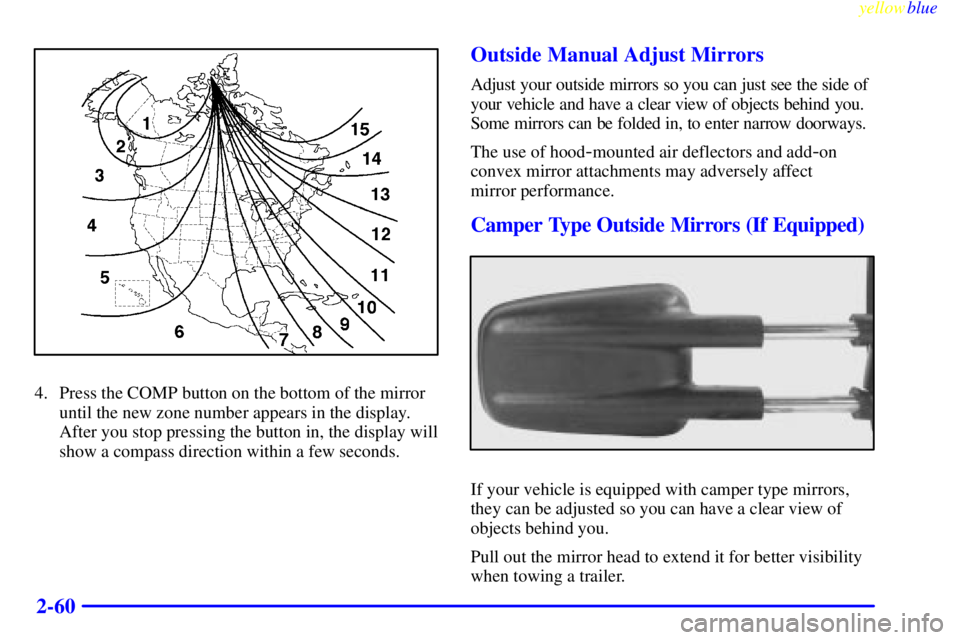
Compass Variance
The compass is set in zone eight upon leaving the
factory. It will be necessary to adjust the compass to
compensate for compass variance if you live outside
zone eight. Under certain circumstances, as during a
long distance cross
-country trip, it will be necessary to
adjust for compass variance. Compass variance is the
difference between earth's magnetic north and true
geographic north. If not adjusted to account for compass
variance, your compass could give false readings.
Page 136 of 421

yellowblue
2-58
Temperature Display
The temperature can be displayed by pressing the TEMP
side of the switch. Pressing the TEMP switch once
briefly, will toggle the temperature reading on and off.
To alternate the temperature reading between Fahrenheit
and Celsius, press and hold the TEMP button for
three seconds until the display blinks F� and C�.
Press and release the TEMP switch to toggle between
the Fahrenheit and Celsius readings. After five seconds
of inactivity, the display will return to a normal
temperature reading.Press and release the TEMP switch to toggle the
temperature display between Fahrenheit or Celsius. If an
abnormal reading is displayed, please consult your dealer.
Electrochromic Mirror Operation
The right side of the switch, labeled TEMP and located
at the bottom of the mirror, turns the electrochromic
mirror on and off. An indicator light, located to the
right of the TEMP switch, will come on when the
electrochromic mirror is turned on. To turn the mirror
on, press and hold the TEMP button for six seconds.
To turn the mirror off, press and hold the TEMP button
for six seconds. The indicator light will turn off.
Compass Operation
Press the COMP switch once briefly to turn the compass
on or off.
When the ignition and the compass feature are on, the
compass will show two character boxes for
approximately two seconds. After two seconds, the
mirror will display the compass heading.
When cleaning the mirror, use a paper towel or similar
material dampened with glass cleaner. Do not spray
glass cleaner directly on the mirror as that may cause the
liquid cleaner to enter the mirror housing.
Page 138 of 421
yellowblue
2-60
4. Press the COMP button on the bottom of the mirror
until the new zone number appears in the display.
After you stop pressing the button in, the display will
show a compass direction within a few seconds.
Outside Manual Adjust Mirrors
Adjust your outside mirrors so you can just see the side of
your vehicle and have a clear view of objects behind you.
Some mirrors can be folded in, to enter narrow doorways.
The use of hood
-mounted air deflectors and add-on
convex mirror attachments may adversely affect
mirror performance.
Camper Type Outside Mirrors (If Equipped)
If your vehicle is equipped with camper type mirrors,
they can be adjusted so you can have a clear view of
objects behind you.
Pull out the mirror head to extend it for better visibility
when towing a trailer.
Page 144 of 421

yellowblue
2-66
Ashtrays and Cigarette Lighter
Front Ashtray
The front ashtray is located near the center of the
instrument panel. Pull on the bottom of the ashtray door
to open it.
NOTICE:
If you store paper or other things that burn in
your ashtrays, they could be set on fire by
cigarettes or other smoking materials. That could
cause a fire and possibly damage your vehicle. Do
not store papers and other things that burn in
your ashtrays.
To remove the front ashtray, press the retainer spring
and pull the ashtray toward you. To replace the ashtray,
place the ashtray on the slides at the side of its location
in the instrument panel. Then slide the ashtray back to
its original position.
To use the cigarette lighter, push it in all the way, and let
go. When it's ready, it will pop back out by itself.
NOTICE:
Holding a cigarette lighter in with your hand
while it's heating can make it overload, damaging
the lighter and the heating element. Just push the
lighter all the way in and let go. When it's done,
it will pop back by itself.