Page 42 of 256
Shuffle feature (if equipped)
The shuffle feature operates in CD
changer mode and plays all tracks
on the current disc in random order.
The shuffle feature continues to the
next disc after all tracks are played.
Press the SHUFFLE control to start this feature. Random order play will
continue until the SHUFFLE control is pressed again.
Radio data system (RDS) feature
This feature allows your audio
system to receive station
identification or program type from
RDS-equipped FM radio station.
The Federal Communications Commission (FCC) and the Canadian Radio
and Telecommunications Commission (CRTC) recommend FM radio
broadcasters to use RDS technology to transmit information. FM radio
stations are independently operated and individually elect to use RDS
technology to transmit station ID and program type as desired.
Press and hold the control for five seconds to turn the feature on or off.
Press the control to scroll through the following sections:
Traffic
²Press the RDS control until
TRAFFIC is displayed.
²Use the SEL control to select ON
or OFF. With the feature on, use
the SEEK or SCAN control to
find a radio station broadcasting a
traffic report (if it is broadcasting
RDS data).
Program type
²Press the RDS control until FIND
program type is displayed.
SHUFF
6
RDS
RDS
SEL
RDS
Controls and features
42
Page 44 of 256
Setting the clock
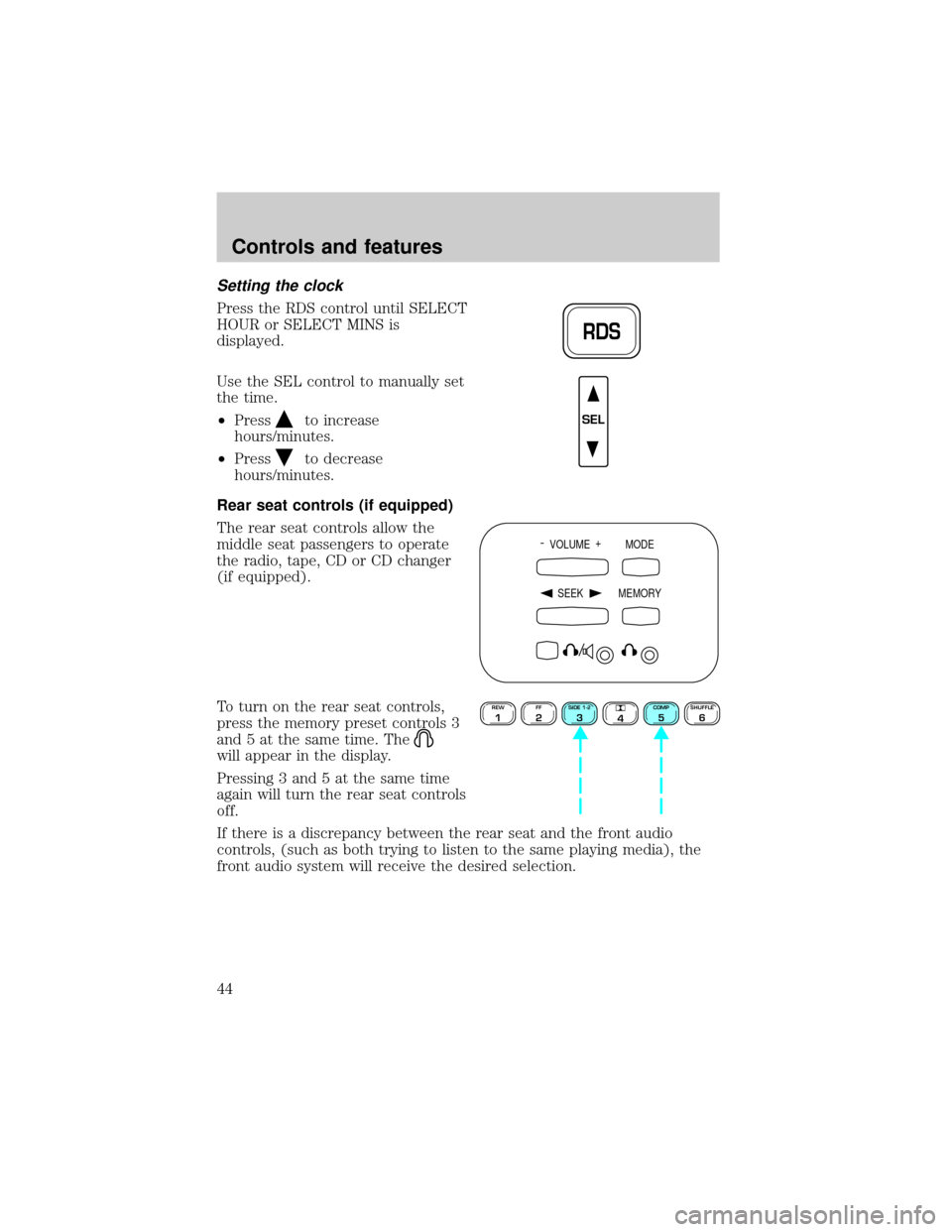
Press the RDS control until SELECT
HOUR or SELECT MINS is
displayed.
Use the SEL control to manually set
the time.
²Press
to increase
hours/minutes.
²Press
to decrease
hours/minutes.
Rear seat controls (if equipped)
The rear seat controls allow the
middle seat passengers to operate
the radio, tape, CD or CD changer
(if equipped).
To turn on the rear seat controls,
press the memory preset controls 3
and 5 at the same time. The
will appear in the display.
Pressing 3 and 5 at the same time
again will turn the rear seat controls
off.
If there is a discrepancy between the rear seat and the front audio
controls, (such as both trying to listen to the same playing media), the
front audio system will receive the desired selection.
RDS
SEL
- VOLUME +
MODE
SEEK MEMORY
REW1FF2SIDE 1-23
4COMP5SHUFFLE6
Controls and features
44
Page 46 of 256
Mode select
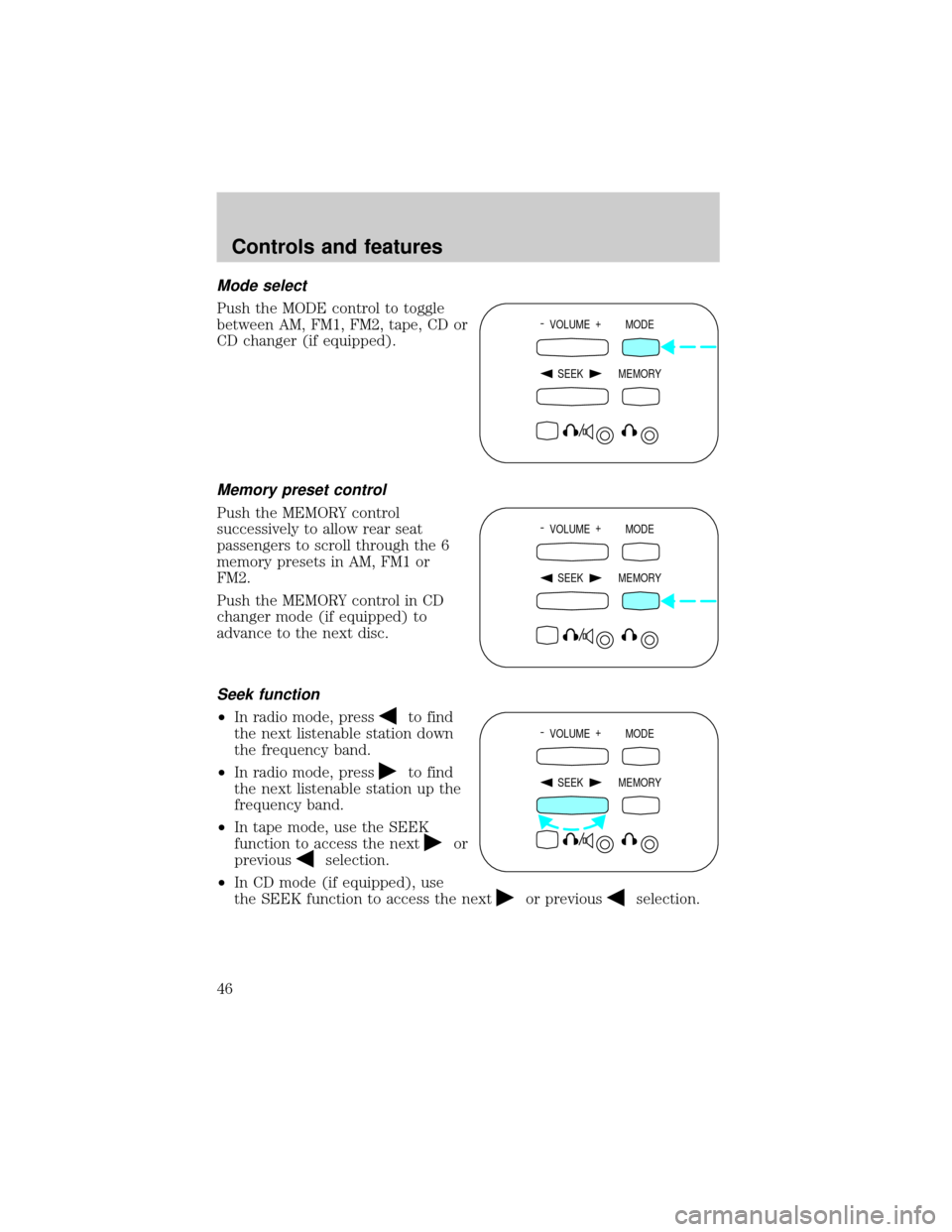
Push the MODE control to toggle
between AM, FM1, FM2, tape, CD or
CD changer (if equipped).
Memory preset control
Push the MEMORY control
successively to allow rear seat
passengers to scroll through the 6
memory presets in AM, FM1 or
FM2.
Push the MEMORY control in CD
changer mode (if equipped) to
advance to the next disc.
Seek function
²In radio mode, pressto find
the next listenable station down
the frequency band.
²In radio mode, press
to find
the next listenable station up the
frequency band.
²In tape mode, use the SEEK
function to access the next
or
previous
selection.
²In CD mode (if equipped), use
the SEEK function to access the next
or previousselection.
- VOLUME +
MODE
SEEK MEMORY
- VOLUME +
MODE
SEEK MEMORY
- VOLUME +
MODE
SEEK MEMORY
Controls and features
46
Page 47 of 256
CD changer (if equipped)
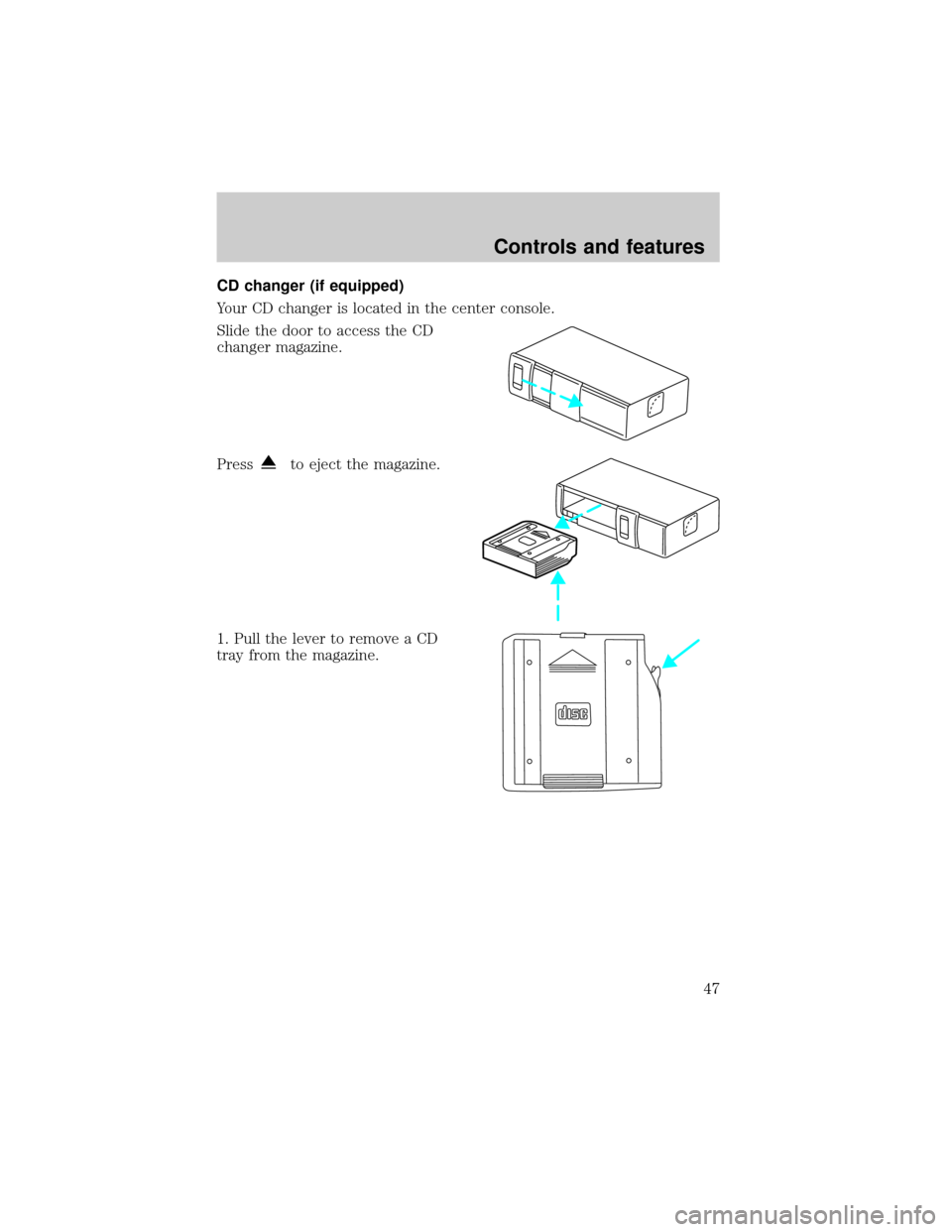
Your CD changer is located in the center console.
Slide the door to access the CD
changer magazine.
Press
to eject the magazine.
1. Pull the lever to remove a CD
tray from the magazine.
Controls and features
47
Page 48 of 256
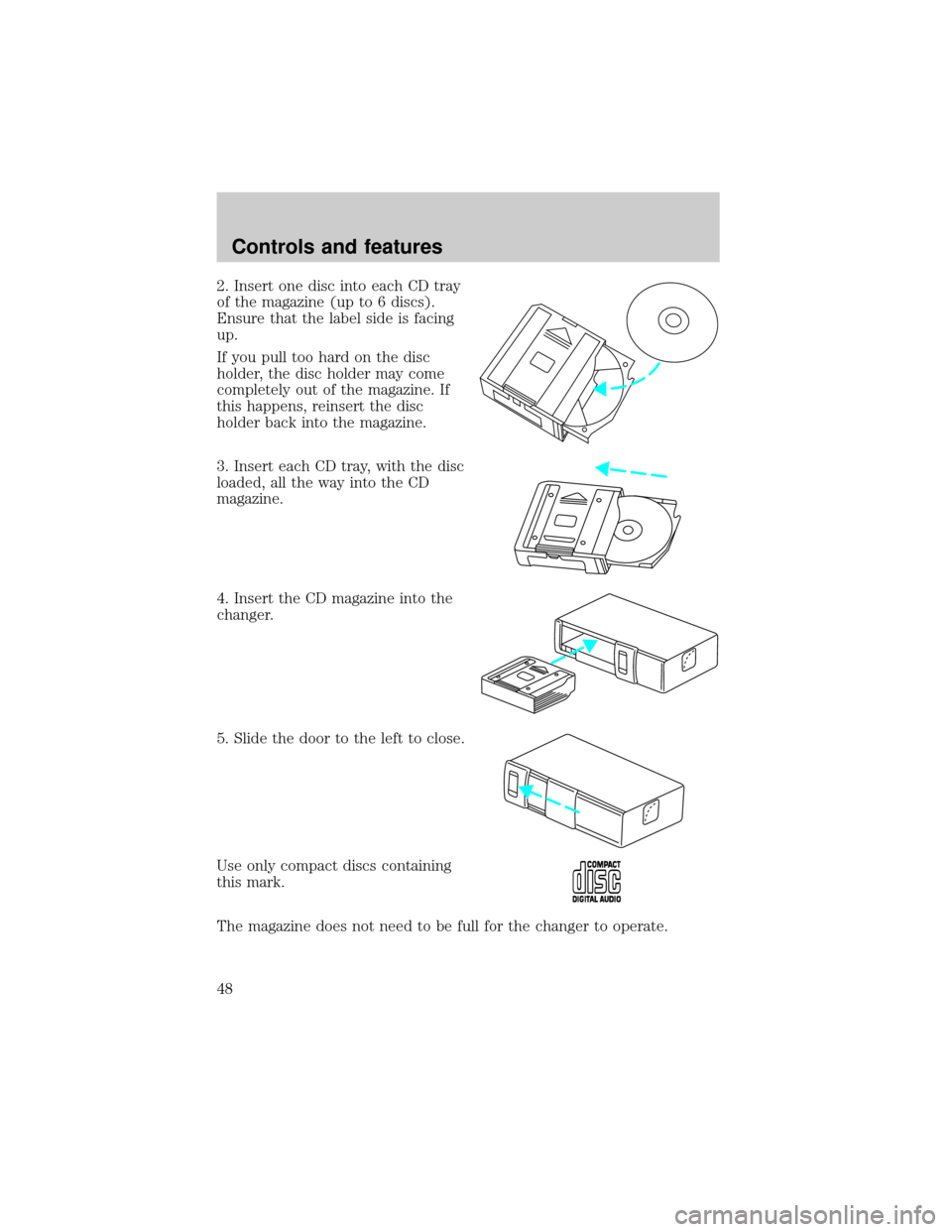
2. Insert one disc into each CD tray
of the magazine (up to 6 discs).
Ensure that the label side is facing
up.
If you pull too hard on the disc
holder, the disc holder may come
completely out of the magazine. If
this happens, reinsert the disc
holder back into the magazine.
3. Insert each CD tray, with the disc
loaded, all the way into the CD
magazine.
4. Insert the CD magazine into the
changer.
5. Slide the door to the left to close.
Use only compact discs containing
this mark.
The magazine does not need to be full for the changer to operate.
Controls and features
48
Page 49 of 256
Radio power must be turned on to play the CDs in the changer. The
magazine may be stored in the glove compartment when not being used.
The CD magazine may be inserted or ejected with the radio power off.
Keep the CD changer door closed. Coins and foreign objects will damage
the CD player and void your audio system warranty.
Do not insert any promotional (odd shaped or sized) discs, or
discs with removable labels into the CD changer as that jamming
may occur.
Troubleshooting the CD changer (if equipped)
The laser beam used in the compact disc player is harmful to the
eyes. Do not attempt to disassemble the case.
If sound skips:
²You may be traveling on a rough road, playing badly scratched discs or
the disc may be dirty. Skipping will not scratch the discs or damage
the player.
If your changer does not work, it may be that:
²A disc is already loaded where you want to insert a disc.
²The disc is inserted with the label surface downward.
²The disc is dusty or defective.
²A disc with format and dimensions not within industry standards is
inserted.
Cleaning compact discs
Inspect all discs for contamination before playing. If necessary, clean
discs only with an approved CD cleaner and wipe from the center out to
the edge. Do not use circular motion.
CD and CD changer care
²Handle discs by their edges only. Never touch the playing surface.
²Do not expose discs to direct sunlight or heat sources for extended
periods of time.
²Do not insert more than one disc into each slot of the CD changer
magazine.
Controls and features
49
Page 80 of 256
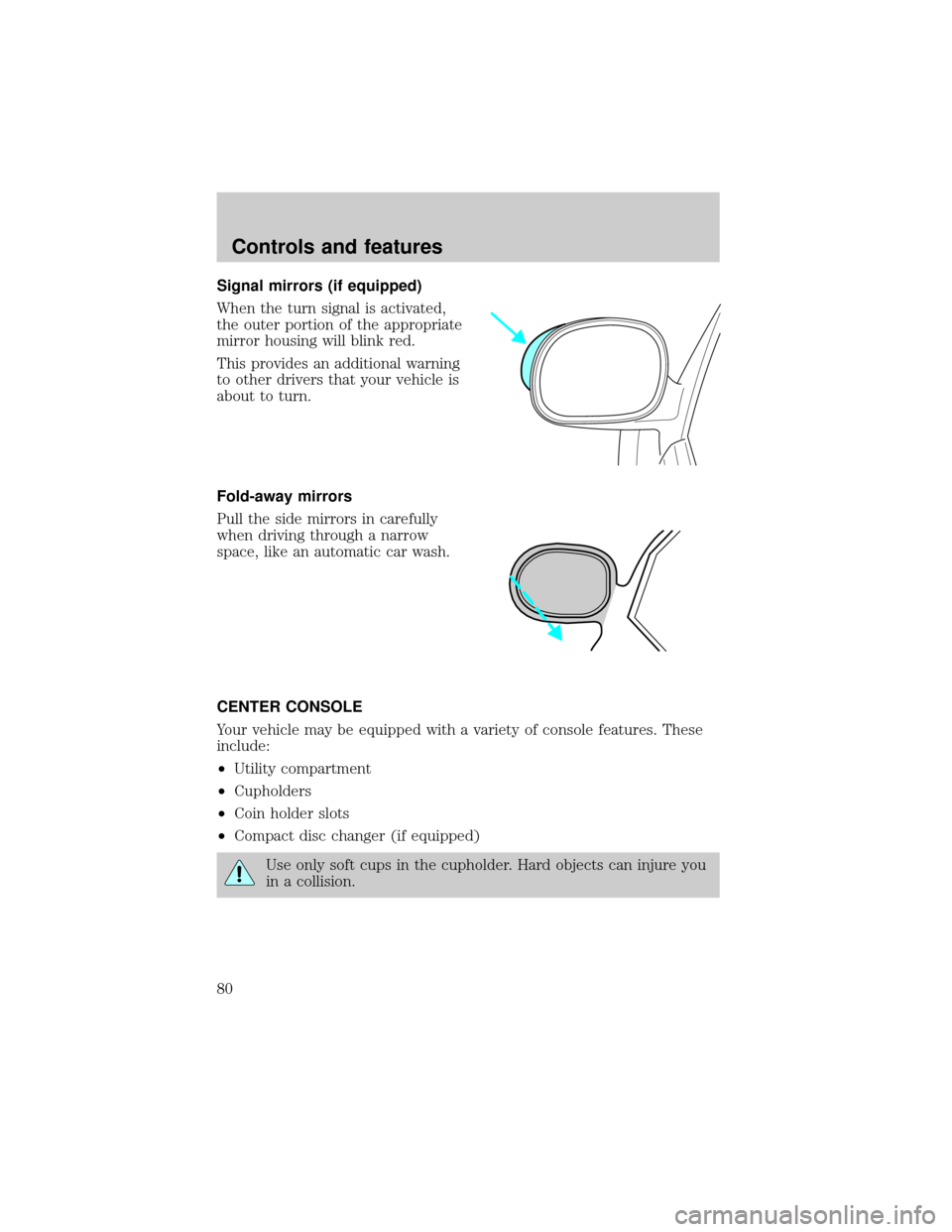
Signal mirrors (if equipped)
When the turn signal is activated,
the outer portion of the appropriate
mirror housing will blink red.
This provides an additional warning
to other drivers that your vehicle is
about to turn.
Fold-away mirrors
Pull the side mirrors in carefully
when driving through a narrow
space, like an automatic car wash.
CENTER CONSOLE
Your vehicle may be equipped with a variety of console features. These
include:
²Utility compartment
²Cupholders
²Coin holder slots
²Compact disc changer (if equipped)
Use only soft cups in the cupholder. Hard objects can injure you
in a collision.
Controls and features
80
Page 248 of 256

Accessory delay ..........................78
Air bag supplemental
restraint system .................114,118
and child safety seats ............116
description .......................114,118
disposal .............................118,121
driver air bag ...................116,119
indicator light ...............9,118,120
operation ..........................116,119
passenger air bag ............116,119
side air bag ..............................118
Air cleaner filter .........199,200,226
Air conditioning ..........................51
automatic temperature
control system ..........................54
auxiliary heater and air
conditioner ................................60
Air suspension ...........................138
description ..............................138
warning light .............................12
Ambulance packages ....................3
Antifreeze
(see Engine coolant) ................187
Anti-lock brake system
(see Brakes) .......................134,135
Anti-theft system
warning light .............................11
Armrests ......................................94
Audio system (see Radio) .........25
Automatic transmission
driving an automatic
overdrive .................................142
fluid, adding ............................194
fluid, checking ........................194
fluid, refill capacities ..............226
fluid, specification ..................232
Auxiliary power point .................24
Axle
lubricant specifications ...229,232
refill capacities ........................226
traction lok ..............................139
Battery .......................................197acid, treating emergencies .....197
charging system
warning light .............................11
jumping a disabled battery ....175
maintenance-free ....................197
replacement, specifications ...226
servicing ..................................197
voltage gauge ............................16
Belt minder ...............................110
Brakes ........................................134
anti-lock ............................134,135
anti-lock brake system (ABS)
warning light ......................10,135
brake warning light ..................10
fluid, checking and adding ....186
fluid, refill capacities ..............226
fluid, specifications ..........229,232
lubricant specifications ...229,232
parking ....................................136
pedals (see Power
adjustable foot pedals) ............21
shift interlock ..........................141
Break-in period .............................3
Capacities for refilling fluids ....226
Cassette tape player ...................25
CD changer .................................47
Certification Label ....................234
Child safety restraints ..............122
child safety belts ....................122
Child safety seats ......................123
in front seat ............................124
in rear seat .......................124,127
tether anchorage hardware ...128
Cleaning your vehicle ...............221
engine compartment ..............222
exterior ....................................222
exterior lamps .........................223
instrument panel ....................224
instrument panel lens ............224
interior ..............................224,225
plastic parts ............................223
safety belts ..............................225
Index
248