Page 128 of 370

2-62 Speedometer and Odometer
Your speedometer lets you see your speed in both miles
per hour (mph) and kilometers per hour (km/h). Your
odometer shows how far your vehicle has been driven in
either miles (used in the United States) or in kilometers
(used in Canada). If your vehicle is equipped with
Driver Information Center (DIC), you can choose which
units you would like displayed. See ªDriver Information
Center (DIC)º in the Index.
Your vehicle has a tamper
-resistant odometer. If you see
ERROR, you'll know someone has probably tampered
with it and the numbers may not be accurate.
You may wonder what happens if your vehicle needs a
new odometer installed. If the new one can be set to the
mileage total of the old odometer, then that will be done.
But if it can't, then it will be set at zero and a label must
be put on the driver's door to show the old mileage
reading when the new odometer was installed.
Trip Odometer
Your trip odometer tells how far you have driven since
you last reset it.
Your trip/select reset switch will go back and forth
between the odometer and the trip odometer if the
button is pressed and released within 1.5 seconds. If the button is pressed and held for longer than
1.5 seconds while in the trip odometer mode, it will be
reset to zero. If the button is pressed and held for longer
than 1.5 seconds while in the odometer mode, it will
have no effect.
Your trip odometer will work no matter what position
your key is in, and even if the key isn't in.
Tachometer
The tachometer displays
the engine speed in
thousands of revolutions
per minute (rpm).
NOTICE:
Do not operate the engine with the tachometer in
the red area, or engine damage may occur.
Page 141 of 370

2-75
The fuel gage, when the ignition is on, tells you about
how much fuel you have left in your tank.
The gage will first indicate empty before you are out of
fuel, and you should get more fuel as soon as possible.
Here are three situations you may experience with your
fuel gage. None of these indicate a problem with the
fuel gage.
�At the gas station, the fuel pump shuts off before
the gage reads full.
�It takes a little more or less fuel to fill up than the
fuel gage indicated. For example, the gage may have
indicated the tank was half full, but it actually took
a little more or less than half the tank's capacity to
fill the tank.
�The gage goes back to empty when you turn off
the ignition.Message Center
The message center is located below the the tachometer
gage on the instrument panel cluster. It gives you
important safety and maintenance facts.
Modes
SERVICE TRACTION SYSTEM
If this message appears
when you are driving,
there is a problem with
your traction control
system and your vehicle
is in need of service.
When this message is displayed, the system will not
limit wheel spin. The message will stay on for
60 seconds and then go out. Four chimes will also
be heard. Adjust your driving accordingly.
Page 147 of 370

2-81
RESET (Reset Button) :
�You can reset the AVG ECON, FUEL USED or
AVG SPEED trip computer modes by pressing and
holding this button for three seconds while you are in
the mode you wish to reset.
�To change the display to a metric or English reading,
press and hold the RESET and MODE buttons
for three seconds. This also changes the setting
of the odometer.
�The reset button can be used to set the compass zone
variation. See ªCompass Varianceº in the Index.
�The reset button can also be used to manually
calibrate the compass. See ªManual Compass
Calibrationº in the Index.MODE (Mode Button):
�Press this button to cycle through three modes of
operation
-- Off, Compass/Temperature and Trip
Computer mode.
�In the Trip Computer mode, pressing the MODE
button cycles through the five displays. Press the
MODE button after the last Trip Computer display
to return the DIC to the OFF mode.
Off: No driver information is displayed in this mode
of operation.
Compass/Temperature Mode: One of eight compass
readings and the outside temperature are displayed.
If the temperature is below 38�F (3�C), the word ªICEº
is displayed for two minutes.
Page 148 of 370
2-82 Compass Variance
Compass variance is the difference between magnetic
north and geographic north. In some areas of the
country, the difference is great enough to cause the
compass to give false readings. If this occurs, the
compass variance must be set.
Setting the Variance
Turn the ignition on and cycle the DIC to the
Compass/Temperature mode. Press the RESET button
for approximately five seconds. The last entered
variance zone number and ªVARº will be displayed.
Press the MODE button until the proper variance
number, as shown on the map, is showing. Press the
RESET button to set the new variance zone and resume
normal operation.
All the display segments will be illuminated for half a
second to acknowledge the change in zone number.
Page 149 of 370

2-83
Automatic Compass Calibration
The compass is self
-calibrating, which eliminates the
need to manually set the compass. When the vehicle is
new, the calibration process may not be complete. In
these cases ªCALº will be displayed, and all segments
of the compass will be illuminated where the compass
reading is normally displayed.
All Segments Illuminated
To calibrate the compass, in an area free from large
metal objects, make two or three 360� turns. The
calibration symbol will turn off and the compass reading
will be displayed.Manual Compass Calibration
If the compass appears erratic and the calibration
symbol does not appear, you must manually put the
compass into the calibration mode.
Turn the ignition on and cycle the DIC to the
Compass/Temperature mode. Press the RESET button
for at least 10 seconds until the calibration symbol
appears and all segments of the compass display are
illuminated. Release the button and complete
three 360� turns in an area free from large metal objects.
The calibration symbol will turn off and the compass
reading will be displayed.
Error Displays
�An error of the vehicle's speed sensor or fuel sender
will cause -E- to be displayed.
�In the absence of vehicle communications, a double
dash ª
--º is displayed.
If one of these error messages appear, see your dealer.
Page 150 of 370

2-84
Trip Computer
There are five trip computer displays which may be
stepped through by pushing the MODE button. The
information will appear in the following order:
�AVG ECON (Average Fuel Economy): This shows
the average fuel economy since the last reset.
�INST ECON (Instantaneous Fuel Economy):
This shows fuel economy for the most recent second
of driving.
�RANGE (Trip Range): This shows the estimated
distance that can be traveled with the remaining fuel.
The fuel economy used to calculate range is based on
the last few hours of driving. When in a low fuel
condition, the word ªLOº is displayed.�FUEL USED (Trip Fuel Used): This shows the
accumulated fuel used since the last reset.
�AVG SPEED (Average Speed): This shows the
average speed since the last reset.
Resetting the Trip Computer
Press and hold the RESET button for at least two seconds.
The reset is acknowledged with the display showing all
segments on for a period of half a second. A reset can only
be done in AVG ECON, FUEL USED and AVG SPEED
displays. Each setting must be reset individually.
Page 158 of 370

3-8 Ventilation System
Adjust the direction of
airflow by moving
the vents.
Your vehicle's flow
-through ventilation system supplies
outside air into the vehicle when it is moving. Outside
air will also enter the vehicle when the air conditioning
fan is running and the OUTSIDE AIR button is pushed.
If the airflow seems very low when the fan is adjusted to
the highest setting, regardless of the mode setting, your
passenger compartment air filter may need to be
replaced. See ªMaintenance Scheduleº in the Index.Ventilation Tips
�Keep the hood and front air inlet free of ice, snow or
any other obstruction (such as leaves). The heater
and defroster will work far better, reducing the
chance of fogging the inside of your windows.
�When you enter a vehicle in cold weather, adjust the
mode knob to LOWER and the fan to the highest
speed for a few seconds before driving off. This
helps clear the intake ducts of snow and moisture
and reduces the chance of fogging the inside of
your windows.
�Keep the air path under the front seats clear of
objects. This helps air to circulate throughout
your vehicle.
Page 159 of 370
3-9
Audio Systems
Your audio system has been designed to operate easily
and give years of listening pleasure. You will get the
most enjoyment out of it if you acquaint yourself with it
first. Find out what your audio system can do and how
to operate all its controls, to be sure you're getting the
most out of the advanced engineering that went into it.
Setting the Clock for Systems with Radio
Data System
Press and hold the HR or MN buttons, located below the
tune knob, for two seconds. Then press and hold HR
until the correct hour appears. AM or PM will appear on
the display. Press and hold MN until the correct minute
appears. The clock may be set with the ignition on or
off. The clock symbol will appear on the display in
time
-set mode.
To set the clock to the time of an FM station
broadcasting Radio Data System (RDS) information,
press and hold HR and MN at the same time for two
seconds until UPDATED and the clock symbol appear
on the display. If the time is not available from the
station, NO UPDAT will appear on the display instead.
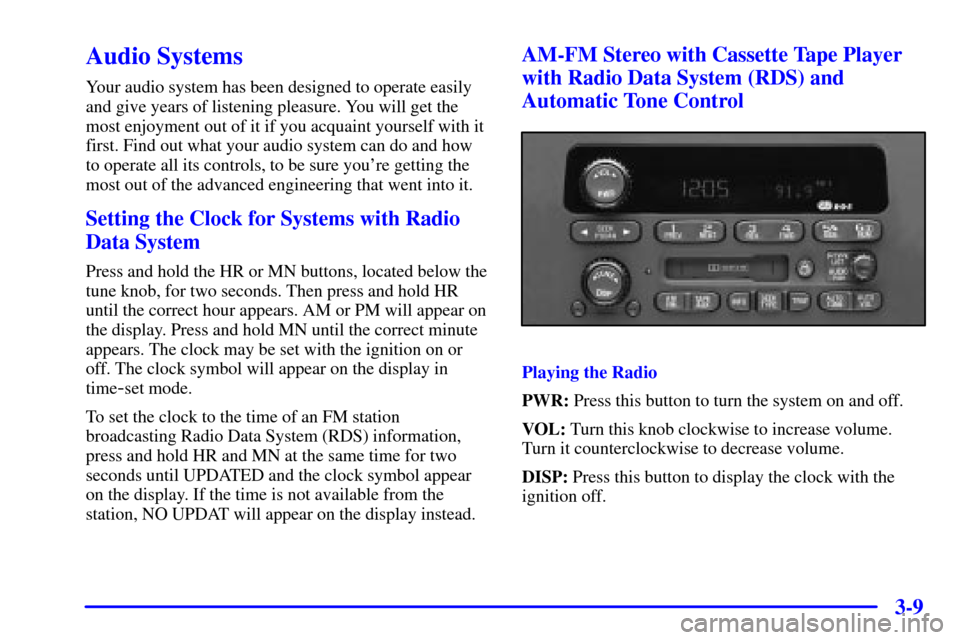
AM-FM Stereo with Cassette Tape Player
with Radio Data System (RDS) and
Automatic Tone Control
Playing the Radio
PWR: Press this button to turn the system on and off.
VOL: Turn this knob clockwise to increase volume.
Turn it counterclockwise to decrease volume.
DISP: Press this button to display the clock with the
ignition off.
