Page 4 of 326
ii
Table of Contents
Keys and Door Locks
Remote Keyless Entry (RKE) System
Trunk Release
Automatic Transmission
Parking Brake
Windows
Tilt Wheel
Turn Signal/Multifunction LeverWindshield Wipers
Cruise Control
Interior and Exterior Lamps
Mirrors
Storage Compartments
Convenience Net (If Equipped)
Sunroof (If Equipped)
Instrument Panel, Warning Lights and Gages Seats and Seat Controls
Safety BeltsAir Bag Systems
Child Restraints
Section
1
Section
2
Seats and Restraint Systems
Features and Controls
Page 11 of 326
ix
For example,
these symbols
are used on an
original battery:
CAUTION
POSSIBLE
INJURY
PROTECT
EYES BY
SHIELDING
CAUSTIC
BATTERY
ACID COULD
CAUSE
BURNS
AVOID
SPARKS OR
FLAMES
SPARK OR
FLAME
COULD
EXPLODE
BATTERY
These symbols
are important
for you and
your passengers
whenever your
vehicle is
driven:
DOOR LOCK
UNLOCK
FASTEN
SEAT
BELTS
POWER
WINDOW
AIR BAG
These symbols
have to do with
your lamps:
MASTER
LIGHTING
SWITCH
TURN
SIGNALS
PARKING
LAMPS
HAZARD
WARNING
FLASHER
DAYTIME
RUNNING
LAMPS
FOG LAMPS
These symbols
are on some of
your controls:
WINDSHIELD
WIPER
WINDSHIELD
WASHER
WINDSHIELD
DEFROSTER
REAR
WINDOW
DEFOGGER
VENTILATING
FAN
These symbols
are used on
warning and
indicator lights:
ENGINE
COOLANT
TEMP
BATTERY
CHARGING
SYSTEM
BRAKE
COOLANT
ENGINE OIL
PRESSURE
ANTI-LOCK
BRAKES
Here are some
other symbols
you may see:
FUSE
LIGHTER
HORN
SPEAKER
FUEL
Vehicle Symbols
These are some of the symbols you may find on your vehicle.
Page 64 of 326
2-
2-1
Section 2 Features and Controls
Here you can learn about the many standard and optional features on your vehicle, and information on starting,
shifting and braking. Also explained are the instrument panel and the warning systems that tell you if everything is
working properly
-- and what to do if you have a problem.
2
-2 Keys
2
-4 Door Locks
2
-7 Keyless Entry System (Option)
2
-10 Trunk
2
-12 Theft
2
-13 Passlock�
2-13 New Vehicle ªBreak-Inº
2
-14 Ignition Positions
2
-15 Starting Your Engine
2
-16 Engine Coolant Heater (If Equipped)
2
-18 Automatic Transaxle Operation
2
-22 Parking Brake
2
-23 Shifting Into PARK (P)
2
-25 Shifting Out of PARK (P)
2
-25 Parking Over Things That Burn
2
-26 Engine Exhaust2
-26 Running Your Engine While You're Parked
2
-27 Windows
2
-28 Tilt Wheel
2
-29 Turn Signal/Multifunction Lever
2
-34 Exterior Lamps
2
-37 Interior Lamps
2
-38 Mirrors
2
-40 Storage Compartments
2
-41 Ashtray and Lighter
2
-42 Sun Visors
2
-42 Accessory Power Outlet
2
-43 Garment Hook
2
-43 Sunroof (If Equipped)
2
-44 The Instrument Panel - Your
Information System
2
-48 Warning Lights, Gages and Indicators
Page 76 of 326
2-13
Passlock�
Your vehicle is equipped with the Passlock
theft
-deterrent system.
Passlock is a passive theft
-deterrent system. Passlock
enables fuel if the ignition lock cylinder has not been
tampered with.
During normal operation, the THEFT SYSTEM light
will go off approximately five seconds after the key is
turned to the ON and the engine started.
If the THEFT SYSTEM light flashes with the key to
ON, wait 10 minutes until the light goes off. Then turn
the ignition key to OFF before attempting to start
the engine.
In an emergency, call the Chevrolet Roadside Assistance
Center at 1
-800-CHEV-USA� (1-800-243-8872).
(In Canada, call 1
-800-268-6800.)
New Vehicle ªBreak-Inº
NOTICE:
Your vehicle doesn't need an elaborate
ªbreak
-in.º But it will perform better in the
long run if you follow these guidelines:
�Don't drive at any one speed -- fast or
slow
-- for the first 500 miles (805 km).
Don't make full
-throttle starts.
�Avoid making hard stops for the first
200 miles (322 km) or so. During this time
your new brake linings aren't yet broken
in. Hard stops with new linings can mean
premature wear and earlier replacement.
Follow this breaking
-in guideline every
time you get new brake linings.
�Don't tow a trailer during break
-in.
See ªTowing a Trailerº in the Index for
more information.
Page 85 of 326
2-22
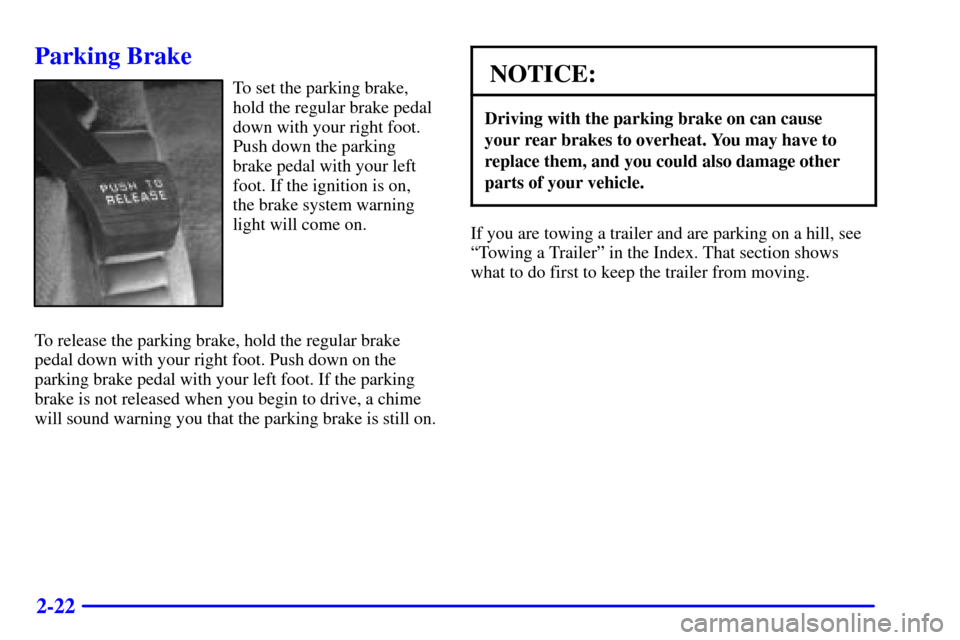
Parking Brake
To set the parking brake,
hold the regular brake pedal
down with your right foot.
Push down the parking
brake pedal with your left
foot. If the ignition is on,
the brake system warning
light will come on.
To release the parking brake, hold the regular brake
pedal down with your right foot. Push down on the
parking brake pedal with your left foot. If the parking
brake is not released when you begin to drive, a chime
will sound warning you that the parking brake is still on.NOTICE:
Driving with the parking brake on can cause
your rear brakes to overheat. You may have to
replace them, and you could also damage other
parts of your vehicle.
If you are towing a trailer and are parking on a hill, see
ªTowing a Trailerº in the Index. That section shows
what to do first to keep the trailer from moving.
Page 96 of 326

2-33
The cruise control buttons are located on the steering
wheel for your convenience.
1. Press the cruise control OFF/ON button. The
indicator light on the OFF/ON button will turn on.
2. Get up to the speed you want.
3. Press the SET DECEL button and release it.
4. Take your foot off the accelerator pedal.
5. The CRUISE light on the instrument panel cluster
will turn on.
Resuming a Set Speed
Suppose you set your cruise control at a desired speed
and then you apply the brake. This, of course, shuts off
the cruise control. But you don't need to reset it. Once
you're going about 25 mph (40 km/h) or more, you can
press the cruise control ACCEL RESUME button for
about half a second.
You'll go right back up to your chosen speed and
stay there.
If you press the ACCEL RESUME button longer than
half a second, the vehicle will keep going faster until
you release the switch or apply the brake. So unless
you want to go faster, don't hold down the ACCEL
RESUME button.Increasing Speed While Using Cruise Control
There are two ways to go to a higher speed.
�Use the accelerator pedal to get to the higher speed.
Push the SET DECEL button, then release the button
and the accelerator pedal. You'll now cruise at the
higher speed.
�Press the ACCEL RESUME button. Hold it there
until you get up to the speed you want, and then
release the button. To increase your speed in very
small amounts, press the ACCEL RESUME button
for less than half a second and then release it. Each
time you do this, your vehicle will go about 1 mph
(1.6 km/h) faster.
The accelerate feature will only work after you turn on
the cruise control by pushing the SET DECEL button.
Reducing Speed While Using Cruise Control
There are two ways to reduce your speed while using
cruise control:
�Push the SET DECEL button until you reach the
lower speed you want, then release it.
�To slow down in very small amounts, push the
button for less than half a second. Each time you
do this, you'll go 1 mph (1.6 km/h) slower.
Page 97 of 326
2-34
Passing Another Vehicle While Using Cruise Control
Use the accelerator pedal to increase your speed. When
you take your foot off the pedal, your vehicle will slow
down to the cruise control speed you set earlier.
Using Cruise Control on Hills
How well your cruise control will work on hills depends
upon your speed, load and the steepness of the hills.
When going up steep hills, you may have to step on the
accelerator pedal to maintain your speed. When going
downhill, you may have to brake or shift to a lower gear
to keep your speed down. Of course, applying the brake
takes you out of cruise control. Many drivers find this to
be too much trouble and don't use cruise control on
steep hills.
Ending Out of Cruise Control
There are two ways to turn off the cruise control:
�Step lightly on the brake pedal;
�Press the cruise control OFF/ON button.
Erasing the Cruise Speed Memory
When you turn off the cruise control or the ignition,
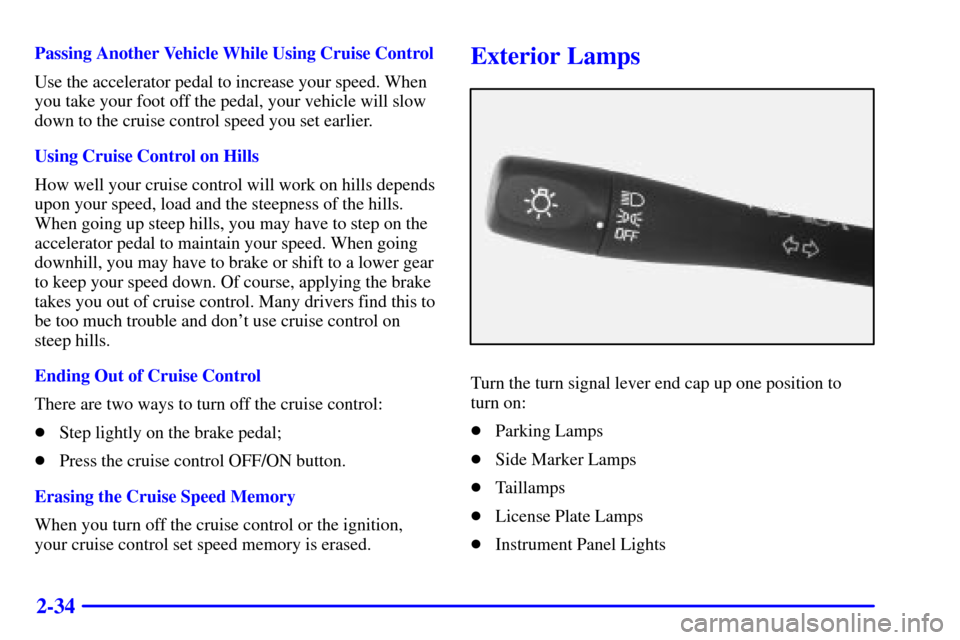
your cruise control set speed memory is erased.Exterior Lamps
Turn the turn signal lever end cap up one position to
turn on:
�Parking Lamps
�Side Marker Lamps
�Taillamps
�License Plate Lamps
�Instrument Panel Lights
Page 98 of 326

2-35
Turn the turn signal lever end cap up two positions to
turn on:
�Headlamps
�Parking Lamps
�Sidemarker Lamps
�Taillamps
�License Plate Lamps
�Instrument Panel Lights
Turn the switch to OFF to turn all of the lamps off.
Lamps On Reminder
If you open the driver's door and turn off the
ignition while leaving the lamps on, you will hear a
warning chime.
Daytime Running Lamps
Daytime Running Lamps (DRL) can make it easier
for others to see the front of your vehicle during the
day. DRL can be helpful in many different driving
conditions, but they can be especially helpful in the
short periods after dawn and before sunset.
The DRL system will make your low
-beam headlamps
come on at a reduced brightness when:
�the ignition is on,
�the headlamp switch is to OFF or you have turned
on your parking lamps,
�the light sensor detects daytime light,
�the parking brake is released and
�the shift lever is not in PARK (P).
When the DRL system is on, the taillamps,
sidemarker, park lamps and instrument panel lights
will not be illuminated.
The DRL system will remain off any time your vehicle
is in PARK (P) or the parking brake is engaged.
As with any vehicle, you should turn on the regular
headlamp system when you need it.