2000 BMW 540I SEDAN ESP
[x] Cancel search: ESPPage 90 of 217
90n
The PDC assists you when you are
parking. A signal warns you of the real
distance to an obstacle. To do this, four
ultrasonic sensors in the rear bumper
measure the distance from the nearest
object. The monitoring range for the
two corner sensors ends approx. 2 feet
(60 cm) beyond the respective bumper.
The range of the two middle sensors is
approx. 4.9 feet (1.50 meters) outward.
The system starts to operate automati-
cally about one second after you select
reverse with the ignition key in posi-
tion 2. It is similarly deactivated when
you engage reverse gear or move the
selector lever position from the "R" po-
sition.
Acoustical signalsThe distance to the nearest object is in-
dicated by a tone sounding at various
intervals. As the distance between vehi-
cle and object decreases, the intervals
between the tones become shorter. A
continuous tone indicates the presence
of an object less than 1 ft. (30 cm)
away.
The warning signal will be canceled af-
ter approx. 3 seconds if the distance to
the obstruction remains constant during
this time (if you are moving parallel to a
wall, for instance).
System malfunctions will be indicated
by a continuous high-pitched tone
when the system is activated the first
time. Please have the cause checked
and corrected by your authorized BMW
center.The PDC does not remove the
driver's personal responsibility for
evaluating the distance between the ve-
hicle and any obstacles. Even when
sensors are involved, there is a blind
spot in which objects cannot be de-
tected. This applies especially in those
cases where the system approaches
the physical limits of ultrasonic mea-
surement, as occurs with tow bars and
trailer couplings, and in the vicinity of
thin and painted objects.
Certain sources of sound, such as a
loud radio, could drown the PDC signal
tone.<
Keep the sensors clean and free
of ice or snow in order to ensure
that they continue to operate effectively.
Do not apply high pressure spray to the
sensors for a prolonged period of time.
Maintain an adequate distance of more
than approx. 4 inches (10 cm).<
Park Distance Control (PDC)
*
Page 91 of 217
91n
RepairsIndexOverview Controls Car care Technology Data
ASC+T/DSC
*
Automatic Stability Control plus
Traction (ASC+T)/Dynamic
Stability Control (DSC)
*
These systems contribute to additional
vehicle stability, especially during ac-
celeration and when cornering.
The DSC system enhances the benefits
of the ASC+T. In addition to optimizing
vehicle stability and traction during ac-
celeration or when starting from a
standstill, a further benefit is realized in
cornering. This, of course, is true only
within physically feasible limits.
The system activates automatically
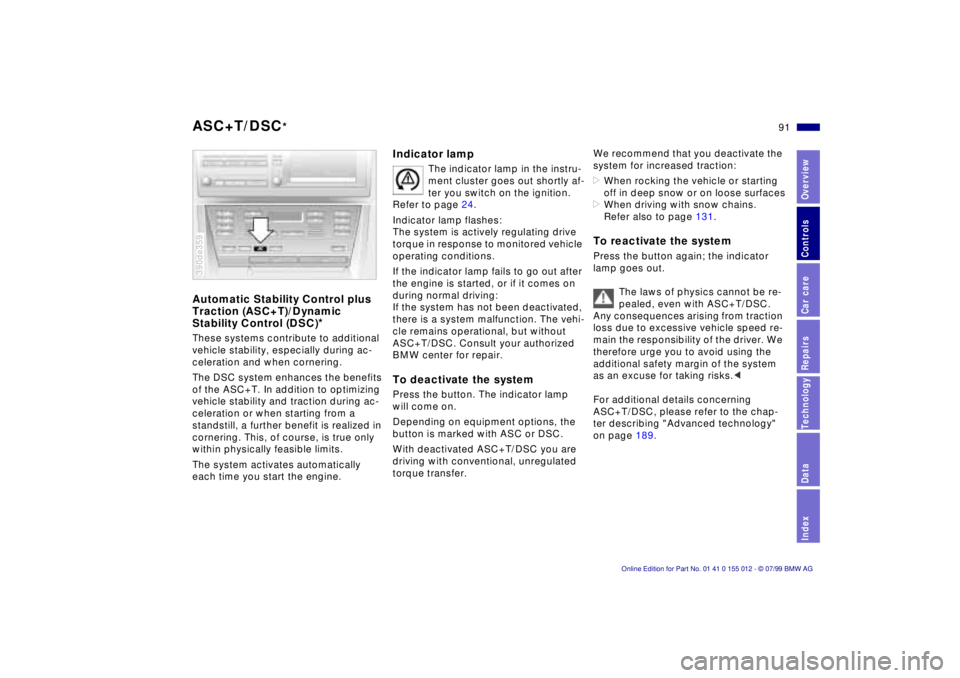
each time you start the engine.390de359
Indicator lamp
The indicator lamp in the instru-
ment cluster goes out shortly af-
ter you switch on the ignition.
Refer to page 24.
Indicator lamp flashes:
The system is actively regulating drive
torque in response to monitored vehicle
operating conditions.
If the indicator lamp fails to go out after
the engine is started, or if it comes on
during normal driving:
If the system has not been deactivated,
there is a system malfunction. The vehi-
cle remains operational, but without
ASC+T/DSC. Consult your authorized
BMW center for repair.
To deactivate the systemPress the button. The indicator lamp
will come on.
Depending on equipment options, the
button is marked with ASC or DSC.
With deactivated ASC+T/DSC you are
driving with conventional, unregulated
torque transfer.
We recommend that you deactivate the
system for increased traction:
>When rocking the vehicle or starting
off in deep snow or on loose surfaces
>When driving with snow chains.
Refer also to page 131.To reactivate the systemPress the button again; the indicator
lamp goes out.
The laws of physics cannot be re-
pealed, even with ASC+T/DSC.
Any consequences arising from traction
loss due to excessive vehicle speed re-
main the responsibility of the driver. We
therefore urge you to avoid using the
additional safety margin of the system
as an excuse for taking risks.<
For additional details concerning
ASC+T/DSC, please refer to the chap-
ter describing "Advanced technology"
on page 189.
Page 100 of 217
100n
Automatic climate controlTips for pleasant drivingUse the automatic system, that is, press
AUTO button 4. Select an interior tem-
perature that is comfortable for you Ð
we recommend 727 (226). When the
outside temperature is above 417
(56), you can also use the air condi-
tioning system (12). This will dry the air
and prevent the window from fogging
(for example if people are wearing
damp clothes in the vehicle). Set the
outlets 2 so that the air flows past you
and is not directed straight at you. Set
the rotary dial between the outlets 2 for
the upper body to a central position.
This will provide cooler air, and help to
prevent fatigue during the journey.
Detailed setting options are described
for you in the following section.
You can make the settings of your
vehicle in such a manner that,
when you unlock the car with your indi-
vidualized remote control, your own
personalized setting for the automatic
climate control is initiated.<
Automatic air distribution
The AUTO program assumes
the adjustment of the air dis-
tribution and the air supply for you and
also adapts the temperature to external
influences (summer, winter) to meet
preferences you can specify. This pro-
gram maintains a comfortable in-car cli-
mate regardless of the season. Select
an interior temperature that is pleasant
for you Ð we recommend 727 (226).
The selected temperature and AUTO for
the air flow appear in the display 7. Re-
fer to the overview on page 98. Open
the ventilation outlets for the upper
body. Switch on the air conditioner in
warm weather. The maximum cooling
capacity is achieved when you set the
rotary dial 3 (refer to page 102) to cold.
Individual air distribution
You can cancel the AUTO pro-
gram by selecting specific dis-
tribution patterns to suit your
own individual requirements.
You can direct air to flow onto the win-
dows , toward the upper body ,
and into the footwell .
Temperature
You can make individual tem-
perature settings on the
driver's side or the front pas-
senger side. Your settings will be
shown in the display 9. The displayed
temperatures are reference values for
the interior temperature. We recom-
mend 727 (226) as a comfortable
setting, whether the air conditioner is
operating or not.When you start the ve-
hicle, the system ensures that the se-
lected temperature is achieved as
quickly as possible. It then maintains
this temperature, regardless of the sea-
son.
Set the rotary dial 3 (refer to "Draft-free
ventilation" on page 102) to a medium
position to provide somewhat cooler
air. This helps to promote driving with-
out fatigue. Make use of this means of
mixing air especially for making minor
adjustments for personal comfort.
You can set uncontrolled heater
output at up to 907 (326). Full
cooling output is available from the air
conditioner down to 607 (166).<
Page 101 of 217
101n
RepairsIndexOverview Controls Car care Technology Data
Automatic climate controlAir supply
In the "AUTO" program, the air
flow is controlled automati-
cally. AUTO will appear in the display
(refer to the overview on page 98). Use
"+" and "-" to vary the air flow. When
your setting is displayed by bars, the
automatic air flow is switched off. Auto-
matic air distribution maintains its set-
ting. You can reactivate the automatic
air flow by pressing the "AUTO" button.
When you press "Ð " during operation at
minimum blower speed all displays are
canceled: The fan, heating and air con-
ditioner are switched off. The outside
air supply is closed. By pressing any
button of the automatic climate control
(except the "REST" button 16), you can
switch the system back on.
To defrost windshield and door
windows
This program quickly removes
ice and condensation from the
windshield and the side windows.
Air conditioner
The air is cooled and dehu-
midified and Ð depending on
the temperature setting Ð warmed again
when the air conditioner system is
switched on. Depending on the
weather, the windshield may fog over
briefly when the engine is started.
Use the button to switch off the air con-
ditioner at outside temperatures below
approx. +417 (+56). This will help to
prevent the windows from fogging up.
If the windows fog over after switching
the air conditioner off, switch it back on.
Condensation forms in the air con-
ditioner system during operation,
which then exits under the vehicle.
Traces of condensed water of this kind
are thus normal.<
Automatic recirculated-air
control (AUC)
You can respond to unpleas-
ant external odors by tempo-
rarily stopping the flow of outside air.
The system then recirculates the air
currently within the vehicle. Press the
button repeatedly to run through the
following control sequence:
>Indicator lamps off: Outside air flow
operational.
>Left-hand indicator lamp on Ð AUC
mode: The system recognizes pollut-
ants in the outside air and blocks the
flow of air when necessary. The sys-
tem then recirculates the air currently
within the vehicle.
Depending on the air quality, the au-
tomatic system then switches back
and forth between outside air supply
and recirculation of the air within the
vehicle.
>Right-hand indicator lamp on: The
flow of external air into the vehicle is
permanently blocked. The system
then recirculates the air currently
within the vehicle.
If you have a multifunction steering
wheel with the recirculated-air button
(refer to page 25), you can also use it to
switch between "Off" and the recircu-
lated-air mode or AUC and the recircu-
lated-air mode.
Page 105 of 217
105n
RepairsIndexOverview Controls Car care Technology Data
The conceptThe BMW Universal Transmitter re-
places up to three hand-held transmit-
ters that control different devices such
as a garage door opener, alarm sys-
tems or a door locking system. The
BMW Universal Transmitter recognizes
and "learns" the transmitted signal from
each of the original hand-held transmit-
ters.
The signal of an original hand-held
transmitter can be programmed to one
of three channel keys. Following that,
each of the devices can be operated
with the channel key that you have pro-
grammed for it. A transmission of the
signal is indicated by the indicator lamp.
Before you sell your vehicle, the pro-
grammed channel keys should be de-
leted. Refer to page 107 for the de-
scription of this process.
To prevent potential injuries or
damage: During the programming
operation and before every remote trig-
gering of a programmed device using
the BMW Universal Transmitter, be sure
that there are no persons, animals or
objects within the range of movement
of the respective device. Read and
comply with the safety instructions for
the original hand-held transmitter
also.<
To Canadian residents:
During programming, your hand-
held transmitter may automatically stop
transmitting after two seconds. This
may not be long enough to program the
BMW Universal Transmitter. If you are
programming from one of these hand-
held transmitters, the Universal Trans-
mitter's lamp may begin to flash in a se-
ries of double flashes. If this occurs,
continue to hold the button on the Uni-
versal Transmitter while you reactivate
your hand-held transmitter. You may
have to repeat this function several
times while programming.<
Before programming, read the
"User's information" section on
page 107.<
The original hand-held transmitter
If this symbol is depicted on the
packaging or in the user's in-
structions for the original hand-
held transmitter, it may be assumed
that this original hand-held transmitter
is compatible with the BMW Universal
Transmitter.
Checking for the change codeIn order to determine whether the origi-
nal hand-held transmitter is equipped
with a change code system, you may
either refer to the instructions for the
original hand-held transmitter or pro-
gram a channel key as described in the
left column on page 106 under "Pro-
gramming."
Following that, press and hold the pro-
grammed channel key of the BMW Uni-
versal Transmitter. If the indicator lamp
of the BMW Universal Transmitter
flashes rapidly for two seconds and
then stays on continuously, the original
hand-held transmitter is equipped with
a change code system. If the change
code system is available, program the
channel keys as described in the right-
hand column on page 106 under "Pro-
gramming a hand-held transmitter with
change code."
If you have additional questions,
please consult your BMW center
or call 1-800-355-3515.<
BMW Universal Transmitter
*
Page 106 of 217
106n
BMW Universal Transmitter
*
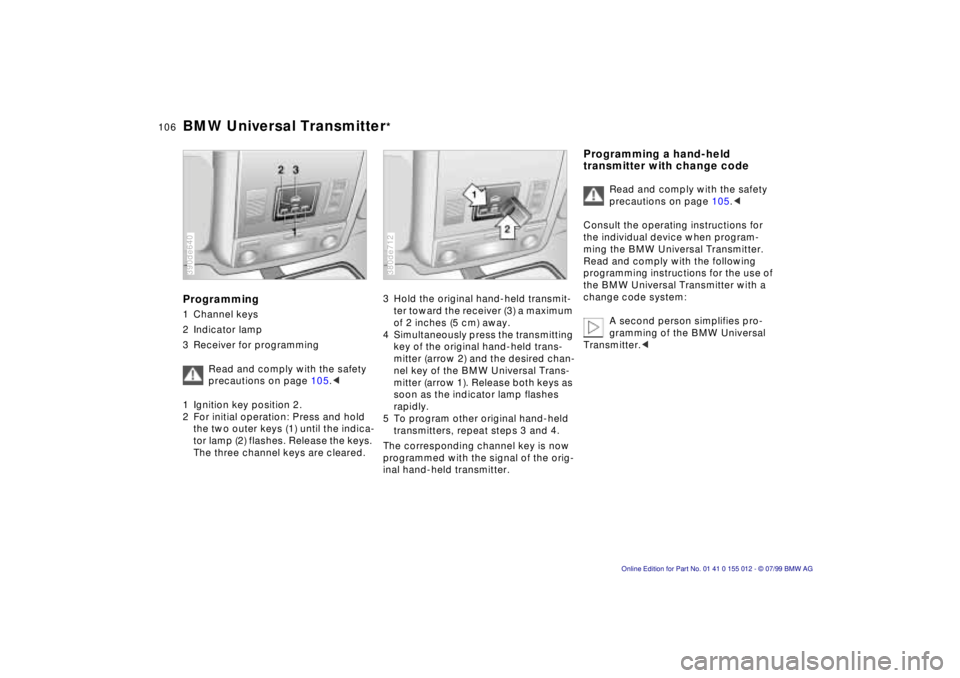
Programming1 Channel keys
2 Indicator lamp
3 Receiver for programming
Read and comply with the safety
precautions on page 105.<
1 Ignition key position 2.
2 For initial operation: Press and hold
the two outer keys (1) until the indica-
tor lamp (2) flashes. Release the keys.
The three channel keys are cleared.390de640
3 Hold the original hand-held transmit-
ter toward the receiver (3) a maximum
of 2 inches (5 cm) away.
4 Simultaneously press the transmitting
key of the original hand-held trans-
mitter (arrow 2) and the desired chan-
nel key of the BMW Universal Trans-
mitter (arrow 1). Release both keys as
soon as the indicator lamp flashes
rapidly.
5 To program other original hand-held
transmitters, repeat steps 3 and 4.
The corresponding channel key is now
programmed with the signal of the orig-
inal hand-held transmitter.380de712
Programming a hand-held
transmitter with change code
Read and comply with the safety
precautions on page 105.<
Consult the operating instructions for
the individual device when program-
ming the BMW Universal Transmitter.
Read and comply with the following
programming instructions for the use of
the BMW Universal Transmitter with a
change code system:
A second person simplifies pro-
gramming of the BMW Universal
Transmitter.<
Page 112 of 217
112n
Through-loading system
*
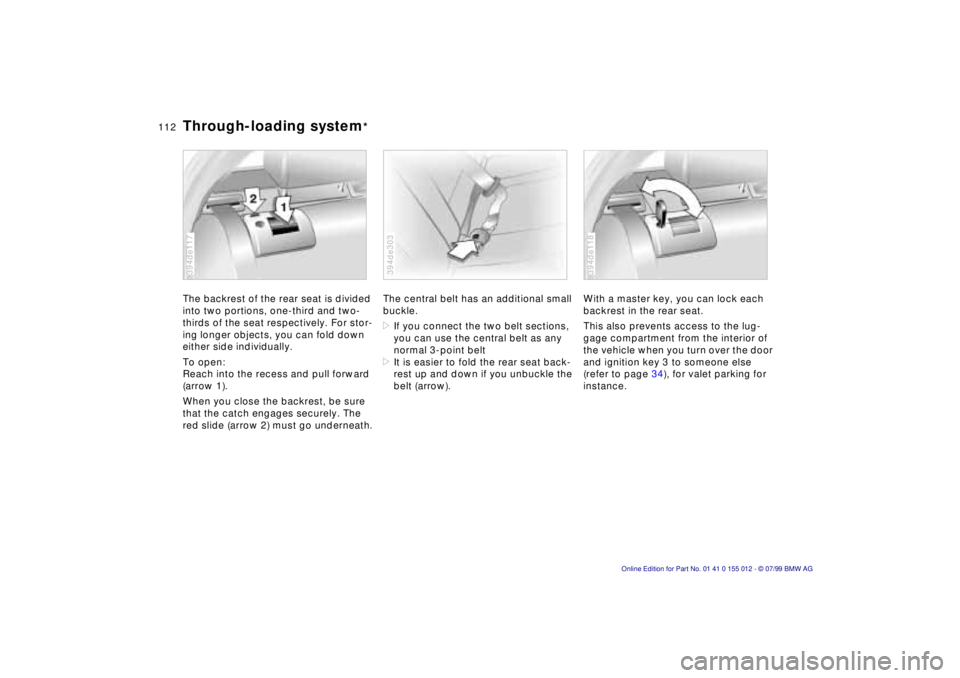
The backrest of the rear seat is divided
into two portions, one-third and two-
thirds of the seat respectively. For stor-
ing longer objects, you can fold down
either side individually.
To open:
Reach into the recess and pull forward
(arrow 1).
When you close the backrest, be sure
that the catch engages securely. The
red slide (arrow 2) must go underneath.394de117
The central belt has an additional small
buckle.
>If you connect the two belt sections,
you can use the central belt as any
normal 3-point belt
>It is easier to fold the rear seat back-
rest up and down if you unbuckle the
belt (arrow).394de303
With a master key, you can lock each
backrest in the rear seat.
This also prevents access to the lug-
gage compartment from the interior of
the vehicle when you turn over the door
and ignition key 3 to someone else
(refer to page 34), for valet parking for
instance.394de118
Page 116 of 217
116n
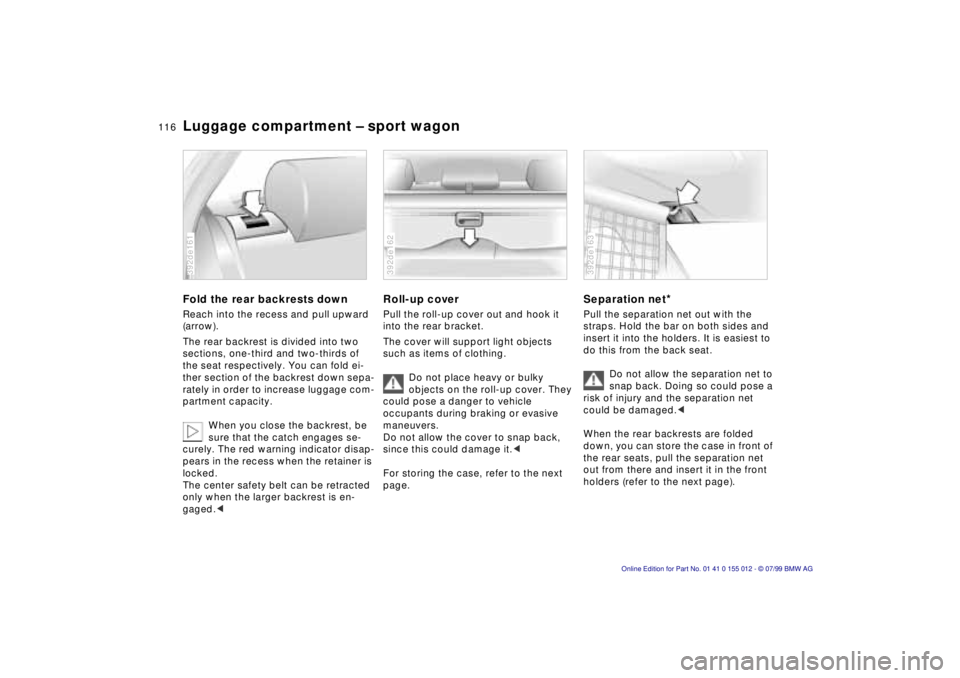
Luggage compartment Ð sport wagonFold the rear backrests downReach into the recess and pull upward
(arrow).
The rear backrest is divided into two
sections, one-third and two-thirds of
the seat respectively. You can fold ei-
ther section of the backrest down sepa-
rately in order to increase luggage com-
partment capacity.
When you close the backrest, be
sure that the catch engages se-
curely. The red warning indicator disap-
pears in the recess when the retainer is
locked.
The center safety belt can be retracted
only when the larger backrest is en-
gaged.<392de161
Roll-up coverPull the roll-up cover out and hook it
into the rear bracket.
The cover will support light objects
such as items of clothing.
Do not place heavy or bulky
objects on the roll-up cover. They
could pose a danger to vehicle
occupants during braking or evasive
maneuvers.
Do not allow the cover to snap back,
since this could damage it.<
For storing the case, refer to the next
page.392de162
Separation net
*
Pull the separation net out with the
straps. Hold the bar on both sides and
insert it into the holders. It is easiest to
do this from the back seat.
Do not allow the separation net to
snap back. Doing so could pose a
risk of injury and the separation net
could be damaged.<
When the rear backrests are folded
down, you can store the case in front of
the rear seats, pull the separation net
out from there and insert it in the front
holders (refer to the next page).392de163