Page 60 of 273
Gauge
s
Speedometer
This shows your speed in miles per
hour (mph). The smaller inner
numbers are the speed in kilometers
per hour (km/h). Tachomete
r
The tachometer shows the engine
speed in revolutions per minute (rpm). To protect the engine from
damage, never drive with the
tachometer needle in the red zone. Odomete
r
The odometer shows the total
number of miles your car has been
driven. It is illegal under U.S. federal
law to disconnect, reset, or alter the
odometer with the intent to change
the number of miles indicated.
Tri p Mete r
This meter shows the number of
miles driven since you last reset it.
To reset it, push the trip meter reset button.
Instrument s an d Control s
TRI
P METE R
RESE T BUTTO N
TRIP METE R
ODOMETE R
SPEEDOMETE
R
FUE
L GAUG E
TACHOMETE R
TEMPERATUR E
GAUG E
Page 62 of 273

Gauge
s
Maintenanc e Require d Indicato r
This indicator reminds you that it is
time to take your vehicle in for sched-
uled maintenance.
Refer to the Maintenance Schedules
for Normal and Severe Driving Conditions on pages 158 — 162.
For the first 6,000 miles (9,600 km) after the Maintenance Required
Indicator is reset, it will come on for
two seconds when you turn the ignition switch ON (II).
Between 6,000 miles (9,600 km) and
7,500 miles (12,000 km) this
indicator will light for two seconds
when you first turn the ignition switch ON (II), and then flash for
ten seconds.
If you exceed 7,500 miles (12,000
km) without having the scheduled
maintenance performed, this
indicator will remain on as a constant
reminder.
Your dealer will reset this indicatorafter completing the scheduled
maintenance. If this maintenance is
done by someone other than your
Acura dealer, reset the indicator by
pressing the reset button. This
button is located on the bottom of the dashboard to the right of the
steering column.
Instrument s an d Control s
MAIN
T
REQ D
Page 86 of 273
Digita
l Cloc k
The digital clock displays the time
with the ignition switch ON (II). To see the time with the ignition off,
press and hold the wide button next
to the clock. To set the clock:
1. Turn the ignition switch ON (II) to
display the time.
2. Swing down the front cover of the wide button next to the clock
display. You will see H, M, and
RESET buttons.
3. Press and hold the H button until
the hour advances to the desired
hour.
4. Press and hold the M button until the numbers advance to the
desired minutes.
You can use the RESET button to quickly set the time to the nearest
hour. If the displayed time is before
the half hour, pressing RESET
button sets the clock back to the previous hour. If the displayed time
is after the half hour, pressing the RESET button sets the clock for- ward to the beginning of the next
hour.
For example: 1:06 would RESET to 1:00. 1:52 would RESET to 2:00.
Instrument s an d Control s
RESE
T
HM
Page 101 of 273
Audi
o Syste m
AM/FM/C D Audi o Syste m
Your Acura's audio system provides clear reception on both AM and FM bands, while the preset buttons allow
you to easily select your favorite
stations.
The anti-theft feature will disable the system if it is disconnected from the vehicle's battery. To get the system
working again, you must enter a
code number (see page 115 ).
Comfor t an d Convenienc e Feature s
SEE
K BA R
PRESE T BUTTON S
AM/F
M 1- 2 BUTTO N
TUNE BA R
Page 102 of 273

Audi
o Syste m
Operatin g th e Radi o
The ignition switch must be in
ACCESSORY (I) or ON (II) to operate the audio system. Turn the
system on by pushing the PWR/
VOL knob. Adjust the volume by turning the same knob.
The band and frequency that the
radio was last tuned to is displayed.
To change bands, press the AM/FM
1 .
2 button. On the FM band, ST will
be displayed if the station is broad-
casting in stereo. Stereo reproduc-
tion on AM is not available. You can use any of three methods to
find radio stations on the selected
band: TUNE, SEEK, or the Presetbuttons.
TUN E — Use the TUNE bar to tune
the radio to a desired frequency. Press the side of the bar to tune
to a higher frequency, and the side to tune to a lower
frequency. The frequency numbers
will start to change rapidly. Release the bar when the display reaches the
desired frequency. To change the
frequency in small increments, press
and release the TUNE bar quickly. SEE
K — The SEEK function
searches the band for a station with
a strong signal. To activate it, press the SEEK bar on either the or
side, then release it.
Depending on which side you press,
the system scans upward or down- ward from the current frequency. It
stops when it finds a station with a
strong signal.
Prese t — You can store the
frequencies of your favorite radio
stations in the six preset buttons.
Each button will store one frequency
on the AM band, and two
frequencies on the FM band.
CONTINUED
Comfor t an d Convenienc e Feature s
Page 103 of 273
Audi
o Syste m
To store a frequency: 1. Select the desired band, AM or FM. FM1 and FM2 let you store
two frequencies with each Preset
button.
2. Use the TUNE or SEEK function to tune the radio to a desired
station.
3. Pick the Preset button you want for that station. Press the buttonand hold it until you hear a beep.
4. Repeat steps 1 to 3 to store a total of six stations on AM and twelve
on
FM.
Once a station's frequency is stored,
simply press and release the proper
Preset button to tune to it.
The preset frequencies will be lost if
your car's battery goes dead, is
disconnected, or the radio fuse is
removed.
Comfor t an d Convenienc e Feature s
AM/F
M 1- 2 BUTTO N
TUNE BA R
PRESE T BUTTON S
SEEK BA R
Page 104 of 273
Audi
o System
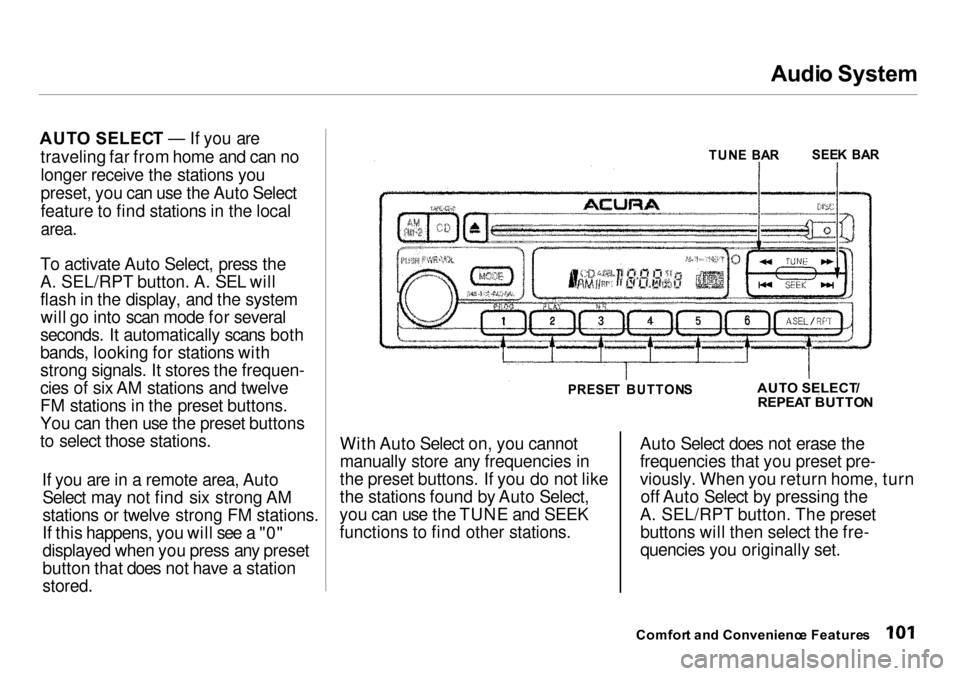
AUT O SELEC T — If you are
traveling far from home and can no
longer receive the stations you
preset, you can use the Auto Select
feature to find stations in the local
area.
To activate Auto Select, press the
A. SEL/RPT button. A. SEL will
flash in the display, and the system will go into scan mode for several
seconds. It automatically scans both
bands, looking for stations with
strong signals. It stores the frequen-
cies of six AM stations and twelve
FM stations in the preset buttons.
You can then use the preset buttons
to select those stations.
If you are in a remote area, AutoSelect may not find six strong AM
stations or twelve strong FM stations.
If this happens, you will see a "0"
displayed when you press any preset
button that does not have a station
stored.
With Auto Select on, you cannot
manually store any frequencies in
the preset buttons. If you do not like
the stations found by Auto Select,
you can use the TUNE and SEEK
functions to find other stations. Auto Select does not erase the
frequencies that you preset pre-
viously. When you return home, turn
off Auto Select by pressing the
A. SEL/RPT button. The preset buttons will then select the fre-
quencies you originally set.
Comfor t an d Convenienc e Feature s
TUN
E BA R
SEE
K BA R
PRESE T BUTTON S
AUT
O SELECT /
REPEA T BUTTO N
Page 110 of 273

Audi
o Syste m
Operatin g th e Optiona l C D
Change r
A trunk-mounted Compact Disc changer is available for your vehicle.
It holds up to six discs, providing
several hours of continuous entertainment. You operate this CD
changer with the same controls used
for the in-dash CD player.
Load the desired CDs in the
magazine and load the magazine in the changer according to theinstructions that came with the unit.
Play only standard round discs. Odd-
shaped CDs may jam in the drive or
cause other problems.
To select the CD changer, press the
CD button. The disc and track
numbers will be displayed. A "0" will flash for the track number as the CD
is loaded, then it will change to a
non-flashing "1".
To select a different disc, press the
appropriate preset button (1 — 6). If
you select an empty slot in the
magazine, the changer will, after
finding that slot empty, try to load the CD in the next slot. This
continues until it finds a CD to load
and play.
If you load a CD in the in-dash player
while the changer is playing a CD, the system will stop the changer and
begin playing the in-dash CD. To select the changer again, press the
CD button. Play will begin where it
left off. Use the CD button to switch
between the player and the changer.
If you eject the in-dash CD while it is
playing, the system will automatically
switch to the CD changer and begin
play where it left off. If there are no
CDs in the changer, the display will
flash. You will have to select another mode (AM or FM) with the button. When you switch back to CD mode,
the system selects the same unit (in-
dash or changer) that was playing
when you switched out of CD mode.
To use the SKIP, REPEAT, and
RANDOM functions, refer to the in-
dash player operating instructions.
Comfor t an d Convenienc e Feature s


