Page 58 of 273

Indicato
r Light s
Supplementa l Restrain t
Syste m Indicato r
This indicator lights when you turn
the ignition switch ON (II). If it comes on at any other time, it
indicates a problem in the supplemental restraint system. For
complete information, see page 45.
Anti-lock Brak e Syste m
(ABS ) Indicato r
This light normally comes on for a
few seconds when you turn the ignition switch ON (II), and when
the ignition switch is turned to START (III). If this light comes on at
any other time, there is a problem in the ABS. If this happens, take the
car to your dealer to have it checked.
With the light on, your car still has normal braking ability but no anti-
lock. For complete information, see
page 144.
Lo
w Fue l Indicato r
This light comes on as a reminder
that you must refuel soon. Immobilize r Syste m
Indicato r
This indicator comes on for a few
seconds when you turn the ignition
switch ON (II). It will then go off if
you have inserted a properly-coded
ignition key. If it is not a properly-
coded key, the indicator will blink
and the engine will not start (see
page 69 ).
This indicator also blinks several
times when you turn the ignition switch from ON (II) to ACCESSORY
(I) or LOCK (0).
Malfunctio
n Indicato r
Lam p
See page 233.
Trunk-ope n Indicato r
This light comes on if the trunk lid is
not closed tightly.
Door-ope n Indicato r
This light comes on if a door is not
closed tightly.
Instrument s an d Control s
S
R
S
A
B S
Page 64 of 273
Control
s Nea r th e Steerin g Whee l
Headlight s
The rotating switch on the left lever
controls the lights. Turning this switch to the position turns
on the parking lights, taillights,
instrument panel lights, side-marker
lights, and rear license plate lights. Turning the switch to the
position turns on the headlights. If you leave the lights on with the
ignition switch in ACCESSORY (I)
or LOCK (0), you will hear a
reminder chime when you open the driver's door.
To change between low beams and high beams, pull the turn signal lever
until you hear a click, then let go.
The blue high beam indicator will
light (see page 56). To flash the high beams, pull the
turn signal lever back lightly, then
release it. The high beams will come
on and go off.
The high beams will stay on for as long as you hold the lever back, no
matter what position the headlight
switch is in.
CONTINUED
Instrument s an d Control s
Page 68 of 273
Control
s Nea r th e Steerin g Whee l
Steerin g Whee l Adjustmen t
See page 18 for important safety
information about how to properly
position the steering wheel.
Make any steering wheel adjustment
before you start driving.
To adjust the steering wheel upwardor downward:
1. Push the lever under the steering column all the way down.
2. Move the steering wheel to the desired position, making sure the
wheel points toward your chest,
not toward your face. Make sure
you can see the instrument panel
gauges and the indicator lights. 3. Push the lever up to lock the
steering wheel in that position.
4. Make sure you have securely locked the steering wheel in place
by trying to move it up and down.
Instrument s an d Control s
Adjusting the steering wheel
position while driving may
cause you to lose control of the
car and be seriously injured in a
crash.
Adjust the steering wheel only
when the car is stopped.
Page 69 of 273
Steerin
g Whee l Control s
Cruis e Contro l
Cruise control allows you to maintain
a set speed above 25 mph (40 km/h)
without keeping your foot on the accelerator pedal. It should be used
for cruising on straight, open
highways. It is not recommended for conditions such as city driving,
winding roads, slippery roads, heavy rain, or bad weather. You should
have full control of the car under
those conditions.
The cruise control, as it operates,
moves the accelerator pedal. You can
damage your car's accelerator mechanism by resting your foot under
the pedal and blocking the movement.
Using the Cruise Control
1. Push in the Cruise Control Master Switch to the left of the steering
column. The indicator in the
switch will light.
2. Accelerate to the desired cruising speed above 25 mph (40 km/h).
Instrument s an d Control s
Improper use of the cruise
control can lead to a crash.
Use the cruise control only
when traveling on open
highways in good weather.
NOTIC
E
Page 72 of 273

Key
s an d Lock s
Key s
Your car comes with two master
keys and a valet key.
The master key fits all the locks on
your car: Ignition
Doors
Trunk
Trunk release handle
Rear seat trunk access
Glove box
The valet key works only in the
ignition and the door locks. You can
keep the trunk, trunk release handle,
rear seat trunk access and the glove
box locked when you leave your car
and the valet key at a parking facility.
You should have received a key
number plate with your keys. You
will need this key number if you ever have to get a lost key replaced. Keep
the plate stored in a safe place. If youneed to replace a key, use only an
Acura-approved key blank.
Immobilize r Syste m
The Immobilizer System protects
your car from theft. A properly- coded master or valet key must be
used in the ignition switch for the
engine to start. If an improperly- coded key (or other device) is used,
the engine's fuel system is disabled. When you turn the ignition switch to
ON (II), the Immobilizer System
indicator should come on for a few
seconds, then go out. If the indicator
starts to blink, it means the system
does not recognize the coding of the
key. Turn the ignition switch to
LOCK (0), remove the key, reinsert
it, and turn the switch to ON (II)
again.
The system may not recognize your key's coding if another immobilizerkey or other metal object is near the
ignition switch when you insert the
key. To make sure the system
recognizes the key code: Do not keep other immobilizer
keys on the same key ring. Use a plastic or leather key fob,
not metal. Keep other keys away from your
vehicle's key and the ignition
switch while trying to start the
engine.
CONTINUED
Instrument s an d Control s
MASTE
R KE Y
(GRAY )
VALE
T KE Y
(BLACK )
KE
Y
NUMBE R
PLAT E
Page 73 of 273
Key
s an d Lock s
If the system repeatedly does not
recognize the coding of your key, contact your Acura dealer.
This indicator will also blink several times when you turn the ignition
switch from ON (II) to ACCESSORY
(I) or LOCK (0).
Do not attempt to alter this system
or add other devices to it. Electrical
problems could result that may make your car undriveable.
If you have lost your key and you cannot start the engine, contact your
Acura dealer. As required by the FCC:
This device complies with Part 15 of the
FCC rules. Operation is subject to the
following two conditions: (1) This device
may not cause harmful interference, and (2) this device must accept any
interference received, including
interference that may cause undesired
operation.
Changes or modifications not expressly approved by the party responsible for
compliance could void the user's
authority to operate the equipment.
This device complies with Industry
Canada Standard RSS-210.
Operation is subject to the following two
conditions: (1) this device may not cause interference, and (2) this device must
accept any interference that may cause undesired operation of the device. Ignitio
n Switc h
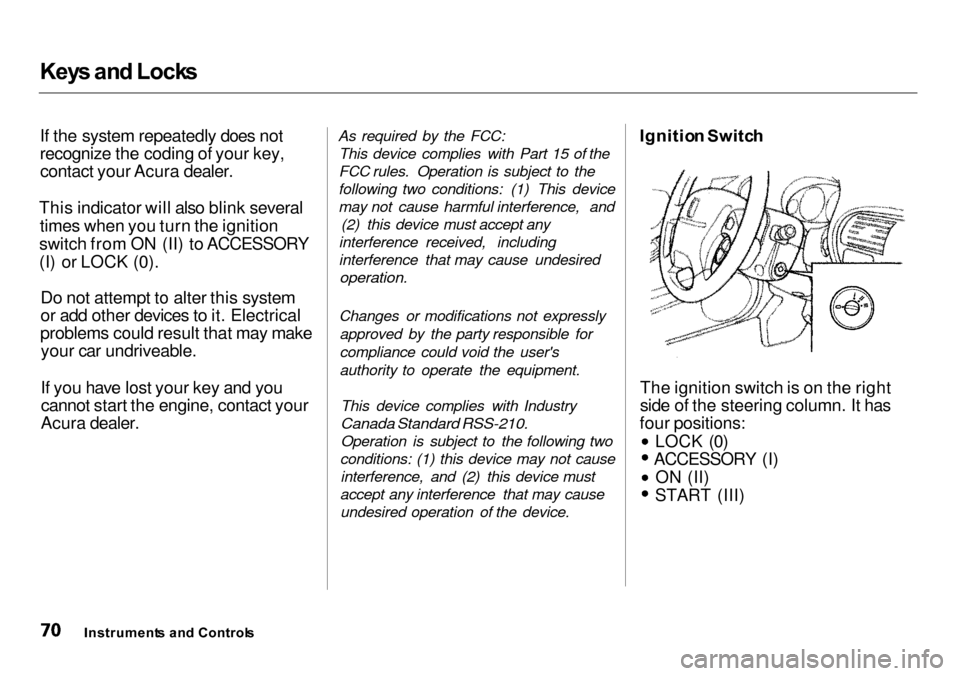
The ignition switch is on the right
side of the steering column. It has
four positions: LOCK (0)
ACCESSORY (I)
ON (II)
START (III)
Instrument s an d Control s
Page 74 of 273

Key
s an d Lock s
LOC K (0 ) — You can insert or
remove the key only in this position.
To switch from ACCESSORY to LOCK, you must push the key in
slightly as you turn it. If your car has
an automatic transmission, the shift
lever must also be in Park. The anti-
theft lock will lock the steering
column when you remove the key. If the front wheels are turned, the
anti-theft lock may sometimes make
it difficult to turn the key from
LOCK to ACCESSORY. Firmly turn
the steering wheel to the left or to
the right as you turn the key. ACCESSOR
Y (I ) — In this position,
you can operate the audio system and the cigarette lighter.
O N (II ) — This is the normal key
position when driving. All features
and accessories on the car are usable. Several of the lights on the instru-
ment panel come on as a test when
you turn the ignition switch from ACCESSORY to ON. STAR
T (III ) — Use this position
only to start the engine. The switch
returns to ON (II) when you let go of
the key.
The engine will not start if the Immobilizer System does not
recognize the key's coding (see page 69).
You will hear a reminder beeper if
you leave the key in the ignition switch in the LOCK (0) or
ACCESSORY (I) position and open
the driver's door. Remove the key to
turn off the beeper.
Instrument s an d Control s
Removing the key from the
ignition switch while driving
locks the steering. This can cause you to lose control.
Remove the key from the
ignition switch only when
parked.
Page 75 of 273
Key
s an d Lock s
Powe r Doo r Lock s
Each front door has a master door
lock switch. Either switch locks and unlocks all doors. Push the switch
down to lock all doors, and up to
unlock them. Each door has a lock tab above the
inside door handle. When you push
in the lock tab on the driver's door,
all doors lock. Pulling out the lock
tab on the driver's door only unlocks
that door. To lock any passenger's door when
getting out of the car, push the lock
tab in and close the door. To lock the
driver's door, pull the outside door
handle and push the lock tab in or
push the master switch down.
Release the handle, then close the
door.
Instrument s an d Control s


