Page 80 of 273

Sea
t Adjustments , Foldin g Rea r Sea t
Hea d Restraint s
See page 14 for important safety
information and a warning about how to
properly position the head restraints.
The front head restraints help
protect you and your passenger from whiplash and other injuries. They are
most effective when you adjust them so the back of the occupant's head
rests against the center of the
restraint. A taller person should adjust the restraint as high as
possible.
The front head restraints adjust forheight. You need both hands toadjust the restraint. Do not attempt
to adjust it while driving. To raise it,
pull upward. To lower the restraint,
push the release button sideways
and push the restraint down.
To remove a head restraint for
cleaning or repair, pull it up as far as it will go. Push the release button
and pull the restraint out of the seat-
back.
Foldin
g Rea r Sea t
The back of the rear seat folds down, giving you direct access to the trunk. The seat-back can be released from
inside the vehicle or inside the trunk.
CONTINUED
Instrument s an d Control s
RELEAS
E
BUTTO N
Page 81 of 273
Foldin
g Rea r Sea t
To fold down the seat-back from
inside the car, insert the master key
in the lock on the rear shelf. Turn
the key clockwise, pull down the top of the seat-back, then release the
key. To release the seat-back from inside
the trunk, pull the release loop under
the rear shelf.
To lock the seat-back upright, push it
firmly against the rear shelf. Make
sure it is latched in place by pulling
on the top of the seat. Make sure all items in the trunk, or
items extending through the opening
into the back seat, are secured.
Loose items can fly forward and
cause injury if you have to brake
hard. See Carryin
g Carg o on page
127.
Never drive with the seat-back
folded down and the trunk lid open. See Carbo n Monoxid e Hazar d on
page 49 .
Instrument s an d Control s RELEAS
E
Pul
l
MASTE
R KE Y
Page 110 of 273

Audi
o Syste m
Operatin g th e Optiona l C D
Change r
A trunk-mounted Compact Disc changer is available for your vehicle.
It holds up to six discs, providing
several hours of continuous entertainment. You operate this CD
changer with the same controls used
for the in-dash CD player.
Load the desired CDs in the
magazine and load the magazine in the changer according to theinstructions that came with the unit.
Play only standard round discs. Odd-
shaped CDs may jam in the drive or
cause other problems.
To select the CD changer, press the
CD button. The disc and track
numbers will be displayed. A "0" will flash for the track number as the CD
is loaded, then it will change to a
non-flashing "1".
To select a different disc, press the
appropriate preset button (1 — 6). If
you select an empty slot in the
magazine, the changer will, after
finding that slot empty, try to load the CD in the next slot. This
continues until it finds a CD to load
and play.
If you load a CD in the in-dash player
while the changer is playing a CD, the system will stop the changer and
begin playing the in-dash CD. To select the changer again, press the
CD button. Play will begin where it
left off. Use the CD button to switch
between the player and the changer.
If you eject the in-dash CD while it is
playing, the system will automatically
switch to the CD changer and begin
play where it left off. If there are no
CDs in the changer, the display will
flash. You will have to select another mode (AM or FM) with the button. When you switch back to CD mode,
the system selects the same unit (in-
dash or changer) that was playing
when you switched out of CD mode.
To use the SKIP, REPEAT, and
RANDOM functions, refer to the in-
dash player operating instructions.
Comfor t an d Convenienc e Feature s
Page 130 of 273
Carryin
g Carg o
CONSOL E COMPARTMEN T FRONT DOO R POCKE T
TRUN K
GLOVE BO X Your car has several convenient
storage areas so you can stow cargo
safely.
The glove box, and the pockets in
the front doors, are designed for small, lightweight items. The trunk
is intended for larger, heavier items.
In addition, the back seat can be
folded down to allow you to carry more cargo or longer items.
However, carrying too much cargo,
or improperly storing it, can affect
your car's handling, stability and operation and make it unsafe. Before
carrying any type of cargo, be sure to
read the following pages.
Before Drivin g
Page 132 of 273
Carrying
Cargo
Carryin g Carg o i n th e Trun k o r o n
a Roo f Rac k Distribute cargo evenly on the
floor of the trunk, placing the
heaviest items on the bottom and
as far forward as possible.
If you fold down the back seat, tie
down items that could be thrown
about the car during a crash or
sudden stop. If you carry large items that
prevent you from closing the
hatch, exhaust gas can enter the
passenger area. To avoid the
possibility of carbon monoxide
poisoning, follow the instructions
on page 49 .
If you can carry any items on a
roof top carrier, be sure the total weight of the rack and the items
does not exceed the maximum
allowable weight. Please contact your Acura dealer for further
information.
Before Drivin g
Page 135 of 273
Preparin
g to Driv e
You should do the following checks and adjustments every day before
you drive your car.
1. Make sure all windows, mirrors, and outside lights are clean and
unobstructed. Remove frost, snow,
or ice.
2. Check that the hood and trunk are fully closed.
3. Visually check the tires. If a tire looks low, use a gauge to check its
pressure.
4. Check that any items you may be carrying with you inside are stored
properly or fastened down
securely.
5. Check the adjustment of the seat
(see page 75 ).
6. Check the adjustment of the inside and outside mirrors (see
page 81 ).
7. Check the adjustment of the steering wheel (see page 65 ).
8. Make sure the doors are securely
closed and locked.
9. Fasten your seat belt. Check that
your passengers have fastened
their seat belts (see page 15 ). 10.Turn the ignition switch ON (II).
Check the indicator lights in the
instrument panel.
11.Start the engine (see page 133 ).
12.Check the gauges and indicator lights in the instrument panel (see
page 53 ).
Drivin g
Page 143 of 273

Parkin
g
Always use the parking brake when
you park your car. The indicator on
the instrument panel shows that the
parking brake is not fully released; it does not indicate that the parking brake is firmly set. Make sure the
parking brake is set firmly or your
car may roll if it is parked on an
incline.
If your car has an automatic
transmission, set the parking brake
before you put the transmission in
Park. This keeps the car from
moving and putting pressure on the
parking mechanism in the transmission — making it easier to
move the shift lever out of Park
when you want to drive away. If the car is facing uphill, turn the
front wheels away from the curb. If
you have a manual transmission, put it in first gear.
If the car is facing downhill, turn the
front wheels toward the curb. If you
have a manual transmission, put it in
reverse gear.
Make sure the parking brake is fully released before driving away.Driving with the parking brake
partially set can overheat or damage the rear brakes. Parkin
g Tip s
Make sure the moonroof and the windows are closed. Turn off the lights.
Place any packages, valuables, etc.,
in the trunk or take them with you.
Lock the doors. Never park over dry leaves, tall
grass, or other flammable
materials. The three way catalytic
converter gets very hot, and could cause these materials to catch on
fire.
Drivin g
Page 203 of 273
Light
s
Headligh t Aimin g
The headlights were properly aimed when your car was new. You should check their aim if you regularly carry
heavy items in the trunk or pull a
trailer. Each headlight assembly has
horizontal and vertical adjustment indicators. These are set to their "0"
positions after the headlights are
aimed at the factory. To check these settings:
1. Make sure the fuel tank is full. Park the vehicle on level ground.
2. The driver or someone who weighs the same should be sittingin the driver's seat for all checksand adjustments.
Load the trunk with the items you
normally carry.
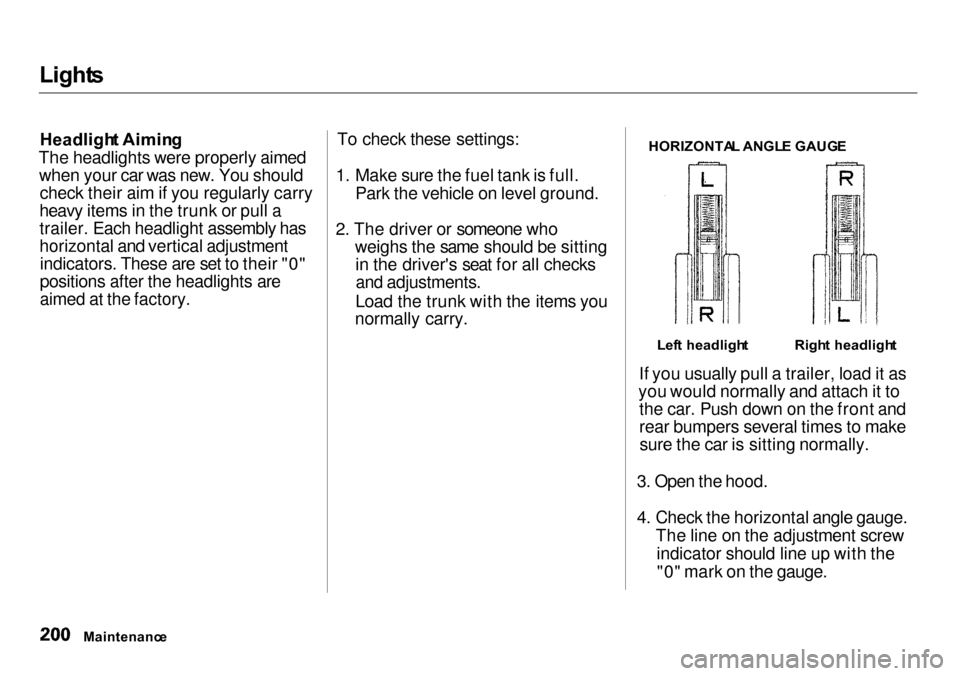
HORIZONTA
L ANGL E GAUG E
If you usually pull a trailer, load it as
you would normally and attach it to the car. Push down on the front and
rear bumpers several times to makesure the car is sitting normally.
3. Open the hood.
4. Check the horizontal angle gauge. The line on the adjustment screwindicator should line up with the"0" mark on the gauge.
Maintenanc e
Righ
t headligh t
Lef t headligh t


