Page 3 of 244
SOLARA_U3
1. Power rear view mirror control switch
2. Headlight and turn signal switch
3. Wiper and washer switches
4. Emergency flasher switch
5. Clock and front passenger 's seat belt
reminder light
6. Car audio
7. Rear window and outside rear view mirror defoggers switch
8. Air conditioning controls
9. Auxiliary box
10. Front ashtray 11. Cigarette lighter
12. Power outlet
13. Ignition switch
14. Cruise control switch
15. Tilt steering lock release lever
16. Instrument panel light control knob
Page 10 of 244

SOLARA_U
10
KEY NUMBER PLATE
Your key number is shown on the plate.
Keep the plate in a safe place such as
your wallet, not in the vehicle.
If you should lose your keys or if you
need additional keys, duplicates can be
made by a Toyota dealer using the key
number.
We recommend you to write down the key
number and keep it in safe place. Engine immobiliser systemThe engine immobiliser system is a
theft prevention system. When you in-
sert the key in the ignition switch, the
transponder chip in the key's head
transmits an electronic code to the ve-
hicle. The engine will start, only when
the electronic code in the chip corre-
sponds to the registered ID code for
the vehicle.The system is automatically set when the
key is removed from the ignition switch.
The indicator light will start flashing every
1 second to show the system is set.
If either of the following indicator condi-
tions occurs, contact your Toyota dealer.
The indicator light stays on except
when the theft deterrent system is set-
ting or activating. (See ºTheft deterrent
system.)
The indicator light does not start flash-
ing when the key is removed from the
ignition switch.
The indicator light flashes unsteady.
Page 11 of 244

SOLARA_U11
Inserting the registered key in the ignition
switch automatically cancels the system,
which enables the engine to start. The
indicator light will go off.
For your Toyota dealer to make you a
new key with built- in transponder chip,
your dealer will need your key number
and master key. However, there is a limit
to the number of additional keys your
Toyota dealer can make for you.
If you make your own duplicate key,
you will not be able to cancel the sys-
tem or start the engine.
For vehicles sold in U.S.A.
FCC ID: MOZ RI- 4ATY
MADE IN JAPAN
This device complies with Part 15 of the
FCC Rules. Operation is subject to the
following two conditions:
(1) This device may not cause harmful
interference, and (2) this device must
accept any interference received, includ-
ing interference that may cause unde-
sired operation.
CAUTION
Changes or modifications not ex-
pressly approved by the party respon-
sible for compliance could void the
user's authority to operate the equip-
ment.
For vehicles sold in CanadaThis device complies with RSS- 210 of
industry Canada. Operation is subject to
the following two conditions:
(1) this device may not cause interfer-
ence, and (2) this device must accept
any interference, including interference
that may cause undesired operation of
the device.
Page 12 of 244
SOLARA_U
12
Side doors
LOCKING AND UNLOCKING WITH KEY
Insert the key into the keyhole and turn it.
To lock: Turn the key forward.
To unlock: Turn the key backward.
Both doors lock and unlock simultaneously
with either door. In the driver's door lock,
turning the key once will unlock the driv-
er's door and twice in succession will un-
lock both doors simultaneously.LOCKING AND UNLOCKING WITH IN-
SIDE LOCK BUTTON
Move the lock button.
To lock: Push the knob forward.
To unlock: Pull the knob backward.
Closing the door with the lock knob in the
lock position will also lock the door. Be
careful not to lock your keys in the ve-
hicle.
The door cannot be locked if you leave
the key in the ignition switch.Driver's side
Passenger's side
Page 13 of 244

SOLARA_U13
LOCKING AND UNLOCKING WITH POW-
ER DOOR LOCK SWITCH
Push the switch.
To lock: Push the switch on the front side.
To unlock: Push the switch on the rear
side.
Both doors lock or unlock simultaneously.
ÐWireless remote control
Locking operation
Unlocking operationYour vehicle has a wireless remote
control system that can lock or unlock
both doors, or activate the theft
deterrent system from a distance within
approximately 1 m (3 ft.) of the vehicle.
LOCKING AND UNLOCKING THE DOORS
To lock and unlock both doors, push
the switches of the transmitter slowly
and securely.
To lock: Push the ºLOCKº switch. Both
doors are locked simultaneously. At this
time, parking lights, side marker lights and
tail lights flash.
Check to see that the doors are securely
locked.
If either doors is not securely closed, or
if the key is in the ignition switch, locking
cannot be performed by the ºLOCKº
switch.
To unlock: Push the ºUNLOCKº switch
once to unlock the driver 's door alone.
Pushing the switch twice within 3 seconds
unlocks both doors simultaneously. At this
time, parking lights, side marker lights and
tail lights flash twice.
Page 14 of 244

SOLARA_U
14
You have 30 seconds to open a door after
using the wireless remote unlock feature.
If a door is not opened by then, both
doors will be automatically locked again.
If the ºLOCKº or ºUNLOCKº switch is kept
pressed in, the locking or unlocking opera-
tion is not repeated. Release the button
and then push again.
ºPANICº SWITCH
Pushing the ºPANICº switch blows the
horn intermittently and flashes the
headlights and tail lights.
The ºPANICº switch is used to deter the
vehicle theft when you witness anyone at-
tempting to brake into or damage your
vehicle.
The alarm will last for one minute. To stop
this in the midway, push the ºPANICº
switch once again, unlock any door with
the key or transmitter, or turn the ignition
key from the ºLOCKº to ºONº position.
The ºPANICº mode does not work when
the ignition key is in the ºONº position.
WIRELESS REMOTE CONTROL TRANS-
MITTER
The wireless remote control transmitter is
an electronic component. Observe the fol-
lowing instructions in order not to cause
damage on the transmitter.
Do not leave the transmitter on the
places where the temperature becomes
high such as on the dashboard.
Do not disassemble it.
Avoid knocking it hard against other
objects or dropping it.
Avoid putting it in water.
You can use up to 4 wireless remote con-
trol transmitters for the same vehicle.
Contact your Toyota dealer for detailed
information.
If the wireless remote control transmitter
does not actuate the doors or alarm, or
operate from a normal distance:
Page 17 of 244
SOLARA_U17
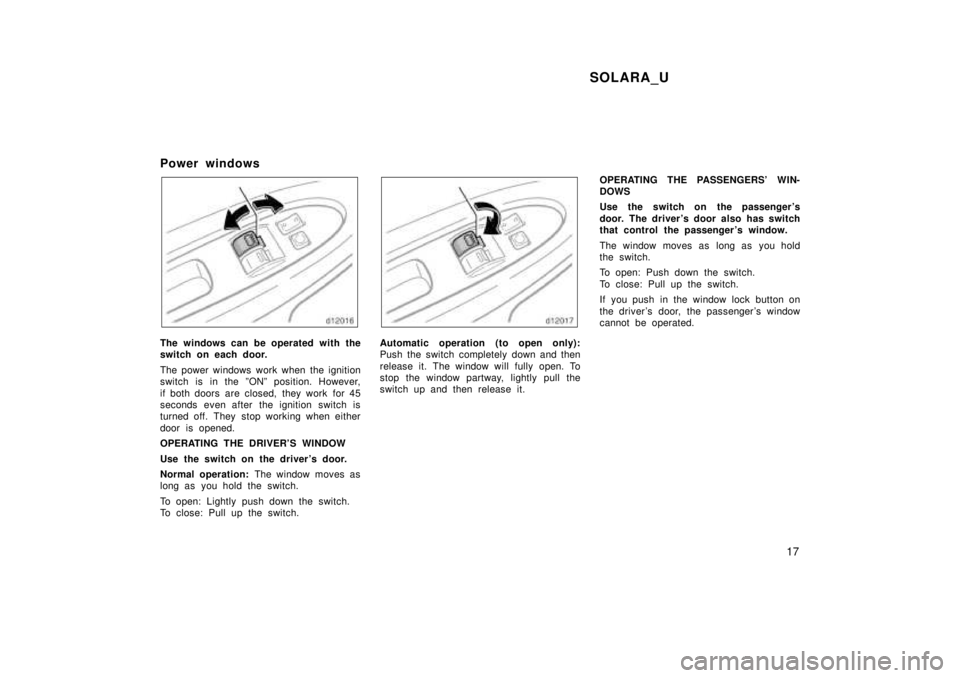
Power windows
The windows can be operated with the
switch on each door.
The power windows work when the ignition
switch is in the ºONº position. However,
if both doors are closed, they work for 45
seconds even after the ignition switch is
turned off. They stop working when either
door is opened.
OPERATING THE DRIVER'S WINDOW
Use the switch on the driver's door.
Normal operation:
The window moves as
long as you hold the switch.
To open: Lightly push down the switch.
To close: Pull up the switch.Automatic operation (to open only):
Push the switch completely down and then
release it. The window will fully open. To
stop the window partway, lightly pull the
switch up and then release it. OPERATING THE PASSENGERS' WIN-DOWS
Use the switch on the passenger 's
door. The driver 's door also has switch
that control the passenger 's window.
The window moves as long as you hold
the switch.
To open: Push down the switch.
To close: Pull up the switch.
If you push in the window lock button on
the driver 's door, the passenger 's window
cannot be operated.
Page 21 of 244
SOLARA_U21
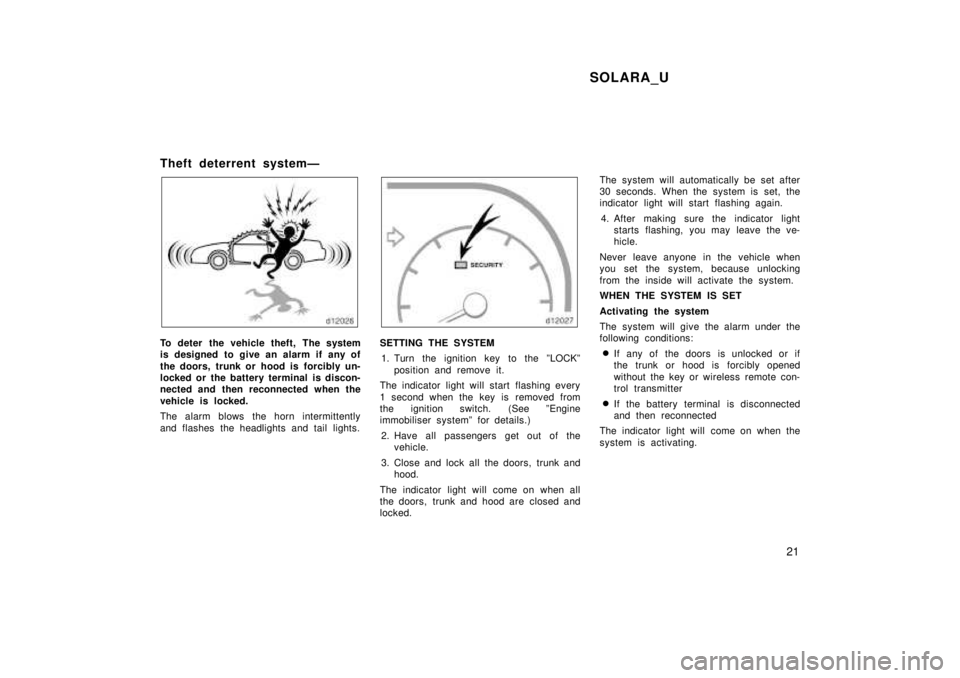
Theft deterrent systemÐ
To deter the vehicle theft, The system
is designed to give an alarm if any of
the doors, trunk or hood is forcibly un-
locked or the battery terminal is discon-
nected and then reconnected when the
vehicle is locked.
The alarm blows the horn intermittently
and flashes the headlights and tail lights.SETTING THE SYSTEM
1. Turn the ignition key to the ºLOCKº position and remove it.
The indicator light will start flashing every
1 second when the key is removed from
the ignition switch. (See ºEngine
immobiliser systemº for details.)
2. Have all passengers get out of the vehicle.
3. Close and lock all the doors, trunk and hood.
The indicator light will come on when all
the doors, trunk and hood are closed and
locked. The system will automatically be set after
30 seconds. When the system is set, the
indicator light will start flashing again.
4. After making sure the indicator light starts flashing, you may leave the ve-
hicle.
Never leave anyone in the vehicle when
you set the system, because unlocking
from the inside will activate the system.
WHEN THE SYSTEM IS SET
Activating the system
The system will give the alarm under the
following conditions: If any of the doors is unlocked or if
the trunk or hood is forcibly opened
without the key or wireless remote con-
trol transmitter
If the battery terminal is disconnected
and then reconnected
The indicator light will come on when the
system is activating.

