Page 114 of 226

'99 Rav4.U
11 4
RPT (Repeat)
There are two repeat featuresÐyou can
either replay a disc track or a whole com-
pact disc.
Repeating a track:
Quickly push and release ºRPTº while the
track is playing. ºRPTº will appear on the
display. If you hear a beep, you held the
button too long, and the player will repeat
the whole disc. When the track ends, it
will automatically be replayed. This pro-
cess will be continued until you push the
button again to turn off the repeat feature.
Compact disc auto changer onlyÐ
Repeating a disc:
Push and hold ºRPTº until you hear a
beep. ºD´RPTº will appear on the display.
The player will repeat all the tracks on the
disc you are listening to. When the disc
ends, the player will automatically go back
to the top track of the disc and replay.
This process will be continued until you
push the button again to turn off the re-
peat feature.
SCAN
Radio
You can either scan all the frequencies on
a band or scan only the preset stations
for that band.
To scan all the frequencies:
Quickly push and release ºSCANº. If you
hear a beep, you held the button too long,
and the radio will scan the preset sta-
tions. The radio will find the next station
up the station band, stay there for a few
seconds, and then scan again. To select
a station, push ºSCANº a second time.
To scan the preset stations:
Push and hold ºSCANº until you hear a
beep. The radio will tune in the next pres-
et station up the band, stay there for a
few seconds, and then move to the next
preset station. To select a station, push
ºSCANº a second time.
Compact disc player
There are two scan featuresÐyou can ei-
ther scan the tracks on a specific disc or
scan the first tracks of all the discs in the
magazine.
Scanning for the tracks on a disc:
Quickly push and release ºSCANº. ºSCANº
will appear on the display and the player
will scan all the tracks on the disc you
are listening to. If you hear a beep, you
held the button too long, and the player
will scan the first tracks of all the discs
in the magazine. To select a track, push
the ºSCANº a second time. If the player
scanned all the tracks on the disc, it will
stop scanning.
Compact disc auto changer onlyÐ
Scanning for the first tracks of all the
discs in the magazine:
Push and hold ºSCANº until you hear a
beep. ºD´SCANº will appear on the display
and the player will perform the first track
of the next disc. To select a disc, push
the ºSCANº a second time. If the player
has scanned all the di
scs, it will stop
scanning.
Page 115 of 226

'99 Rav4.U11 5
ST (Stereo reception) display
Your radio automatically changes to stereo
reception when a stereo broadcast is re-
ceived. ºSTº appears on the display. If the
signal becomes weak, the radio reduces
the amount of channel separation to prev-
ent the weak signal from creating noise.
If the signal becomes extremely weak, the
radio switches from stereo to mono recep-
tion.
TRACK (Track up/down button):
Compact disc player
By using this button, you can skip up or
down to a different track.
Push either side of the track button until
the number of the track you want to listen
to appears on the display. If you want to
return to the beginning of the current
track, push the down side of the button
one time, quickly.
TUNE (Tuning)
Tuning
Your Toyota has an electronic tuning radio
(ETR). Push and release the º
º (up) or
º º (down) side of ºTUNEº to step up or
down the station band. (If you hear a
beep, you held the button too long and
the radio will go into the seek mode.) Seeking
In the seek mode, the radio finds and
plays the next station up or down the
station band.
To seek a station, push and hold the º
º
or º º side of ºTUNEº until you hear a
beep. Do this again to find another sta-
tion.
NOTICE
To ensure the correct audio system
operation:
Be careful not to spill beveragesover the audio system.
Do not put anything other than acassette tape or Compact Disc into
the slot.
RADIO RECEPTION
Usually, a problem with radio reception
does not mean there is a problem with
your radioÐit is just the normal result of
conditions outside the vehicle.
For example, nearby buildings and terrain
can interfere with FM reception. Power
lines or telephone wires can interfere with
AM signals. And of course, radio signals
have a limited range, and the farther you
are from a station, the weaker its signal
will be. In addition, reception conditions
change constantly as your vehicle moves. ÐCar audio system operating
hints
Page 194 of 226
'99 Rav4.U
194
Engine oil selection
Use API grade SJ, ºEnergy- Conservingº or
ILSAC multigrade engine oil.
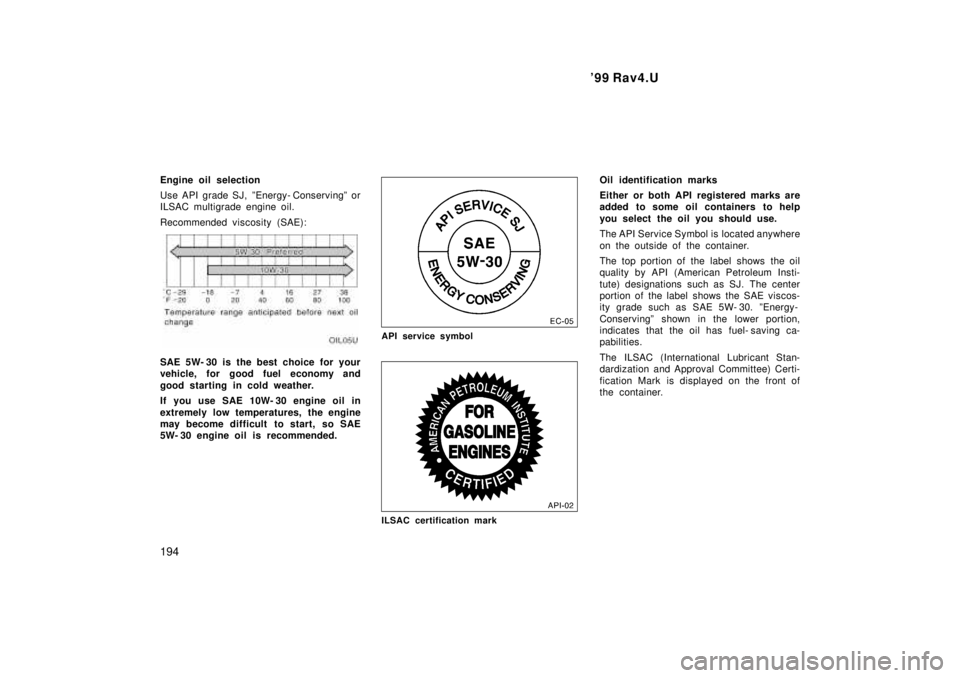
Recommended viscosity (SAE):
SAE 5W- 30 is the best choice for your
vehicle, for good fuel economy and
good starting in cold weather.
If you use SAE 10W- 30 engine oil in
extremely low temperatures, the engine
may become difficult to start, so SAE
5W- 30 engine oil is recommended.
API service symbol
ILSAC certification mark
Oil identification marks
Either or both API registered marks are
added to some oil containers to help
you select the oil you should use.
The API Service Symbol is located anywhere
on the outside of the container.
The top portion of the label shows the oil
quality by API (American Petroleum Insti-
tute) designations such as SJ. The center
portion of the label shows the SAE viscos-
ity grade such as SAE 5W- 30. ºEnergy-
Conservingº shown in the lower portion,
indicates that the oil has fuel- saving ca-
pabilities.
The ILSAC (International Lubricant Stan-
dardization and Approval Committee) Certi-
fication Mark is displayed on the front of
the container.