1999 TOYOTA 4RUNNER engine
[x] Cancel search: enginePage 102 of 268
4RUNNER ()
102
CAUTION
While the vehicle is moving, never
attempt to move the selector lever
into ºPº position under any circum-
stances. Serious mechanical damage
and loss of vehicle control may re-
sult.
(f) Good driving practice If the transmission is repeatedly up-
shifted and downshifted between third
gear and overdrive when climbing a
gentle slope, the overdrive switch
should be turned off. Be sure to turn
the switch on immediately afterward.
When towing a trailer, in order to main-
tain engine braking efficiency, do not
use overdrive.
CAUTION
Always keep your foot on the brake
pedal while stopped with the engine
running. This prevents the vehicle
from creeping.
NOTICE
Do not hold the vehicle on an up-
grade with the accelerator pedal. Itcan cause the transmission to over- heat. Always use the brake pedal or
parking brake.
(g) Rocking your vehicle if stuck
CAUTION
If your vehicle becomes stuck in
snow, mud, sand, etc., then you may
attempt to rock the vehicle free by
moving it forward and backward. Do
not attempt this procedure if people
or objects are anywhere near the ve-
hicle. During the rocking operation
the vehicle may suddenly move for-
ward or backward as it becomes un-
stuck, causing injury or damage to
nearby people or objects.
NOTICE
If you rock your vehicle, observe thefollowing precautions to prevent dam-age to the transmission and other parts.
Do not depress the accelerator ped-
al while shifting the selector leveror before the transmission is com-pletely shifted to forward or reverse
gear.
Do not race the engine and avoidspinning the wheels.
If your vehicle remains stuck afterrocking the vehicle several times,
consider other ways such as tow-ing.
(h) Driving in ºPWRº (Power) mode
In the ºPWRº mode, the transmission is
shifted up and down at a higher vehicle
speed than in the ºNORMº(Normal) mode
and a more powerful acceleration is
achieved. To set the ºPWRº mode, push
in the driving pattern selector button. The
ºPWRº mode indicator light comes on.
For ordinary driving, Toyota recommends
using the ºNORMº mode to improve fuel
economy.
Page 103 of 268
4RUNNER ()103
(i) If you cannot shift the selector le-
ver out of ºPº position
If you cannot shift the selector lever from
the ºPº position even though the brake
pedal is depressed, use the shift lock
override lever. For instructions, see ºIf you
cannot shift automatic transmission selec-
tor leverº in Part 4. Manual transmission
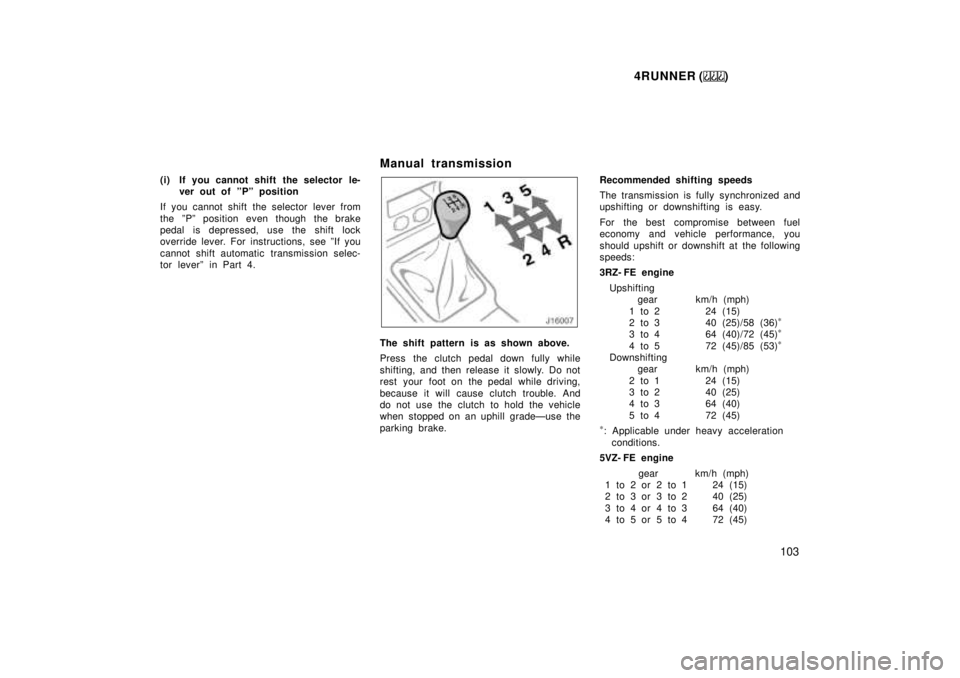
The shift pattern is as shown above.
Press the clutch pedal down fully while
shifting, and then release it slowly. Do not
rest your foot on the pedal while driving,
because it will cause clutch trouble. And
do not use the clutch to hold the vehicle
when stopped on an uphill gradeÐuse the
parking brake.Recommended shifting speeds
The transmission is fully synchronized and
upshifting or downshifting is easy.
For the best compromise between fuel
economy and vehicle performance, you
should upshift or downshift at the following
speeds:
3RZ- FE engine
Upshifting gear km/h (mph)
1 to 2 24 (15)
2 to 3 40 (25)/58 (36) *
3 to 4 64 (40)/72 (45) *
4 to 5 72 (45)/85 (53) *
Downshifting gear km/h (mph)
2 to 1 24 (15)
3 to 2 40 (25)
4 to 3 64 (40)
5 to 4 72 (45)
* : Applicable under heavy acceleration
conditions.
5VZ- FE engine
gear km/h (mph)
1 to 2 or 2 to 1 24 (15)
2 to 3 or 3 to 2 40 (25)
3 to 4 or 4 to 3 64 (40)
4 to 5 or 5 to 4 72 (45)
Page 104 of 268
4RUNNER ()
104
Downshift to the appropriate gear if accel-
eration is needed when you are cruising
below the above downshifting speeds.
Upshifting too soon or downshifting too
late will cause lugging and, possibly, ping-
ing. Regularly revving the engine to maxi-
mum speed in each gear will cause ex-
cessive engine wear and high fuel
consumption.
Maximum allowable speeds
To get on a highway or to pass slower
traffic, maximum acceleration may be nec-
essary. Make sure you observe the follow-
ing maximum allowable speeds in each
gear:
Two- wheel drive models
gear km/h (mph)1 48 (29)
2 90 (55)
3 139 (86)
4 165 (102)
Four- wheel drive models
3RZ- FE engine
gear km/h (mph) ºH2º and ºH4º ºL4º
1 45 (28) 17 (11)
2 84 (52) 32 (20)
3 130 (81) 50 (31)
4 165 (102) 64 (39) 5VZ- FE engine
gear km/h (mph) ºH2º and ºH4º ºL4º
1 48 (29) 18 (11)
2 89 (55) 34 (21)
3 127 (79) 49 (31)
4 165 (102) 64 (39)
NOTICE
Do not downshift if you are going
faster than the maximum allowablespeed for the next lower gear.
Good driving practice
If it is difficult to shift into reverse, put
the transmission in neutral, release the
clutch pedal momentarily, and then try
again.
When towing a trailer, in order to main-
tain engine braking efficiency, do not
use the fifth gear.
CAUTION
Be careful when downshifting on a
slippery surface. Abrupt shifting
could cause the vehicle to spin or
skid.
NOTICE
Make sure the vehicle is completely
stopped before shifting into reverse.
Page 111 of 268

4RUNNER ()111
To lock the rear differential, push the
switch.
Be sure to stop the wheels before locking
the differential.
Vehicles with manual transmissionÐFor
easy locking, depress the clutch pedal,
push the lock switch and slowly release
the clutch pedal.
The indicator light will blink when the
switch is turned on. Wait a few seconds
for the system to complete operation. Af-
ter the differential is locked, the light will
stop blinking and remain on. The anti- lock brake system does not oper-
ate when the rear differential is locked. It
is normal operation for the ºABSº warning
light to be on at this time.
CAUTION
Do not lock the differential until the
wheels have stopped spinning.
Otherwise, the vehicle may move in
an unexpected direction when the
differential lock is engaged, result-
ing in an accident. This may also
lead to possible damage to differen-
tial lock component parts.
Do not drive over 8 km/h (5 mph)
when the differential is locked.
To unlock the differential, push the
switch once again.
Unlock the differential as soon as the ve-
hicle moves out.
For easy unlocking, slightly turn the steer-
ing wheel in either direction while the ve-
hicle is in motion.
When the differential lock is disengaged,
the indicator light will go out. The differential will also unlock if you shift
the front drive control lever out of ºL4º.
Never forget to turn off the switch after
using this feature.
To check the indicator bulb, turn the igni-
tion key to the ºONº position, but do not
start the engine.
CAUTION
Do not keep driving with the differen-
tial lock switch on.
Page 112 of 268
4RUNNER ()
11 2
Parking brake
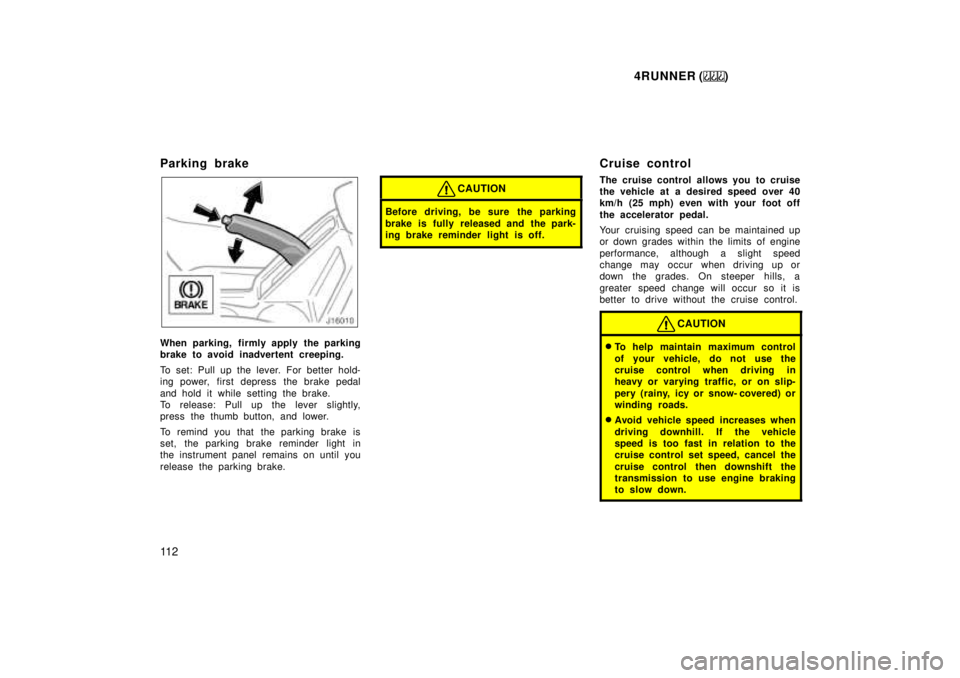
When parking, firmly apply the parking
brake to avoid inadvertent creeping.
To set: Pull up the lever. For better hold-
ing power, first depress the brake pedal
and hold it while setting the brake.
To release: Pull up the lever slightly,
press the thumb button, and lower.
To remind you that the parking brake is
set, the parking brake reminder light in
the instrument panel remains on until you
release the parking brake.
CAUTION
Before driving, be sure the parking
brake is fully released and the park-
ing brake reminder light is off.
Cruise control
The cruise control allows you to cruise
the vehicle at a desired speed over 40
km/h (25 mph) even with your foot off
the accelerator pedal.
Your cruising speed can be maintained up
or down grades within the limits of engine
performance, although a slight speed
change may occur when driving up or
down the grades. On steeper h
ills, a
greater speed change will occur so it is
better to drive without the cruise control.
CAUTION
To help maintain maximum control
of your vehicle, do not use the
cruise control when driving in
heavy or varying traffic, or on slip-
pery (rainy, icy or snow- covered) or
winding roads.
Avoid vehicle speed increases when
driving downhill. If the vehicle
speed is too fast in relation to the
cruise control set speed, cancel the
cruise control then downshift the
transmission to use engine braking
to slow down.
Page 113 of 268
4RUNNER ()11 3
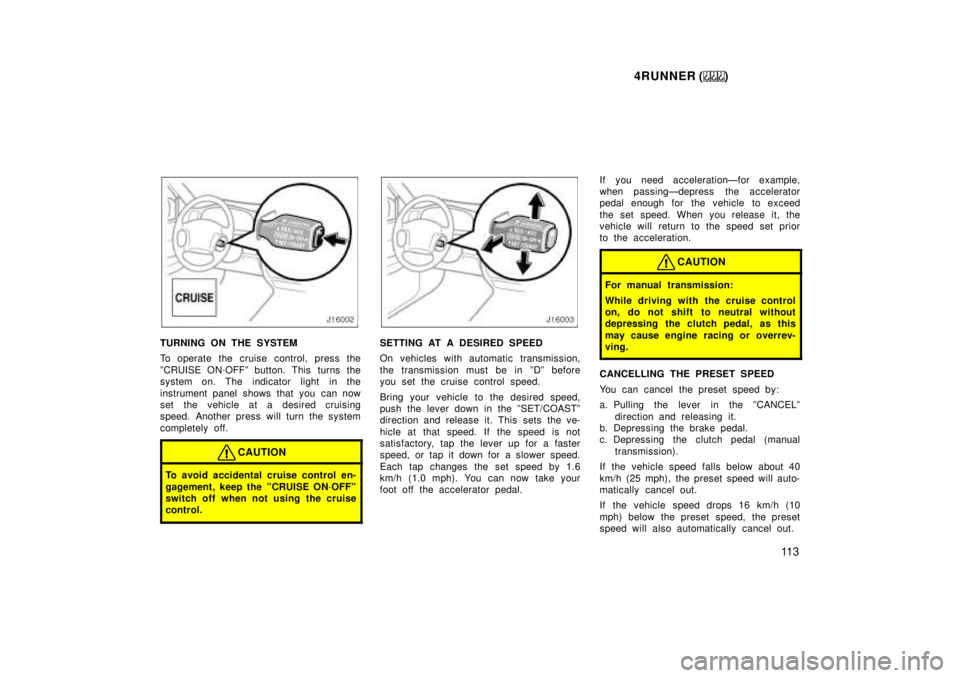
TURNING ON THE SYSTEM
To operate the cruise control, press the
ºCRUISE ON´OFFº button. This turns the
system on. The indicator light in the
instrument panel shows that you can now
set the vehicle at a desired cruising
speed. Another press will turn the system
completely off.
CAUTION
To avoid accidental cruise control en-
gagement, keep the ºCRUISE ON´OFFº
switch off when not using the cruise
control.
SETTING AT A DESIRED SPEED
On vehicles with automatic transmission,
the transmission must be in ºDº before
you set the cruise control speed.
Bring your vehicle to the desired speed,
push the lever down in the ºSET/COASTº
direction and release it. This sets the ve-
hicle at that speed. If the speed is not
satisfactory, tap the lever up for a faster
speed, or tap it down for a slower speed.
Each tap changes the set speed by 1.6
km/h (1.0 mph). You can now take your
foot off the accelerator pedal. If you need accelerationÐfor example,
when passingÐdepress the accelerator
pedal enough for the vehicle to exceed
the set speed. When you release it, the
vehicle will return to the speed set prior
to the acceleration.
CAUTION
For manual transmission:
While driving with the cruise control
on, do not shift to neutral without
depressing the clutch pedal, as this
may cause engine racing or overrev-
ving.
CANCELLING THE PRESET SPEED
You can cancel the preset speed by:
a. Pulling the lever in the ºCANCELº
direction and releasing it.
b. Depressing the brake pedal.
c. Depressing the clutch pedal (manual
transmission).
If the vehicle speed falls below about 40
km/h (25 mph), the preset speed will auto-
matically cancel out.
If the vehicle speed drops 16 km/h (10
mph) below the preset speed, the preset
speed will also automatically cancel out.
Page 114 of 268

4RUNNER ()
11 4
If the preset speed automatically cancels
out other than for the above cases, have
your vehicle checked by your Toyota deal-
er at the earliest opportunity.
RESETTING AT A FASTER SPEED
Push the lever up in the ºRES/ACCº direc-
tion and hold it. Release the lever when
the desired speed is attained. While the
lever is held up, the vehicle will gradually
gain speed.
However, a faster way to reset is to ac-
celerate the vehicle and then push the
lever down in the ºSET/COASTº direction.
RESETTING AT A SLOWER SPEED
Push the lever down in the ºSET/COASTº
direction and hold it. Release the lever
when the desired speed is attained. While
the lever is held down, the vehicle speed
will gradually decrease.
However, a faster way to reset is to de-
press the brake pedal and then push the
lever down in the ºSET/COASTº direction.
On vehicles with automatic transmission,
even if you turn off the overdrive switch,
with the cruise control on, engine braking
will not be applied because the cruise
control is not cancelled. To decrease the
vehicle speed, reset to a slower speed
with the cruise control lever or depress
the brake pedal. If you use the brake
pedal, cruise control is cancelled.
RESUMING THE PRESET SPEED
If the preset speed is cancelled by pu
lling
the control lever or by depressing the
brake pedal or clutch pedal, pushing the
lever up in the ºRES/ACCº direction will
restore the speed set prior to cancellation.
However, once the vehicle speed falls be-
low about 40 km/h (25 mph), the preset
speed will not be resumed.
CRUISE CONTROL FAILURE WARNING
If the ºCRUISEº indicator light in the
instrument cluster flashes when using the
cruise control, press the ºCRUISE
ON´OFFº button to turn the system off and
then press it again to turn it on. If any of the following conditions then oc-
curs, there is some trouble in the cruise
control system.
The indicator light does not come on.
The indicator light flashes again.
The indicator light goes out after it
comes on.
If this is the case, contact your Toyota
dealer and have your vehicle inspected.
Page 115 of 268
4RUNNER ()11 5
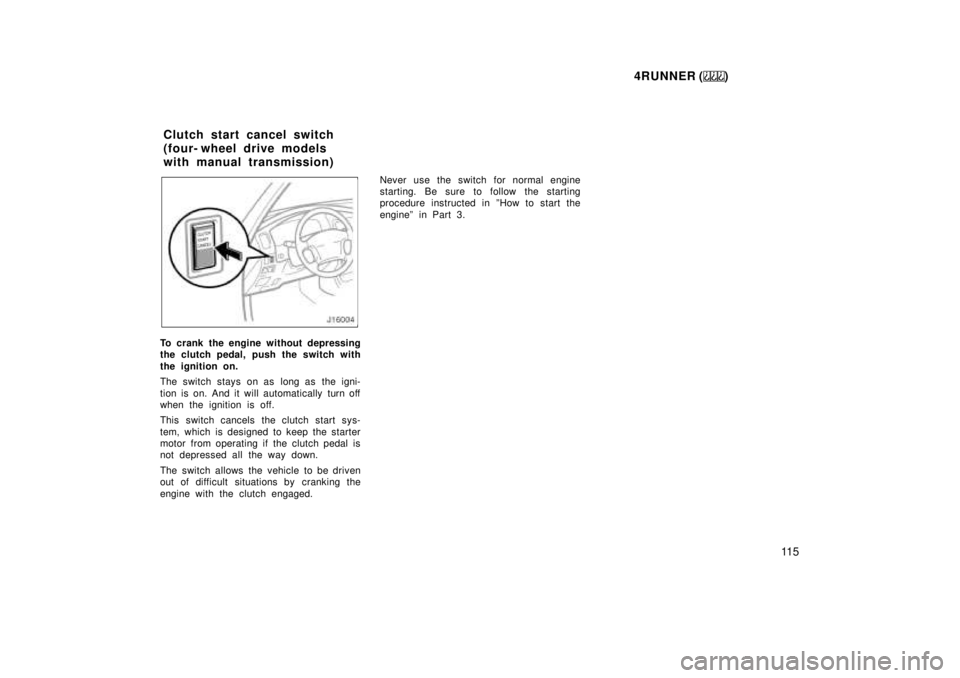
To crank the engine without depressing
the clutch pedal, push the switch with
the ignition on.
The switch stays on as long as the igni-
tion is on. And it will automatically turn off
when the ignition is off.
This switch cancels the clutch start sys-
tem, which is designed to keep the starter
motor from operating if the clutch pedal is
not depressed all the way down.
The switch allows the vehicle to be driven
out of difficult situations by cranking the
engine with the clutch engaged. Never use the switch for normal engine
starting. Be sure to follow the starting
procedure instructed in ºHow to start the
engineº in Part 3.
Clutch start cancel switch
(four- wheel drive models
with manual transmission)