1999 TOYOTA 4RUNNER ESP
[x] Cancel search: ESPPage 49 of 268

4RUNNER ()49
The SRS airbag system is designed to
activate in response to a severe frontal
impact within the shaded area between
the arrows in the illustration.
There may be the case that the SRS air-
bags will not activate with such an impact
in which the occupant wearing the seat
belt correctly would not get serious injury.
The SRS airbags will deploy if the severi-
ty of the impact is above the designed
threshold level, comparable to an approxi-
mate 25 km/h (15 mph) collision when
impacting straight into a fixed barrier that
does not move or deform.
If the severity of the impact is below the
above threshold level, the SRS airbags
may not deploy. However, this threshold velocity will be
considerably higher if the vehicle strikes
an object, such as a parked vehicle or
sign pole, which can move or deform on
impact, or if it is involved in an underride
collision (e.g. a collision in which the nose
of the vehicle ºunderridesº, or goes under,
the bed of a truck, etc.).
It is possible with collision severity at the
marginal level of airbag sensor detection
and activation that only one of your ve-
hicle's two airbags will deploy.
For the safety of all occupants, be sure
to always wear seat belts.
Collision from thee rear
Collision from the side Vehicle rollover
The SRS airbags are not designed to
inflate if the vehicle is subjected to a
side or rear impact, if it rolls over, or
if it is involved in a low- speed frontal
collision.
Page 83 of 268

4RUNNER ()83
NOTICE
Do not operate the back window wip-er if the back window is dry. It mayscratch the glass.
To defog or defrost the back window,
push the switch with the back window
closed.
The key must be in the ºONº position.
The thin heater wires on the inside of the
back window will quickly clear the surface.
An indicator light will illuminate to indicate
the defogger is operating.
On some models, heater panels in the
outside rear view mirrors will also quickly
clear the surfaces.
Push the switch once again to turn the
defogger off.
The system will automatically shut off af-
ter the defoggers have operated about 15
minutes. Make sure you turn the defoggers off
when the surfaces are clear. Leaving the
defoggers on for a long time could cause
the battery to discharge, especially during
stop- and- go driving. The defoggers are
not designed for drying rain water or for
melting snow.
CAUTION
On some models, since the mirror
surfaces can get hot, keep your
hands off them when the defogger
switch is on.
NOTICE
When cleaning the inside of the back
window, be careful not to scratch ordamage the heater wires.
Back window and outside rear
view mirror defoggers
Page 104 of 268
4RUNNER ()
104
Downshift to the appropriate gear if accel-
eration is needed when you are cruising
below the above downshifting speeds.
Upshifting too soon or downshifting too
late will cause lugging and, possibly, ping-
ing. Regularly revving the engine to maxi-
mum speed in each gear will cause ex-
cessive engine wear and high fuel
consumption.
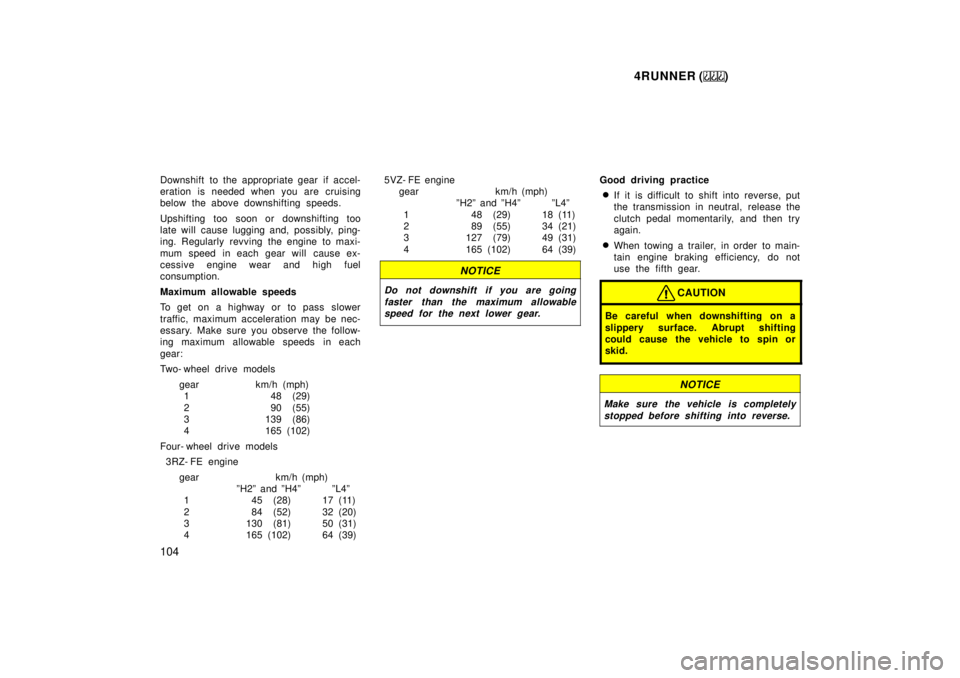
Maximum allowable speeds
To get on a highway or to pass slower
traffic, maximum acceleration may be nec-
essary. Make sure you observe the follow-
ing maximum allowable speeds in each
gear:
Two- wheel drive models
gear km/h (mph)1 48 (29)
2 90 (55)
3 139 (86)
4 165 (102)
Four- wheel drive models
3RZ- FE engine
gear km/h (mph) ºH2º and ºH4º ºL4º
1 45 (28) 17 (11)
2 84 (52) 32 (20)
3 130 (81) 50 (31)
4 165 (102) 64 (39) 5VZ- FE engine
gear km/h (mph) ºH2º and ºH4º ºL4º
1 48 (29) 18 (11)
2 89 (55) 34 (21)
3 127 (79) 49 (31)
4 165 (102) 64 (39)
NOTICE
Do not downshift if you are going
faster than the maximum allowablespeed for the next lower gear.
Good driving practice
If it is difficult to shift into reverse, put
the transmission in neutral, release the
clutch pedal momentarily, and then try
again.
When towing a trailer, in order to main-
tain engine braking efficiency, do not
use the fifth gear.
CAUTION
Be careful when downshifting on a
slippery surface. Abrupt shifting
could cause the vehicle to spin or
skid.
NOTICE
Make sure the vehicle is completely
stopped before shifting into reverse.
Page 131 of 268

4RUNNER ()131
Compact disc auto changer onlyÐ
Scanning for the first tracks of all the
discs in the magazine:
Push and hold ºSCANº until you hear a
beep. ºD´SCANº will appear on the display
and the player will perform the first track
of the next disc. To select a disc, push
the ºSCANº a second time. If the player
has scanned all the di
scs, it will stop
scanning.
SEEK (Seeking)
Radio
In the seek mode, the radio finds and
plays the next station up or down the
station band.
To seek a station, push and hold the º º
or º º side of ºSEEKº until you hear a
beep. Do this again to find another sta-
tion. Cassette Player
By using this button, you can skip up or
down to a different track.
You can skip up to nine tracks at a time.
Push the up or down side of the button.
ºFF 1º or ºREW 1º will appear on the
display.
Next, push either side of the track button
until the number on the display reaches
the number of tracks you want to skip. If
you push the button ten times, the skip
feature will be turned off.
When counting the number of tracks you
want to rewind, remember to count the
current track as well. For example, if you
want to rewind to a song that is two be-
fore the song you are listening to, push
on the down side of the button until ºREW
3º appears on the display.
If you have pushed the track button more
than you wanted to, push the other side
of the button. The track number will be
reduced.The track number you select is not valid
if it is higher than the number of tracks
remaining on the current cassette side.
After the beginning of the tape is
reached, the player will automatically
start playing the same side.
After the end of the tape is reached,
the player will automatically reverse
sides and start playing the other side.
There must be at least 3 seconds of blank
space between tracks for the track button
to work correctly. In addition, the feature
may not work well with some spoken
word, live, or classical recordings.
SKIP
The skip feature allows you to fast for-
ward past long stretches of blank tape.
This is especially useful at the end of
cassettes.
Push ºSKIPº. ºSKIPº will appear on the
display. The cassette player will keep
track of how much blank space it plays.
Any time it has played about 10 seconds
of blank tape, it will automatically fast
forward to the next track and begin to
play.
Push the button a second time to turn off
the skip feature.
Page 143 of 268

4RUNNER ()143
SEEK (Seeking)
Radio
In the seek mode, the radio finds and
plays the next station up or down the
station band.
To seek a station, push and hold the º
º
or º º side of ºSEEKº until you hear a
beep. Do this again to find another sta-
tion.
Cassette Player
By using this button, you can skip up or
down to a different track.
You can skip up to nine tracks at a time.
Push the up or down side of the button.
ºFF 1º or ºREW 1º will appear on the
display.
Next, push either side of the track button
until the number on the display reaches
the number of tracks you want to skip. If
you push the button ten times, the skip
feature will be turned off. When counting the number of tracks you
want to rewind, remember to count the
current track as well. For example, if you
want to rewind to a song that is two be-
fore the song you are listening to, push
on the down side of the button until ºREW
3º appears on the display.
If you have pushed the track button more
than you wanted to, push the other side
of the button. The track number will be
reduced.
The track number you select is not valid
if it is higher than the number of tracks
remaining on the current cassette side.
After the beginning of the tape is
reached, the player will automatically
start playing the same side.
After the end of the tape is reached,
the player will automatically reverse
sides and start playing the other side.
There must be at least 3 seconds of blank
space between tracks for the track button
to work correctly. In addition, the feature
may not work well with some spoken
word, live, or classical recordings. SKIP
The skip feature allows you to fast for-
ward past long stretches of blank tape.
This is especially useful at the end of
cassettes.
Push ºSKIPº. ºSKIPº will appear on the
display. The cassette player will keep
track of how much blank space it plays.
Any time it has played about 10 seconds
of blank tape, it will automatically fast
forward to the next track and begin to
play.
Push the button a second time to turn off
the skip feature.
ST (Stereo reception) display
Your radio automatically changes to stereo
reception when a stereo broadcast is re-
ceived. ºSTº appears on the display. If the
signal becomes weak, the radio reduces
the amount of channel separation to prev-
ent the weak signal from creating noise.
If the signal becomes extremely weak, the
radio switches from stereo to mono recep-
tion.
Page 145 of 268

4RUNNER ()145
AM
FadingÐAM broadcasts are reflected by
the upper atmosphereÐespecially at night.
These reflected signals can interfere with
those received directly from the radio sta-
tion, causing the radio station to sound
alternately strong and weak.
Station interferenceÐWhen a reflected sig-
nal and a signal received directly from a
radio station are very nearly the same
frequency, they can interfere with each
other, making it difficult to hear the broad-
cast.
StaticÐAM is easily affected by external
sources of electrical noise, such as high
tension power lines, lightening, or electri-
cal motors. This results in static.
CARING FOR YOUR CASSETTE PLAYER
AND TAPES
For high performance from your cassette
player and tapes:
Clean the tape head and other parts regu-
larly.
A dirty tape head or tape path can
decrease sound quality and tangle your
cassette tapes. The easiest way to
clean them is by using a cleaning tape.
(A wet type is recommended.) Use high- quality cassettes.
Low- quality cassette tapes can cause
many problems, including poor sound,
inconsistent playing speed, and
constant auto- reversing. They can also
get stuck or tangled in the cassette
player.
Do not use a cassette if it has been
damaged or tangled or if its label is
peeling off.
Do not leave a cassette in the player
if you are not listening to it, especially
if it is hot outside.
Store cassettes in their cases and out
of direct sunlight.
Avoid using cassettes with a total play-
ing time longer than 100 minutes (50
minutes per side). The tape used in
these cassettes is thin and could get
stuck or tangled in the cassette player.
CARING FOR YOUR COMPACT DISC
PLAYER AND DISCS
Use only compact discs labeled as
shown.
Extremely high temperatures can keep
your compact disc player from working.
On hot days, use the air conditioning
to cool the vehicle interior before you
listen to a disc.
Bumpy roads or other vibrations may
make your compact disc player skip.
Page 146 of 268
4RUNNER ()
146
If moisture gets into your compact disc
player, you may not hear any sound
even though your compact disc player
appears to be working. Remove the
disc from the player and wait until it
dries.
Handle compact discs carefully, espe-
cially when you are inserting them.
Hold them on the edge and do not
bend them. Avoid getting fingerprints
on them, particularly on the shiny side.
Dirt, scrapes, warping, pin holes, or
other disc damage could cause the
player to skip or to repeat a section of
a track. (To see a pin hole, hold the
disc up to the light.)
Remove discs from the compact disc
player when you are not listening
to them. Store them in their plastic
cases away from moisture, heat, and
direct sunlight.
To clean a compact disc: Wipe it with a
soft, lint- free cloth that has been damp-
ened with water. Wipe in a straight line
from the center to the edge of the disc
(not in circles). Dry it with another soft,
lint- free cloth. Do not use a conventional
record cleaner or anti- static device.
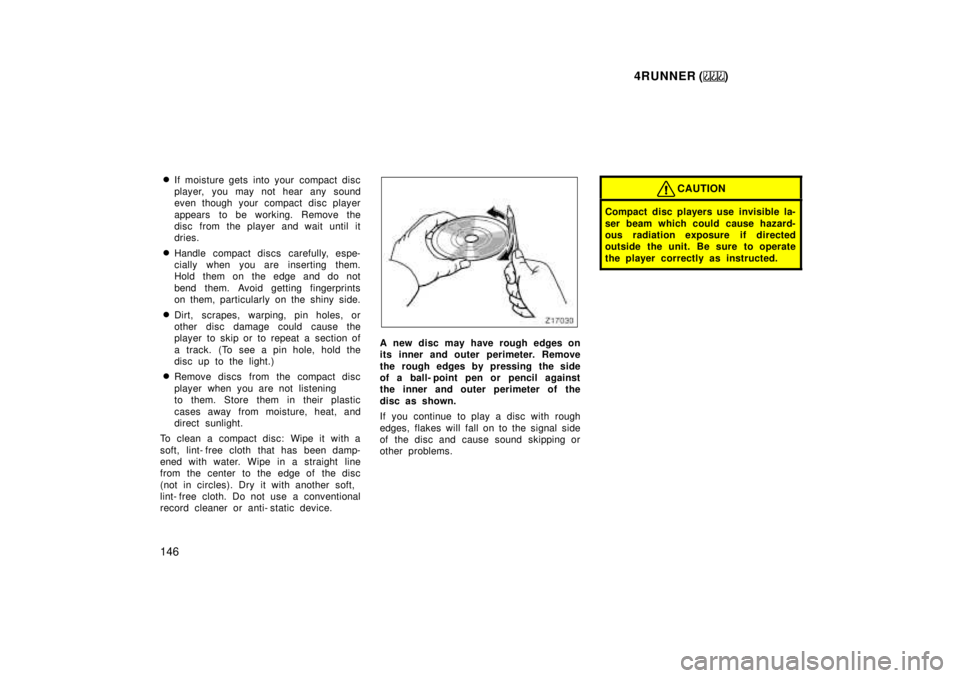
A new disc may have rough edges on
its inner and outer perimeter. Remove
the rough edges by pressing the side
of a ball- point pen or pencil against
the inner and outer perimeter of the
disc as shown.
If you continue to play a disc with rough
edges, flakes will fall on to the signal side
of the disc and cause sound skipping or
other problems.
CAUTION
Compact disc players use invisible la-
ser beam which could cause hazard-
ous radiation exposure if directed
outside the unit. Be sure to operate
the player correctly as instructed.
Page 188 of 268
4RUNNER ()
188
Off- road driving precautions
When driving your vehicle off- road, please
observe the following precautions to en-
sure your driving enjoyment and to help
prevent the closure of areas to off- road
vehicles.
a. Drive your vehicle only in areas where
off- road vehicles are permitted to travel.
b. Respect private property. Get owner 's
permission before entering private proper-
ty.
c. Do not enter areas that are closed.
Honor gates, barriers and signs that re-
strict travel.
d. Stay on established roads. When condi-
tions are wet, driving techniques should
be changed or travel delayed to prevent
damage to roads.
For owners in U.S. mainland, Hawaii and
Puerto Rico:
To obtain additional information pertaining
to driving your vehicle off- road, consult
the following organizations.
State and Local Parks and Recreation
Departments
State Motor Vehicle Bureau
Recreational Vehicle Clubs
U.S. Forest Service and Bureau of
Land Management
CAUTION
Always observe the following precau-
tions to minimize the risk of serious
personal injury or damage to your ve-
hicle: Drive carefully when off the road.
Do not take unnecessary risks by
driving in dangerous places.
Do not grip the steering wheel
spokes when driving off- road. A
bad bump could jerk the wheel and
injure your hands. Keep both hands
and especially your thumbs on the
outside of the rim.
Always check your brakes for effec-
tiveness immediately after driving in
sand, mud, water or snow.
After driving through tall grass,
mud, rock, sand, rivers, etc., check
that there is no grass, bush, paper,
rags, stone, sand, etc. adhering or
trapped on the underbody. Clear off
any such matter from the under-
body. If the vehicle is used with
these materials trapped or adhering
to the underbody, a breakdown or
fire could occur.
The driver and all passengers
should fasten their seat belts whe-
never the vehicle is moving.
NOTICE
If driving through water, such as
when crossing shallow streams,first check the depth of the waterand the bottom of the river bed for
firmness. Drive slowly and avoiddeep water.
Take all necessary safety measures
to ensure that water damage to theengine or other components doesnot occur.
Water entering the engine air intakewill cause severe engine damage.
Water can wash the grease fromwheel bearings, causing rusting and
premature failure, and may also en-ter the differentials, transmission and transfer case, reducing the gear
oil's lubricating qualities.