Page 142 of 376
yellowblue
2-82
Head-Up Display (Option)
CAUTION:
If the HUD image is too bright, or too high in
your field of view, it may take you more time to
see things you need to see when it's dark outside.
Be sure to keep the HUD image dim and placed
low in your field of view.
If you have the Head-Up
Display (HUD), you can see
the speedometer reading (in
English or metric units) and
a brief display of the current
radio station or CD track,
displayed ªthroughº
the windshield.The HUD also shows these lights when they are lit on
the instrument panel:
�Turn Signal Indicators
�High
-Beam Indicator Symbol
�Low Fuel Symbol
The HUD will display ªCHECK GAGEº when the
following items are lit on the instrument panel:
�Oil Warning Symbol
�Coolant Temperature Symbol
�Charging System Symbol
When you sit straight in your seat, the HUD image will
appear straight ahead near the front bumper.
Page 146 of 376
yellowblue
2-86
Driver Information Center (DIC) (If Equipped)
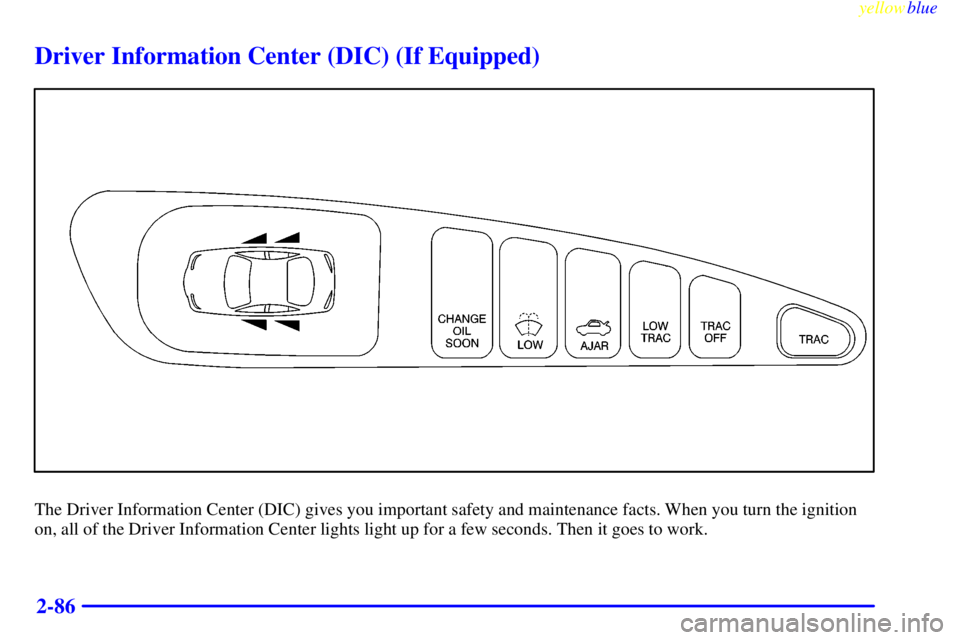
The Driver Information Center (DIC) gives you important safety and maintenance facts. When you turn the ignition
on, all of the Driver Information Center lights light up for a few seconds. Then it goes to work.
Page 147 of 376

yellowblue
2-87 Functions
: If one of the doors is ajar, a light will appear
next to that door on the vehicle outline.
CHANGE OIL SOON: This light will appear when the
system predicts that the oil's remaining useful life is
almost up. The system predicts remaining oil life using
inputs from length of drives, coolant temperature,
engine rpm and vehicle speed. It alerts you to change
the oil on a schedule consistent with the vehicle's
driving conditions.
After changing the oil, the system must be reset. With
the ignition key in ON but the engine off, fully push and
release the accelerator pedal slowly three times within
five seconds. If the CHANGE OIL SOON light flashes,
the system is resetting. Turn the ignition key to OFF,
then start the vehicle. If the CHANGE OIL SOON light
comes back on, the Oil Life Monitor has not reset.
Repeat the procedure.LOW: This light will come on when the ignition is
on and the fluid container is low.
AJAR: This light alerts you that the trunk is not
fully closed.
LOW TRAC: This light will come on when the
Traction Control System is limiting wheel spin. See
ªTrac Systemº or ªLow Traction Lightº in the Index.
TRAC OFF: This light lets you know that the Traction
Control System has been disabled and will not limit
wheel spin. See ªEnhanced Traction System Warning
Lightº or ªLow Traction Lightº in the Index.
TRAC switch: If the vehicle has the Traction Control
System, you will have a disable switch on the far right
side of the Driver Information Center. The Traction
Control System is automatically activated when you turn
the ignition on. This switch will activate/deactivate the
Traction Control System. If you need to disable the
system, such as when you are stuck and are rocking the
vehicle back and forth, push this switch. See ªStuck: In
Sand, Mud, Ice or Snowº in the Index.
Page 148 of 376
yellowblue
2-88
Trip Computer (If Equipped)
3100 and 3800 Engines
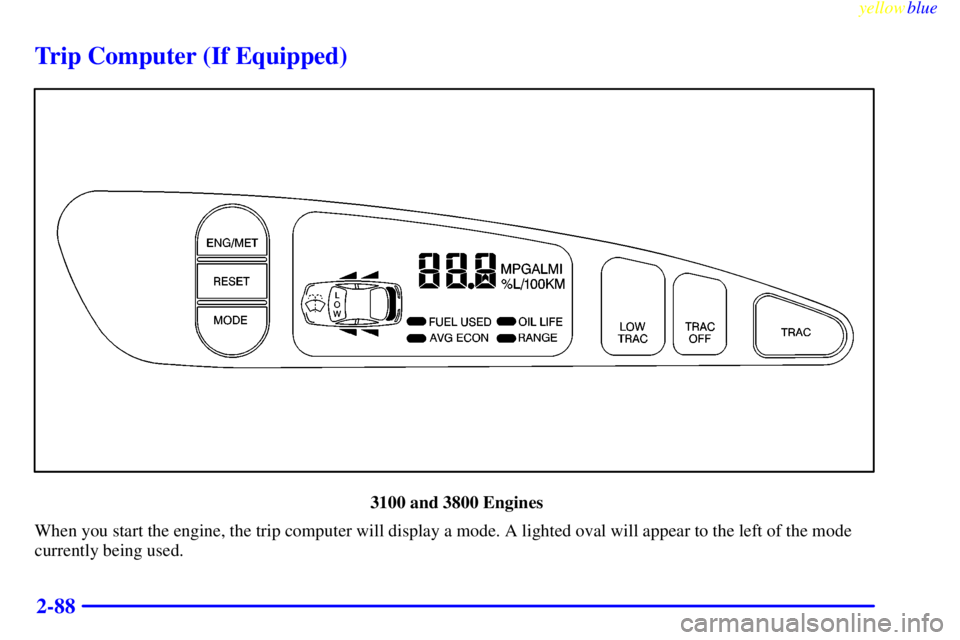
When you start the engine, the trip computer will display a mode. A lighted oval will appear to the left of the mode
currently being used.
Page 149 of 376
yellowblue
2-89
3800 Supercharged Engine
When you start the engine, the trip computer will display a mode. A lighted oval will appear to the left of the mode
currently being used.
Page 150 of 376
yellowblue
2-90 Control Buttons
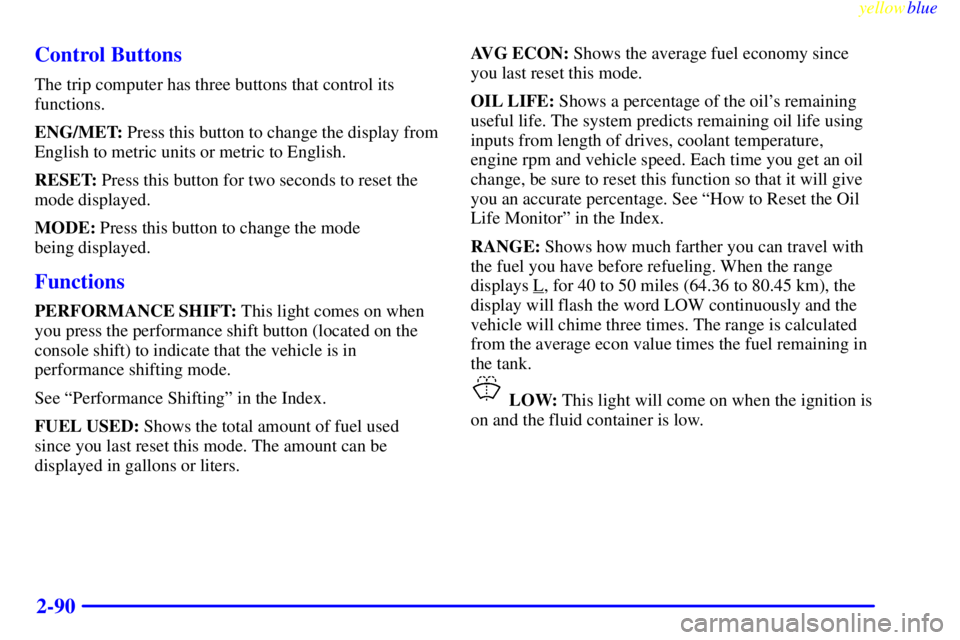
The trip computer has three buttons that control its
functions.
ENG/MET: Press this button to change the display from
English to metric units or metric to English.
RESET: Press this button for two seconds to reset the
mode displayed.
MODE: Press this button to change the mode
being displayed.
Functions
PERFORMANCE SHIFT: This light comes on when
you press the performance shift button (located on the
console shift) to indicate that the vehicle is in
performance shifting mode.
See ªPerformance Shiftingº in the Index.
FUEL USED: Shows the total amount of fuel used
since you last reset this mode. The amount can be
displayed in gallons or liters.AVG ECON: Shows the average fuel economy since
you last reset this mode.
OIL LIFE: Shows a percentage of the oil's remaining
useful life. The system predicts remaining oil life using
inputs from length of drives, coolant temperature,
engine rpm and vehicle speed. Each time you get an oil
change, be sure to reset this function so that it will give
you an accurate percentage. See ªHow to Reset the Oil
Life Monitorº in the Index.
RANGE: Shows how much farther you can travel with
the fuel you have before refueling. When the range
displays L
, for 40 to 50 miles (64.36 to 80.45 km), the
display will flash the word LOW continuously and the
vehicle will chime three times. The range is calculated
from the average econ value times the fuel remaining in
the tank.
LOW: This light will come on when the ignition is
on and the fluid container is low.
Page 151 of 376

yellowblue
2-91
DOOR AJAR: If one of the doors is left ajar, a light
will appear next to that door on the vehicle outline.
BOOST GAGE: If you have the 3800 supercharged
engine, this gage will show the amount of boost the
engine is receiving.
TRUNK AJAR: If the trunk is not fully closed or open,
a light will outline the trunk area on the vehicle outline.
LOW TRAC: This light will come on when the
Traction Control System is limiting wheel spin. See
ªTraction Control Systemº or ªLow Traction Lightº in
the Index.TRAC/TCS OFF: This light lets you know that the
Traction Control System has been disabled and will not
limit wheel spin. See ªTraction Control System Warning
Lightº or ªLow Traction Lightº in the Index.
TRAC/TCS SWITCH: If the vehicle has the Traction
Control System, you will have a disable switch on the
far right side of the Trip Computer. The Traction
Control System is automatically activated when you turn
the ignition on. This switch will activate/deactivate the
Traction Control System. If you need to disable the
system, such as when you are stuck and are rocking the
vehicle back and forth, push this switch. See ªStuck: In
Sand, Mud, Ice or Snowº in the Index.
Page 155 of 376
yellowblue
3-3
FLOOR: This setting sends most of the air
through the ducts near the floor. The remaining airflow
comes out of the defroster and side window vents.
DEFOG: This setting allows half of the air to go
to the floor ducts and half to the defroster and side
window vents.
DEFROST: This setting directs most of the air
through the defroster. Some of the air goes to the floor
ducts and the side window vent. The air conditioning
compressor will run automatically in this setting unless
the outside temperature is below 38�F (3.3�C).
Air Conditioning Compressor Button
Press the A/C button to operate the air conditioning
compressor. The indicator light above the button will
glow when the button is pressed. You don't have to
press the button to run the compressor in MAX or
DEFROST because it will already be running in
these modes.Air Conditioning
On very hot days, open the windows long enough to let
hot, inside air escape. This reduces the time for the
vehicle to cool down.
For quick cool
-down on very hot days, use MAX with
the temperature knob all the way in the blue area. If this
setting is used for long periods of time, the air in your
vehicle may become too dry.
For normal cooling on hot days, use UPPER with the
temperature knob in the blue area and the A/C button
pushed in. The system will bring in outside air and
cool it.
On cool, but sunny days, the sun may warm your upper
body, but your lower body may not be warm enough.
You can use BI
-LEVEL with the temperature knob in
the middle and the A/C button pushed in. The system
will bring in outside air and direct it to your upper body,
while sending slightly warmed air to your lower body.
You may notice this temperature difference more at
some times than others.