1999 NISSAN PATHFINDER Eps
[x] Cancel search: EpsPage 84 of 274
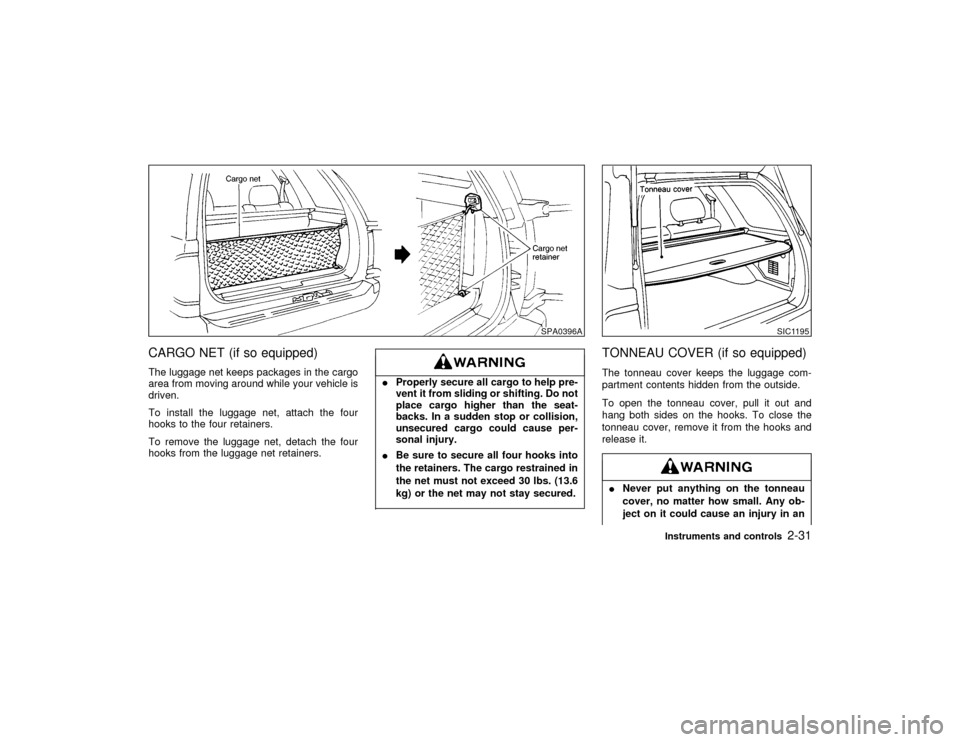
CARGO NET (if so equipped)The luggage net keeps packages in the cargo
area from moving around while your vehicle is
driven.
To install the luggage net, attach the four
hooks to the four retainers.
To remove the luggage net, detach the four
hooks from the luggage net retainers.
IProperly secure all cargo to help pre-
vent it from sliding or shifting. Do not
place cargo higher than the seat-
backs. In a sudden stop or collision,
unsecured cargo could cause per-
sonal injury.
IBe sure to secure all four hooks into
the retainers. The cargo restrained in
the net must not exceed 30 lbs. (13.6
kg) or the net may not stay secured.
TONNEAU COVER (if so equipped)The tonneau cover keeps the luggage com-
partment contents hidden from the outside.
To open the tonneau cover, pull it out and
hang both sides on the hooks. To close the
tonneau cover, remove it from the hooks and
release it.INever put anything on the tonneau
cover, no matter how small. Any ob-
ject on it could cause an injury in an
SPA0396A
SIC1195
Instruments and controls
2-31
Z
01.1.22/R50-D/V5
X
Page 92 of 274

3. Using both hands, simultaneously push the
hand-held transmitter button and the de-
sired HomeLink
button. Do not release the
buttons until step 4 has been completed.
NOTE:
Some garage door openers may require
the procedures noted under ªCanadian
Programmingº.
4. The HomeLinkindicator light will flash,
first slowly and then rapidly. When the
indicator light flashes rapidly, both buttons
may be released. The rapid flashing light
indicates the Integrated HomeLink
Univer-
sal Transceiver has been successfully pro-
grammed.
To program the remaining two buttons, follow
steps 2 through 4.
If, after repeated attempts, you do not suc-
cessfully program the Integrated HomeLink
Universal Transceiver to learn the signal of the
hand-held transmitter, refer to ªRolling Code
Programmingº later in this section.CANADIAN PROGRAMMINGPrior to 1992, D.O.C. regulations required
hand-held transmitters to stop transmitting af-
ter 2 seconds. To program your hand-held
transmitter to HomeLink
, continue to pressand hold the HomeLink
button (note steps 2
through 4 under ªProgramming HomeLink
º)
while you press and re-press (ªcycleº) your
hand-held transmitter every 2 seconds until
the indicator light flashes rapidly (indicating
successful programming).
NOTE:
If programming a garage door opener, etc.,
it is advised to unplug the device during
the ªcyclingº process to prevent possible
damage to the garage door opener compo-
nents.
OPERATING THE INTEGRATED
HomeLink
UNIVERSAL
TRANSCEIVER
The Integrated HomeLink
Universal Trans-
ceiver (once programmed) may now be used
to activate the garage door, etc. To operate,
simply press the appropriate programmed In-
tegrated HomeLink
Universal Transceiver
button. The red indicator light will illuminate
while the signal is being transmitted.
PROGRAMMING
PROBLEM-DIAGNOSISIf the HomeLink
does not quickly learn the
hand-held transmitter information:Ireplace the hand-held transmitter batteries
with new batteries.
Iposition the hand-held transmitter with its
battery area facing away from the
HomeLink
surface.
Ipress and hold both the HomeLink
and
hand-held transmitter buttons without inter-
ruption.
Iposition the hand-held transmitter 2 to 5
inches (50 to 127 mm) away from the
HomeLink
surface. Hold the transmitter in
that position for up to 15 seconds. If
HomeLinkis not programmed within that
time, try holding the transmitter in another
position - keeping the indicator light in view
at all times.
If you continue to have programming difficul-
ties, please contact the NISSAN Consumer
Affairs Department. The phone numbers are
located in the Foreword of this Owner's
Manual.
CLEARING THE PROGRAMMED
INFORMATIONIndividual buttons cannot be cleared, however
to clear all programming, press and hold the
two outside buttons and release when the
Instruments and controls
2-39
Z
01.1.22/R50-D/V5
X
Page 93 of 274

indicator light begins to flash (approximately
20 seconds).ROLLING CODE PROGRAMMINGRolling code garage door openers (or other
rolling code devices) which are ªcode pro-
tectedº and manufactured after 1996, may be
determined by the following.
A. Reference the garage door opener Owner's
Manual for verification.
B. The hand-held transmitter appears to pro-
gram the Integrated HomeLink
Universal
Transceiver but does not activate the ga-
rage door.
C. Press and hold the trained HomeLink
but-
ton. If the garage door opener has the
rolling code feature, the HomeLink
indica-
tor light will flash rapidly, then remains on
after 2 seconds.
To program the Integrated HomeLinkUniver-
sal Transceiver to a garage door opener with
the rolling code feature, follow these instruc-
tions after completing the ªProgramming
HomeLink
º (the aid of a second person may
make the following procedures quicker and
easier).
1. Locate the training button on the garage
door opener motor unit. Exact location andcolor of the button may vary by garage door
opener brand. If there is difficulty locating
the training button, reference the garage
door opener Owner's Manual.
2. Press the training button on the garage
door opener motor unit (which may activate
a training light).
NOTE:
Following step 2, there are 30 seconds
in which to initiate step 3.
3. Firmly press and release the programmed
HomeLink
button. Press and release the
HomeLinkbutton a second time to com-
plete the training process. (Some garage
door openers may require you to do this
procedure a third time to complete the
training.)
The garage door opener should now recognize
the Integrated HomeLink
Universal Trans-
ceiver and activate when the HomeLink
but-
ton is pressed. The remaining two buttons may
now be programmed (if not yet programmed,
follow steps 2 through 4 in the ªProgramming
HomeLink
º procedures earlier in this section).
REPROGRAMMING A SINGLE
HomeLink
BUTTON
To reprogram an Integrated HomeLink
Uni-versal Transceiver button, complete the follow-
ing.
1. Press and hold the desired HomeLink
button.Do notrelease the button until step
4 has been completed.
2. When the indicator light begins to flash
slowly (after 20 seconds), position the
hand-held transmitter 2 to 5 inches (50 to
127 mm) away from the HomeLink
sur-
face.
3. Press and hold the hand-held transmitter
button.
4. The HomeLink
indicator light will flash,
first slowly and then rapidly. When the
indicator light begins to flash rapidly, re-
lease both buttons.
The Integrated HomeLink
Universal Trans-
ceiver button has now been reprogrammed.
The new device can be activated by pushing
the HomeLink
button that was just pro-
grammed. This procedure will not affect any
other programmed HomeLink
buttons.
IF YOUR VEHICLE IS STOLENIf your vehicle is stolen, you should change the
codes of any non-rolling code device that has
been programmed into HomeLink
. Consult
the Owner's Manual of each device or call the
2-40
Instruments and controls
Z
01.1.22/R50-D/V5
X
Page 165 of 274

PRECAUTIONS ON CRUISE
CONTROLIIf the cruise control system malfunctions, it
cancels automatically. The cruise indicator
light in the instrument panel then blinks to
warn the driver.
IIf the cruise indicator light blinks, turn the
cruise control main switch off and have the
system checked by your NISSAN dealer.
IThe cruise indicator light may blink when
the cruise control main switch is turned on
while pushing the RES/ACCEL, COAST/
SET, or CANCEL switch (located on the
steering wheel). To properly set the cruise
control system, perform the preceding
steps in the order indicated.Do not use the cruise control when driv-
ing under the following conditions:
Iwhen it is not possible to keep the
vehicle at set speed.
Iin heavy traffic or in traffic that varies
in speed.
Ion winding or hilly roads.Ion slippery roads (rain, snow, ice,
etc.)
Iin very windy areas.
Doing so could cause a loss of vehicle
control and result in an accident.
On manual transmission models, do not
shift into N (Neutral) without depressing
the clutch pedal when the cruise control
is on. This could cause engine damage.
If this happens, depress the clutch pedal
and turn the main switch off immedi-
ately.
CRUISE CONTROL (if so
equipped)5-16
Starting and driving
Z
01.1.22/R50-D/V5
X
Page 167 of 274

ACCEL set switch. Each time you do this,
the set speed will increase by about 1 MPH
(1.6 km/h).
To reset at a slower cruising speed,follow
either of these three methods:
a) Lightly tap the brake pedal. When the ve-
hicle attains the desired speed, push the
COAST/SET switch and release it.
b) Push and hold the COAST/SET switch.
Release the switch when the vehicle slows
down to the desired speed.
c) Push, then quickly release the COAST/
SET switch. Each time you do this, the set
speed will decrease by about 1 MPH (1.6
km/h).
To resume the preset speed,push and re-
lease the resume set switch. The vehicle will
resume the last set cruising speed when the
vehicle speed is over 30 MPH (48 km/h).
PrecautionsIThe cruise indicator may sometimes blink
when the cruise control switch (Main
switch) is turned ON while pushing the
RES/ACCEL switch or COAST/SET switch
or CANCEL switch (located on the steering
wheel). To properly set the cruise control
system perform the steps above in theorder indicated. (This is a fail-safe mode.
Turn the main switch OFF and turn it ON
again without pushing the set switch to
return to normal operation.)
IIf the cruise control system malfunctions, it
will cancel automatically. The cruise indica-
tor in the meter assembly will then blink to
warn the driver.
IWhen the cruise indicator blinks, turn the
cruise control switch (Main switch) OFF and
have the system checked by your NISSAN
dealer.During the first 1,000 miles (1,600 km), follow
these recommendations for the future reliabil-
ity and economy of your new vehicle. Failure to
follow these recommendations may result in
vehicle damage or shortened engine life.
IDo not run the engine over 4,000 rpm.
Do not drive over the following speed limits:
Two wheel drive models:
Four wheel drive models
(2H position):
55 MPH (90 km/h)
Four wheel drive models
(4H position):
50 MPH (80 km/h)
Four wheel drive models
(4L position):
30 MPH (50 km/h)
IDo not accelerate hard in top gear.
IAvoid quick starts and full acceleration.
IAvoid hard stops as much as possible.
I
For the first 300 miles (500 km), it is rec-
ommended that you drive in the two wheel
drive (2H) position.
IDo not tow a trailer for the first 500 miles
(800 km).
BREAK-IN SCHEDULE
5-18
Starting and driving
Z
01.1.22/R50-D/V5
X
Page 187 of 274

IAutomatic transmission models can-
not be push started. This may cause
transmission damage.
IThree way catalyst equipped models
should not be started by pushing
since the three way catalyst may be
damaged.
INever try to start the vehicle by tow-
ing it; when the engine starts, the
forward surge could cause the ve-
hicle to collide with the tow vehicle.
If your vehicle is overheating indicated by an
extremely high temperature gauge reading, or
if you feel a lack of engine power, detect
abnormal noise, etc., take the following steps:IDo not continue to drive if your ve-
hicle overheats. Doing so could
cause a vehicle fire.
ITo avoid the danger of being scalded,
never remove the radiator cap while
the engine is still hot. When the radia-
tor cap is removed, pressurized hot
water will spurt out, possibly causing
serious injury.
IDo not open the hood if steam is
coming out.1. Move the vehicle safely off the road, apply
the parking brake and move the gearshift
lever to the neutral position (automatic
transmission to P (Park)).
Do not stop the engine.
2. Turn off the air conditioner switch. Open all
the windows, move the heater or air condi-
tioner temperature control to maximum hotand fan control to high speed.
3. If engine overheating is caused by climbing
a long hill on a hot day, run the engine at a
fast idle (approximately 1,500 rpm) until the
temperature gauge indication returns to
normal.
4. Get out of the vehicle. Look and listen for
steam or coolant escaping from the radiator
before opening the hood. Wait until no
steam or coolant can be seen before pro-
ceeding.
5. Open the engine hood.
If steam or water is coming from the
engine, stand clear to prevent getting
burned.6. Visually check drive belts for damage or
looseness. Also check if the cooling fan is
running. The radiator hoses and radiator
should not leak water. If coolant is leaking,
the cooling fan belt is missing or loose or
the cooling fan does not run, stop the
engine.
PUSH STARTING IF YOUR VEHICLE OVERHEATS6-10
In case of emergency
Z
01.1.22/R50-D/V5
X
Page 195 of 274

In order to maintain the appearance of your
vehicle, it is important to take proper care of it.
In the following cases, please wash your ve-
hicle as soon as possible to protect the paint
surface.
IAfter a rainfall to prevent possible damage
from acid rain
IAfter driving on coastal roads
IWhen contaminants such as soot, bird
droppings, tree sap, metal particles or bugs
get on the paint surface
IWhen dust or mud builds up on the surfaceWhenever possible, store or park your vehicle
inside a garage or in a covered area.
When it is necessary to park outside, park in a
shady area or protect the vehicle with a body
cover.
Be careful not to scratch the paint surface
when putting on or removing the body
cover.
WASHINGWash dirt off with a wet sponge and plenty of
water. Clean the vehicle thoroughly using a
mild soap such as Nissan Car Wash, or a
general purpose dish-washing liquid mixed
with clean, lukewarm (never hot) water.IDo not use strong household soap,
strong chemical detergents, gasoline
or solvents.
IDo not wash the vehicle in direct
sunlight or while the vehicle body is
hot, as the surface may become
water-spotted.
IAvoid using tight-napped or rough
cloths, such as washing mitts. Caremust be taken when removing
caked-on dirt or other foreign sub-
stance so that the paint surface is not
scratched or damaged.
Rinse the vehicle thoroughly with plenty of
clean water.
Inside flanges, seams and folds on the doors,
hatches and hood are particularly endangered
by the effects of road salt. Therefore, these
areas must be regularly cleaned. Take care
that the drain holes in the lower edge of the
door are open. Spray water under the body
and in the wheel wells to loosen the dirt and
wash away road salt.
A damp chamois can be used to dry the
vehicle to avoid water spots.WAXINGRegular waxing protects the paintwork and
keeps the finish. After waxing, polishing is
recommended to remove built-up residue and
avoid a ªweatheredº appearance.
Your NISSAN dealer can assist you in choos-
ing the proper product.
IWax your vehicle only after a thorough
washing. Follow the instructions supplied
with the wax.
MAI0001
CLEANING EXTERIOR7-2
Appearance and care
Z
01.1.22/R50-D/V5
X
Page 218 of 274

CHECKING BRAKE PEDALWith the engine running, check distance A
between the upper surface of the pedal and
the dash lower panel.
Distance A
M/T models
2-1/2 in (65 mm) or more
A/T models
2-3/4 in (70 mm) or more
If it is out of the range shown above, see your
NISSAN dealer.
Self-adjusting brakesYour vehicle is equipped with self-adjusting
brakes.
The front disc-type brakes self-adjust every
time the brake pedal is applied. The rear
drum-type brakes self-adjust every time the
parking brake is applied. If the brake pedal
goes down farther than normal, it may be due
to a lack of adjustment of the rear drum
brakes. Apply the parking brake several times.See your NISSAN dealer and have it
checked if the brake pedal height does
not return to normal.Brake pad wear indicatorsThe disc brake pads on your vehicle have
audible wear indicators. When a brake pad
requires replacement, it will make a high
pitched scraping or screeching sound when
the vehicle is in motion whether or not the
brake pedal is depressed. Have the brakes
checked as soon as possible if the wear indi-
cator sound is heard.
Under some driving or climate conditions, oc-casional brake squeak, squeal or other noise
may be heard. Occasional brake noise during
light to moderate stops is normal and does not
affect the function or performance of the brake
system.
The rear drum brakes (if so equipped) do not
have audible wear indicators. Should you ever
hear an unusually loud noise from the rear
drum brakes, have them inspected as soon as
possible by your NISSAN dealer.
Proper brake inspection intervals should
be followed.For additional information, see
ªPeriodic maintenanceº in the ª9. Mainte-
nanceº section for maintenance intervals.
BRAKE BOOSTERCheck the brake booster function with the
following steps:
1. With the engine off, press and release the
brake pedal several times. When brake
pedal movement (distance of travel) re-
mains the same from one pedal application
to the next, continue on to the next step.
2. While depressing the brake pedal, start the
engine. The pedal height should drop a
little.
3. With the brake pedal depressed, stop the
engine. Keeping the pedal depressed for
DI0453
Do-it-yourself
8-19
Z
01.1.22/R50-D/V5
X