1999 NISSAN MAXIMA engine
[x] Cancel search: enginePage 52 of 233

and the foot brake systems.
Parking brake indicator:
When the ignition key is in the ON position, the
light comes on when the parking brake is
applied.
Low brake fluid warning light:
The light warns of a low brake fluid level. If the
light comes on while the engine is running with
the parking brake not applied, stop the vehicle
and perform the following:
1. Check the brake fluid level. Add brake fluid
as necessary. See ªBrake and clutch fluidº
in the ªDo-it-yourselfº section.IYour brake system may not be work-
ing properly if the warning light is on.
Driving could be dangerous. If you
judge it to be safe, drive carefully to
the nearest service station for re-
pairs. Otherwise, have your vehicle
towed.
IPressing the brake pedal with the
engine stopped and/or low brake fluid
level may increase your stopping dis-
tance and braking will require greaterpedal effort as well as greater pedal
travel.
IIf the brake fluid level is below the
MIN mark on the brake fluid reservoir,
do not drive until the brake system
has been checked at a NISSAN
dealer.
2. If the brake fluid level is correct, have the
warning system checked by a NISSAN
dealer.
or
Anti-lock brake
warning light (if so
equipped)
After turning the ignition key to the ON posi-
tion, the light will illuminate. The light will turn
off after about 2 seconds if the system is
operational.
If the light comes on while the engine is
running, it may indicate there is something
wrong with the anti-lock portion of the brake
system. Have the system checked by your
NISSAN dealer. However if the light illumi-
nates while starting the engine, it does not
indicate a system malfunction.
If an abnormality occurs in the system, the
anti-lock function will cease but the ordinarybrakes will continue to operate normally.
If the light comes on while you are driving,
contact your NISSAN dealer for repair.
Low fuel warning light
This light comes on when the fuel in the tank is
getting low. Refuel as soon as it is convenient,
preferably before the fuel gauge reaches E.
There will be a small reserve of fuel remain-
ing in the tank when the fuel gauge needle
reaches E.INDICATOR LIGHTS
Overdrive off indicator light
This light comes on during driving when the
overdrive switch is pressed to prevent over-
drive operation.
The O/D OFF indicator light comes on for 2
seconds each time the ignition key is turned
ON. This shows the light is functioning prop-
erly.If the O/D OFF indicator light blinks for
approximately 8 seconds after coming on for
2 seconds, have your NISSAN dealer check
the transmission and repair it if necessary.The automatic transmission is equipped with
an electronic fail-safe mode. This system al-
Instruments and controls
2-9
Z
01.1.22/A32-D/V5.0
X
Page 53 of 233

lows the vehicle to be driven even in the event
of damage to the electrical circuits. If this
occurs, the gears automatically engage and
lock into third gear.
See the ªDriving the vehicleº in the ª5. Starting
and drivingº section for fail-safe before visiting
your NISSAN dealer.
Turn signal/hazard indicator
lights
The light flashes when the turn signal switch
lever or hazard switch is turned on.
High beam indicator light
(Blue)
This light comes on when the headlight high
beam is on and goes out when the low beam is
selected.
Cruise indicator light
The light comes on while the vehicle speed is
controlled by the cruise control system. If the
light flickers while the engine is running, it may
indicate there is something wrong with the
cruise control system. Have the system
checked by your NISSAN dealer.
Malfunction indicator light
(MIL)
If the malfunction indicator light comes on
steady or blinks while the engine is running, it
may indicate a potential emission control prob-
lem.
The malfunction indicator light may also come
on steady or blink if the fuel filler cap has not
been closed tightly or if the fuel tank is nearly
empty. Check to make sure the fuel cap is
secure and that you have at least 3 US gallons
(14 liters) of fuel in the fuel tank.
After driving for a while, the light should remain
off if no other potential emission control sys-
tem problem exists.
Operation
The malfunction indicator light will come on in
one of two ways:
IMalfunction indicator light on steady Ð An
emission control system malfunction has
been detected. Have the vehicle inspected
by an authorized NISSAN dealer. You do
not need to have your vehicle towed to the
dealer.
IMalfunction indicator light blinking Ð An
engine misfire has been detected which
may damage the emission control system.To reduce or avoid emission control system
damage:
a) Do not drive at speeds above 45 MPH
(72 km/h).
b) Avoid hard acceleration or deceleration.
c) Avoid steep uphill grades.
d) If possible, reduce the amount of cargo
being hauled or towed.
The malfunction indicator light may stop
blinking and come on steady.
Have the vehicle inspected by an autho-
rized NISSAN dealer. You do not need to
have your vehicle towed to the dealer.
Continued vehicle operation without
having the emission control system
checked and repaired as necessary
could lead to poor driveability, reduced
fuel economy, and possible damage to
the emission control system.
Traction control system
indicator light (if so equipped)
The traction control system indicator light
should come on when you turn the ignition key
2-10
Instruments and controls
Z
01.1.22/A32-D/V5.0
X
Page 54 of 233

to ON. The light will go off as you start the
engine. If the indicator light does not come on
or go off, have the TCS checked by your
NISSAN dealer.
If the light stays on or comes on when you are
driving, there may be a problem with your
traction control system and it may not operate
properly. Have the system checked by your
NISSAN dealer.
The traction control system indicator light may
come on for the following reasons.
a) If the system is turned off by pressing
the button on the instrument panel, the
indicator light will come on and stay on.
To turn the system back on, press the
button again. The indicator light will go
off.
b) If engine speed is above 4,000 rpm in a
selected gear. Use D range on low fric-
tion road surfaces.
If the traction control system indicator light
comes on and stays on for an extended period
of time when the system is turned on, have
your vehicle checked by your NISSAN dealer.
Slip indicator light (if so
equipped)
This light will blink on when your tractioncontrol system is limiting wheel spin. Slippery
road conditions may exist if the slip indicator
light blinks on. If this happens, adjust your
driving accordingly.
You may feel or hear the system working, but
this is normal.
The light will blink on for a few seconds after
the traction control system stops limiting wheel
spin.
The slip indicator light also comes on when
you turn the ignition key to ON. The light will go
off as you start the engine. If the light does not
come on or go off, have the TCS checked by
your NISSAN dealer. The traction control sys-
tem operates in all transmission shift lever
positions. But the system can upshift the trans-
mission only as high as the indicated shift lever
position.
CHIMES
Key reminder chimeThe chime will sound if the driver side door is
opened while the key is left in the ignition
switch (ignition switch is turned off). Remove
the key and take it with you when leaving the
vehicle.
Light reminder chimeA chime will sound when the driver side door is
opened if the light switch is in the
or
position (ignition switch is turned off).
Turn the light switch off when you leave the
vehicle.
Brake pad wear warningThe disc brake pads have audible wear warn-
ings. When a brake pad requires replacement,
it will make a high pitched scraping sound
when the vehicle is in motion whether or not
the brake pedal is depressed. Have the brakes
checked as soon as possible if the warning
sound is heard.
Instruments and controls
2-11
Z
01.1.22/A32-D/V5.0
X
Page 56 of 233

key is returned beyond the vertical po-
sition toward the rear of the vehicle to
remove the key, the system may be
deactivated. If the indicator light fails to
glow for 30 seconds, unlock the door
once and lock it again.
IEven when the driver and/or passengers
are in the vehicle, the system will acti-
vate with all doors, hood and trunk lid
locked and ignition key off. Turn the
ignition key to ACC to turn the system
off.
Theft warning system operationThe warning system will give the following
alarm:
IThe headlights blink and the horn sounds
intermittently.
IThe alarm automatically turns off after 2 to
3 minutes. However, the alarm reactivates
if the vehicle is tampered with again. The
alarm can be shut off by unlocking a door or
trunk lid with the key, or by pressing the
button on the multi-remote controller.
The alarm is activated by:
IOpening the door or trunk lid without using
the key (even if the door is unlocked by
releasing the door inside lock switch) oropening the trunk lid by operating the
opener release button.
IOpening the hood.
IPushing in or pulling out of the key cylinder
on the door or trunk lid.
How to stop alarmThe alarm will stop only by unlocking a door or
trunk lid with the key, or by pressing the
button on multi-remote controller. The
alarm will not stop if the ignition switch is
turned to ACC or ON.
If the system does not operate as de-
scribed above, have it checked by your
NISSAN dealer.
NISSAN VEHICLE IMMOBILIZER
SYSTEMThe Nissan Vehicle Immobilizer System will
not allow the engine to start without the use of
the registered Nissan Vehicle Immobilizer Sys-
tem key.
If the engine fails to start using the registered
Nissan Vehicle Immobilizer System key (for
example, when interference is caused by an-
other Nissan Vehicle Immobilizer System key,
an automated toll road device or automated
payment device on the key ring), restart theengine using the following procedures:
1. Leave the ignition switch in the ON position
for approximately 5 seconds.
2. Turn the ignition switch to the OFF or LOCK
position and wait approximately 5 seconds.
3. Repeat step 1 and 2 again.
4. Restart the engine while holding the device
(which may have caused the interference)
separate from the registered Nissan Ve-
hicle Immobilizer System key.
If the no start condition still occurs, NISSAN
recommends placing the registered Nissan
Vehicle Immobilizer System key on a sepa-
rate key ring to avoid interference from
other devices.
Statement related to section 15 of FCC
rules for Nissan Vehicle Immobilizer Sys-
tem (CONT UNIT-IMMOBILIZER, ANT
ASSY-IMMOBILIZER)
This device complies with part 15 of the
FCC Rules. Operation is subject to the
following two conditions;
(1) This device may not cause hanmful
interference, and (2) this device must ac-
cept any interference received, including
interference that may cause undesired op-
eration.
Instruments and controls
2-13
Z
01.1.22/A32-D/V5.0
X
Page 59 of 233

To defog/defrost the rear window glass and
outside mirrors, start the engine and push the
switch on. The indicator light will come on.
Push the switch again to turn the defogger off.
It will automatically turn off in approximately 15
minutes.
When cleaning the inner side of the rear
window, be careful not to scratch or
damage the rear window defogger.
SIC0177
REAR WINDOW AND OUTSIDE
MIRROR (if so equipped)
DEFOGGER SWITCH2-16
Instruments and controls
Z
01.1.22/A32-D/V5.0
X
Page 61 of 233

Headlight beam selectTo select the high beam, push the lever for-
ward. Pull it back to select the low beam.Passing signalPulling the lever toward you will flash the
headlight high beam.Daytime running light system
(Canada only)The headlights automatically illuminate at a
reduced intensity when the engine is started
with the parking brake released. The daytime
running lights operate with the headlight switch
in the OFF position or in the
position.
Turn the headlight switch to theposition
for full illumination when driving at night.
If the parking brake is applied before the
engine is started, the daytime running lights do
not illuminate. The daytime running lights illu-
minate once the parking brake is released.
The daytime running lights will remain on until
the ignition switch is turned off.
When the daytime running light system
is active, tail lights on your vehicle are
not on. It is necessary at dusk to turn on
your headlights. Failure to do so could
cause an accident injuring yourself and
others.TURN SIGNAL SWITCH
Turn signalMove the lever up or down to signal the turning
direction. When the turn is completed, the turn
signals cancel automatically.Lane change signalTo indicate a lane change, move the lever up
or down to the point where lights begin flash-
ing.To turn the fog lights on, turn the headlight
switch to the
position, then turn the
switch to theposition. To turn them off,
turn the switch to the OFF position.
The headlights must be on for the fog lights to
operate.
SIC0880
FRONT FOG LIGHT SWITCH (if so
equipped)
2-18
Instruments and controls
Z
01.1.22/A32-D/V5.0
X
Page 63 of 233
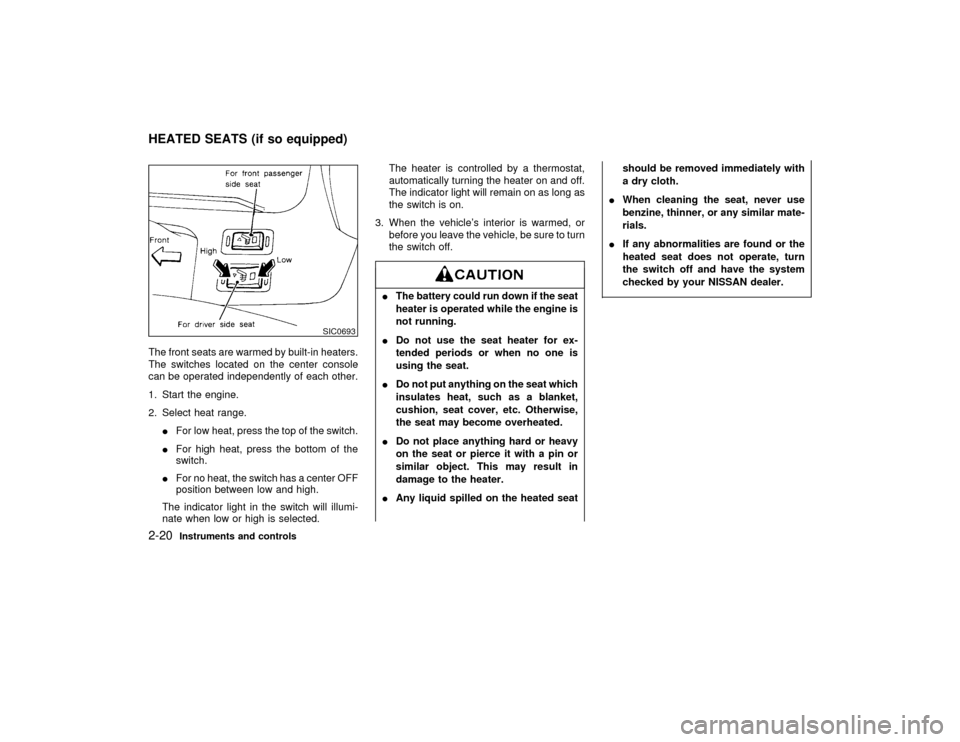
The front seats are warmed by built-in heaters.
The switches located on the center console
can be operated independently of each other.
1. Start the engine.
2. Select heat range.
IFor low heat, press the top of the switch.
IFor high heat, press the bottom of the
switch.
IFor no heat, the switch has a center OFF
position between low and high.
The indicator light in the switch will illumi-
nate when low or high is selected.The heater is controlled by a thermostat,
automatically turning the heater on and off.
The indicator light will remain on as long as
the switch is on.
3. When the vehicle's interior is warmed, or
before you leave the vehicle, be sure to turn
the switch off.
IThe battery could run down if the seat
heater is operated while the engine is
not running.
IDo not use the seat heater for ex-
tended periods or when no one is
using the seat.
IDo not put anything on the seat which
insulates heat, such as a blanket,
cushion, seat cover, etc. Otherwise,
the seat may become overheated.
IDo not place anything hard or heavy
on the seat or pierce it with a pin or
similar object. This may result in
damage to the heater.
IAny liquid spilled on the heated seatshould be removed immediately with
a dry cloth.
IWhen cleaning the seat, never use
benzine, thinner, or any similar mate-
rials.
IIf any abnormalities are found or the
heated seat does not operate, turn
the switch off and have the system
checked by your NISSAN dealer.
SIC0693
HEATED SEATS (if so equipped)2-20
Instruments and controls
Z
01.1.22/A32-D/V5.0
X
Page 73 of 233

The Integrated HomeLink
Universal Trans-
ceiver provides a convenient way to consoli-
date the functions of up to three individual
hand-held transmitters into one built-in device.
Integrated HomeLink
Universal Transceiver:
IWill operate most Radio Frequency (RF)
devices such as garage doors, gates, home
and office lighting, entry door locks and
security systems.
IIs powered by your vehicle's battery. No
separate batteries are required. If the vehi-
cle's battery is discharged or is discon-
nected, HomeLinkwill retain all program-
ming.
Once the Integrated HomeLink
Universal
Transceiver is programmed, retain the
original transmitter for future programming
procedures (i.e., new vehicle purchases).
Upon sale of the vehicle, the programmed
Integrated HomeLink
Universal Trans-
ceiver buttons should be erased for secu-
rity purposes. For additional information,
refer to ªProgramming the Integrated
HomeLink
Universal Transceiverº later in
this section.
IDo not use the Integrated HomeLink
Universal Transceiver with any ga-
rage door opener that lacks safety
stop and reverse features as required
by federal safety standards. (These
standards became effective for
opener models manufactured after
April 1, 1982). A garage door opener
which cannot detect an object in the
path of a closing garage door and
then automatically stop and reverse,
does not meet current federal safety
standards. Using a garage door
opener without these features in-
creases the risk of serious injury or
death.
IDuring programming, your garage
door or gate may open or close. Make
sure that people and objects are clear
of the garage door or gate that you
are programming.
IYour vehicle's engine should be
turned off while programming the In-
tegrated HomeLink
UniversalTransceiver.
INTEGRATED HomeLinkUNIVERSAL TRANSCEIVER (if so
equipped)2-30
Instruments and controls
Z
01.1.22/A32-D/V5.0
X