Page 282 of 472

STARTING AND DRIVING
262
2Overdrive switch
For selecting either a three±speed or four±speed
transmission.
When the cruise control is being used, even if you
downshift the transmission by turning off the
overdrive switch, engine braking will not be applied
because the cruise control is not cancelled. For the
operation to decrease the vehicle speed, see page
277.
3 Shift position indicator
The shift position is also displayed on the
instrument cluster.
P:Parking, engine starting and key removal
position
R: Reverse position
N: Neutral position
D: Normal driving position (Shifting into overdrive
possible)
2: Position for engine braking
L: Position for stronger engine braking than that in
º2º position Correct use of the automatic transmission is
explained in the following parts.
(a) Normal driving
(b) Using engine braking
(c) Using the º2º and ºLº positions
(d) Backing up
(e) Parking
(f) Good driving practice
(g) Rocking your vehicle if stuck
(h) If you cannot shift the selector lever out of ºPº
position
Page 287 of 472

STARTING AND DRIVING
267
(b) Using engine braking
31E009±2
To use the braking power of the engine, downshift the
transmission in the way described below:
1Turn off the overdrive switch. (This is effective only
when you are driving in the ºDº position.) The ºO/D
OFFº indicator light in the instrument cluster will
come on and the transmission will downshift to the
third gear and engine braking will be obtained.
When the cruise control is being used, even if you
downshift the transmission by turning off the
overdrive switch, engine braking will not be applied
because the cruise control is not cancelled. If you
need to decrease the vehicle speed, see page 277.
2 Shift into the º2º position. The transmission will
downshift to the second gear when the vehicle
speed is lower than 122 km/h (76 mph) and more
powerful engine braking will be obtained.
3Shift into the ºLº position. The transmission will
downshift to the first gear when the vehicle speed
is lower than 55 km/h (34 mph) and maximum
engine braking will be applied.
Page 294 of 472
STARTING AND DRIVING
274
CRUISE CONTROL
The cruise control allows you to cruise the vehicle
at a desired speed over 40 km/h (25 mph) with your
foot off the accelerator pedal.
Your cruising speed can be maintained although a slight
speed change may occur when driving up or down a
gradient, within the limits of engine performance. On
steeper hills, a great speed change will occur so it is
better to drive without the cruise control.
CAUTION
�To help maintain maximum control of your vehicle,
do not use the cruise control when driving in heavy
or varying traffic, or on slippery (rainy, icy or
snow±covered) or winding roads.
� Avoid vehicle speed increases when driving
downhill. If the vehicle speed is too fast in relation to
the cruise control set speed, cancel the cruise
control then downshift the transmission to use
engine braking to slow down.
Page 295 of 472
STARTING AND DRIVING
275
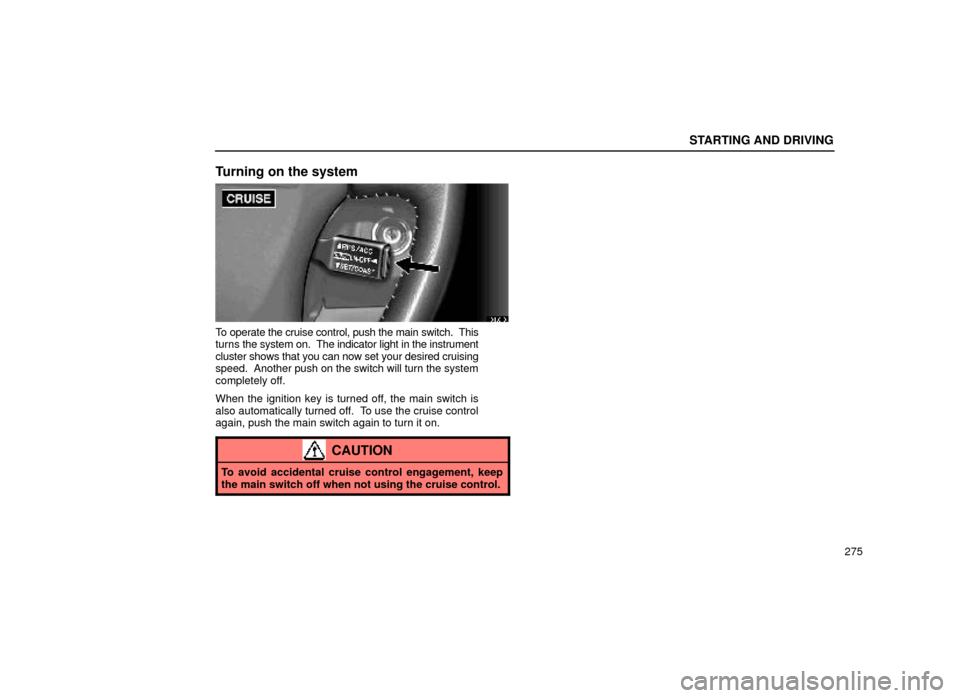
Turning on the system
31L013
To operate the cruise control, push the main switch. This
turns the system on. The indicator light in the instrument
cluster shows that you can now set your desired cruising
speed. Another push on the switch will turn the system
completely off.
When the ignition key is turned off, the main switch is
also automatically turned off. To use the cruise control
again, push the main switch again to turn it on.
CAUTION
To avoid accidental cruise control engagement, keep
the main switch off when not using the cruise control.
Page 296 of 472

STARTING AND DRIVING
276
Setting at a desired speed
31L014
The transmission must be in ºDº before you set the
cruise control speed.
Bring the vehicle to the desired speed, press the control
lever downward in the ºSET/COASTº direction and
release it. This sets the vehicle at that speed. Now you
may take your foot off the accelerator pedal. If you need
acceleration ± for example, when passing ± depress the
accelerator pedal enough for the vehicle to exceed the
set speed. When you release the accelerator pedal, the
vehicle will return to the speed set prior to the
acceleration.Cancelling the preset speed
You can cancel the preset speed by either of the
following:
a. Pulling the control lever in the ºCANCELº direction.
b. Depressing the brake pedal.
If the vehicle speed falls below about 40 km/h (25 mph),
the preset speed will be automatically cancelled.
If the vehicle speed drops 16 km/h (10 mph) below the
preset speed, the preset speed will also automatically be
cancelled.
If the preset speed automatically cancels out for other
than these reasons, have your vehicle checked by your
Lexus dealer at the earliest opportunity.
Page 297 of 472

STARTING AND DRIVING
277
Resetting to a faster speed
Press the control lever upward in the ºRES/ACCº
direction and hold it. Release the lever when the desired
speed is attained. While the lever is held upward, the
vehicle will gradually gain speed.
When the difference between the actual vehicle speed
and the set speed is less than 5 km/h (3 mph), the set
speed can be increased 1.6 km/h (1 mph) each time by
pressing the control lever upward in the ºRES/ACCº
direction quickly.
However, a quicker way to reset is to accelerate the
vehicle and then press the control lever downward in the
ºSET/COASTº direction.
Resetting to a slower speed
Press the control lever downward in the ºSET/COASTº
direction and hold it. Release the lever when the desired
speed is attained. While the lever is held downward, the
vehicle speed will gradually decrease.
When the difference between the actual vehicle speed
and the set speed is less than 5 km/h (3 mph), the set
speed can be lowered 1.6 km/h (1 mph) each time by
pressing the control lever downward in the
ºSET/COASTº direction quickly.
However, a quicker way to reset is to depress the brake
pedal and then press the control lever downward in the
ºSET/COASTº direction.
Even if you turn off the overdrive switch with the cruise
control on, engine braking will not be applied because
the cruise control is not cancelled. To decrease the
vehicle speed, reset to a slower speed with the cruise
control lever or depress the brake pedal. If you use the
brake pedal, cruise control is cancelled.
Resuming the preset speed
If the preset speed is cancelled by pulling the control
lever or by depressing the brake pedal, pushing the lever
up in the ºRES/ACCº direction will restore the speed set
prior to cancellation. However, once the vehicle speed
falls below about 40 km/h (25 mph), the preset speed will
not be resumed.
Page 298 of 472

STARTING AND DRIVING
278
Cruise control failure warning
If the ºCRUISEº indicator light in the instrument cluster
flashes five times and then goes out when using the
cruise control, it means that there is trouble in the cruise
control system. Contact your Lexus dealer.
ELECTRONIC MODULATED SUSPENSION
This electronic modulated suspension adjusts the
damping effect on the shock absorbers with the
control switch. Select one of the 4 modes which is
suited to the driving conditions with the control
switch to provide good riding comfort and stability.
31E044
1For sporty type driving such as on winding
mountain roads and high speed driving
2For moderate high speed driving
3For ordinary driving such as in the city traffic
4For driving on a bumpy road
TRACTION CONTROL SYSTEM
The traction control system automatically helps
control the spinning of the front wheels which may
occur when accelerating on slippery road surfaces,
thus assisting driver to control the driving power of
the front wheels.
31E013±1
Page 433 of 472

ELECTRICAL COMPONENTS
413
No.FUSEAMPERECIRCUIT
13 AM230Starting system
14 TEL5Telephone
15 HEAD
LH (UPR)15Left±hand headlight (high
beam)
16 ALT±S5Charging system
17 HEAD RH (UPR)15Right±hand headlight
(high beam)
18 EFI15Multiport fuel injection
19 HORN10Theft deterrent system
20 RDI30Electronic cooling fan
system
21 CDS30Air conditioning system
22 A/F HTR25Air fuel ration sensor
23 A/C10No circuit
24 SEAT±
HEATER20Seat heater system
25 HEATER10Air conditioning system
26 GAUGE10
Gauges and meters,
service reminder
indicators and warning
buzzers, Back±up light,
Door courtesy light, Seat
heater, Power window
system
No.FUSEAMPERECIRCUIT
27 WIPER25Windshield wipers and
washer
28 MIRROR± HTR10Outside rear view mirror
defogger
29 ECU±IG15
Cruise control system,
Anti±lock brake system,
Shift lock system, Theft
deterrent system,
Electronic modulated
suspension, Wireless
remote control
30 IGN5SRS, Multiport fuel
injection
31 STOP15
Stop lights, High mounted
stoplight, Cruise control
system, Electronic
modulated suspension,
Anti±lock brake system,
Shift lock system, Power
seat system, Multiport
fuel injection
32 TAIL10Tail light, Side marker
lights, License plate lights
33 POWER±OUTLET15Power outlet
34 OBD7.5On±board diagnosis
system
35 FOG15Fog lights