1999 CHEVROLET S10 clock
[x] Cancel search: clockPage 132 of 384

yellowblue
3-8
In addition to the four stations already set, up to three
more stations may be preset on each band by pressing
two adjoining buttons at the same time. Just:
1. Tune in the desired station.
2. Press SET. (SET will appear on the display.)
3. Press two adjoining buttons at the same time, within
five seconds. Whenever you press the same two
buttons, the station you set will return.
4. Repeat the steps for each pair of pushbuttons.
Setting the Tone
BASS: Slide this lever up or down to increase or
decrease bass.
TREB: Slide this lever up or down to increase or
decrease treble. If a station is weak or noisy, you may
want to decrease the treble.
Adjusting the Speakers
BAL: Turn the control behind the upper knob to move
the sound to the left or right speakers. The middle
position balances the sound between the speakers.
FADE: Turn the control behind the lower knob to move
the sound to the front or rear speakers. The middle
position balances the sound between the speakers.AM-FM Stereo with Cassette Tape Player
(If Equipped)
Playing the Radio
VOLUME: This knob turns the system on and off
and controls the volume. To increase volume and turn
the radio on, turn the knob clockwise. Turn it
counterclockwise to decrease volume and turn the
radio off.
RECALL: Display the time with the ignition off by
pressing this knob. When the radio is playing, press this
knob to recall the station frequency.
Page 135 of 384

yellowblue
3-11 AM-FM Stereo with Cassette Tape Player
and Automatic Tone Control (If Equipped)
Playing the Radio
PWR
-VOL: Press this knob to turn the system on and
off. To increase volume, turn the knob clockwise. Turn
it counterclockwise to decrease volume. The knob is
capable of being rotated continuously.
RECALL: Display the time with the ignition off by
pressing this button. When the radio is playing, press
this button to recall the station frequency.SCV: Your system has a feature called
Speed
-Compensated Volume (SCV). With SCV, your
audio system adjusts automatically to make up for road
and wind noise as you drive. Set the volume at the
desired level. Turn the control ring behind the upper
knob clockwise to adjust the SCV. Then, as you drive,
SCV automatically increases the volume, as necessary,
to overcome noise at any particular speed. The volume
level should always sound the same to you as you drive.
If you don't want to use SCV, turn the control all the
way down. Each notch on the control ring allows for
more volume compensation at faster vehicle speeds.
Finding a Station
AM
-FM: Press this button to switch between AM, FM1
and FM2. The display will show your selection.
TUNE: Press this knob lightly so it extends. Turn it to
choose radio stations. Push the knob back into its stored
position when you're not using it.
SEEK: Press the right arrow to tune to the next
higher station and the left arrow to tune to the next
lower station and stay there. The sound will mute
while seeking.
Page 136 of 384

yellowblue
3-12
SCAN: Press and hold SEEK for two seconds until
SCAN appears on the display. SCAN allows you to
listen to stations for a few seconds. The receiver will
continue to scan and momentarily stop at each station
until you press the button again. The sound will mute
while scanning.
PUSHBUTTONS: The six numbered pushbuttons let
you return to your favorite stations. You can set up to
18 stations (six AM, six FM1 and six FM2). Just:
1. Turn the radio on.
2. Press AM
-FM to select the band.
3. Tune in the desired station.
4. Press AUTO TONE to select the setting you prefer.
5. Press and hold one of the six pushbuttons. The sound
will mute. When it returns, release the button.
Whenever you press that numbered button, the
station you set will return and the tone you selected
will be automatically selected for that button.
6. Repeat the steps for each pushbutton.
P. SCAN: The preset scan button lets you scan through
your favorite stations stored on your pushbuttons.
Select either the AM, FM1 or FM2 mode and then
press P. SCAN. It will scan through each station stored
on your pushbuttons and stop for a few seconds beforecontinuing to scan through all of the pushbuttons.
Press P. SCAN again or one of the pushbuttons to stop
scanning to listen to a specific preset station. P. SCAN
will light up on the display while in this mode. If one of
the stations stored on a pushbutton is too weak for the
location you are in, the radio display will show the
channel number (P1
-P6) for several seconds before
advancing to the next preset station.
Setting the Tone
BASS: Press lightly on this knob to release it from its
stored position. Turn the knob clockwise to increase
bass and counterclockwise to decrease bass. When the
BASS control is rotated, the AUTO TONE display will
go blank.
TREB: Press lightly on this knob to release it from its
stored position. Turn the knob clockwise to increase
treble and counterclockwise to decrease treble. When
the TREB control is rotated, the AUTO TONE display
will go blank. If a station is weak or noisy, you may
want to decrease the treble.
Push these knobs back into their stored positions when
you're not using them.
Page 137 of 384

yellowblue
3-13
AUTO TONE: Press this button to select among the six
preset equalization settings and tailor the sound to the
music or voice being heard. Each time you press the
button, the selection will switch to one of the preset
settings of CLASSIC, NEWS, ROCK, POP, C/W
(Country/Western) or JAZZ. To return to the manual
mode, press and release this button until the AUTO
TONE display goes blank. This will return the tone
adjustment to the BASS and TREB controls. If a BASS
or TREB control is rotated, the AUTO TONE display
will go blank. Use PUSHBUTTONS to program
AUTO TONE.
Adjusting the Speakers
BAL: Press lightly on this knob to release it from its
stored position. Turn the control clockwise to adjust
sound to the right speakers and counterclockwise to
adjust sound to the left speakers. The middle position
balances the sound between the speakers.
FADE: Press lightly on this knob to release it from its
stored position. Turn the control clockwise to adjust the
sound to the front speakers and counterclockwise for the
rear speakers. The middle position balances the sound
between the speakers.
Push these knobs back into their stored positions when
you're not using them.Playing a Cassette Tape
Your tape player is built to work best with tapes that
are up to 30 to 45 minutes long on each side. Tapes
longer than that are so thin they may not work well in
this player.
To load a cassette tape with the ignition off, press
EJECT or RECALL. Then, insert the cassette tape.
If the ignition is on but the radio is off, the tape will
begin playing.
Once the tape is playing, use the VOL, AUTO TONE,
BAL, FADE, BASS and TREB controls just as you do
for the radio. The tape symbol and a direction arrow will
be on the display whenever a tape is being played.
Anytime a tape is inserted, the top side is selected for
play first.
The player automatically senses if the cassette tape is
metal or CrO
2 and adjusts for best playback sound.
For metal tapes, the double
-D symbol will appear on
the display.
PREV (1): Press the PREV button or the SEEK left
arrow to search for the previous selection. A minimum
three
-second blank gap is required for the player to stop
at the beginning of the selection. The tape direction
arrow will blink during the SEEK operation.
Page 139 of 384
yellowblue
3-15
CD Adapter Kits
It is possible to use a CD adapter kit with your cassette
tape player after activating the bypass feature on your
tape player.
To activate the bypass feature, use the following steps:
1. Turn the ignition to RUN or ACCESSORY.
2. Turn the radio off.
3. Press and hold the TAPE AUX button for five
seconds. The tape symbol on the display will flash
for two seconds, indicating the feature is active.
4. Insert the adapter. It will power up the radio and
begin playing.
This override routine will remain active until EJECT
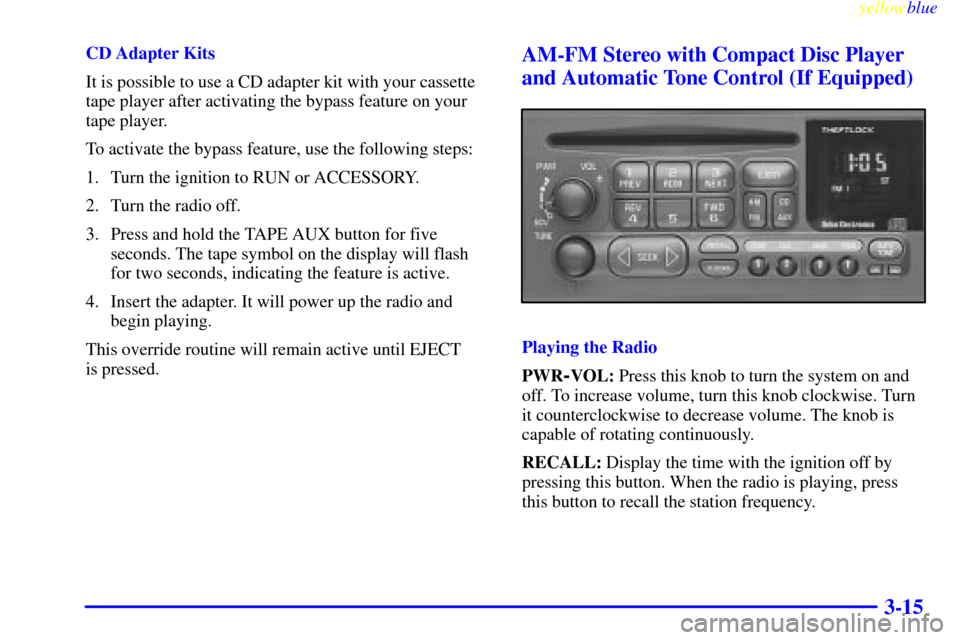
is pressed.AM-FM Stereo with Compact Disc Player
and Automatic Tone Control (If Equipped)
Playing the Radio
PWR
-VOL: Press this knob to turn the system on and
off. To increase volume, turn this knob clockwise. Turn
it counterclockwise to decrease volume. The knob is
capable of rotating continuously.
RECALL: Display the time with the ignition off by
pressing this button. When the radio is playing, press
this button to recall the station frequency.
Page 140 of 384

yellowblue
3-16
SCV: Your system has a feature called
Speed
-Compensated Volume (SCV). With SCV, your
audio system adjusts automatically to make up for road
and wind noise as you drive. Set the volume at the
desired level. Turn the control ring behind the upper
knob clockwise to adjust the SCV. Then, as you drive,
SCV automatically increases the volume, as necessary,
to overcome noise at any particular speed. The volume
level should always sound the same to you as you drive.
If you don't want to use SCV, turn the control all the
way down. Each notch on the control ring allows for
more volume compensation at faster vehicle speeds.
Finding a Station
AM
-FM: Press this button to switch between AM, FM1
and FM2. The display will show your selection.
TUNE: Press this knob lightly so it extends. Turn it to
choose radio stations. Push the knob back into its stored
position when you're not using it.
SEEK: Press the right arrow to tune to the next
higher station and the left arrow to tune to the next
lower station and stay there. The sound will mute
while seeking.SCAN: Press and hold SEEK for two seconds until
SCAN appears on the display. SCAN allows you to
listen to stations for a few seconds. The receiver will
continue to scan and momentarily stop at each station
until you press the button again. The sound will mute
while scanning.
PUSHBUTTONS: The six numbered pushbuttons let
you return to your favorite stations. You can set up to
18 stations (six AM, six FM1 and six FM2). Just:
1. Turn the radio on.
2. Press AM
-FM to select the band.
3. Tune in the desired station.
4. Press AUTO TONE to select the setting you prefer.
5. Press and hold one of the six pushbuttons. The sound
will mute. When it returns, release the button.
Whenever you press that numbered button, the
station you set will return and the tone you selected
will be automatically selected for that button.
6. Repeat the steps for each pushbutton.
Page 141 of 384

yellowblue
3-17
P.SCAN: The preset scan button lets you scan through
your favorite stations stored on your pushbuttons. Select
either the AM, FM1 or FM2 mode and then press
P.SCAN. It will scan through each station stored on your
pushbuttons and stop for a few seconds before continuing
to scan through all of the pushbuttons. Press P.SCAN
again or one of the pushbuttons to stop scanning to listen
to a specific stored station. P.SCAN will light up on the
display while in this mode. If one of the stations stored on
a pushbutton is too weak for the location you are in, the
radio display will show the channel number (P1
-P6) for
several seconds before advancing to the next preset station.
Setting the Tone
BASS: Press lightly on this knob to release it from its
stored position. Turn the knob clockwise to increase bass
and counterclockwise to decrease bass. When the BASS
control is rotated, the AUTO TONE display will go blank.
TREB: Press lightly on this knob to release it from its
stored position. Turn the knob clockwise to increase
treble and counterclockwise to decrease treble. When
the TREB control is rotated, the AUTO TONE display
will go blank. If a station is weak or noisy, you may
want to decrease the treble.
Push these knobs back into their stored positions when
you're not using them.AUTO TONE: Press this button to select among the
six preset equalization settings and tailor the sound to
the music or voice being heard. Each time you press the
button, the selection will switch to one of the preset
settings of CLASSIC, NEWS, ROCK, POP, C/W
(Country/Western) or JAZZ. To return to the manual
mode, press and release this button until the AUTO
TONE display goes blank. This will return the tone
adjustment to the BASS and TREB controls. If a
BASS or TREB control is rotated, the AUTO TONE
display will go blank. Use PUSHBUTTONS to program
AUTO TONE.
Adjusting the Speakers
BAL: Press lightly on this knob to release it from its
stored position. Turn the control clockwise to adjust
sound to the right speakers and counterclockwise to
adjust sound to the left speakers. The middle position
balances the sound between the speakers.
FADE: Press lightly on this knob to release it from its
stored position. Turn the control clockwise to adjust the
sound to the front speakers and counterclockwise for the
rear speakers. The middle position balances the sound
between the speakers.
Push these knobs back into their stored positions when
you're not using them.
Page 160 of 384

yellowblue
4-10
Speed limit signs near curves warn that you should
adjust your speed. Of course, the posted speeds are
based on good weather and road conditions. Under less
favorable conditions you'll want to go slower.
If you need to reduce your speed as you approach a
curve, do it before you enter the curve, while your front
wheels are straight ahead.
Try to adjust your speed so you can ªdriveº through the
curve. Maintain a reasonable, steady speed. Wait to
accelerate until you are out of the curve, and then
accelerate gently into the straightaway.
Steering in Emergencies
There are times when steering can be more effective than
braking. For example, you come over a hill and find a
truck stopped in your lane, or a car suddenly pulls out
from nowhere, or a child darts out from between parked
cars and stops right in front of you. You can avoid these
problems by braking
-- if you can stop in time. But
sometimes you can't; there isn't room. That's the time for
evasive action
-- steering around the problem.
Your vehicle can perform very well in emergencies like
these. First apply your brakes. (See ªBraking in
Emergenciesº earlier in this section.) It is better to
remove as much speed as you can from a possible
collision. Then steer around the problem, to the left or
right depending on the space available.
An emergency like this requires close attention and a
quick decision. If you are holding the steering wheel at
the recommended 9 and 3 o'clock positions, you can
turn it a full 180 degrees very quickly without removing
either hand. But you have to act fast, steer quickly, and
just as quickly straighten the wheel once you have
avoided the object.
The fact that such emergency situations are always
possible is a good reason to practice defensive driving at
all times and wear safety belts properly.