Page 116 of 328

yellowblue
3-10
Playing a Cassette Tape
With the ignition and radio on, insert a cassette tape.
The tape will begin playing as soon as it is inserted.
Press EJECT or RECALL to load a tape with the
ignition off. Then insert the cassette tape. A tape symbol
is shown in the center of the graphic display whenever a
tape is inserted. When a tape is active, the tape symbol
will be accompanied by a direction arrow.
Your tape player is built to work best with tapes that are
up to 30 to 45 minutes long on each side. Tapes longer
than that are so thin they may not work well in this player.
The longer side with the tape visible should face to the
right. If you hear nothing or hear just a garbled sound, it
may not be in squarely. Press EJECT to remove the tape
and start over.
While the tape is playing, use the VOLUME, FADE,
BAL, TREB, BASS and TONE controls just as you do for
the radio. The display will show an arrow to show which
side of the tape is playing. When the down indicator arrow
is lit, selections listed on the bottom side of the cassette are
playing. When the up arrow is lit, selections listed on the
top side of the cassette are playing.
REV (TUNE): Press the left arrows to reverse the tape
rapidly. Press REV (TUNE) or TAPE to return to
playing speed.FWD (TUNE): Press the right arrows to advance
rapidly to another part of the tape. Press FWD (TUNE)
or TAPE to return to playing speed.
PREV (SEEK): Press the left arrow to go to the start of
the current selection if more than eight seconds have
played. If you hold the button or press it more than once,
the player will continue moving back through the tape.
Press the left arrow or TAPE to return to playing speed.
NEXT (SEEK): Press the right arrow to go to the start
of the next selection if more than eight seconds have
played. If you hold the button or press it more than once,
the player will continue moving forward through the
tape. Press the right arrow or TAPE to return to
playing speed.
� (2): Press this button to reduce background noise
from tapes encoded with Dolby NR.
Dolby Noise Reduction is manufactured under a license
from Dolby Laboratories Licensing Corporation. Dolby
and the double
-D symbol are trademarks of Dolby
Laboratories Licensing Corporation.
MTL: Your bias is set automatically. MTL will appear
on your display when a metal or chrome tape is inserted.
AM´FM: Press this button to play the radio when a tape
is playing.
Page 117 of 328

yellowblue
3-11
TAPE: With a tape loaded in the player and the radio
playing, press this button once to play the tape. To
switch from the tape to the radio when the tape is
playing, press the AM´FM button. Press this button to
switch from one side of the tape to the other. Your
cassette tape player can play continuously because the
player has an auto
-reverse feature.
EJECT: Press this button to remove the tape. The radio
will play.
CLEAN: If this message appears on the display, the
cassette tape player needs to be cleaned. It will still play
tapes, but you should clean it as soon as possible to
prevent damage to the tapes and player. See ªCare of
Your Cassette Tape Playerº in the Index. After you clean
the player, press and hold EJECT for five seconds to
reset the CLEAN indicator. The radio will display
--- to
show the indicator was reset.
AM-FM Stereo with Compact Disc Player
and Automatic Tone Control (If Equipped)
Playing the Radio
PWR
-VOLUME: This knob turns the system on and
off and controls the volume. To increase volume and
turn the radio on, turn the knob clockwise. Turn it
counterclockwise to decrease volume.
RECALL: Display the time with the ignition off by
pressing this button. When the radio is playing, press
this button to recall the station frequency.
Page 122 of 328

yellowblue
3-16 Care of Your Cassette Tape Player
A tape player that is not cleaned regularly can cause
reduced sound quality, ruined cassettes or a damaged
mechanism. Cassette tapes should be stored in their
cases away from contaminants, direct sunlight and
extreme heat. If they aren't, they may not operate
properly or may cause failure of the tape player.
Your tape player should be cleaned regularly after every
50 hours of use. Your radio may display CLEAN to
indicate that you have used your tape player for 50
hours without resetting the tape clean timer. If this
message appears on the display, your cassette tape
player needs to be cleaned. It will still play tapes, but
you should clean it as soon as possible to prevent
damage to your tapes and player. If you notice a
reduction in sound quality, try a known good cassette to
see if it is the tape or the tape player at fault. If this other
cassette has no improvement in sound quality, clean the
tape player.
The recommended cleaning method for your cassette
tape player is the use of a scrubbing action,
non
-abrasive cleaning cassette with pads which scrub
the tape head as the hubs of the cleaner cassette turn.
The recommended cleaning cassette is available through
your dealership (GM Part No. 12344789).When using a scrubbing action, non
-abrasive cleaning
cassette, it is normal for the cassette to eject because
your unit is equipped with a cut tape detection feature
and a cleaning cassette may appear as a broken tape. To
prevent the cleaning cassette from being ejected, use the
following steps.
1. Turn the ignition to ON or ACC.
2. Turn the radio off.
3. Press and hold the TAPE button for five seconds.
The tape symbol on the display will flash for
two seconds.
4. Insert the scrubbing action cleaning cassette.
5. Eject the cleaning cassette after the manufacturer's
recommended cleaning time.
When the cleaning cassette has been ejected, the cut tape
detection feature is active again.
You may also choose a non
-scrubbing action, wet-type
cleaner which uses a cassette with a fabric belt to clean
the tape head. This type of cleaning cassette will not
eject on its own. A non
-scrubbing action cleaner may
not clean as thoroughly as the scrubbing type cleaner.
The use of a non
-scrubbing action, dry-type cleaning
cassette is not recommended.
Page 148 of 328
yellowblue
4-24
If you drive regularly in steep country, or if you're
planning to visit there, here are some tips that can make
your trips safer and more enjoyable.
�Keep your vehicle in good shape. Check all fluid
levels and also the brakes, tires, cooling system and
transaxle. These parts can work hard on
mountain roads.
�Know how to go down hills. The most important
thing to know is this: let your engine do some of the
slowing down. Shift to a lower gear when you go
down a steep or long hill.
CAUTION:
If you don't shift down, your brakes could get so
hot that they wouldn't work well. You would then
have poor braking or even none going down a
hill. You could crash. Shift down to let your
engine assist your brakes on a steep
downhill slope.
CAUTION:
Coasting downhill in NEUTRAL (N) or with the
ignition off is dangerous. Your brakes will have to
do all the work of slowing down. They could get so
hot that they wouldn't work well. You would then
have poor braking or even none going down a hill.
You could crash. Always have your engine running
and your vehicle in gear when you go downhill.
�Know how to go uphill. You may want to shift down
to a lower gear. The lower gears help cool your engine
and transaxle, and you can climb the hill better.
�Stay in your own lane when driving on two
-lane
roads in hills or mountains. Don't swing wide or cut
across the center of the road. Drive at speeds that let
you stay in your own lane.
�As you go over the top of a hill, be alert. There could be
something in your lane, like a stalled car or an accident.
�You may see highway signs on mountains that warn of
special problems. Examples are long grades, passing or
no
-passing zones, a falling rocks area or winding
roads. Be alert to these and take appropriate action.
Page 154 of 328
yellowblue
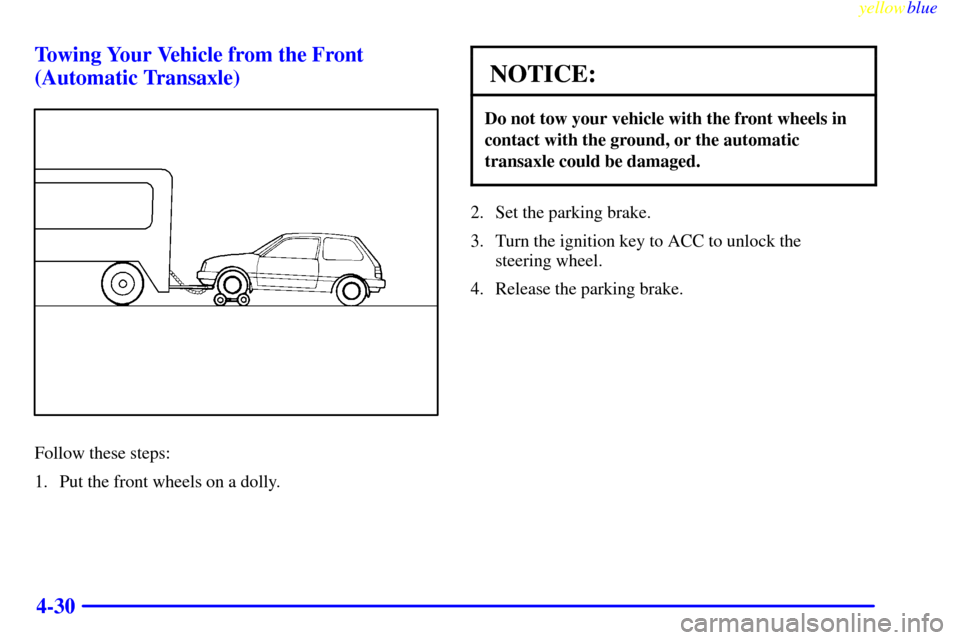
4-30 Towing Your Vehicle from the Front
(Automatic Transaxle)
Follow these steps:
1. Put the front wheels on a dolly.
NOTICE:
Do not tow your vehicle with the front wheels in
contact with the ground, or the automatic
transaxle could be damaged.
2. Set the parking brake.
3. Turn the ignition key to ACC to unlock the
steering wheel.
4. Release the parking brake.
Page 155 of 328
yellowblue
4-31
NOTICE:
The front wheels transmit shocks during towing.
The steering column may not be strong enough to
withstand the shocks. Always unlock the steering
wheel before towing.
NOTICE:
Make sure that the towing speed does not exceed
55 mph (90 km/h), or your vehicle could be
badly damaged.
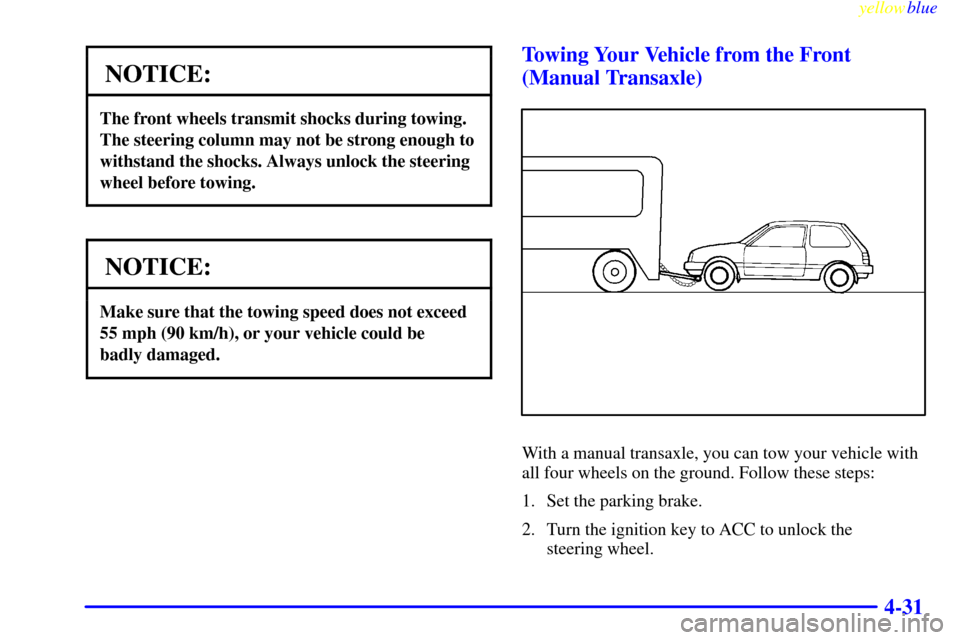
Towing Your Vehicle from the Front
(Manual Transaxle)
With a manual transaxle, you can tow your vehicle with
all four wheels on the ground. Follow these steps:
1. Set the parking brake.
2. Turn the ignition key to ACC to unlock the
steering wheel.
Page 164 of 328
yellowblue
5-4
1. Check the other vehicle. It must have a 12-volt
battery with a negative ground system.
NOTICE:
If the other system isn't a 12-volt system with a
negative ground, both vehicles can be damaged.
2. Get the vehicles close enough so the jumper cables
can reach, but be sure the vehicles aren't touching
each other. If they are, it could cause a ground
connection you don't want. You wouldn't be able to
start your vehicle, and the bad grounding could
damage the electrical systems.
To avoid the possibility of the vehicles rolling, set
the parking brake firmly on both vehicles involved in
the procedure. Put an automatic transaxle vehicle in
PARK (P) and a manual transaxle vehicle in
NEUTRAL (N).3. Turn off the ignition on both vehicles. Unplug
unnecessary accessories plugged into the cigarette
lighter. Turn off all lamps that aren't needed as well
as radios. This will avoid sparks and help save both
batteries. In addition, it could save your radio!
NOTICE:
If you leave your radio on, it could be badly
damaged. The repairs wouldn't be covered by
your warranty.
4. Open the hoods and locate the batteries.
CAUTION:
An electric fan can start up even when the engine
is not running and can injure you. Keep hands,
clothing and tools away from any underhood
electric fan.
Page 250 of 328
yellowblue
6-58
Fuse Useage
1 Left Headlamp,
High
-Beam Indicator
2 Right Headlamp
3 Parking Lamps, Sidemarker
Lamps, License Plate Lamps,
Instrument Cluster LightsFuse Useage
4 Door Lock System (If Equipped)
5 Hazard Lamps, Horn
6 Ignition System, Gages, Warning
and Indicator Lights, Automatic
Transaxle Speed Sensor
7 Heater, Air Conditioning
(If Equipped)
8 Stoplamps
9 Lighter, Radio
10 Back
-Up Lamps,
Turn Signal Lamps
11 Rear Defogger (If Equipped)
12 Front and Rear Wiper/Washer