Page 80 of 344

yellowblue
2-20 To Use the Engine Coolant Heater
1. Turn off the engine.
2. Open the hood and unwrap the electrical cord. The
cord is attached to the underside of the vehicle's
diagonal brace, which is located above the air
cleaner assembly.
3. Plug it into a normal, grounded 110
-volt AC outlet.
CAUTION:
Plugging the cord into an ungrounded outlet
could cause an electrical shock. Also, the wrong
kind of extension cord could overheat and cause
a fire. You could be seriously injured. Plug the
cord into a properly grounded three
-prong
11 0
-volt AC outlet. If the cord won't reach, use a
heavy
-duty three-prong extension cord rated for
at least 15 amps.
4. Before starting the engine, be sure to unplug and
store the cord as it was before to keep it away
from moving engine parts. If you don't, it could
be damaged.How long should you keep the coolant heater plugged
in? The answer depends on the outside temperature, the
kind of oil you have, and some other things. Instead of
trying to list everything here, we ask that you contact
your dealer in the area where you'll be parking your
vehicle. The dealer can give you the best advice for that
particular area.
Automatic Transaxle Operation
Your automatic transaxle will have a shift lever on the
steering column.
The graphic shown above is displayed on your
instrument panel cluster in reference to your steering
column shift lever.
Page 92 of 344
yellowblue
2-32
The driver's window switch has an express-down
feature. This switch is labeled AUTO. Tap the rear of
the switch, and the driver's window will open a small
amount. If the rear of the switch is pressed all the way
down, the window will go all the way down.
To stop the window while it is lowering, press the front
of the switch. To raise the window, press and hold the
front of the switch.
The driver's window controls also include a lock
-out
switch. Press LOCK to stop front and rear passengers
from using their window switches. The driver can still
control all the windows with the lock on. Press the other
side of the LOCK button for normal window operation.
Horn
Press anywhere near the horn symbols on your steering
wheel pad to sound the horn.
TILT-WHEEL� Adjustable
Steering Column
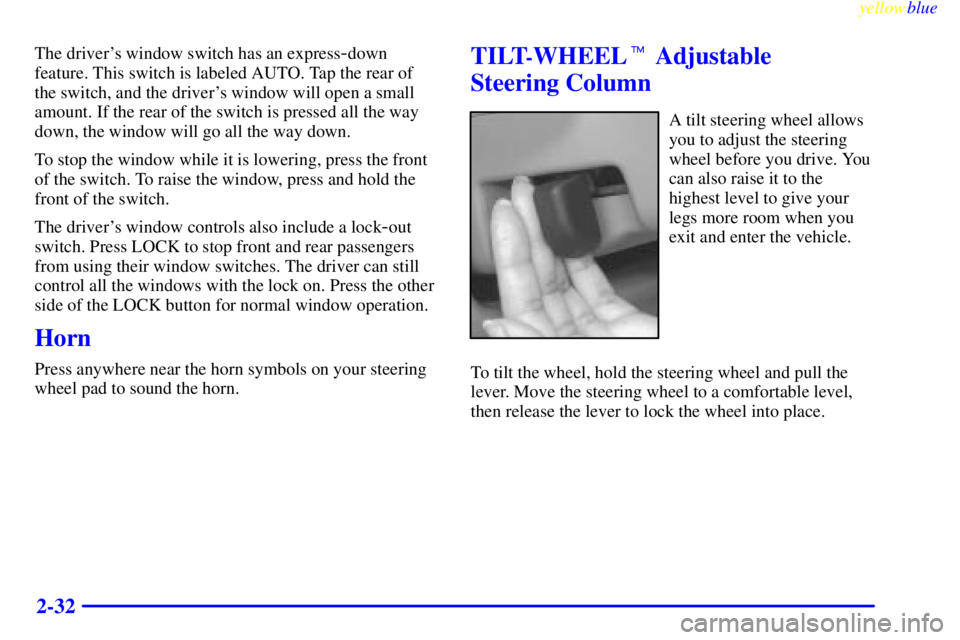
A tilt steering wheel allows
you to adjust the steering
wheel before you drive. You
can also raise it to the
highest level to give your
legs more room when you
exit and enter the vehicle.
To tilt the wheel, hold the steering wheel and pull the
lever. Move the steering wheel to a comfortable level,
then release the lever to lock the wheel into place.
Page 93 of 344

yellowblue
2-33
Turn Signal/Multifunction Lever
The lever on the left side of the steering column
includes your:
�Turn Signal and Lane Change Indicator
�Headlamp High/Low Beam Changer
�Windshield Wipers
�Windshield Washer
�Cruise Control (If Equipped)
�Flash
-to-Pass
Turn Signal and Lane Change Indicator
The turn signal has the following positions: two upward
(for right) and two downward (for left). These positions
allow you to signal a turn or a lane change.
To signal a turn, move the lever all the way up or down.
When the turn is finished, the lever will return automatically.
An arrow on the instrument
panel will flash in the
direction of the turn or
lane change.
To signal a lane change, just raise or lower the lever
until the arrow starts to flash. Hold it there until you
complete your lane change. The lever will return by
itself when you release it.
If the arrow flashes faster than normal as you signal a
turn or a lane change, a signal bulb may be burned out
and other drivers won't see your turn signal.
If a bulb is burned out, replace it to help avoid an
accident. If the arrows don't go on at all when you
signal a turn, check for burned
-out bulbs and then check
the fuse (see ªFuses and Circuit Breakersº in the Index).
Page 125 of 344

3-
yellowblue
3-1
Section 3 Comfort Controls and Audio Systems
In this section, you'll find out how to operate the comfort control and audio systems offered with your vehicle. Be
sure to read about the particular systems supplied with your vehicle.
3
-2 Comfort Controls
3
-2 Manual Single Zone Climate Control
3
-4 Dual ComforTemp Climate Control
(If Equipped)
3
-7 Dual Automatic ComforTemp Climate Control
(If Equipped)
3
-9 Rear Window Defogger
3
-10 Ventilation System
3
-11 Audio Systems
3
-11 Setting the Clock
3
-12 AM-FM Stereo
3
-14 AM-FM Stereo with Cassette Tape Player
(If Equipped)
3
-17 AM-FM Stereo with Cassette Tape Player and
Automatic Tone Control (If Equipped)3
-21 AM-FM Stereo with Cassette Tape and
Compact Disc Player with Automatic Tone
Control (If Equipped)
3
-26 Theft-Deterrent Feature (If Equipped)
3
-29 Audio Steering Wheel Controls (If Equipped)
3
-30 Understanding Radio Reception
3
-30 Tips About Your Audio System
3
-31 Care of Your Cassette Tape Player
3
-32 Care of Your Compact Discs
3
-32 Care of Your Compact Disc Player
3
-32 Fixed Mast Antenna
3
-32 Backglass Antenna (If Equipped)
3
-33 Diversity Antenna System (If Equipped)
Page 153 of 344

yellowblue
3-29 Audio Steering Wheel Controls
(If Equipped)
If your vehicle has this feature, you can control certain
radio functions using the buttons on your steering wheel.
SEEK: Press the up
or down arrow to tune to
the next or previous
radio station.
If a cassette tape or compact disc is playing, the player
will advance to the next or previous selection.
SCAN: Press the SCAN button and SCAN will appear
on the display. SCAN works as the PSCAN button on
your radio. It will scan through each of the preset radio
stations. If a preset radio station has weak reception, the
radio will not stop at the preset station. Press SCAN
again to stop scanning.AM
-FM: Press this button to choose AM, FM1 or FM2.
If a cassette tape or compact disc is playing, press this
button to stop it and the radio will play.
SRCE: Press this button to
change to the cassette tape,
compact disc function or
return to playing the radio.
MUTE: Press this button to silence the audio system.
Press it again to turn on the sound.
VOL: Press the up or down arrow to increase or
decrease volume.
Page 159 of 344
4-
yellowblue
4-1
Section 4 Your Driving and the Road
Here you'll find information about driving on different kinds of roads and in varying weather conditions. We've also
included many other useful tips on driving.
4
-2 Defensive Driving
4
-3 Drunken Driving
4
-6 Control of a Vehicle
4
-6 Braking
4
-10 Steering
4
-12 Off-Road Recovery
4
-13 Passing
4
-14 Loss of Control
4
-15 Driving at Night
4
-17 Driving in Rain and on Wet Roads4
-20 City Driving
4
-21 Freeway Driving
4
-22 Before Leaving on a Long Trip
4
-23 Highway Hypnosis
4
-23 Hill and Mountain Roads
4
-25 Winter Driving
4
-29 Recreational Vehicle Towing
4
-30 Loading Your Vehicle
4
-32 Towing a Trailer
Page 164 of 344

yellowblue
4-6
Control of a Vehicle
You have three systems that make your vehicle go where
you want it to go. They are the brakes, the steering and
the accelerator. All three systems have to do their work
at the places where the tires meet the road.
Sometimes, as when you're driving on snow or ice, it's
easy to ask more of those control systems than the tires
and road can provide. That means you can lose control
of your vehicle.
Braking
Braking action involves perception time and
reaction time.
First, you have to decide to push on the brake pedal.
That's perception time. Then you have to bring up your
foot and do it. That's reaction time.
Average reaction time is about 3/4 of a second. But
that's only an average. It might be less with one driver
and as long as two or three seconds or more with
another. Age, physical condition, alertness, coordination
and eyesight all play a part. So do alcohol, drugs and
frustration. But even in 3/4 of a second, a vehicle
moving at 60 mph (100 km/h) travels 66 feet (20 m).
That could be a lot of distance in an emergency, so
keeping enough space between your vehicle and others
is important.
And, of course, actual stopping distances vary greatly
with the surface of the road (whether it's pavement or
gravel); the condition of the road (wet, dry, icy); tire
tread; the condition of your brakes; the weight of the
vehicle and the amount of brake force applied.
Page 168 of 344

yellowblue
4-10
When the system is on, this
warning light will come on
to let you know if there's
a problem.
See ªEnhanced Traction System Warning Lightº in the
Index. When this warning light is on, the system will not
limit wheel spin. Adjust your driving accordingly.
To limit wheel spin, especially in slippery road
conditions, you should always leave the Enhanced
Traction System on. But you can turn the system off if
you ever need to. (You should turn the system off if your
vehicle ever gets stuck in sand, mud, ice or snow. See
ªRocking Your Vehicleº in the Index.)
To turn the system off, your gear shift lever must be in
FIRST (1) or SECOND (2) gear. See ªRocking Your
Vehicleº in the Index. When you turn the system off, the
Enhanced Traction System warning light will come on
and stay on. If the Enhanced Traction System is limiting
wheel spin when you turn the system off, the warning
light will come on
-- but the system won't turn off right
away. It will wait until there's no longer a current need
to limit wheel spin. Also, if you set the parking brake,
the system will turn off.You can turn the system back on at any time by shifting
to OVERDRIVE (�) or THIRD (3). The Enhanced
Traction System warning light should go off.
Braking in Emergencies
With anti-lock, you can steer and brake at the same
time. In many emergencies, steering can help you more
than even the very best braking.
Steering
Power Steering
If you lose power steering assist because the engine
stops or the system is not functioning, you can steer but
it will take much more effort.
Magnetic Variable Effort Steering�
(If Equipped)
This steering system provides lighter steering effort for
parking and when driving at low speeds. Steering effort
will increase at higher speeds for improved road feel.
Steering Tips
Driving on Curves
It's important to take curves at a reasonable speed.