Page 155 of 175

1998 Volvo S90
Enter the code again once this
time has elapsed.
Radio SC-816 pg. 147
A- On/off switch
Push the button to switch on the
radio. Press the button to turn
the radio off.
B- Volume control
Turn the button clockwise to
increase the volume. The
volume control is electronic and
has no end stop.
C- Waveband selector
The desired waveband is set by
pressing one of the waveband
selector bands. The frequency
and waveband is shown on the
display.
NOTE: There are two FM
wavebands and one AM D- Setting frequency
selection
The radio can be used in most
parts of the world by changing
the frequency selection
intervals as follows:
Depress and hold preset button
5 and turn the radio ON. "USA"
will flash on the display. Each
time button 5 is pressed, the
frequency selection will change
from "USA" to "AUS", etc.
When the correct country name
is displayed, wait 5 seconds and
the radio will be ready for use. E- Manual tuning
Press the left side tune button to
tune to lower frequencies and the
right side to tune to higher
frequencies. The tuned
frequency is displayed.
ST will be displayed to indicate
stereo FM reception.
file:///K|/ownersdocs/1998/1998_SV90/98S90_145.htm (3 of 6)12/30/2006 \
1:52:53 PM
Page 156 of 175
1998 Volvo S90
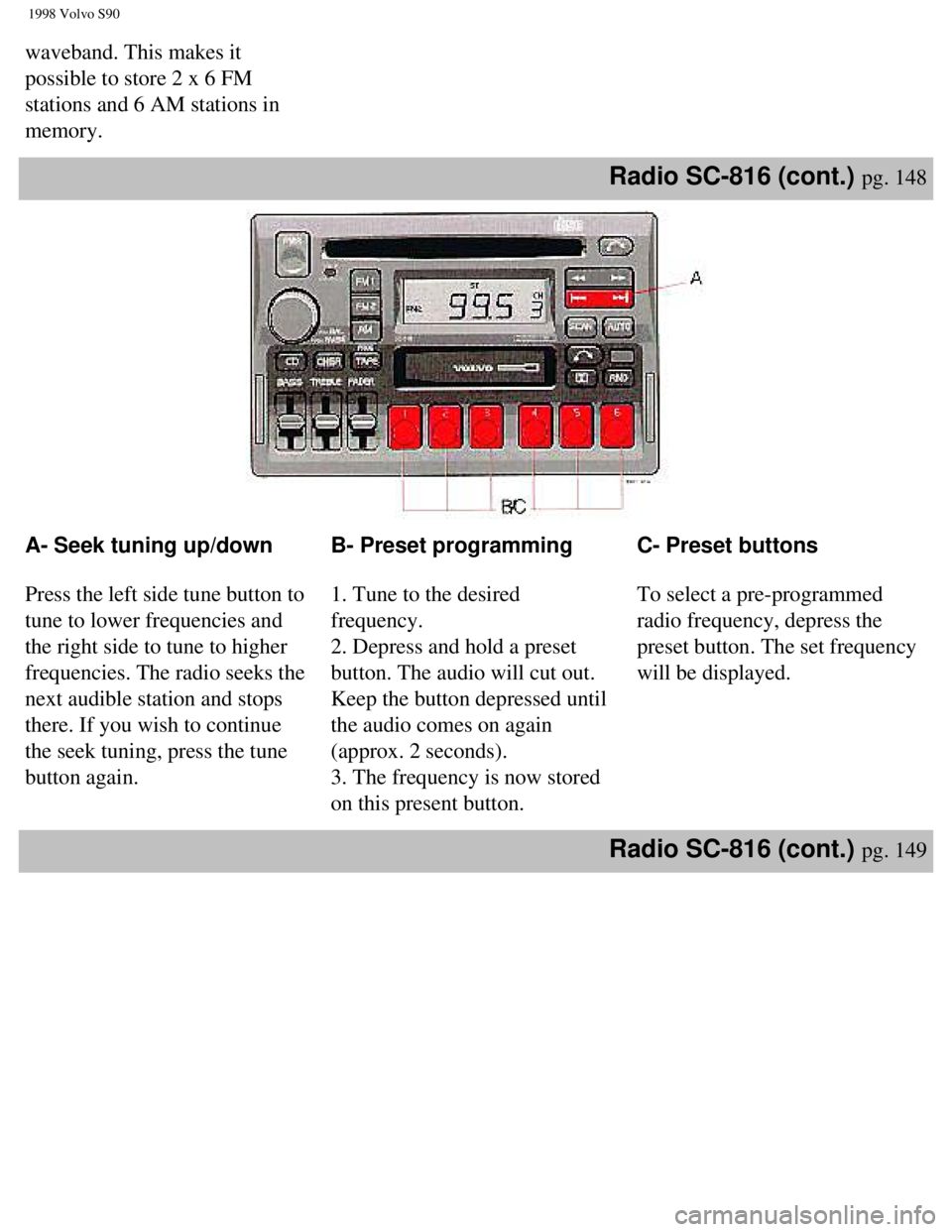
waveband. This makes it
possible to store 2 x 6 FM
stations and 6 AM stations in
memory.
Radio SC-816 (cont.) pg. 148
A- Seek tuning up/down
Press the left side tune button to
tune to lower frequencies and
the right side to tune to higher
frequencies. The radio seeks the
next audible station and stops
there. If you wish to continue
the seek tuning, press the tune
button again. B- Preset programming
1. Tune to the desired
frequency.
2. Depress and hold a preset
button. The audio will cut out.
Keep the button depressed until
the audio comes on again
(approx. 2 seconds).
3. The frequency is now stored
on this present button. C- Preset buttons
To select a pre-programmed
radio frequency, depress the
preset button. The set frequency
will be displayed.
Radio SC-816 (cont.) pg. 149
file:///K|/ownersdocs/1998/1998_SV90/98S90_145.htm (4 of 6)12/30/2006 \
1:52:53 PM
Page 157 of 175
1998 Volvo S90
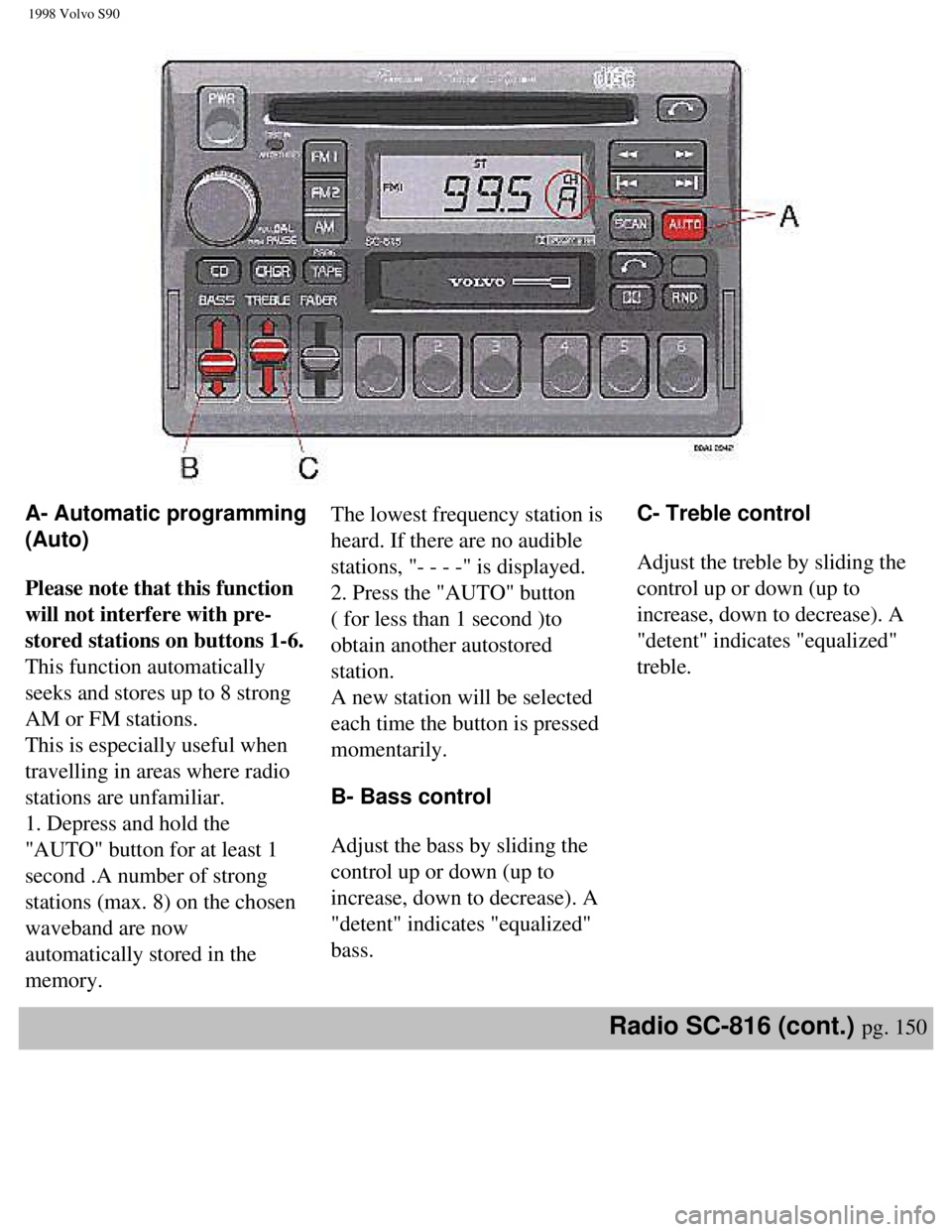
A- Automatic programming
(Auto)
Please note that this function
will not interfere with pre-
stored stations on buttons 1-6.
This function automatically
seeks and stores up to 8 strong
AM or FM stations.
This is especially useful when
travelling in areas where radio
stations are unfamiliar.
1. Depress and hold the
"AUTO" button for at least 1
second .A number of strong
stations (max. 8) on the chosen
waveband are now
automatically stored in the
memory.The lowest frequency station is
heard. If there are no audible
stations, "- - - -" is displayed.
2. Press the "AUTO" button
( for less than 1 second )to
obtain another autostored
station.
A new station will be selected
each time the button is pressed
momentarily.
B- Bass control
Adjust the bass by sliding the
control up or down (up to
increase, down to decrease). A
"detent" indicates "equalized"
bass.
C- Treble control
Adjust the treble by sliding the
control up or down (up to
increase, down to decrease). A
"detent" indicates "equalized"
treble.
Radio SC-816 (cont.) pg. 150
file:///K|/ownersdocs/1998/1998_SV90/98S90_145.htm (5 of 6)12/30/2006 \
1:52:53 PM
Page 159 of 175

1998 Volvo S90
Chapter 10 - (cont.)
Cassette deck
pg. 151
A- Cassette slot
The cassette is inserted with the
open side to the right (side 1 or
A of the cassette upwards).
When the cassette is inserted,
the radio is disengaged and the
cassette will start to play
automatically. "TAPE
"or
"TAPE
"is displayed to
indicate which side of the tape
is being played. When one side
of the tape has been played the
unit will automatically play the
other side (auto-reverse). The
cassette can be inserted or
ejected even when the unit
switched off. B- Reversing the tape
(PROG)
Press the button to play the
other side of the tape.
C- Fast winding
The tape is advanced with "
"and rewound with "
".
"FF" will be displayed while
advancing the tape. "REW" will
be displayed while rewinding
the tape.
Fast winding can be stopped by
pressing the tuning button or the
TAPE button again. D- Dolby B NR button
Press this button when you use
tapes recorded with the Dolby B
noise reduction system. The
Dolby symbol
will be
indicated in the display.
Cassette deck pg. 152
file:///K|/ownersdocs/1998/1998_SV90/98S90_151.htm (1 of 3)12/30/2006 \
1:52:54 PM
Page 161 of 175
1998 Volvo S90
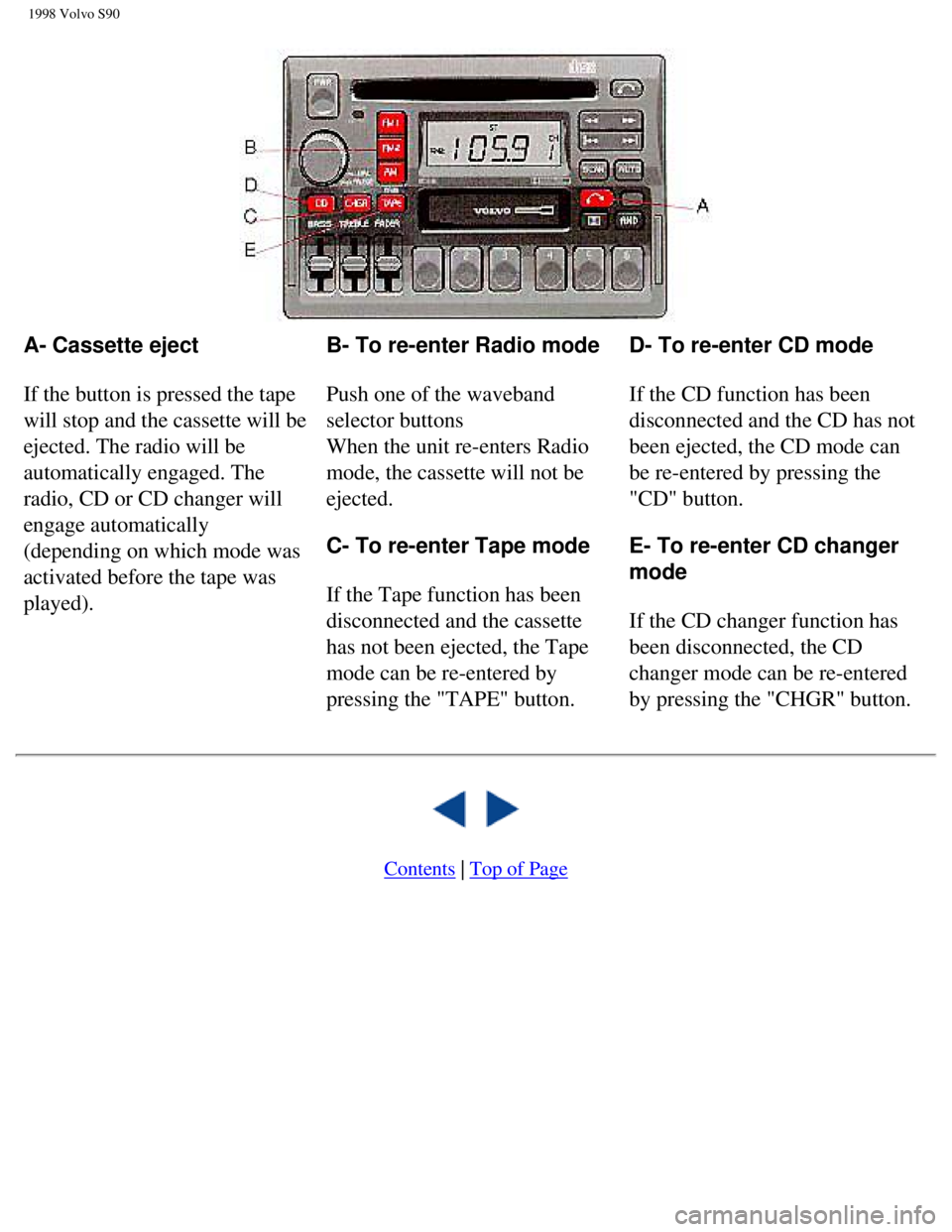
A- Cassette eject
If the button is pressed the tape
will stop and the cassette will be
ejected. The radio will be
automatically engaged. The
radio, CD or CD changer will
engage automatically
(depending on which mode was
activated before the tape was
played). B- To re-enter Radio mode
Push one of the waveband
selector buttons
When the unit re-enters Radio
mode, the cassette will not be
ejected.
C- To re-enter Tape mode
If the Tape function has been
disconnected and the cassette
has not been ejected, the Tape
mode can be re-entered by
pressing the "TAPE" button. D- To re-enter CD mode
If the CD function has been
disconnected and the CD has not
been ejected, the CD mode can
be re-entered by pressing the
"CD" button.
E- To re-enter CD changer
mode
If the CD changer function has
been disconnected, the CD
changer mode can be re-entered
by pressing the "CHGR" button.
Contents | Top of Page
file:///K|/ownersdocs/1998/1998_SV90/98S90_151.htm (3 of 3)12/30/2006 \
1:52:54 PM
Page 162 of 175

1998 Volvo S90
Chapter 10 - (cont.)CD - Single
pg. 154
A- CD slot
With the audio system on, insert
a disc into the slot with the label
side up. When the CD is
inserted, the radio is disengaged
and the CD will start to play
automatically.
The CD can be inserted or
ejected even when the unit is
switched off.
When the CD has been inserted
into the player, the "DISC IN"
light will always be ON even if
the radio, tape deck or CD
changer are in use. B- CD mode selector
Press "CD" to actuate the CD
mode. The track last listened to
will continue to play. If the CD-
player is empty, "NO CD" will
be displayed.
C- CD eject
If the button is pressed the CD
will stop and the disc will be
ejected. The radio will be
automatically engaged. The
radio, tape or CD changer will
engage automatically (depending
on which mode was activated
before the CD was played).
NOTE: If the CD eject button is
pressed and the disc is not
removed within 12 seconds, the
disc will be drawn into the CD
player again.
CD - Single pg. 155
file:///K|/ownersdocs/1998/1998_SV90/98S90_154.htm (1 of 7)12/30/2006 \
1:52:55 PM
Page 164 of 175

1998 Volvo S90
A- Random choice
Press "RND" to actuate the
random mode.
From a disc, tracks will be
played at random. "RND" will
be displayed when this function
is engaged.
the random function may cause
a disc to be played more than
once before playing through all
discs. B- Pause
If you press the "volume" knob
the disc is stopped, the unit is
silent and "PAUSE" is
displayed. To restart the disc
press the knob again.
C- To re-enter Radio mode
Push one of the waveband
selector buttons
D- To re-enter Tape mode
If a cassette is already inserted,
the tape deck will re-engage if
the "TAPE" button is pressed. E- To re-enter CD mode
If the CD function has been
disconnected and the CD has not
been ejected, the CD mode can
be re-entered by pressing the
"CD" button.
F- To re-enter CD changer
mode
If the CD changer function has
been disconnected, the CD
changer mode can be re-entered
by pressing the "CHGR" button.
CD - Changer (option) pg. 157
file:///K|/ownersdocs/1998/1998_SV90/98S90_154.htm (3 of 7)12/30/2006 \
1:52:55 PM
Page 167 of 175

1998 Volvo S90
A- Random choice
Press "RND" to actuate the
random mode. From a disc
chosen at random, 4 tracks will
be played (also chosen at
random). A new disc will then
be played in the same way.
"RND" will be displayed when
this function is engaged.
B- Pause
If you press the "volume" knob
the disc is stopped, the unit is
silent and "PAUSE" is
displayed. To restart the disc
press the knob again. C- To re-enter Radio mode
Push one of the waveband
selector buttons
D- To re-enter Tape mode
If a cassette is already inserted,
the tape deck will re-engage if
the "TAPE" button is pressed.
E- To re-enter CD mode
If the CD function has been
disconnected and the CD has not
been ejected, the CD mode can
be re-entered by pressing the
"CD" button.
F- To re-enter CD changer
mode
If the CD changer function has
been disconnected, the CD
changer mode can be re-entered
by pressing the "CHGR" button.
Technical specifications(option) pg. 160
SC-816
Power output: 4x 25 W (10% dist.)
Output impedance: 4Ohms
System voltage: 12 Volts, negative ground
Radio
System: PLL (Phase Lock Loop) system with tuned RF (Radio Frequency)\
front and end automatic
wide band gain control.
Electronic suppression circuitry (noise killer).
The Radio is equipped with FM diversity.
Frequency range:
FM 87.9 - 107.9 MHz
AM 530 - 1710 kHz
Sensitivity
FM 1.1µV
AM 20µV
Stereo separation: 35 dB
file:///K|/ownersdocs/1998/1998_SV90/98S90_154.htm (6 of 7)12/30/2006 \
1:52:55 PM