3.2
The voice-ac tivate d sys te m will dial the
number. party will an swe r thro ugh your
ste reo speakers .
Wit h
Calling, you ca n enj oy
th e s imp
licity of a one-touch wireless will rec eive
vate your perso nal callin g serv ic e at no
tio nal cost.
In order to use this service, an OnStar Advisor must set up the
cellular
account and modify the settings in your vehicle.
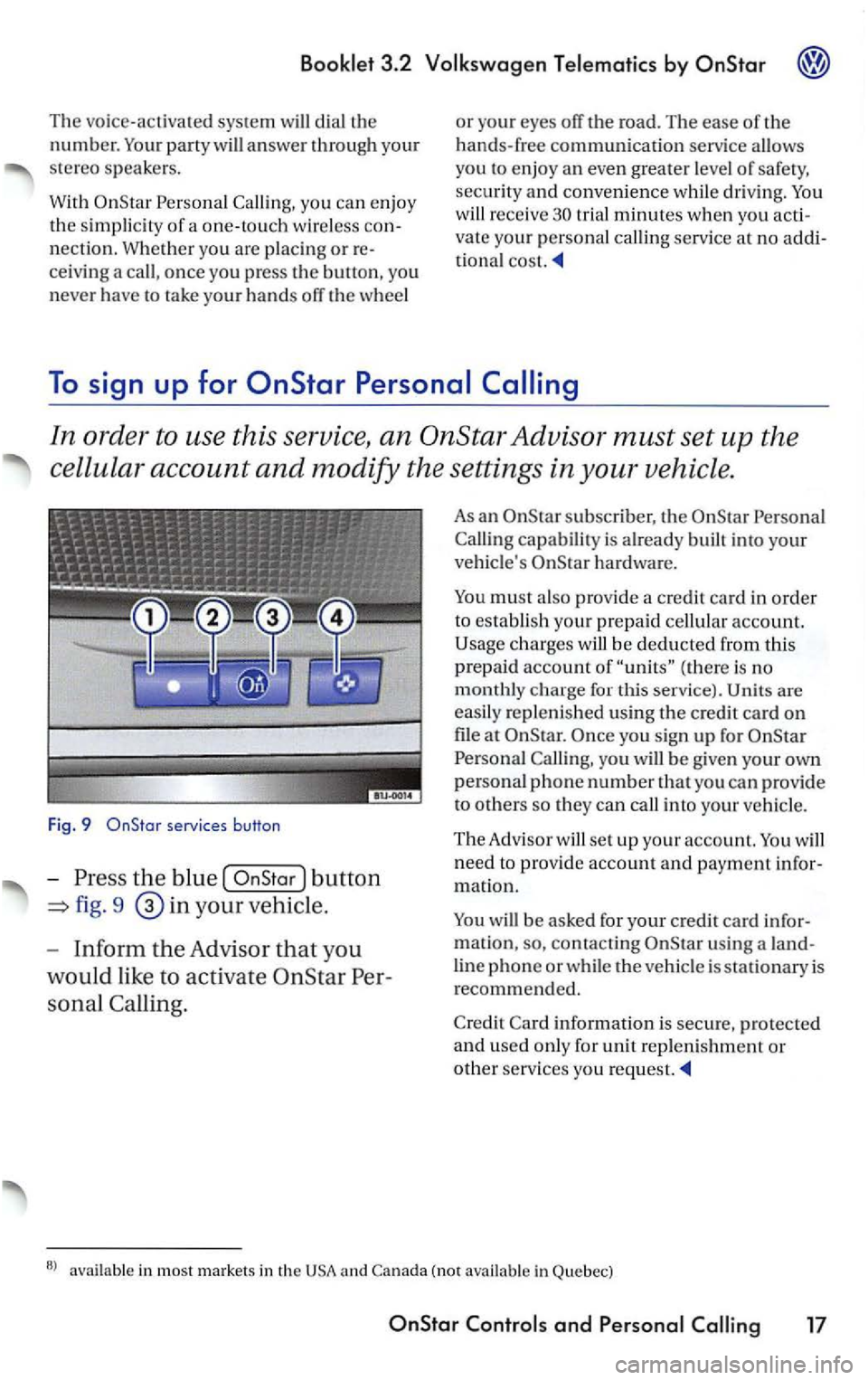
Fig. 9
the blu e button
=> fig. 9 your vehicl e.
- Inform the A dvi s
or that yo u
wo uld like to
activa te
s onal Calling.
As an subscrib er, th e
Call ing capabil ity is alread y built into yo ur
veh icle' s
must also pro vide a credit card in order
to esta bli sh you r prepaid cellular account.
(ther e is no monthly ch arge for this service). are
easily reple ni shed using the c redit ca rd on
file a t you sig n up fo r
Ca lling , you will be give n yo ur own
persona l p ho ne number that you can provide
t o o thers so they can call into your vehic le.
The Adviso r will set up your account. will
n ee d to prov ide account and payment m atio n.
will be asked for your credit card
u sing a
lin e ph one or w hil e the vehicl e is stat io nary is recommend ed.
C redit Card
informatio n is sec ure, protecte d and used onl y for unit reple ni shment or
other servi ces you request.
in most market s in th e (not in Quebec)
and
PREMIUM
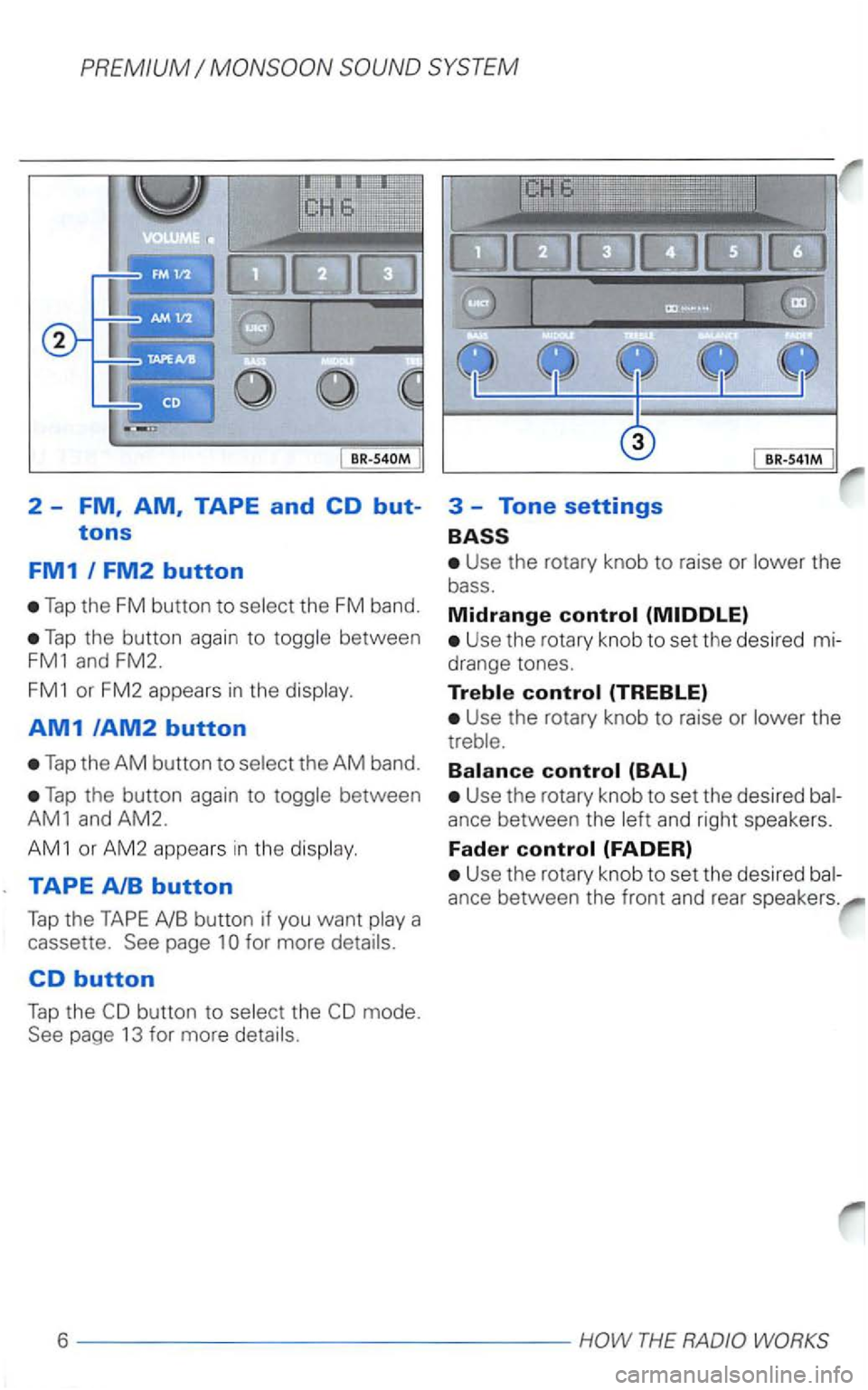
Tap the FM button to select the FM band.
Tap the button again to toggle between
FM1 and FM2.
FM1 or FM2 appears in the display.
AM1/AM2 button
Tap the AM button to select the AM band.
Tap the button again to toggle between
AM1 and AM2.
AM 1 or AM2 appears in the display.
TAPE
button to select the
Use the rotary knob to raise or lower the
bass.
Midrange
Use the rotary knob to set the des ired mi
drange tones.
Use the rotary knob to raise or lower the
treble.
Use the rotary knob to set the desired bal
ance between the left and right speakers.
Fader
Use the rotary knob to set the desired bal
ance between the front and rear speakers.
6 ----------------HOW THE RADIO
A
Adjusting
and right
speakers .
.................... 6
-Bass ....................... 6
-Fader ....................... 6
-Midrange . . . . . . . . . . . . . . . . . . . 6
...................... 6
up? .................... 19
Anti-theft coding ............. 19
. 19
-What do
up . . . . . . . . . 19
. . . . . . . . . . . . . . . . . . 7
8
. . . . . . . . . . . . . . . . . 6
Bands received . . . . . . . . . . . . . . . . 22
.......................... 6
Broadcasting mode . . . . . . . . . . . . . . 5
Button
-AM ......................... 6
..................... 6
-Bass ....................... 6
......................
FM ....... .................. 6
-Mix Mode .................. 13
.................... 5
..................... 11
...................... 11
B ............
-Tone settings . . . . . . . . . . . . . . . . 6
Track (when
......................... 14
...................... 6
c
. . . . . . . . . . . . . . . . 1
Ejecting a cassette . . . . . . . . . . 1
Fast forward to the next track 11
Fast reverse . . . . . . . . . . . . . . . . 11
Fast rewind to the previous track 11
How can
.
How do
-