Page 92 of 261
name. SIENNA (U)
92
The lights automatically turn off when the
driver ’s door is opened with the ignition
key in the ”ACC” or ”LOCK” position. To
turn them on again, turn the key to the
”ON” position or actuate the headlight
switch. If you are going to park for over
one week, make sure the headlight switch
is off.
NOTICE
To prevent the battery from being dis-
charged, do not leave the lights on
for a long period when the engine is
not running.
Daytime running light system (Canada
only)
The headlights turn on at reduced intensi-
ty when the parking brake is released with
the engine started, even with the light
switch in the ”OFF” position. They will not
go off until the ignition switch is turned
off.
To turn on the other exterior lights and
instrument panel lights, twist the knob to
the position 1.
Twist the knob to the position 2 to turn
the headlights to full intensity for driving
at night.
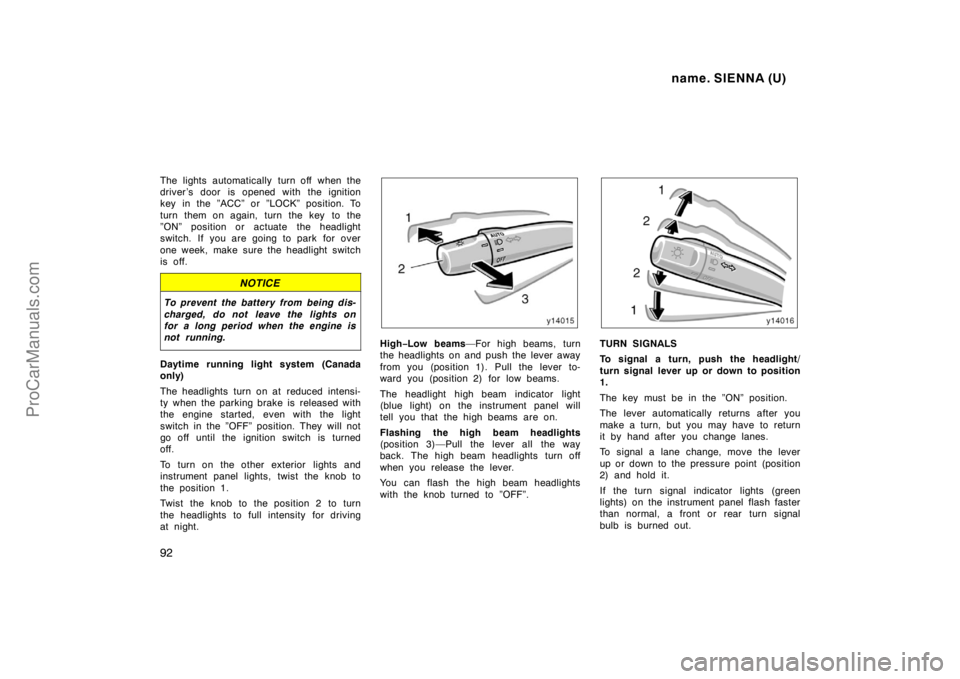
High−Low beams—For high beams, turn
the headlights on and push the lever away
from you (position 1). Pull the lever to-
ward you (position 2) for low beams.
The headlight high beam indicator light
(blue light) on the instrument panel will
tell you that the high beams are on.
Flashing the high beam headlights
(position 3)—Pull the lever all the way
back. The high beam headlights turn off
when you release the lever.
You can flash the high beam headlights
with the knob turned to ”OFF”.TURN SIGNALS
To signal a turn, push the headlight/
turn signal lever up or down to position
1.
The key must be in the ”ON” position.
The lever automatically returns after you
make a turn, but you may have to return
it by hand after you change lanes.
To signal a lane change, move the lever
up or down to the pressure point (position
2) and hold it.
If the turn signal indicator lights (green
lights) on the instrument panel flash faster
than normal, a front or rear turn signal
bulb is burned out.
ProCarManuals.com
Page 93 of 261
name. SIENNA (U)
93
HEADLIGHTS
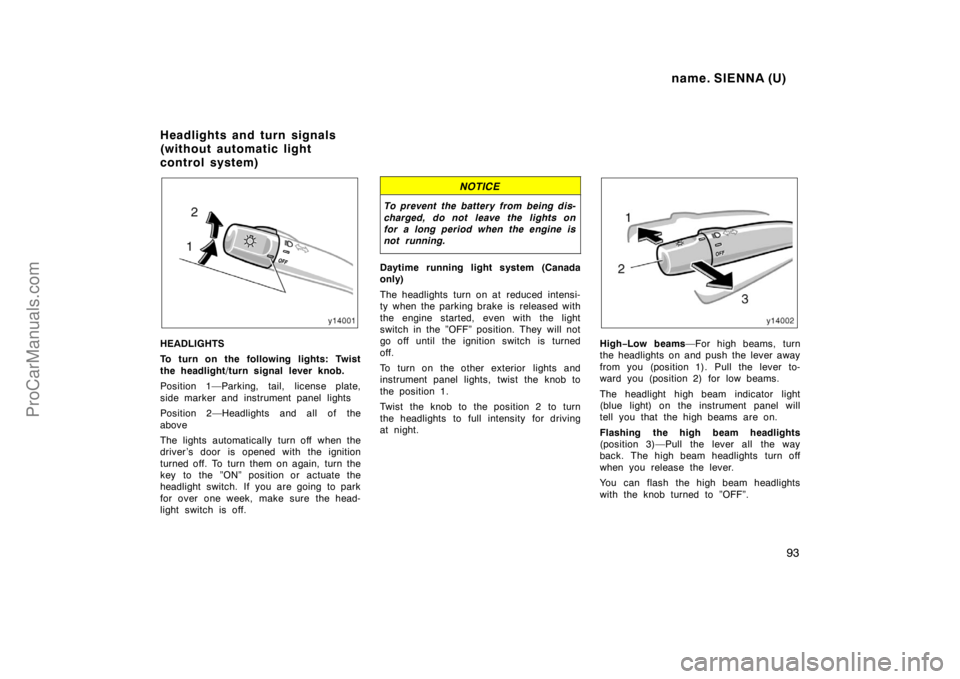
To turn on the following lights: Twist
the headlight/turn signal lever knob.
Position 1—Parking, tail, license plate,
side marker and instrument panel lights
Position 2—Headlights and all of the
above
The lights automatically turn off when the
driver ’s door is opened with the ignition
turned off. To turn them on again, turn the
key to the ”ON” position or actuate the
headlight switch. If you are going to park
for over one week, make sure the head-
light switch is off.
NOTICE
To prevent the battery from being dis-
charged, do not leave the lights on
for a long period when the engine is
not running.
Daytime running light system (Canada
only)
The headlights turn on at reduced intensi-
ty when the parking brake is released with
the engine started, even with the light
switch in the ”OFF” position. They will not
go off until the ignition switch is turned
off.
To turn on the other exterior lights and
instrument panel lights, twist the knob to
the position 1.
Twist the knob to the position 2 to turn
the headlights to full intensity for driving
at night.
High−Low beams—For high beams, turn
the headlights on and push the lever away
from you (position 1). Pull the lever to-
ward you (position 2) for low beams.
The headlight high beam indicator light
(blue light) on the instrument panel will
tell you that the high beams are on.
Flashing the high beam headlights
(position 3)—Pull the lever all the way
back. The high beam headlights turn off
when you release the lever.
You can flash the high beam headlights
with the knob turned to ”OFF”.
Headlights and turn signals
(without automatic light
control system)
ProCarManuals.com
Page 148 of 261

name. SIENNA (U)
148
Heating
For best results, set controls to:
Fan speed —Any setting except ”OFF”
Temperature —Towards WA R M
(red zone)
Air intake —FRESH (outside air)
Air flow —FLOOR
Air conditioning —OFF
�For quick heating, select recirculated
air for a few minutes. To keep the
windows from fogging, select fresh af-
ter the vehicle interior has been
warmed.
�Press the ”A/C” button on for dehumidi-
fied heating.
�Choose floor/windshield air flow to heat
the vehicle interior while defrosting or
defogging the windshield.Air conditioning
For best results, set controls to:
Fan speed —Any setting except ”OFF”
Temperature —Towards COLD
(blue zone)
Air intake —FRESH (outside air)
Air flow —PA N E L
Air conditioning —ON
�For quick cooling, move the air intake
selector to recirculate for a few min-
utes.
Ventilation
For best results, set controls to:
Fan speed —Any setting except ”OFF”
Temperature —Towards COLD
(blue zone)
Air intake —FRESH (outside air)
Air flow —PA N E L
Air conditioning —OFF
Defogging
The inside of the windshield
For best results, set controls to:
Fan speed —Any setting except ”OFF”
Temperature —Towards WA R M
(red zone) to heat;
COLD (blue zone) to
cool
Air intake —FRESH (outside air)
Air flow —WINDSHIELD
Turning the air flow control knob to wind-
shield position turns on the defroster−
linked air conditioning. At this time, the
”A/C” button indicator comes on regard-
less of whether or not the ”A/C” button is
pressed in. This is to clean up the front
view more quickly.
When the ”A/C” button is not pressed in,
turning the air flow control knob to anoth-
er position turns off the air conditioning.
�On humid days, do not blow cold air
on the windshield—the difference be-
tween the outside and inside tempera-
tures could make the fogging worse.
ProCarManuals.com
Page 236 of 261
name. SIENNA (U)
236
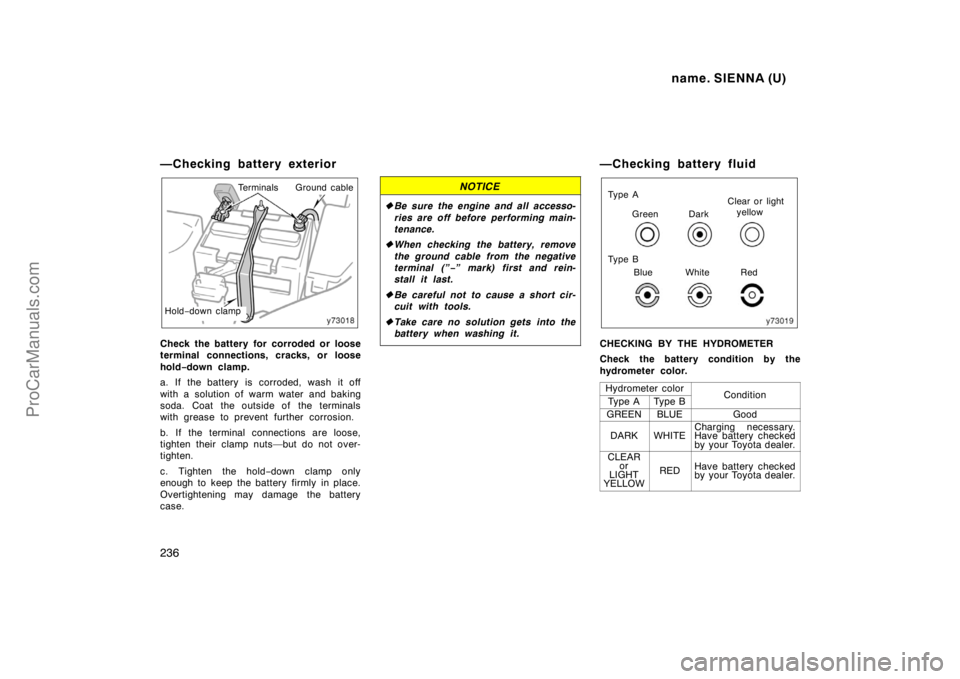
—Checking battery exterior
TerminalsGround cable
Hold−down clamp
Check the battery for corroded or loose
terminal connections, cracks, or loose
hold−down clamp.
a. If the battery is corroded, wash it off
with a solution of warm water and baking
soda. Coat the outside of the terminals
with grease to prevent further corrosion.
b. If the terminal connections are loose,
tighten their clamp nuts—but do not over-
tighten.
c. Tighten the hold−down clamp only
enough to keep the battery firmly in place.
Overtightening may damage the battery
case.
NOTICE
�Be sure the engine and all accesso-
ries are off before performing main-
tenance.
�When checking the battery, remove
the ground cable from the negative
terminal (”−” mark) first and rein-
stall it last.
�Be careful not to cause a short cir-
cuit with tools.
�Take care no solution gets into the
battery when washing it.
—Checking battery fluid
BlueClear or light
yellow
Dark Green
Red White Ty p e A
Ty p e B
CHECKING BY THE HYDROMETER
Check the battery condition by the
hydrometer color.
Hydrometer color
ConditionTy p e ATy p e B
GREENBLUEGood
DARKWHITECharging necessary.
Have battery checked
by your Toyota dealer.
CLEAR
or
LIGHT
YELLOW
REDHave battery checked
by your Toyota dealer.
ProCarManuals.com