1998 TOYOTA 4RUNNER audio
[x] Cancel search: audioPage 189 of 350

4RUNNER (1998)
(Reverse/Fast forward but-
tons)
Cassette Player
Push the fast forward button to fast
forward a cassette tape. ºFFº will ap-
pear on the display. Push the reverse
button to rewind a tape. ºREWº will
appear on the display.
To stop the tape while it is fast for-
warding, push the fast forward button
or ºTAPEº; to stop the tape while it is
rewinding, push the reverse button or
ºTAPEº.
If a tape side rewinds completely, the
cassette player will stop and then play
that same side. If a tape fast forwards
completely, the cassette player will
play the other side of the tape, using
the auto- reverse feature.
Compact Disc Player
If you want to fast forward or reverse
through a compact disc track, push
and hold in the fast forward or re-
verse button. When you release the
button, the compact disc player will
resume playing. AM FM
Push ºAM
FMº to switch between the
AM and FM bands.ºAMº, ºFM1º or
ºFM2º will appear on the display.
These systems allow you to set
twelve FM stations, two for each but-
ton.
If the audio system is off, you can
turn on the radio by pushing
ºAM
F Mº. Also, push ºAMFMº to
switch from cassette or compact disc
operation to radio operation.
AUDIO CONTROL / MODE
Manual tone adjustment functionÐ
This knob is used to adjust the tone
manually.
For low- pitch tone adjustment, push
ºAUDIO CONTROL / MODEº
repeatedly until ºBASº appears on the
display. Then turn the knob to suit
your preference.
The display will show the range from
ºBAS -5º to ºBAS 5º.
For middle- pitch tone adjustment,
push ºAUDIO CONTROL / MODEº re-
peatedly until ºMIdº appears on the
display. Then turn the knob to suit
your preference.
The display will show the range
from ºMId -5º to ºMId 5º. For high- pitch tone adjustment, push
ºAUDIO CONTROL / MODEº
repeatedly until ºTREº appears on the
display. Then turn the knob to suit
your preference.
The display will show the range from
ºTRE -5º to ºTRE 5º.
Sound balance adjustment func-
tionÐ
This knob is also to adjust the sound
balance between the front and rear,
and the right and left speakers.
For front/rear adjustment, push ºAU-
DIO CONTROL / MODEº repeatedly
until ºFAdº appears on the display.
Then turn the knob to adjust the front/
rear balance.
The display will show the range from
ºFAd F7º to ºFAd R7º.
For left/right adjustment, push ºAUDIO
CONTROL / MODEº repeatedly until
ºBALº appears on the display. Then
turn the knob to adjust the left/right
balance.
The display will show the range from
ºBAL L7º to ºBAL R7º.
Page 190 of 350

4RUNNER (1998)
CD (Compact Disc)
Push ºCDº to switch from radio or
cassette operation to compact disc op-
eration. If the audio system is off, you
can turn on the compact disc player
by pushing ºCDº. In both cases, a
disc must already be loaded in the
player.
When the audio is set into compact
disc operation, the display shows the
track or, track and disc number cur-
rently being played. Each time you
push ºCDº, the system changes be-
tween built- in single disc player and
automatic changer.
Your audio system shows six different
display if the player malfunctions.
If ºWAITº appears on the display, it
indicates inside the player unit may
be too hot due to the very high ambi-
ent temperature. Remove the disc or
magazine from the player and allow
the player to cool down.
If ºErr 1º appears on the display, it
indicates the disc is dirty, damaged,
or it was inserted up- side down.
Clean the disc or insert it correctly. If ºErr 2º appears on the display,
it
indicates no disc is loaded inside the
magazine, insert a disc.
If ºErr 3º or ºErr 4º on the display,
it indicates there is a trouble inside
the system. Eject the disc or maga-
zine. Set the disc or magazine again.
If ºOPEnº appears on the display, it
indicates the compact disc auto
changer lid is open. Close the com-
pact disc auto changer lid.
If the malfunction is not recovered,
take your vehicle to your Toyota deal-
er.
DISC !~
Compact disc auto changer onlyÐ
By using this button, you can select
a disc you wish to listen to.
Push the either side of the button until
the number of the disc you want to
listen to appears on the display. Dolby
B NR *
If you are listening to a tape that was
recorded with Dolby B Noise Reduc-
tion, push the button marked with the
double- D symbol. The double- D sym-
bol will appear on the display. Push
the button again to turn off Dolby B
NR.
The Dolby NR mode reduces tape
noise by about 10 dB. For best sound
reproduction, play your tapes with this
button on or off according to the mode
used for recording the tape. * : Dolby noise reduction manufactured under license
from Dolby Laboratories Licensing Corporation.
ºDOLBYº and the double D symbol
are trademarks
of Dolby Laboratories Licensing Corporation.
MTL (Metal) Display
If a metal or chrome equivalent cas-
sette tape is put in the cassette play-
er, the player will automatically adapt
to it and ºMTLº will appear on the
display.
Page 191 of 350

4RUNNER (1998)
PROG (Program)
Push ºPROGº to select the other side
of a cassette tape. The display indi-
cates which side is currently selected (º
º indicates top side, ºº
indicates bottom side).
Auto- reverse feature: After the cas-
sette player reaches the end of a tape
side, it automatically reverses and be-
gins to play the other side. This is
true whether the cassette was playing
or fast forwarding.
PWR´VOL (Power´Volume)
Push ºPWR´VOLº to turn the audio
system on and off. Turn ºPWR´VOLº
to adjust the volume.
RAND (Random)
There are two random featuresÐyou
can either listen to the tracks on all
the compact discs in the magazine in
random order, or only listen to the
tracks on a specific compact disc in
random order. Random playing for the tracks on a
disc: Quickly push and release
ºRANDº. ºRANDº will appear on the
display and the disc you are listening
to in random order. If you hear a
beep, you held the button too long,
and the player will play all the tracks
in the magazine in random order. To
turn off the random feature, push the
ºRANDº a second time.
Compact disc auto changer onlyÐ
Random playing for all the tracks in
the magazine:
Push and hold ºRANDº until you hear
a beep. ºD´RANDº will appear on the
display and the player will perform all
the tracks on all the discs in the mag-
azine in random order. To turn off the
random feature, push ºRANDº a sec-
ond time.
RPT (Repeat)
Cassette Player
Push ºRPTº while the track is playing.
ºRPTº will appear on the display.
When the track ends, it will automati-
cally be rewound and replayed. This
process will be continued until you
push the button again to turn off the
repeat feature.There must be at least 3 seconds of
blank space between tracks in order
for the repeat feature to work correct-
ly.
Page 194 of 350

4RUNNER (1998)
TA P E
Push ºTAPEº to switch from radio or
compact disc operation to cassette op-
eration. If the audio system is off, you
can turn on the cassette player by
pushing ºTAPEº. In both cases, a cas-
sette must already be loaded in the
player.
TRACK (Track up/down button):
Compact disc player
By using this button, you can skip up
or down to a different track.
Push either side of the track button
until the number of the track you want
to listen to appears on the display. If
you want to return the beginning of
the current track, push the down side
of the button one time, quickly.
TUNE (Tuning)
Your Toyota has an electronic tuning
radio (ETR). Push and release the º ~º
(up) or º !º (down) side of ºTUNEº to
step up or down the station band. (If
you hear a beep, you held the button
too long and the radio will go into the
seek mode.)
NOTICE
To ensure the correct audio sys-
tem operation:
Be careful not to spill bever-ages over the audio system.
Do not put anything other thana cassette tape or Compact
Disc into the slot.
RADIO RECEPTION
Usually, a problem with radio recep-
tion does not mean there is a problem
with your radio Ðit is just the normal
result of conditions outside the ve-
hicle.
For example, nearby buildings and ter-
rain can interfere with FM reception.
Power lines or telephone wires can
interfere with AM signals. And of
course, radio signals have a limited
range, and the farther you are from a
station, the weaker its signal will be.
In addition, reception conditions
change constantly as your vehicle
moves. Here are some common reception
problems that probably do not indicate
a problem with your radio: FM
Fading and drifting stationsÐGeneral-
ly, the effective range of FM is about
40 km (25 miles). Once outside this
range, you may notice fading and
drifting, which increase with the dis-
tance from the radio transmitter. They
are often accompanied by distortion.
Multi- pathÐFM signals are reflective,
making it possible for two signals to
reach your antenna at the same time.
If this happens, the signals will cancel
each other out, causing a momentary
flutter or loss of reception.
Static and flutteringÐThese occur
when signals are blocked by buildings,
trees, or other large objects. Increas-
ing the bass level may reduce static
and fluttering.
Station swappingÐIf the FM signal
you are listening to is interrupted or
weakened, and there is another strong
station nearby on the FM band, your
radio may tune in the second station
until the original signal can be picked
up again.
ÐCar audio system operati
n
hints
Page 289 of 350

4RUNNER (1998)
Cleaning the interior
CAUTION
Do not wash the vehicle floor
with water, or allow water to get
onto the floor when cleaning the
vehicle interior or exterior. Water
may get into audio components
or other electrical components
above or under the floor carpet
(or mat) and cause a malfunction;
and it may cause body corrosion.
Vinyl interior
The vinyl upholstery may be easily
cleaned with a mild soap or deter-
gent and water.
First vacuum over the upholstery to
remove loose dirt. Then, using a
sponge or soft cloth, apply the soap
solution to the vinyl. After allowing it
to soak in for a few minutes to loosen
the dirt, remove the dirt and wipe off
the soap with a clean damp cloth. If
all the dirt does not come off, repeat
the procedure. Commercial foaming-
type vinyl cleaners are also available
which work well. Follow the manufac-
turer's instructions.
NOTICE
Do not use solvent, thinner, gaso- line or window cleaner on the in-terior.
Carpets
Use a good foam- type shampoo to
clean the carpets.
Begin by vacuuming thoroughly to re-
move as much dirt as possible. Sever-
al types of foam cleaners are avail-
able; some are in aerosol cans and
others are powders or liquids which
you mix with water to produce a foam.
To shampoo the carpets, use a
sponge or brush to apply the foam.
Rub in overlapping circles.
Do not apply waterÐthe best results
are obtained by keeping the carpet as
dry as possible. Read the shampoo
instructions and follow them closely.
Seat belts
The seat belts may be cleaned with
mild soap and water or with luke-
warm water.
Use a cloth or sponge. As you are
cleaning, check the belts for exces-
sive wear, fraying, or cuts.
NOTICE
Do not use dye or bleach on the
beltsÐit may weaken them.
Windows
The windows may be cleaned with
any household window cleaner.
NOTICE
When cleaning the inside of thewindows, be careful not toscratch or damage the heaterwires on the rear window.
Air conditioning control panel, car
audio, instrument panel, console
panel, and switches
Use a soft damp cloth for cleaning.
Soak a clean soft cloth in water or
lukewarm water then lightly wipe off
any dirt.
Page 345 of 350
4RUNNER (1998)
J80002
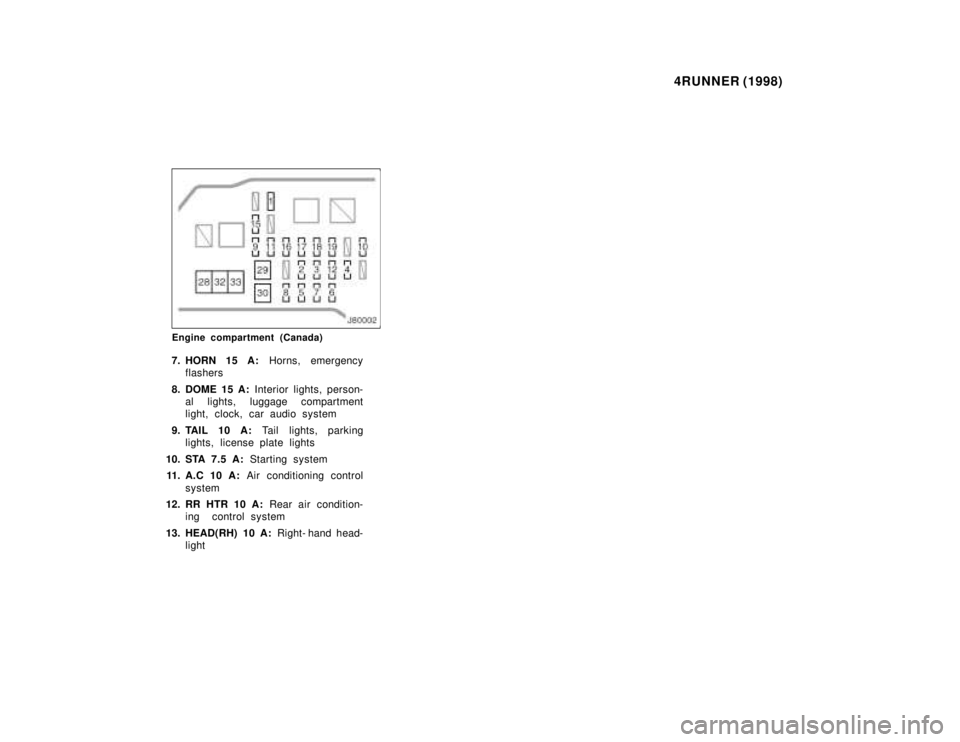
Engine compartment (Canada)
7. HORN 15 A: Horns, emergency
flashers
8. DOME 15 A: Interior lights, person-
al lights, luggage compartment
light, clock, car audio system
9. TAIL 10 A: Tail lights, parking
lights, license plate lights
10. STA 7.5 A: Starting system
11. A.C 10 A: Air conditioning control
system
12. RR HTR 10 A: Rear air condition-
ing control system
13. HEAD(RH) 10 A: Right- hand head-
light
Page 346 of 350

4RUNNER (1998)
J80003
Instrument panel
14. HEAD(LH) 10 A: Left- hand head-
light
15. DRL 7.5 A: Daytime running light
system
16. HEAD (LO RH) 10 A: Right- hand
headlight(low beam)
17. HEAD (LO LH) 10 A: Left- hand
headlight(low beam)
18. HEAD (HI RH) 10 A: Right- hand
headlight(high beam)
19. HEAD (HI LH) 10 A: Left- hand
headlight(high beam)
20. ACC 15 A: Car audio system, pow-
er antenna, clock, power rear view
mirror control 21. ECU- B 7.5 A:
SRS airbag warning
light
22. 4WD 20 A: A.D.D. control system,
four- wheel drive control system,
rear differential lock system
23. TURN 10 A: Turn signals lights,
emergency flashers
24. GAUGE 10 A: Gauges and meters,
back window defogger, daytime
running light system, air condition-
ing system, electric moon roof
25. ECU- IG 10 A: cruise control sys-
tem, anti- lock brake system, elec-
tronically controlled automatic
transmission system, power anten-na
26. WIPER 20 A: windshield wipers
and washer, back window wiper 27. IGN 7.5 A:
SRS airbag system,
multiport fuel injection system / se-
quential multiport fuel injection sys-
tem, discharge warning light