1998 NISSAN QUEST radio
[x] Cancel search: radioPage 98 of 260
Push the lighter in all the way. When the
lighter is heated, it springs out.
Return the lighter to its original position after
use.
CAUTION
The cigarette lighter socket is a power
source for the cigarette lighter element
only. The use of the cigarette lighter
socket as a power source for any other
accessory is not recommended.
WARNING
The cigarette lighter should not be
used while driving in order that full
attention may be given to the driving
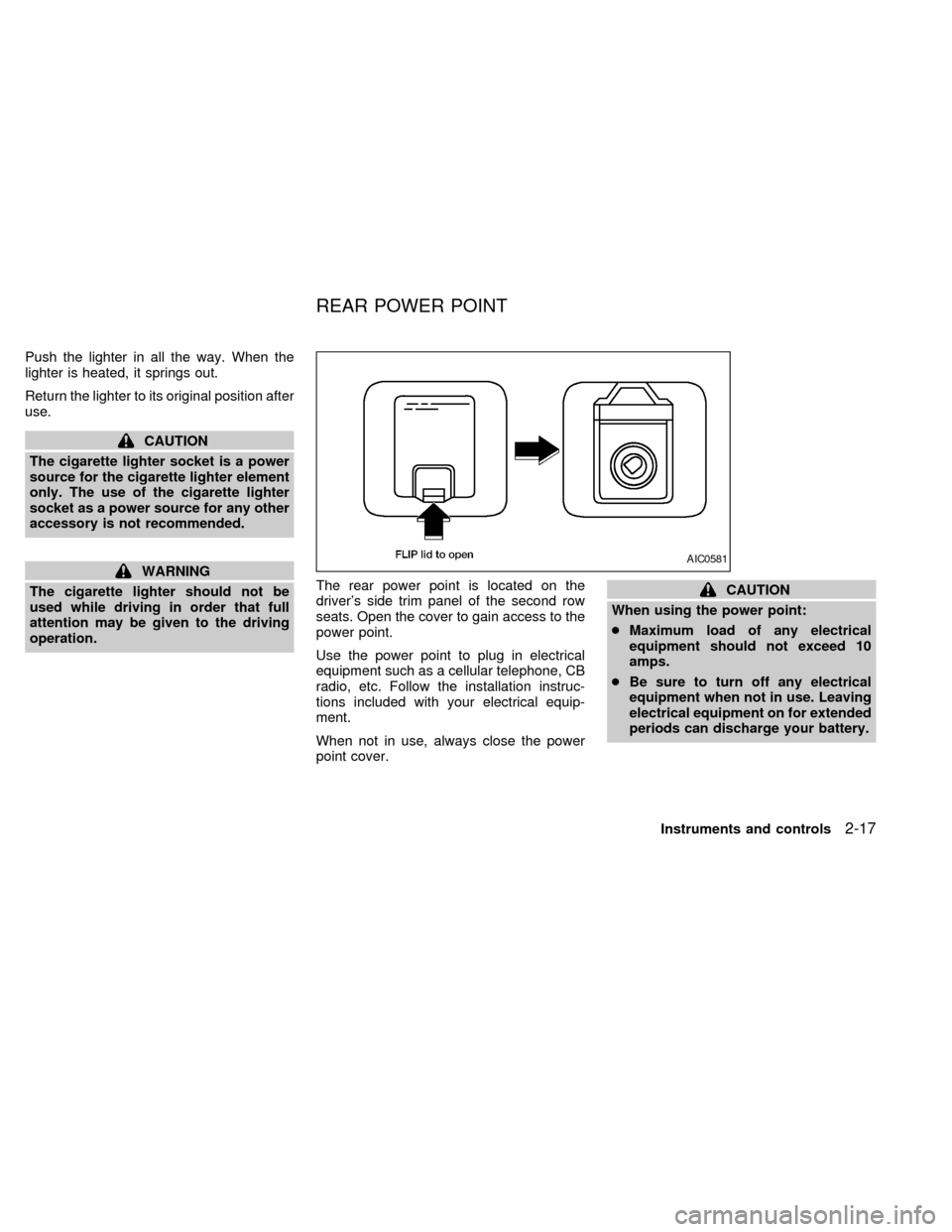
operation.The rear power point is located on the
driver's side trim panel of the second row
seats. Open the cover to gain access to the
power point.
Use the power point to plug in electrical
equipment such as a cellular telephone, CB
radio, etc. Follow the installation instruc-
tions included with your electrical equip-
ment.
When not in use, always close the power
point cover.
CAUTION
When using the power point:
cMaximum load of any electrical
equipment should not exceed 10
amps.
cBe sure to turn off any electrical
equipment when not in use. Leaving
electrical equipment on for extended
periods can discharge your battery.
AIC0581
REAR POWER POINT
Instruments and controls2-17
ZX
Page 99 of 260
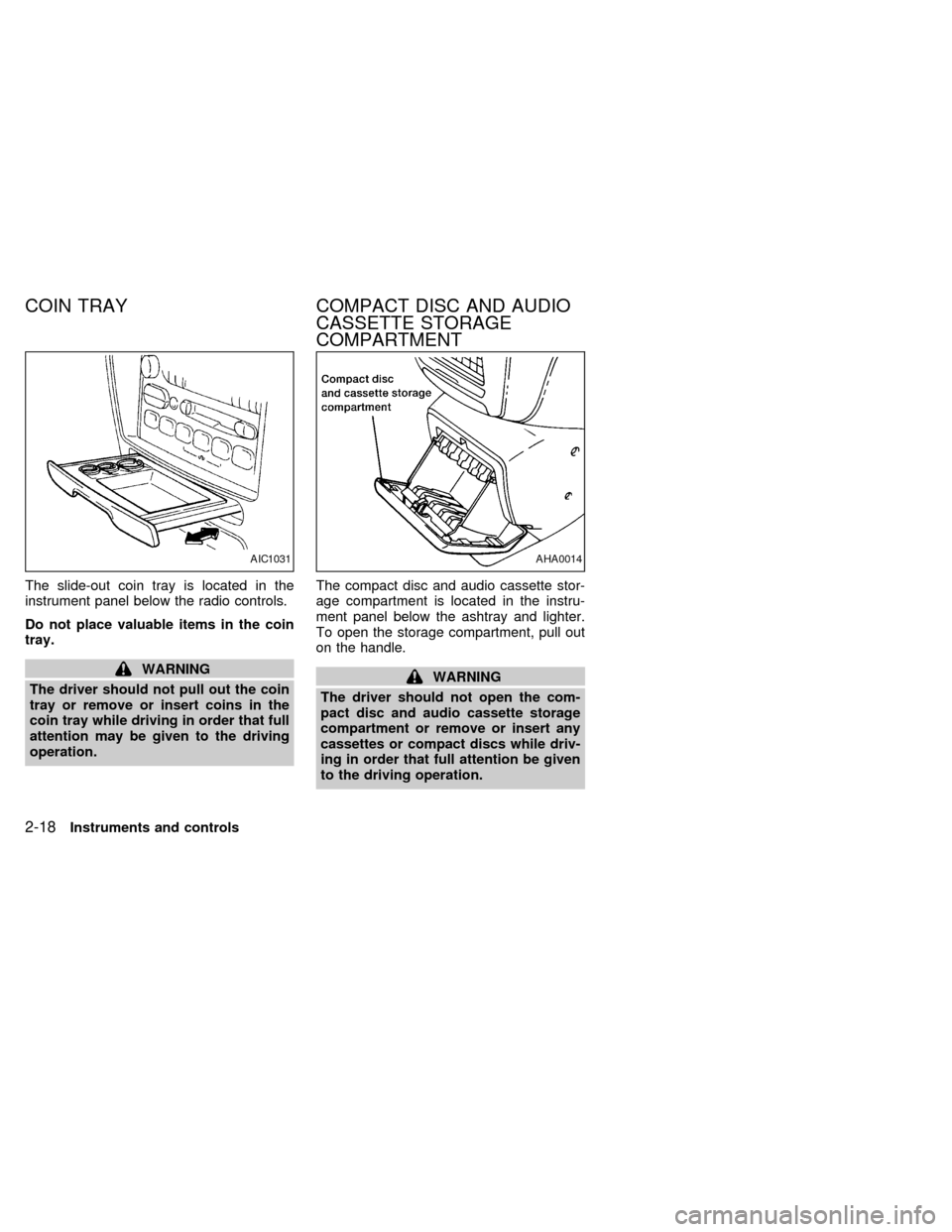
The slide-out coin tray is located in the
instrument panel below the radio controls.
Do not place valuable items in the coin
tray.
WARNING
The driver should not pull out the coin
tray or remove or insert coins in the
coin tray while driving in order that full
attention may be given to the driving
operation.The compact disc and audio cassette stor-
age compartment is located in the instru-
ment panel below the ashtray and lighter.
To open the storage compartment, pull out
on the handle.WARNING
The driver should not open the com-
pact disc and audio cassette storage
compartment or remove or insert any
cassettes or compact discs while driv-
ing in order that full attention be given
to the driving operation.
AIC1031AHA0014
COIN TRAY COMPACT DISC AND AUDIO
CASSETTE STORAGE
COMPARTMENT
2-18Instruments and controls
ZX
Page 104 of 260

Use the vent buttons on the power sunroof
controls to open and close the power rear
windows. To open one of the rear power
windows, press the indented side of the
switch. To close the window, press the
raised side of the switch.
The power rear windows operate when the
ignition key is in the ON position, or for 15
minutes after the ignition key is turned to the
OFF position. If the driver's or passenger's
door is opened during this 15 minute period,
delayed power to the rear windows is can-
celled.The digital clock displays time when the
ignition key is in ACC or ON.
If the power supply is disconnected, the
clock does not indicate the correct time.
Readjust the time.
How to view the clock mode
Push the CLK button to alternate the radio
frequency and the time in the display. In the
clock mode, press any radio function to
automatically display the radio frequency for
AIC0042
AIC0580
POWER REAR WINDOWS
(if so equipped)CLOCK
Instruments and controls2-23
ZX
Page 105 of 260
approximately ten seconds before changing
back to the clock mode.
How to set the clock
1. Turn the radio on. (Time is displayed
while the radio is off.)
2. Push and hold the CLK button; then,
press the SEEK button either
orto adjust the hours, and press the
TUNE button eitherorto
adjust the minutes.
NOTE: The clock displays 12-hour time with
no A.M./P.M. indications.
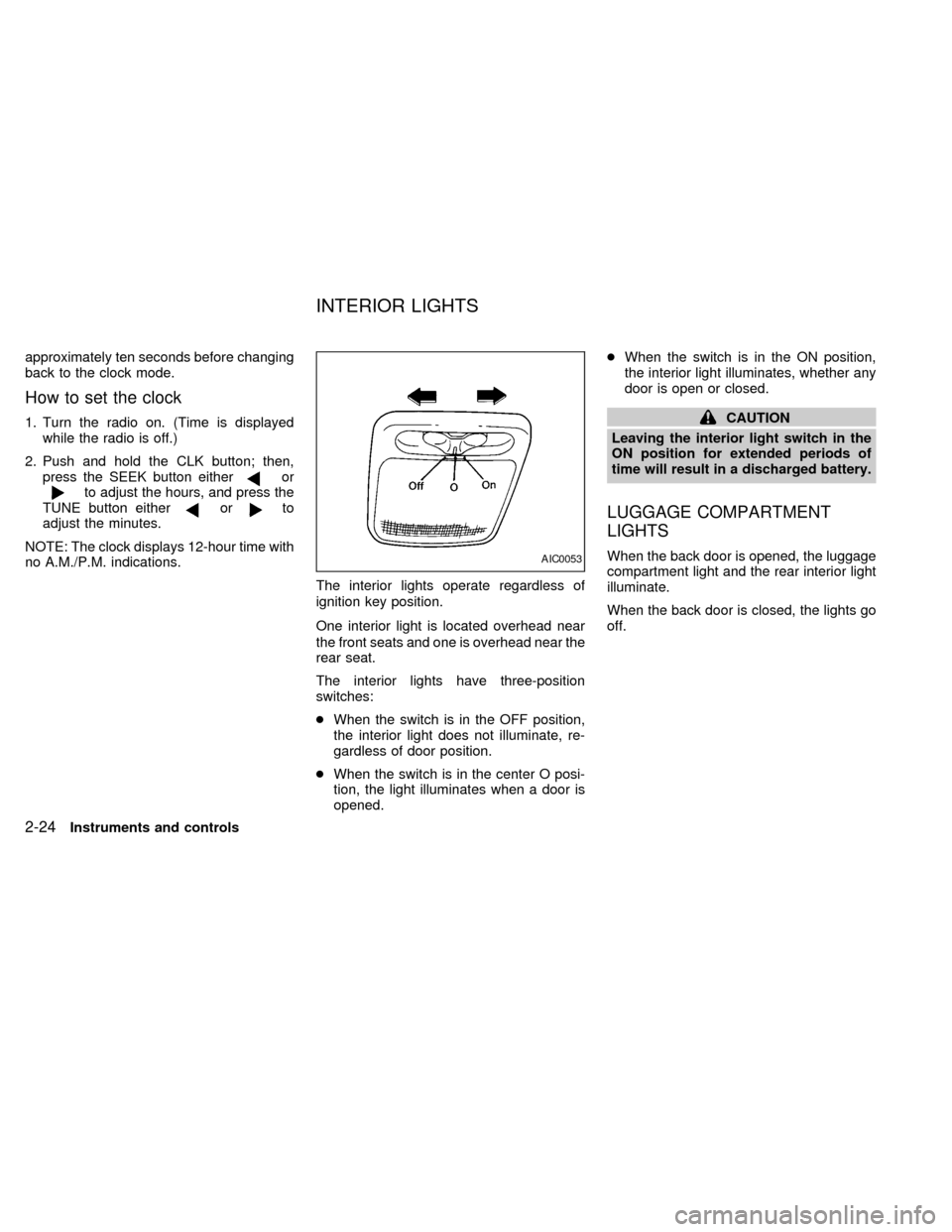
The interior lights operate regardless of
ignition key position.
One interior light is located overhead near
the front seats and one is overhead near the
rear seat.
The interior lights have three-position
switches:
cWhen the switch is in the OFF position,
the interior light does not illuminate, re-
gardless of door position.
cWhen the switch is in the center O posi-
tion, the light illuminates when a door is
opened.cWhen the switch is in the ON position,
the interior light illuminates, whether any
door is open or closed.
CAUTION
Leaving the interior light switch in the
ON position for extended periods of
time will result in a discharged battery.
LUGGAGE COMPARTMENT
LIGHTS
When the back door is opened, the luggage
compartment light and the rear interior light
illuminate.
When the back door is closed, the lights go
off.AIC0053
INTERIOR LIGHTS
2-24Instruments and controls
ZX
Page 128 of 260

4Heater, air conditioner and audio systems
Ventilators ..............................................................4-2
Heater and air conditioner (manual) ......................4-3
Controls ..................................................................4-3
Heater operation ....................................................4-4
Air conditioner operation ........................................4-5
Air flow charts.........................................................4-7
Heater and air conditioner (automatic) (if so
equipped) .............................................................4-10
Automatic operation .............................................4-11
Air control buttons ................................................4-11
Air conditioner and air recirculation .....................4-12
English/metric mode .............................................4-12
Rear seat heater and air conditioner (if so
equipped) .............................................................4-13Controls ................................................................4-13
Audio system ........................................................4-14
AM-FM radio with cassette player .......................4-14
Tuning ..................................................................4-16
Adjusting tone quality ...........................................4-17
Cassette tape operations .....................................4-18
Antenna ................................................................4-20
Compact disc (CD) player (if so equipped) .........4-21
Steering wheel controls ........................................4-23
Rear audio controls ..............................................4-24
CB radio or car phone..........................................4-25
ZX
Page 137 of 260
WARNING
cThe air conditioner cooling function
operates only when the engine is
running.
cDo not leave children, unreliable
adults, or pets alone in your vehicle.
On hot, sunny days, temperatures in
a closed vehicle could quickly be-
come high enough to cause severe
or possibly fatal injuries to people or
animals.cDo not use the recirculation mode
for long periods as it may cause the
interior air to become stale and the
windows to fog up.
cPositioning of the heater and air con-
ditioner controls should not be done
while driving, in order that full atten-
tion may be given to the driving
operation.
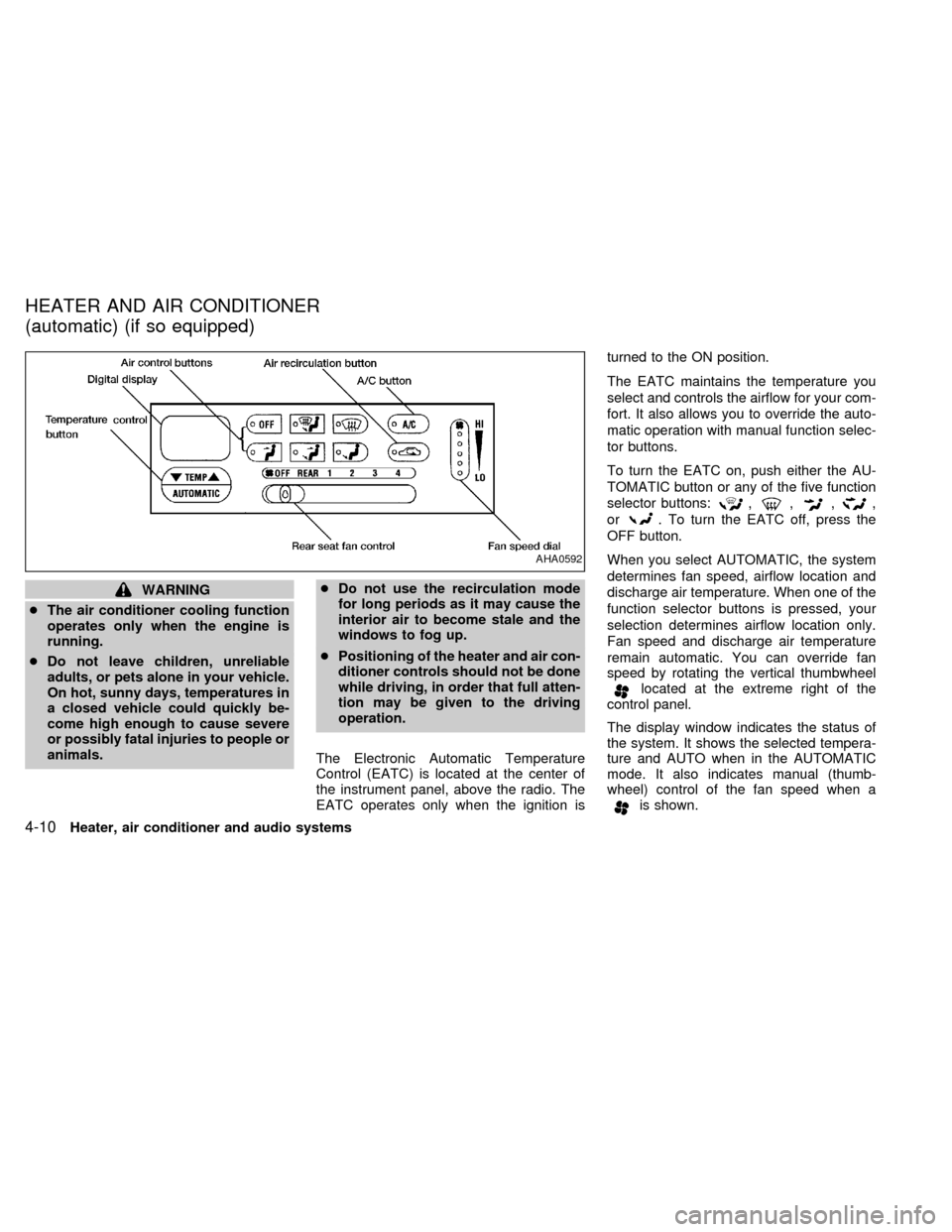
The Electronic Automatic Temperature
Control (EATC) is located at the center of
the instrument panel, above the radio. The
EATC operates only when the ignition isturned to the ON position.
The EATC maintains the temperature you
select and controls the airflow for your com-
fort. It also allows you to override the auto-
matic operation with manual function selec-
tor buttons.
To turn the EATC on, push either the AU-
TOMATIC button or any of the five function
selector buttons:
,,,,
or
. To turn the EATC off, press the
OFF button.
When you select AUTOMATIC, the system
determines fan speed, airflow location and
discharge air temperature. When one of the
function selector buttons is pressed, your
selection determines airflow location only.
Fan speed and discharge air temperature
remain automatic. You can override fan
speed by rotating the vertical thumbwheel
located at the extreme right of the
control panel.
The display window indicates the status of
the system. It shows the selected tempera-
ture and AUTO when in the AUTOMATIC
mode. It also indicates manual (thumb-
wheel) control of the fan speed when a
is shown.
AHA0592
HEATER AND AIR CONDITIONER
(automatic) (if so equipped)
4-10Heater, air conditioner and audio systems
ZX
Page 141 of 260
Servicing air conditioning
The air conditioning system in your NISSAN
vehicle is charged with a refrigerant de-
signed with the environment in mind.
This refrigerant does not harm the
earth's ozone layer.
Special charging equipment and lubricant
are required when servicing your NISSAN
air conditioner. Using improper refrigerants
or lubricants causes severe damage to your
air conditioning system. See ``Air condition-
ing system refrigerant and lubricant recom-
mendations'' in the ``Technical and con-
sumer information'' section of this manual.
An authorized NISSAN dealer is able to
service your environmentally ``friendly'' air
conditioning system.
WARNING
The air conditioner system contains
refrigerant under high pressure. To
avoid personal injury, any air condi-
tioner service should be done by an
experienced technician with proper
equipment.To turn the radio on, turn the ignition key to
ACC or ON. If you listen to the radio with the
engine not running, turn the key to the ACC
position.
Radio reception is affected by station signal
strength, distance from radio transmitter,
buildings, bridges, mountains and other ex-
ternal influences. Intermittent changes in
reception quality normally are caused by
these external influences.
Clock
For information on setting the clock, refer to
the section ``Instruments and controls''.
AM-FM RADIO WITH CASSETTE
PLAYER
Radio operation
Push the VOL-PUSH ON knob to turn the
radio on. Push the VOL-PUSH ON knob
once more to turn the radio off.
Turn the knob to adjust the volume.
Inserting a cassette tape into the cassette
player while the radio is on turns the radio
off and turns the cassette player on.
AUDIO SYSTEM
4-14Heater, air conditioner and audio systems
ZX
Page 143 of 260
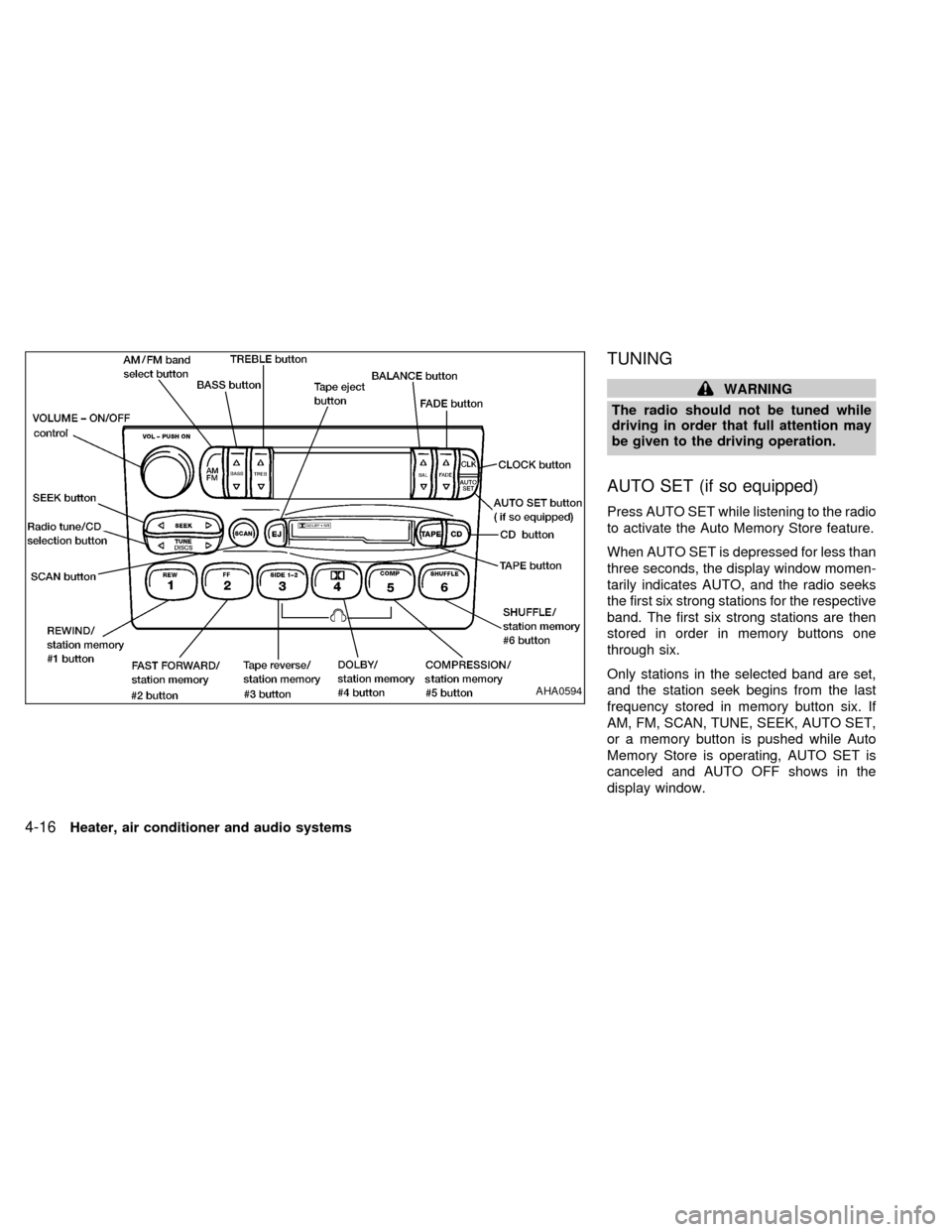
TUNING
WARNING
The radio should not be tuned while
driving in order that full attention may
be given to the driving operation.
AUTO SET (if so equipped)
Press AUTO SET while listening to the radio
to activate the Auto Memory Store feature.
When AUTO SET is depressed for less than
three seconds, the display window momen-
tarily indicates AUTO, and the radio seeks
the first six strong stations for the respective
band. The first six strong stations are then
stored in order in memory buttons one
through six.
Only stations in the selected band are set,
and the station seek begins from the last
frequency stored in memory button six. If
AM, FM, SCAN, TUNE, SEEK, AUTO SET,
or a memory button is pushed while Auto
Memory Store is operating, AUTO SET is
canceled and AUTO OFF shows in the
display window.
AHA0594
4-16Heater, air conditioner and audio systems
ZX