1998 NISSAN QUEST audio
[x] Cancel search: audioPage 6 of 260
Table of
ContentsSeats, restraints and supplemental air bag systems
Instruments and controls
Pre-driving checks and adjustments
Heater, air conditioner and audio systems
Starting and driving
In case of emergency
Appearance and care
Do-it-yourself
Maintenance
Technical and consumer information
Index
1
2
3
4
5
6
7
8
9
10
11
Page 82 of 260

2 Instruments and controls
Meters and gauges ................................................2-3
Speedometer and odometer ..................................2-4
Tachometer ............................................................2-4
Engine coolant temperature gauge........................2-4
Fuel gauge .............................................................2-5
Warning/indicator lights and chimes ......................2-6
Theft warning (if so equipped) .............................2-10
Windshield wiper and washer switch ...................2-11
Rear window wiper and washer switches ............2-12
Rear window defogger switch ..............................2-13
Headlight control switch .......................................2-13
Daytime running light system (Canada only) .......2-13
Autolamp switch (if so equipped) .........................2-14
Turn signal switch .............................................2-15
Cornering light ......................................................2-15
Instrument brightness control ...............................2-15
Hazard warning flasher switch .............................2-16Cigarette lighter (accessory) and ashtray ............2-16
Rear power point ..................................................2-17
Coin tray ...............................................................2-18
Compact disc and audio cassette storage
compartment.........................................................2-18
Cup holder ............................................................2-19
Power window ......................................................2-20
Automatic power window switch ..........................2-21
Sunroof (if so equipped).......................................2-22
Manual rear windows ...........................................2-22
Power rear windows (if so equipped) ..................2-23
Clock.....................................................................2-23
Interior lights .........................................................2-24
Luggage compartment lights ................................2-24
Personal reading light ..........................................2-25
Spotlights ..............................................................2-25
ZX
Page 91 of 260

cvehicle ran out of fuel, which caused
the engine to misfire.
cfuel filler cap was left off or improperly
installed, allowing fuel to evaporate
into the atmosphere.
If you suspect that you experienced such a
condition, drive the vehicle to an authorized
NISSAN dealer and have the vehicle in-
spected. Avoid any unnecessary diagnosis
during the service by informing the dealer of
the condition that may have occurred.
The theft warning system provides audio
and visual alarm signals if parts of the
vehicle are disturbed.
How to activate the theft warning
system
1. Close all windows.
2. Remove the key from the ignition switch.
3. Close all doors and the hood. Lock all
doors by pressing the
button on the
multi-remote controller. At this time, the
parking lights blink and the horn chirps to
indicate all doors are locked.The system can be activated even if the
windows are open.
4. Confirm that the SECURITY light, lo-
cated under the hazard warning switch,
illuminates. The SECURITY light illumi-
nates for about 30 seconds and then
begins to flash once every three sec-
onds. The system is now activated.
The theft warning system is NOT activated if
one of the following occurs:
cA door is unlocked or opened, the hood is
opened, or the ignition key is turned to
the ACC or ON position during the 30
seconds in which the SECURITY light
stays on.
cThe SECURITY light blinks at a steady
1/2 second on - 1/2 second off rate
because a door or the hood is open and
the key is not in the ACC or ON position.
When the ignition key is turned to the
ACC or ON position, the SECURITY light
turns off.
IC0005
THEFT WARNING
(if so equipped)
2-10Instruments and controls
ZX
Page 99 of 260
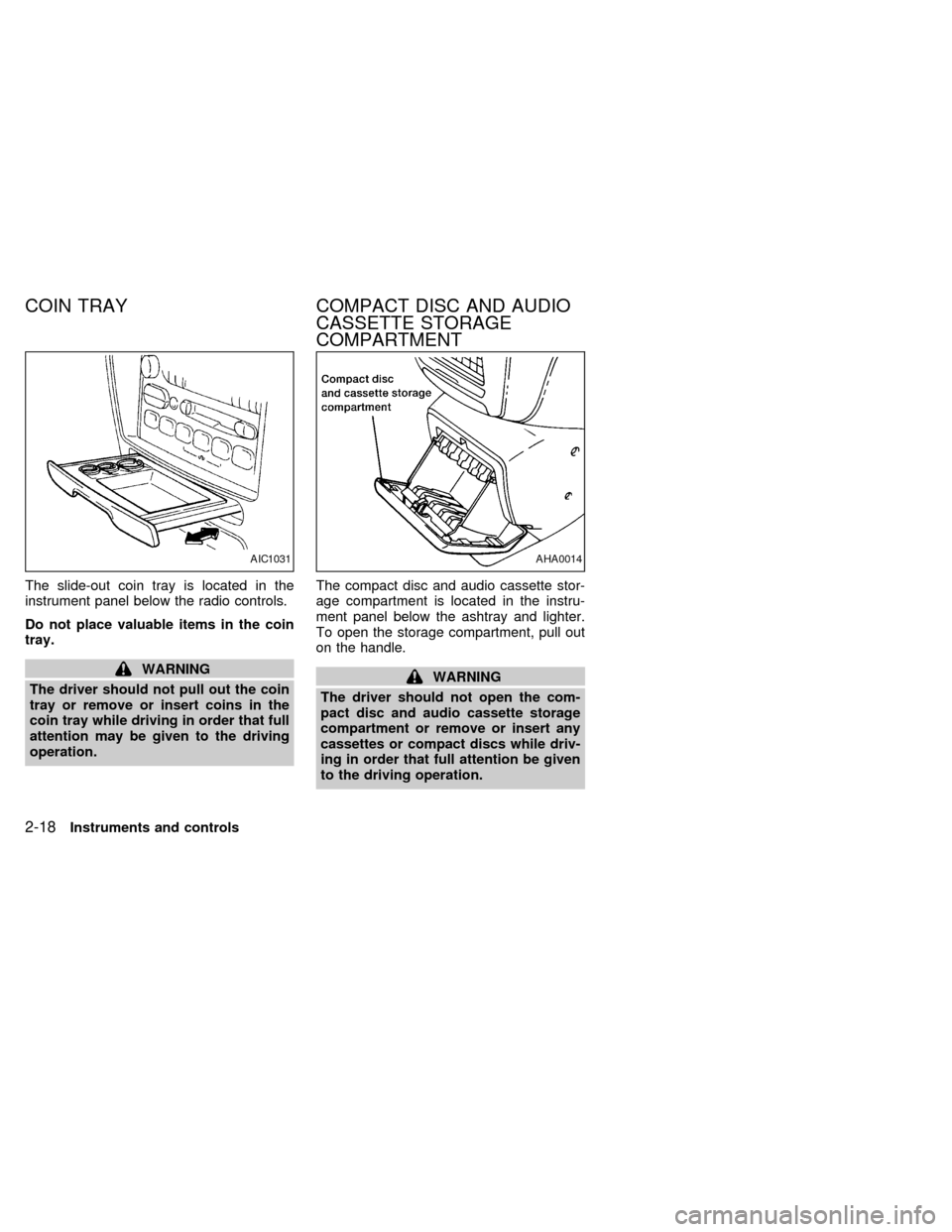
The slide-out coin tray is located in the
instrument panel below the radio controls.
Do not place valuable items in the coin
tray.
WARNING
The driver should not pull out the coin
tray or remove or insert coins in the
coin tray while driving in order that full
attention may be given to the driving
operation.The compact disc and audio cassette stor-
age compartment is located in the instru-
ment panel below the ashtray and lighter.
To open the storage compartment, pull out
on the handle.WARNING
The driver should not open the com-
pact disc and audio cassette storage
compartment or remove or insert any
cassettes or compact discs while driv-
ing in order that full attention be given
to the driving operation.
AIC1031AHA0014
COIN TRAY COMPACT DISC AND AUDIO
CASSETTE STORAGE
COMPARTMENT
2-18Instruments and controls
ZX
Page 128 of 260

4Heater, air conditioner and audio systems
Ventilators ..............................................................4-2
Heater and air conditioner (manual) ......................4-3
Controls ..................................................................4-3
Heater operation ....................................................4-4
Air conditioner operation ........................................4-5
Air flow charts.........................................................4-7
Heater and air conditioner (automatic) (if so
equipped) .............................................................4-10
Automatic operation .............................................4-11
Air control buttons ................................................4-11
Air conditioner and air recirculation .....................4-12
English/metric mode .............................................4-12
Rear seat heater and air conditioner (if so
equipped) .............................................................4-13Controls ................................................................4-13
Audio system ........................................................4-14
AM-FM radio with cassette player .......................4-14
Tuning ..................................................................4-16
Adjusting tone quality ...........................................4-17
Cassette tape operations .....................................4-18
Antenna ................................................................4-20
Compact disc (CD) player (if so equipped) .........4-21
Steering wheel controls ........................................4-23
Rear audio controls ..............................................4-24
CB radio or car phone..........................................4-25
ZX
Page 129 of 260

Center ventilators
Open, close and adjust the air flow direction
of ventilators.
: This symbol indicates a vent is closed
when the vent switch is rotated down-
ward.
: This symbol indicates a vent is open
when the vent switch is rotated up-
ward.
Side ventilators
Open, close and adjust the air flow direction
of ventilators.
: This symbol indicates a vent is closed
when the vent switch is moved to the
left.
: This symbol indicates a vent is open
when the vent switch is moved to the
right.
AHA0590AHA0591
VENTILATORS
4-2Heater, air conditioner and audio systems
ZX
Page 130 of 260
WARNING
cThe air conditioner cooling function
operates only when the engine is
running.
cDo not leave children, unreliable
adults, or pets alone in your vehicle.
On hot, sunny days, temperatures in
a closed vehicle could quickly be-
come high enough to cause severe
or possibly fatal injuries to people or
animals.
cDo not use the recirculation mode
for long periods as it may cause the
interior air to become stale and the
windows to fog up.
cPositioning of the heater and air con-
ditioner controls should not be done
while driving, in order that full atten-
tion may be given to the driving
operation.
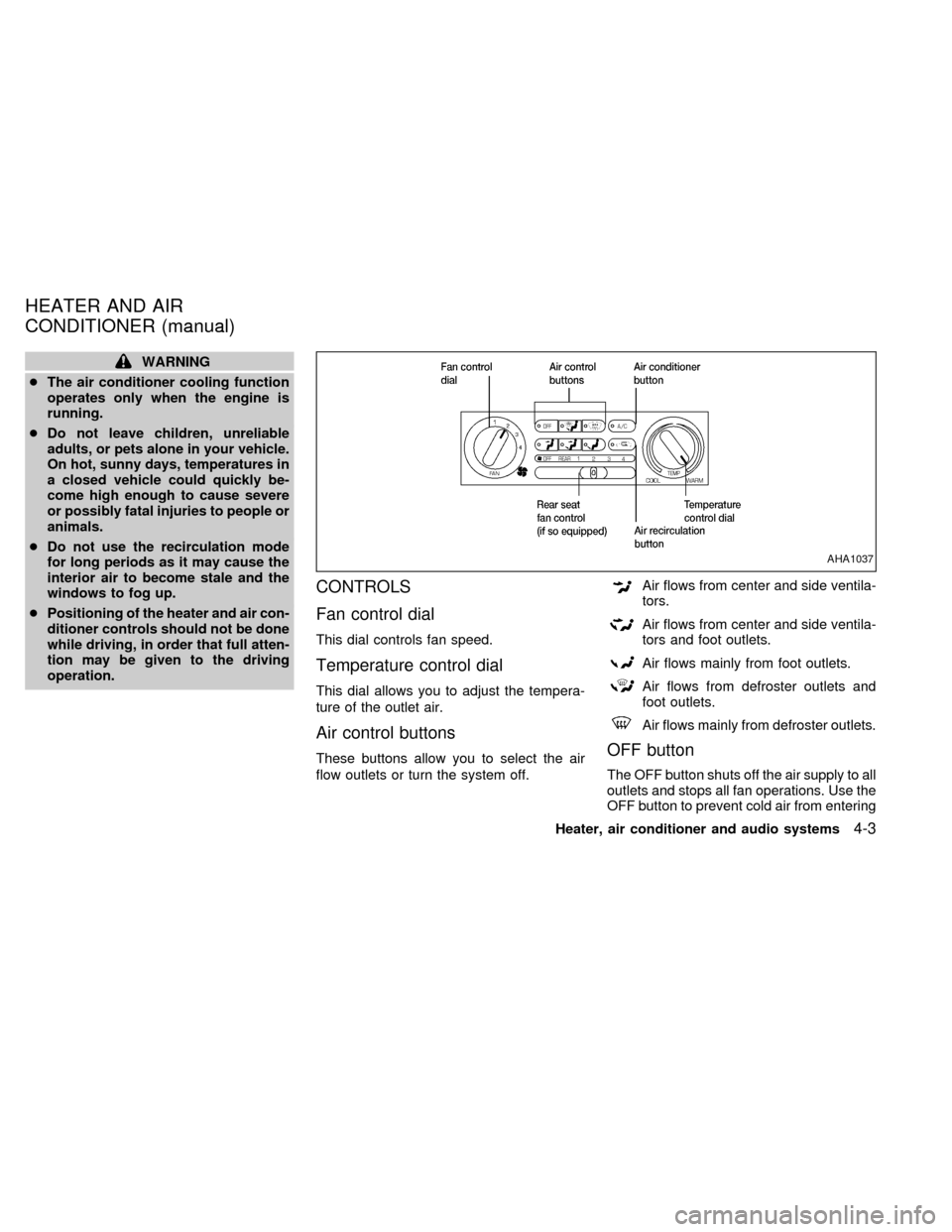
CONTROLS
Fan control dial
This dial controls fan speed.
Temperature control dial
This dial allows you to adjust the tempera-
ture of the outlet air.
Air control buttons
These buttons allow you to select the air
flow outlets or turn the system off.
Air flows from center and side ventila-
tors.
Air flows from center and side ventila-
tors and foot outlets.
Air flows mainly from foot outlets.
Air flows from defroster outlets and
foot outlets.
Air flows mainly from defroster outlets.
OFF button
The OFF button shuts off the air supply to all
outlets and stops all fan operations. Use the
OFF button to prevent cold air from entering
AHA1037
HEATER AND AIR
CONDITIONER (manual)
Heater, air conditioner and audio systems4-3
ZX
Page 131 of 260
the passenger compartment under cold out-
side conditions before the engine is warmed
up.
Air recirculation button
Fresh position (indicator light off):
Outside air is drawn into the passenger
compartment.
Use this position for normal heater or air
conditioner operation.
Recirculate position (indicator light on):
Interior air is recirculated inside the vehicle.
Activate the air recirculation button when
driving on a dusty road or to help keep out
traffic fumes.
Activate the air recirculation button for im-
proved air conditioner performance under high
temperature and high humidity conditions.
If the system is operating in theormode, the system does not allow the
air recirculate mode to be selected.
CAUTION
Do not use the recirculation mode for
long periods as it may cause the inte-
rior air to become stale and the win-
dows to fog up.
Air conditioner button
Start the engine, move the fan control dial to
the desired (one to four) position, select an
air control button and push the air conditioner
button to turn on the air conditioner. The
indicator light comes on when the air condi-
tioner is on. To stop the air conditioner, push
the button again; the indicator light goes off.
The air conditioner cooling function op-
erates only when the engine is running.
HEATER OPERATION
Heating
This mode is used to direct most of the hot
air to the floor outlets.
Push the air recirculation button to the off
position for normal heating.
1. Push the
button in.
2. Turn the fan control dial to select speed.3. Move the temperature control dial to the
desired position.
Ventilation
This mode directs air to the side and center
vents.
1. Push the
button in.
2. Turn the fan control dial to select speed.
3. Move the temperature control dial to the
desired position.
Defrosting or defogging
This mode is used to defrost/defog the
windows.
1. Push the
button in.
2. Turn the fan control dial to select speed.
3. Move the temperature control dial to the
desired position.
When the
button is pushed, the air
conditioner automatically turns on to de-
fog the windshield. The air recirculation
mode automatically turns off to reduce
window fogging.
When
is selected, the air condi-
tioner indicator light does not illuminate
4-4Heater, air conditioner and audio systems
ZX