Page 103 of 260
The sunroof operates when the ignition key
is in the ON position, or for 15 minutes after
the ignition key is turned to the OFF posi-
tion. If the driver's or passenger's door is
opened during this 15 minute period, de-
layed power to the sunroof is cancelled.
Sliding the sunroof
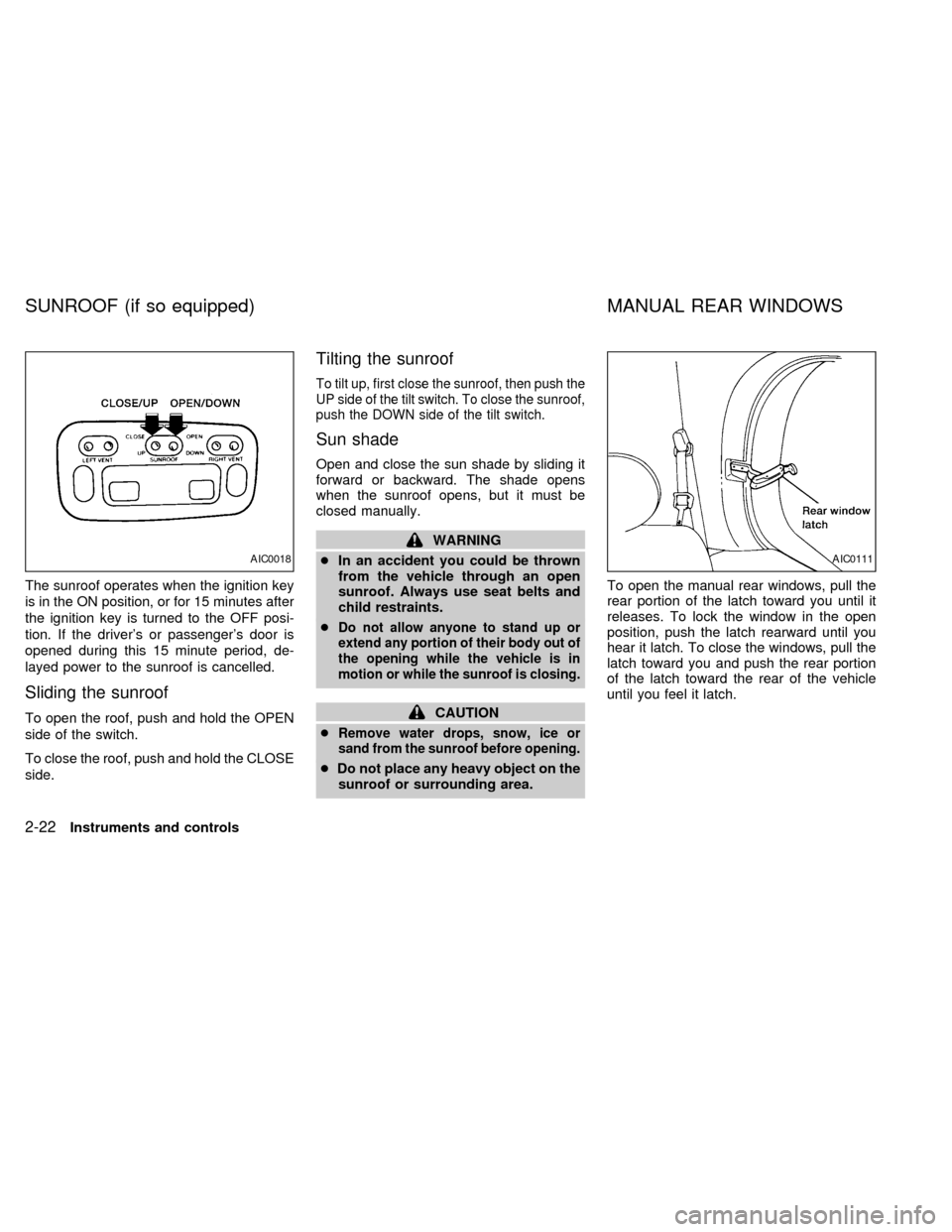
To open the roof, push and hold the OPEN
side of the switch.
To close the roof, push and hold the CLOSE
side.
Tilting the sunroof
To tilt up, first close the sunroof, then push the
UP side of the tilt switch. To close the sunroof,
push the DOWN side of the tilt switch.
Sun shade
Open and close the sun shade by sliding it
forward or backward. The shade opens
when the sunroof opens, but it must be
closed manually.
WARNING
cIn an accident you could be thrown
from the vehicle through an open
sunroof. Always use seat belts and
child restraints.
c
Do not allow anyone to stand up or
extend any portion of their body out of
the opening while the vehicle is in
motion or while the sunroof is closing.
CAUTION
c
Remove water drops, snow, ice or
sand from the sunroof before opening.
cDo not place any heavy object on the
sunroof or surrounding area.To open the manual rear windows, pull the
rear portion of the latch toward you until it
releases. To lock the window in the open
position, push the latch rearward until you
hear it latch. To close the windows, pull the
latch toward you and push the rear portion
of the latch toward the rear of the vehicle
until you feel it latch.
AIC0018AIC0111
SUNROOF (if so equipped) MANUAL REAR WINDOWS
2-22Instruments and controls
ZX
Page 104 of 260
Use the vent buttons on the power sunroof
controls to open and close the power rear
windows. To open one of the rear power
windows, press the indented side of the
switch. To close the window, press the
raised side of the switch.
The power rear windows operate when the
ignition key is in the ON position, or for 15
minutes after the ignition key is turned to the
OFF position. If the driver's or passenger's
door is opened during this 15 minute period,
delayed power to the rear windows is can-
celled.The digital clock displays time when the
ignition key is in ACC or ON.
If the power supply is disconnected, the
clock does not indicate the correct time.
Readjust the time.
How to view the clock mode
Push the CLK button to alternate the radio
frequency and the time in the display. In the
clock mode, press any radio function to
automatically display the radio frequency for
AIC0042
AIC0580
POWER REAR WINDOWS
(if so equipped)CLOCK
Instruments and controls2-23
ZX
Page 105 of 260
approximately ten seconds before changing
back to the clock mode.
How to set the clock
1. Turn the radio on. (Time is displayed
while the radio is off.)
2. Push and hold the CLK button; then,
press the SEEK button either
orto adjust the hours, and press the
TUNE button eitherorto
adjust the minutes.
NOTE: The clock displays 12-hour time with
no A.M./P.M. indications.
The interior lights operate regardless of
ignition key position.
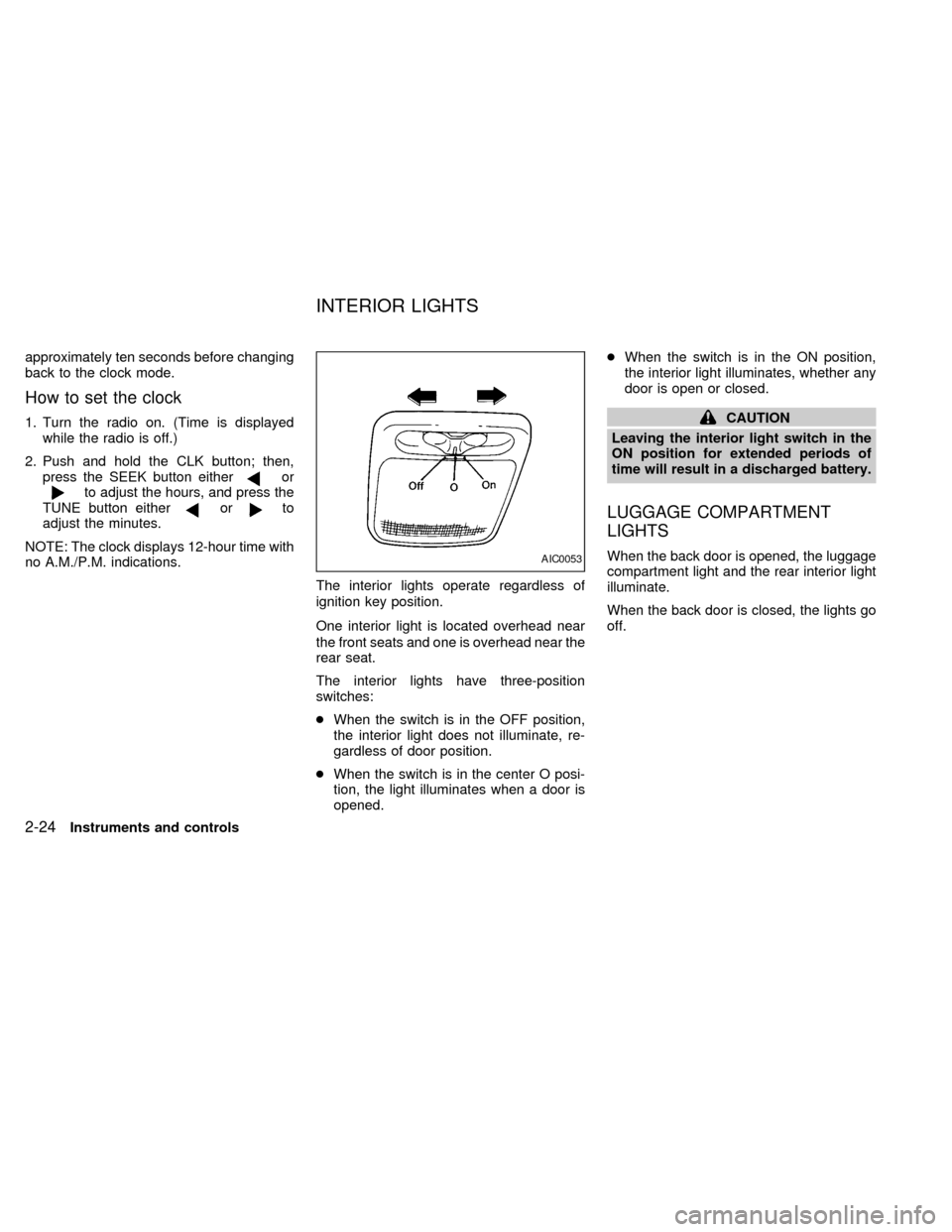
One interior light is located overhead near
the front seats and one is overhead near the
rear seat.
The interior lights have three-position
switches:
cWhen the switch is in the OFF position,
the interior light does not illuminate, re-
gardless of door position.
cWhen the switch is in the center O posi-
tion, the light illuminates when a door is
opened.cWhen the switch is in the ON position,
the interior light illuminates, whether any
door is open or closed.
CAUTION
Leaving the interior light switch in the
ON position for extended periods of
time will result in a discharged battery.
LUGGAGE COMPARTMENT
LIGHTS
When the back door is opened, the luggage
compartment light and the rear interior light
illuminate.
When the back door is closed, the lights go
off.AIC0053
INTERIOR LIGHTS
2-24Instruments and controls
ZX
Page 114 of 260
cTurning a door key to the rear unlocks
that door.
cTurning a door key to the front locks all
doors. This function can be operated
from the driver or passenger doors.
cPushing a front door lock knob in locks all
doors. When locking the doors this way,
be certain not to leave the key inside the
vehicle. All doors automatically unlock
with the key in the ignition.Selective unlock
cIf the vehicle has the multi-remote control
system, turning the door key one time to
the rear of the vehicle unlocks the corre-
sponding door. From that position, re-
turning the key to Neutral (where the key
can only be removed and inserted) and
turning it to the rear again within 2 sec-
onds unlocks all doors. This function and
locking all doors can be operated from
the driver, passenger or sliding door.
APD1030APD0828
Pre-driving checks and adjustments3-7
ZX
Page 115 of 260
It is possible to lock/unlock all doors, turn
the interior lights on or off, and activate the
panic alarm by using the remote controller
from outside the vehicle.
Be sure to remove the key from the
vehicle before locking the doors and
leaving it.
The remote controller can operate at a
distance of approximately 49 ft (15 m) from
the vehicle. The effective distance depends
on the conditions around the vehicle.
As many as four remote controllers can be
used with one vehicle. For more information
concerning the purchase and use of addi-
tional remote controllers, contact an autho-
rized NISSAN dealer.
CAUTION
Listed below are conditions or occur-
rences which will damage the remote
controller:
cDo not allow the remote controller to
become wet.
cDo not drop the remote controller.
cDo not strike the remote controller
sharply against another object.cDo not place the remote controller
for an extended period in an area
where temperatures exceed 140ÉF
(60ÉC).
Locking doors
1. Close all of the doors.
2. Push the
button on the multi-remote
controller.
3. All of the doors lock.
4. The parking lights flash twice and the
horn chirps once to verify all the doors
are locked.
Unlocking doors
1. Push thebutton on the multi-remote
controller. Only the driver side door un-
locks.
2. The interior lights come on and stay on
for 30 seconds.
3. Push the
button on the multi-remote
controller again within five seconds. The
passenger doors and the rear door un-
lock.The interior lights can be turned off without
waiting 30 seconds by either turning the
ignition to ON or locking the doors with the
multi-remote controller.
Using the panic alarm
If you are near your vehicle and feel threat-
ened, you may activate the panic alarm to
call attention as follows:
1. Push the
button on the remote con-
troller for at least one full second.
2. The theft warning alarm (horn) sounds
and the headlights and tail lights flash for
30 seconds.
3. The panic alarm stops when:
cit has run for 30 seconds, or
cthe
or thebutton is pressed, or
c
thebutton is released and re-pushed.
MULTI-REMOTE CONTROL
SYSTEM (if so equipped)
3-8Pre-driving checks and adjustments
ZX
Page 117 of 260
The interior lights, the cargo light, the glove
box light, the stepwell lights near the sliding
door and on the front doors, and the footwell
lights near the driver's and front passen-
ger's feet illuminate when the front and
sliding doors are opened. These lights
gradually dim to off within 30 seconds or
turn off immediately when the key is turned
to ON.
Battery saver
If the vehicle doors are not fully closed and
the interior lights remain illuminated, they
eventually turn off automatically to prevent
the battery from becoming discharged.
Lights that illuminate when the front doors
and/or the sliding door are open turn off
after approximately 30 minutes. Lights that
illuminate when the back door is open turn
off after approximately 60 minutes.
If the personal reading lamp is left on when
the key is removed from the ignition, it turns
off automatically in 30 minutes.
ILLUMINATED ENTRY
SYSTEM
3-10Pre-driving checks and adjustments
ZX
Page 124 of 260
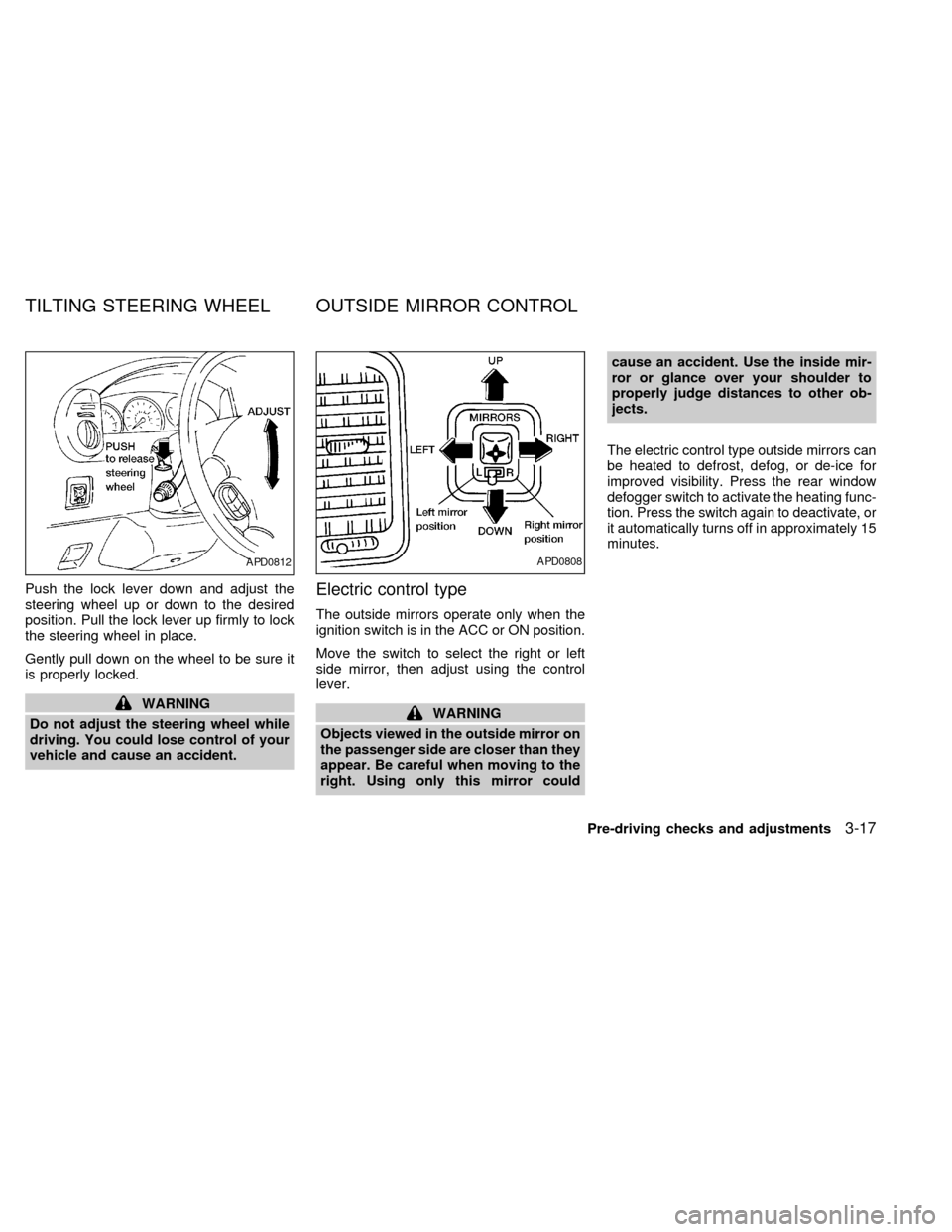
Push the lock lever down and adjust the
steering wheel up or down to the desired
position. Pull the lock lever up firmly to lock
the steering wheel in place.
Gently pull down on the wheel to be sure it
is properly locked.
WARNING
Do not adjust the steering wheel while
driving. You could lose control of your
vehicle and cause an accident.
Electric control type
The outside mirrors operate only when the
ignition switch is in the ACC or ON position.
Move the switch to select the right or left
side mirror, then adjust using the control
lever.
WARNING
Objects viewed in the outside mirror on
the passenger side are closer than they
appear. Be careful when moving to the
right. Using only this mirror couldcause an accident. Use the inside mir-
ror or glance over your shoulder to
properly judge distances to other ob-
jects.
The electric control type outside mirrors can
be heated to defrost, defog, or de-ice for
improved visibility. Press the rear window
defogger switch to activate the heating func-
tion. Press the switch again to deactivate, or
it automatically turns off in approximately 15
minutes.
APD0812APD0808
TILTING STEERING WHEEL OUTSIDE MIRROR CONTROL
Pre-driving checks and adjustments3-17
ZX
Page 137 of 260
WARNING
cThe air conditioner cooling function
operates only when the engine is
running.
cDo not leave children, unreliable
adults, or pets alone in your vehicle.
On hot, sunny days, temperatures in
a closed vehicle could quickly be-
come high enough to cause severe
or possibly fatal injuries to people or
animals.cDo not use the recirculation mode
for long periods as it may cause the
interior air to become stale and the
windows to fog up.
cPositioning of the heater and air con-
ditioner controls should not be done
while driving, in order that full atten-
tion may be given to the driving
operation.
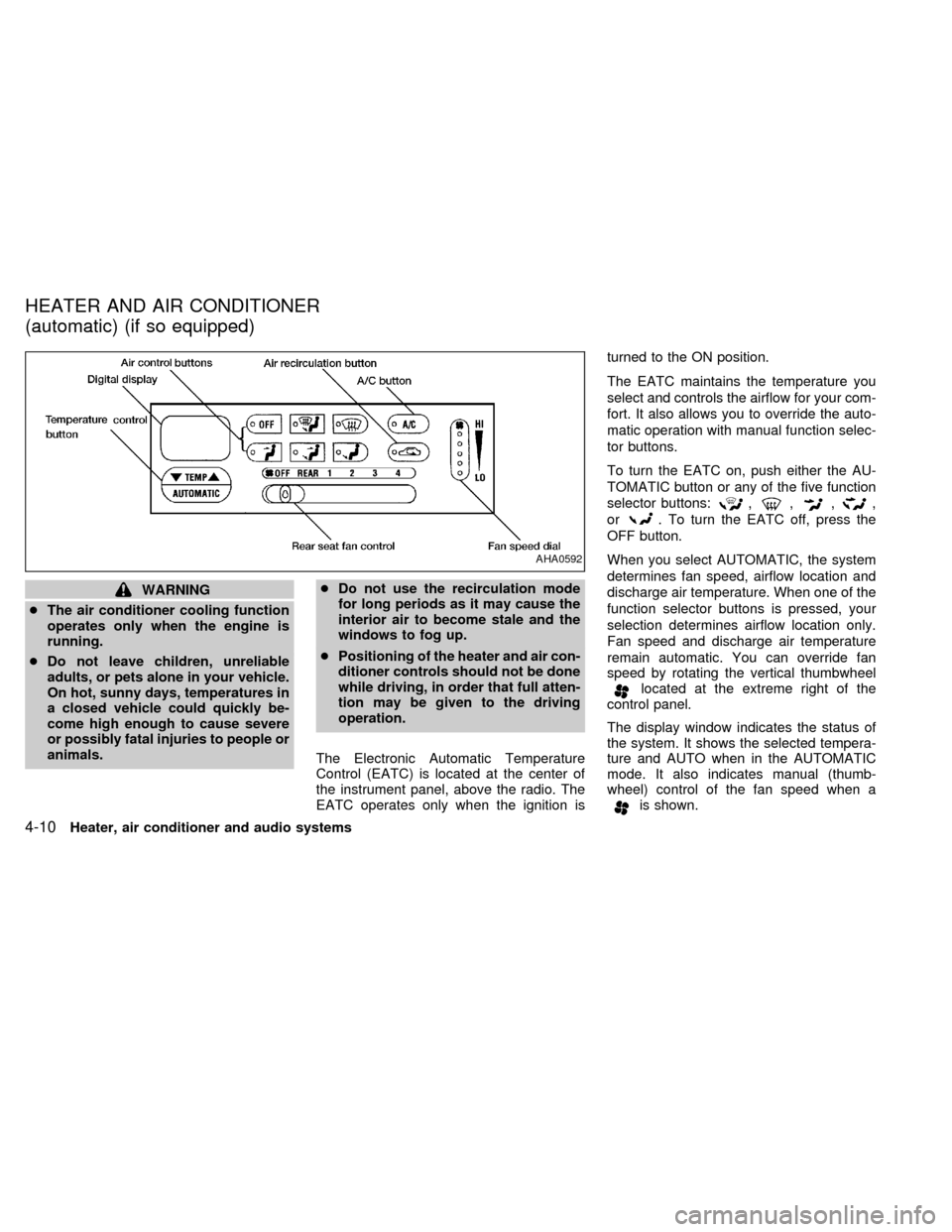
The Electronic Automatic Temperature
Control (EATC) is located at the center of
the instrument panel, above the radio. The
EATC operates only when the ignition isturned to the ON position.
The EATC maintains the temperature you
select and controls the airflow for your com-
fort. It also allows you to override the auto-
matic operation with manual function selec-
tor buttons.
To turn the EATC on, push either the AU-
TOMATIC button or any of the five function
selector buttons:
,,,,
or
. To turn the EATC off, press the
OFF button.
When you select AUTOMATIC, the system
determines fan speed, airflow location and
discharge air temperature. When one of the
function selector buttons is pressed, your
selection determines airflow location only.
Fan speed and discharge air temperature
remain automatic. You can override fan
speed by rotating the vertical thumbwheel
located at the extreme right of the
control panel.
The display window indicates the status of
the system. It shows the selected tempera-
ture and AUTO when in the AUTOMATIC
mode. It also indicates manual (thumb-
wheel) control of the fan speed when a
is shown.
AHA0592
HEATER AND AIR CONDITIONER
(automatic) (if so equipped)
4-10Heater, air conditioner and audio systems
ZX