1998 NISSAN QUEST instrument panel
[x] Cancel search: instrument panelPage 118 of 260
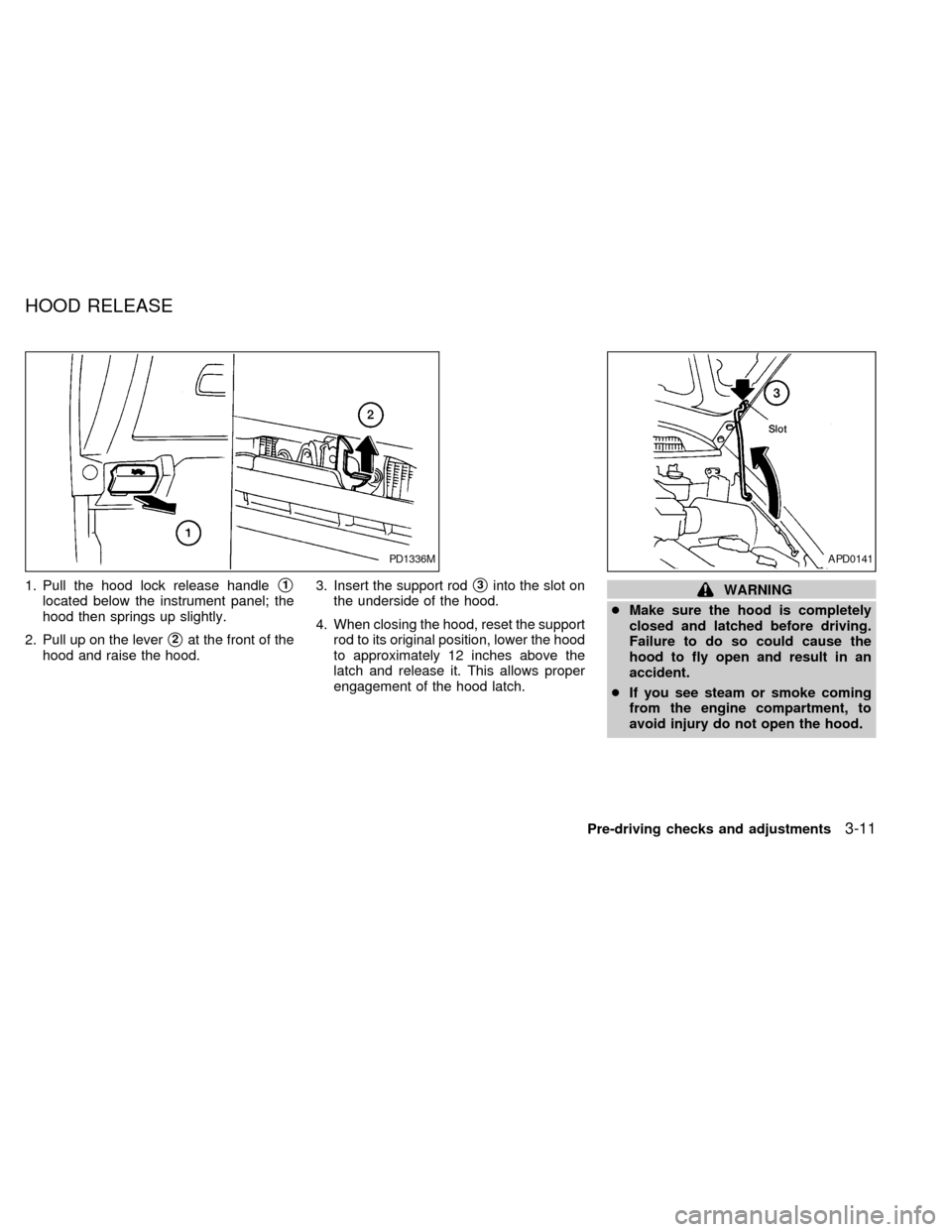
1. Pull the hood lock release handles1
located below the instrument panel; the
hood then springs up slightly.
2. Pull up on the lever
s2at the front of the
hood and raise the hood.3. Insert the support rod
s3into the slot on
the underside of the hood.
4. When closing the hood, reset the support
rod to its original position, lower the hood
to approximately 12 inches above the
latch and release it. This allows proper
engagement of the hood latch.WARNING
cMake sure the hood is completely
closed and latched before driving.
Failure to do so could cause the
hood to fly open and result in an
accident.
cIf you see steam or smoke coming
from the engine compartment, to
avoid injury do not open the hood.
PD1336MAPD0141
HOOD RELEASE
Pre-driving checks and adjustments3-11
ZX
Page 137 of 260
WARNING
cThe air conditioner cooling function
operates only when the engine is
running.
cDo not leave children, unreliable
adults, or pets alone in your vehicle.
On hot, sunny days, temperatures in
a closed vehicle could quickly be-
come high enough to cause severe
or possibly fatal injuries to people or
animals.cDo not use the recirculation mode
for long periods as it may cause the
interior air to become stale and the
windows to fog up.
cPositioning of the heater and air con-
ditioner controls should not be done
while driving, in order that full atten-
tion may be given to the driving
operation.
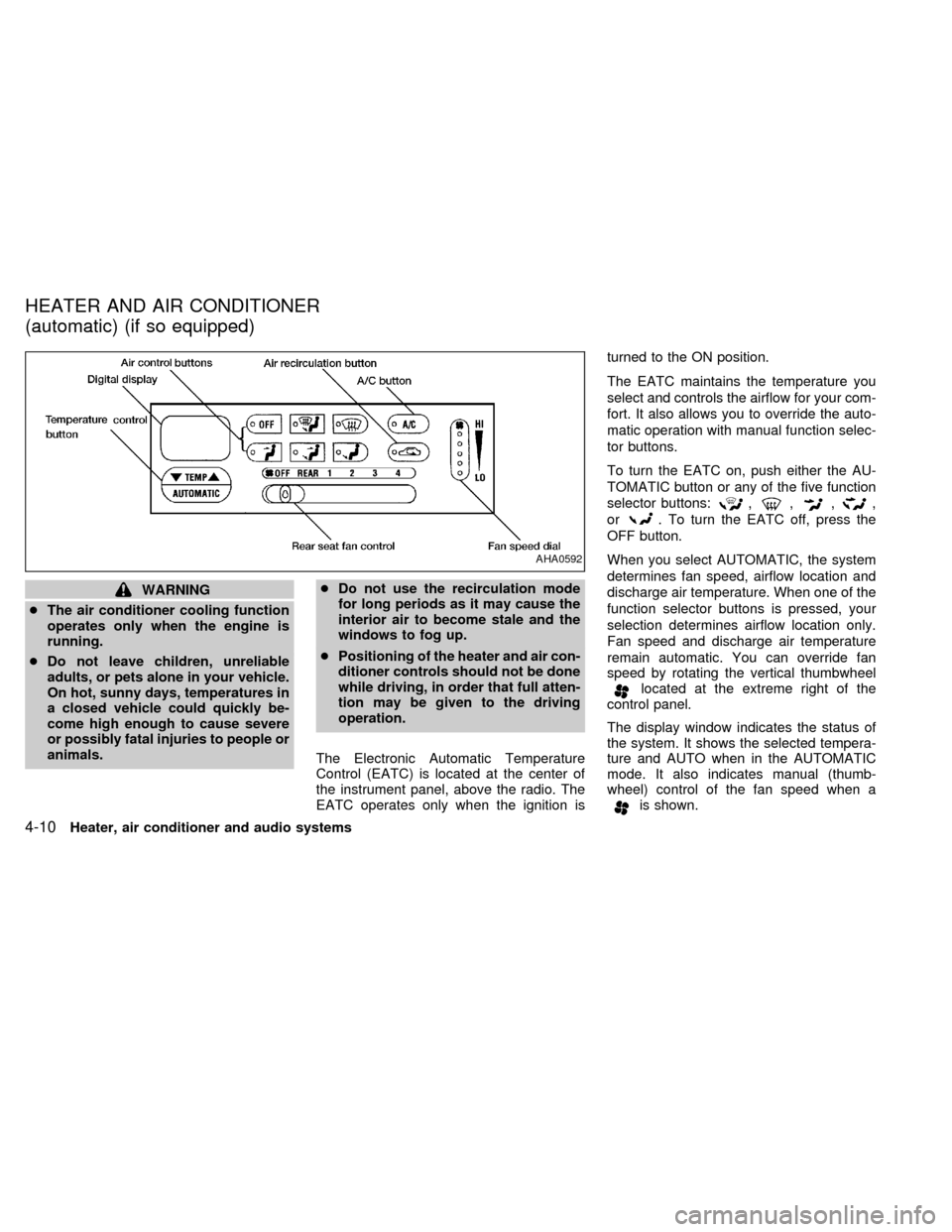
The Electronic Automatic Temperature
Control (EATC) is located at the center of
the instrument panel, above the radio. The
EATC operates only when the ignition isturned to the ON position.
The EATC maintains the temperature you
select and controls the airflow for your com-
fort. It also allows you to override the auto-
matic operation with manual function selec-
tor buttons.
To turn the EATC on, push either the AU-
TOMATIC button or any of the five function
selector buttons:
,,,,
or
. To turn the EATC off, press the
OFF button.
When you select AUTOMATIC, the system
determines fan speed, airflow location and
discharge air temperature. When one of the
function selector buttons is pressed, your
selection determines airflow location only.
Fan speed and discharge air temperature
remain automatic. You can override fan
speed by rotating the vertical thumbwheel
located at the extreme right of the
control panel.
The display window indicates the status of
the system. It shows the selected tempera-
ture and AUTO when in the AUTOMATIC
mode. It also indicates manual (thumb-
wheel) control of the fan speed when a
is shown.
AHA0592
HEATER AND AIR CONDITIONER
(automatic) (if so equipped)
4-10Heater, air conditioner and audio systems
ZX
Page 138 of 260

AUTOMATIC OPERATION
Push the AUTOMATIC button and select the
desired temperature. The selected tempera-
ture and AUTO show in the display window.
The EATC heats or cools to achieve the set
temperature.
When in AUTOMATIC and weather conditions
require heat, air is sent to the floor. However,
a feature is included in the EATC to prevent
blowing cold air to the floor if the engine
coolant is not warm enough to allow heating.
In three or four minutes the fan speed gradu-
ally increases and airflow changes to the floor.
If unique conditions exist, such as window
fogging, the five override buttons allow spe-
cific airflow selection. The thumbwheel al-
lows you to adjust the fan speed to suit your
needs.
Temperature selection
TheTEMPbutton on the left side of
the control panel is for temperature selec-
tion. The
side lowers the set tempera-
ture, and theside raises the set tem-
perature. Press and hold either side of the
button to rapidly change the temperature
setting in one degree increments to either
65ÉF (18ÉC) or 85ÉF (29ÉC). If you wantcontinuous maximum cooling, push the
side of the TEMP button until 60ÉF
(16ÉC) shows in the display window. The
EATC cools at maximum and disregards the
60ÉF (16ÉC) setting until a warmer tempera-
ture is selected. If you want continuous
maximum heating, push the
side of the
TEMP button until 90ÉF (32ÉC) shows in the
display window. The EATC provides maxi-
mum heat regardless of the 90ÉF (32ÉC)
setting until a cooler temperature is se-
lected.
Fan speed and thumbwheel
Your EATC automatically adjusts the fan
speed to the existing conditions. To control
the fan speed yourself, use the thumbwheel
located at the extreme right side of the
EATC control panel. Using the thumbwheel
cancels the automatic fan speed control,
and causes a
to appear in the display
window. Rotate the thumbwheel up for HI
speeds and down for LO speeds.
To return to auto fan control, press the
AUTOMATIC button.
AIR CONTROL BUTTONS
Your EATC has five buttons which allow you
to make special selections. The buttons aregrouped in the middle of the EATC panel
and allow you to determine airflow location.
Pressing any of the air control buttons
changes airflow location only, and does not
affect the ability of the system to control
temperature or fan speed. Return to fully
automatic operation by pushing the AUTO-
MATIC button.
Push this button for airflow to the floor and
windshield at the same time. The
in-
dicator light comes on, and the display
window shows the set temperature.
Press this button to obtain maximum airflow
to the windshield. Adjust the temperature
setting as required for defrosting. The
indicator light comes on, and the
display window shows the set temperature.
When the outside temperature is about
50ÉF (10ÉC) or above, the air is dehumidi-
fied to prevent window fogging.
Push this button to select airflow through
the instrument panel registers. The
Heater, air conditioner and audio systems
4-11
ZX
Page 139 of 260

indicator light comes on, and the
display window shows the set temperature.
The EATC heats the air if the selected
temperature is warmer than the outside air
coming into the vehicle. However, the air is
not cooled regardless of the temperature
setting.
Push this button to get air from the floor and
instrument panel registers at the same time.
The
indicator light comes on and the
display window shows the set temperature.
Depending on the selected temperature, the
air is automatically heated or cooled.
Push this button to direct airflow to the floor.
Theindicator light comes on, and the
display window shows the set temperature.
The air cannot be cooled in the
mode,
only heated.
AIR CONDITIONER AND AIR RE-
CIRCULATION
Activate the air conditioner in any of the
override modes listed above by pressing the
A/C button. The A/C indicator light comeson to verify activation, and cooled air flows
from the vents. Fan speed continues to be
controlled by the EATC unless the fan
speed thumbwheel is used to override.
Press the
button to choose air recir-
culation. In this mode the EATC system
recirculates the air inside the vehicle rather
than drawing air from outside. Use this
mode together with the air conditioner to
rapidly cool the inside of the vehicle, or to
dehumidify the air inside the vehicle.
ENGLISH/METRIC MODE
Switch from English to metric temperature
display by simultaneously pressing the
and A/C buttons and holding the
thumbwheel in upper position (HI) for one
second.
AHA762
4-12Heater, air conditioner and audio systems
ZX
Page 148 of 260

COMPACT DISC (CD) PLAYER
(if so equipped)
NOTE: Audio control features include com-
mand buttons for CD players which can be
installed as optional equipment to upgrade
the audio system. A CD player is not in-
cluded with this system, but can be pur-
chased as an option at any time. Consult
with an authorized NISSAN dealer for fea-
ture availability.
The compact disc player consists of two
main components; the 6 CD magazine and
the CD changer. Both components are lo-cated on the center instrument panel con-
sole, below the ashtray.How to load the CD magazine
To load the magazine with CDs, first push
the
button on the CD changer to eject
the magazine, then remove the magazine
from the changer. The inside of the CD
magazine contains six shelves, one for
each CD to be loaded. Carefully slide a CD
(label side up) onto one of the shelves and
push it in. Repeat as desired, loading up to
six CDs.
CD magazine insert
Once the desired number of CDs are loaded
into the magazine, insert the magazine back
into the CD changer.
With the ignition switch OFF, the CD maga-
zine loads into the CD changer. Once the
ignition switch is turned to ACC or ON, the
audio system returns to its previous mode.
With the ignition switch in the ACC or ON
position, the CD magazine loads into the
CD changer and begins play with disc one,
track one.
CD
Push this button to switch from radio or tape
mode to CD mode. CD play begins auto-
matically if at least one disc is loaded in the
magazine. The display window shows the
CD number for three seconds, then the track
number for three seconds, then displays
both together for the remainder of the track.
Push this button when a CD is already
playing to stop the CD.
If the CD button is pushed while in the radio
or tape mode, and there are no CDs loaded
in the magazine, the display window flashes
a NO DISC message for 4 seconds.
AHA0597
Heater, air conditioner and audio systems4-21
ZX
Page 163 of 260

The cruise control allows driving at speeds
between 30 and 90 MPH (48 and 144 km/h)
without keeping your foot on the accelerator
pedal.
To turn the cruise control on,push the
CRUISE CONT main switch. The indicator
light on the switch comes on.
To set at cruising speed,accelerate your
vehicle to the desired speed, push the
COAST/SET switch and release it. The
CRUISE light in the instrument cluster
comes on. Take your foot off the accelerator
pedal. Your vehicle maintains the set
speed.cTo pass another vehicle,depress the
accelerator pedal. When you release the
pedal, the vehicle returns to the previ-
ously set speed.
cThe vehicle may not maintain the set
speed when going up or down steep hills.
If this happens, drive without the cruise
control.
To cancel the preset speed,follow any of
these three methods.
a) Push the CANCEL button; the CRUISE
light in the instrument panel goes out.b) Tap the brake pedal; the CRUISE light
goes out.
c)
Push the cruise control OFF switch. Both
the ON indicator and CRUISE lights go out.
cIf you depress the brake pedal while
pushing the RES/ACCEL switch, the
RES/ ACCEL function is cancelled.
In order for the RES/ACCEL switch to
operate, the COAST/SET must be used
to re-engage the system.
cThe cruise control automatically cancels
if the vehicle slows down more than 5
MPH (8 km/h) below the set speed.
ASD0562
5-10Starting and driving
ZX
Page 164 of 260

cMove the selector lever to N (Neutral).
The CRUISE light goes out.
To reset at a faster cruising speed,use
one of the following three methods:
a) Depress the accelerator pedal. When the
vehicle attains the desired speed, push
and release the COAST/SET switch.
b) Push and hold the RES/ACCEL switch.
When the vehicle attains the speed you
desire, release the switch.
c) Push and release the RES/ACCEL
switch. Each time you do this, the set
speed increases by about 1 MPH (1.6
km/h).
To reset at a slower cruising speed,use
one of the following three methods.
a) Lightly tap the brake pedal. When the
vehicle attains the desired speed, push
the COAST/SET switch and release it.
b) Push and hold the COAST/SET switch.
Release the switch when the vehicle
slows down to the desired speed.
c) Push and release the COAST/SET
switch. Each time you do this, the setspeed decreases by about 1 MPH (1.6
km/h).
To resume the preset speed,push and
release the RES/ACCEL switch. The ve-
hicle resumes the last set cruising speed
when the vehicle speed is over 30 MPH (48
km/h).
Precautions
cIf the cruise control system malfunctions,
it cancels automatically. The CRUISE
light in the instrument panel then blinks to
warn the driver.
cWhen the CRUISE light blinks, turn the
CRUISE CONT main switch OFF and
have the system checked by an autho-
rized NISSAN dealer.
cThe CRUISE light in the instrument panel
may blink when the CRUISE CONT main
switch is turned ON while pushing either
the RES/ACCEL, COAST/SET, or the
CANCEL switch (located on the steering
wheel). To properly set the cruise control
system, perform the steps in the order
indicated.During the first 1,000 miles (1,600 km),
follow these recommendations for the future
reliability and fuel economy of your new
vehicle. Failure to follow these recommen-
dations may result in vehicle damage or
shortened engine life.
cDo not drive over 55 MPH (90 km/h) and
do not run the engine over 4,000 RPM.
Avoid driving for long periods at constant
speed, either fast or slow.
cDo not accelerate at full throttle in any
gear.
cAvoid quick starts.
cAvoid hard braking as much as possible.
cDo not tow a trailer for the first 500 miles
(800 km).
BREAK-IN SCHEDULE
Starting and driving5-11
ZX
Page 254 of 260
11 Index
A
After an accident........................................ 6-11
Air bag (See supplemental restraint
system) ...................................................... 1-18
Air bag warning light .................................. 1-23
Air cleaner housing filter ............................ 8-13
Air conditioner
Air conditioner operation ............... 4-20, 4-5
Air conditioner service .......................... 4-14
Air conditioner specification label ....... 10-11
Air conditioner system refrigerant and
lubrication recommendations ................ 10-6
Heater and air conditioner (automatic)
(if so equipped)..................................... 4-10
Heater and air conditioner (manual)....... 4-3
Rear seat heater and air conditioner ... 4-13
Air flow charts .............................................. 4-7
Alarm system (See theft warning) ............. 2-10
Anchor point locations ............................... 1-53
Antenna
Manual .................................................. 4-20
Power.................................................... 4-20
Anti-lock brake system (ABS).................... 5-15
Anti-lock brake warning light ....................... 2-8
Armrests....................................................... 1-6
Ashtray (See cigarette lighter and
ashtray) ...................................................... 2-16Audio system
AM-FM radio with cassette player ........ 4-14
Compact disc (CD) player .................... 4-21
Autolamp switch......................................... 2-14
Automatic
Automatic power window switch .......... 2-21
Automatic transmission fluid (ATF) ........ 8-8
Driving with automatic transmission ....... 5-5
B
Battery........................................................ 8-11
Before starting the engine ........................... 5-5
Brake
Anti-lock brake system (ABS) .............. 5-15
Brake booster ....................................... 8-18
Brake fluid ................................... 10-2, 8-10
Brake light (See stop light) ................... 8-22
Brake pedal .......................................... 8-17
Brake system ........................................ 5-14
Brake warning light ................................. 2-7
Brake wear indicators ............................. 2-9
Parking brake check ............................. 8-16
Parking brake operation ......................... 5-9
Self-adjusting brakes ............................ 8-17
Break-in schedule ...................................... 5-11
Bulb check/instrument panel ....................... 2-6
Bulb replacement ....................................... 8-22C
Capacities and recommended fuel/
lubricants.................................................... 10-2
Cargo net ................................................... 3-14
Cargo (See vehicle loading
information) .............................................. 10-12
Cassette player (See audio system) ......... 4-14
CB radio or car phone ............................... 4-25
Check engine indicator light
(See malfunction indicator light) .................. 2-9
Child restraint with top tether strap ........... 1-49
Child restraints ........................................... 1-39
Child safety sliding door lock....................... 3-5
Cigarette lighter (accessory)
and ashtray ................................................ 2-16
Cleaning exterior and interior ...................... 7-2
Clock .......................................................... 2-23
Coin tray .................................................... 2-18
Cold weather driving .................................. 5-16
Compact disc (CD) player ......................... 4-21
Controls
Audio controls ....................................... 4-14
Audio controls (rear) ............................. 4-24
Audio controls (steering wheel) ............ 4-23
Heater and air conditioner controls
(automatic) ............................................ 4-10
Heater and air conditioner controls
(manual).................................................. 4-3
ZX