Page 231 of 326
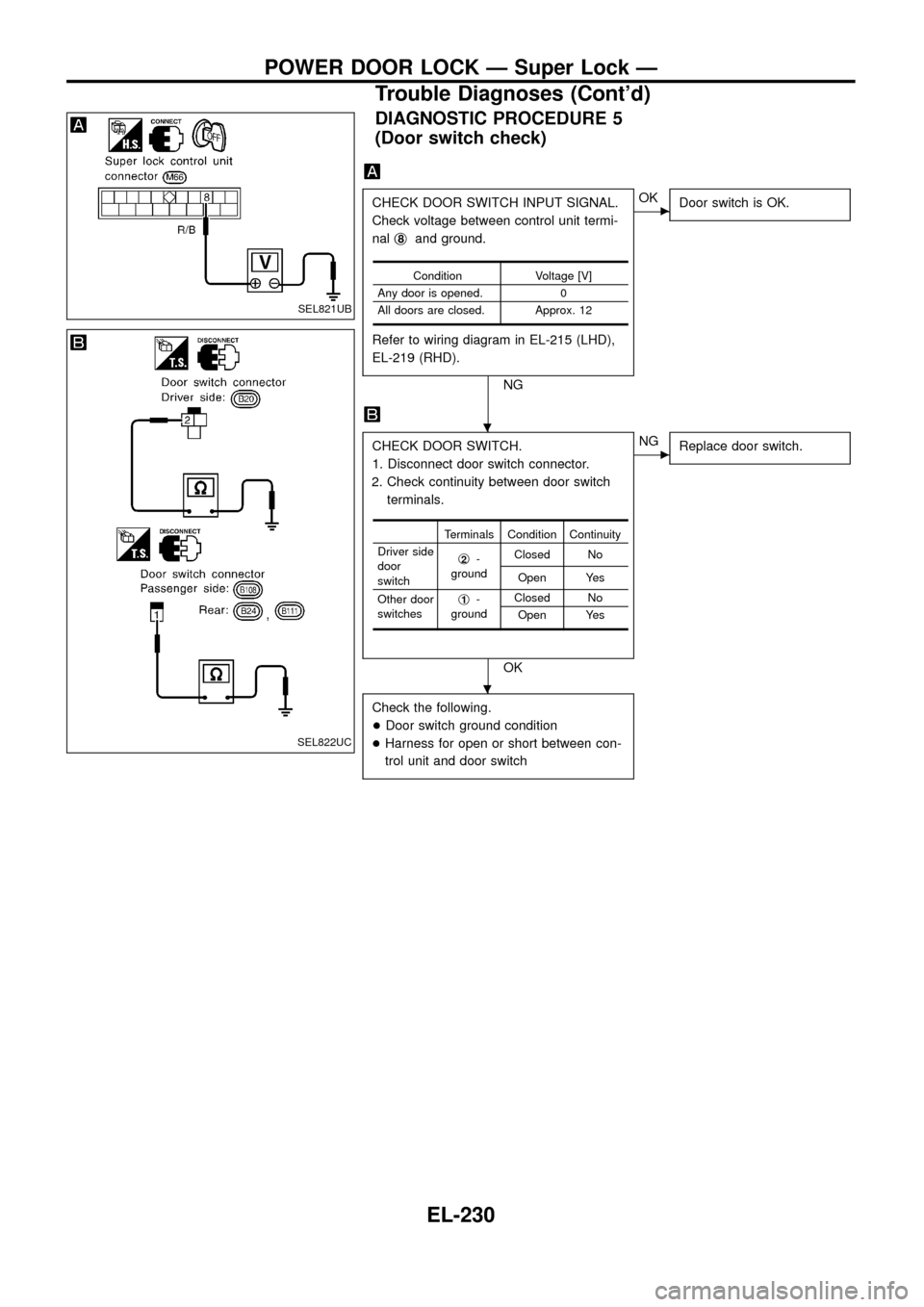
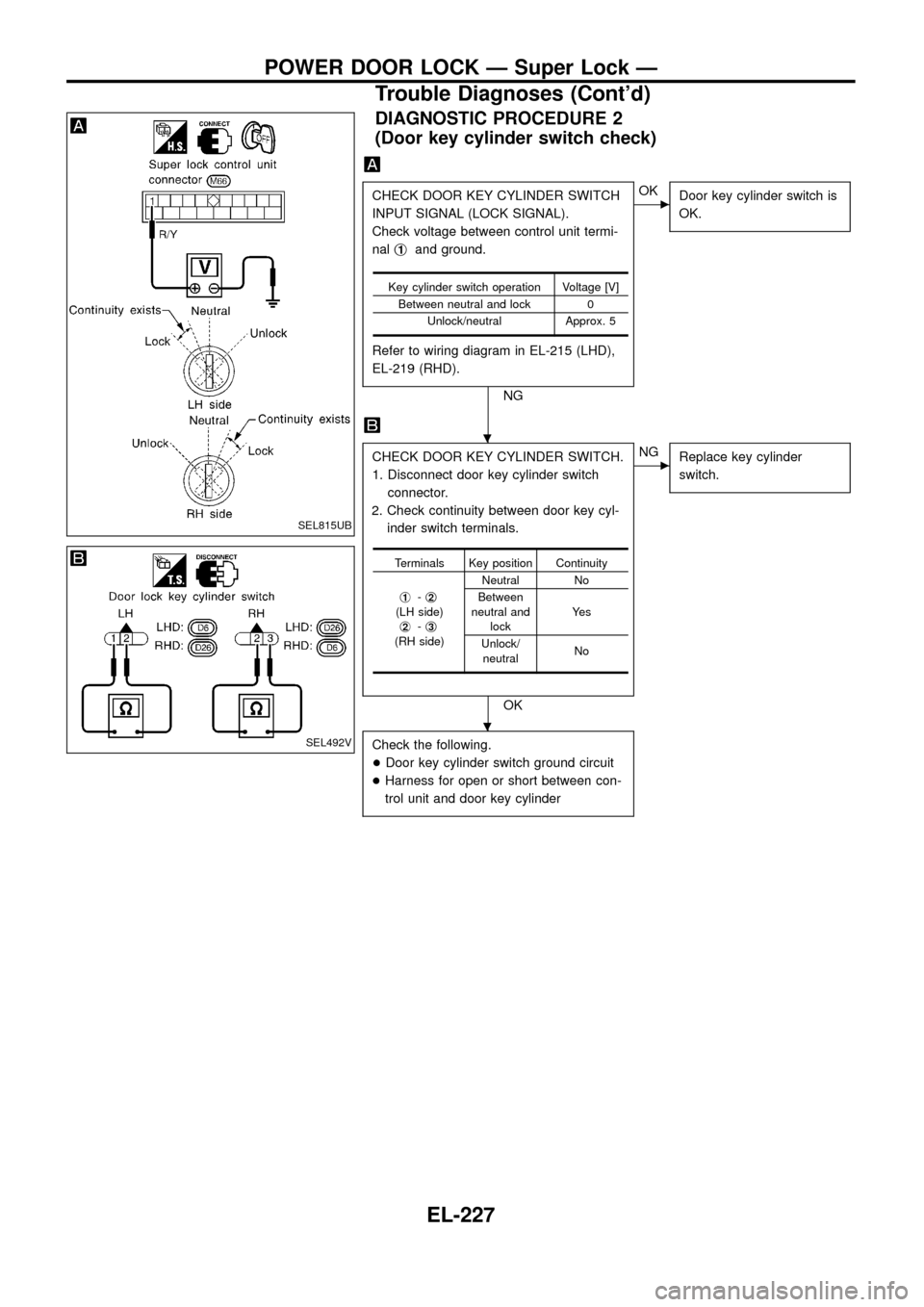
DIAGNOSTIC PROCEDURE 2
(Door key cylinder switch check)
CHECK DOOR KEY CYLINDER SWITCH
INPUT SIGNAL (LOCK SIGNAL).
Check voltage between control unit termi-
nalj
1and ground.
Refer to wiring diagram in EL-215 (LHD),
EL-219 (RHD).
NG
cOK
Door key cylinder switch is
OK.
CHECK DOOR KEY CYLINDER SWITCH.
1. Disconnect door key cylinder switch
connector.
2. Check continuity between door key cyl-
inder switch terminals.
OK
cNG
Replace key cylinder
switch.
Check the following.
+Door key cylinder switch ground circuit
+Harness for open or short between con-
trol unit and door key cylinder
Key cylinder switch operation Voltage [V]
Between neutral and lock 0
Unlock/neutral Approx. 5
Terminals Key position Continuity
j
1-j2(LH side)
j2-j3(RH side)Neutral No
Between
neutral and
lockYe s
Unlock/
neutralNo
SEL815UB
SEL492V
.
.
POWER DOOR LOCK Ð Super Lock Ð
Trouble Diagnoses (Cont'd)
EL-227
Page 232 of 326
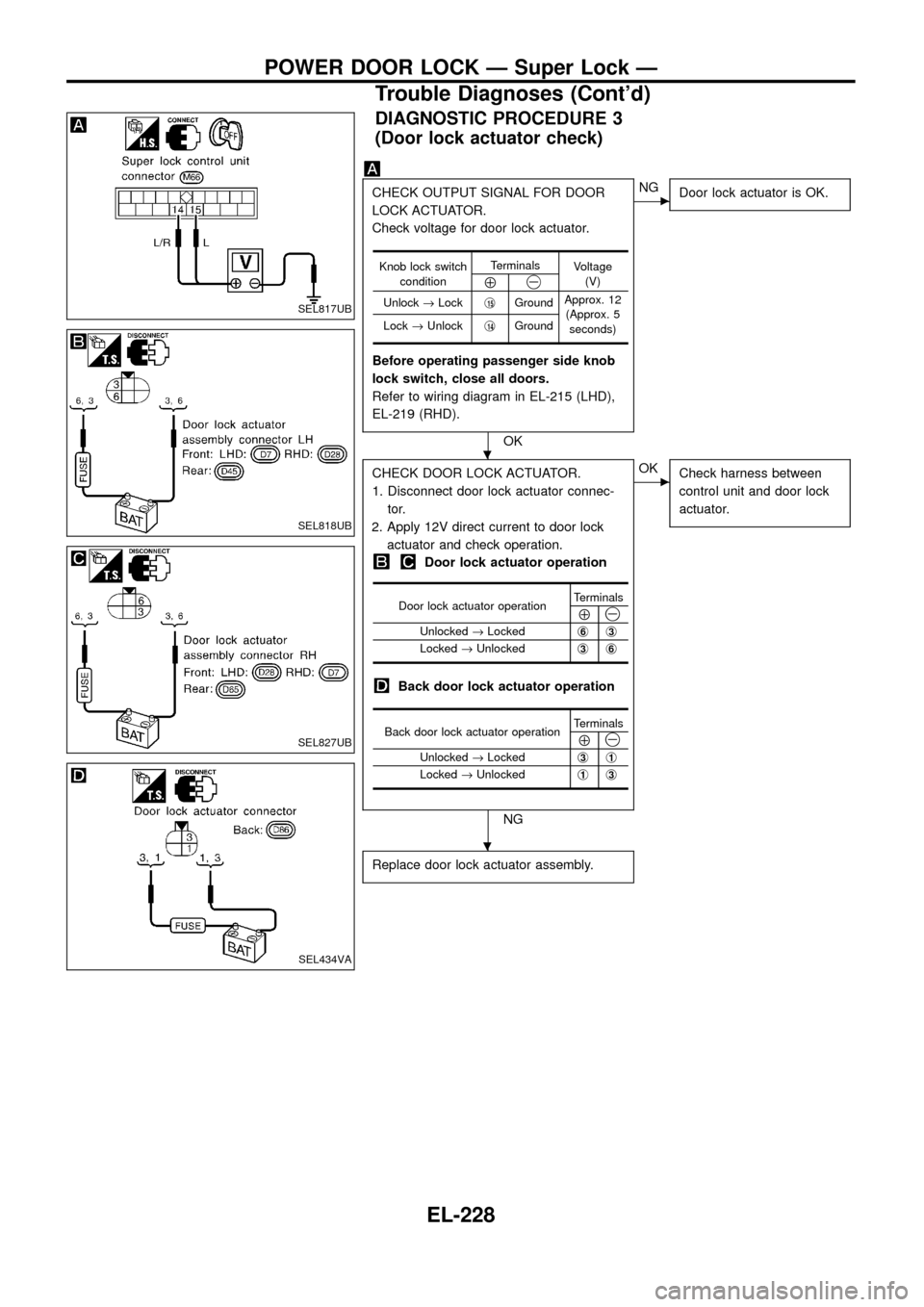
DIAGNOSTIC PROCEDURE 3
(Door lock actuator check)
CHECK OUTPUT SIGNAL FOR DOOR
LOCK ACTUATOR.
Check voltage for door lock actuator.
Before operating passenger side knob
lock switch, close all doors.
Refer to wiring diagram in EL-215 (LHD),
EL-219 (RHD).
OK
cNG
Door lock actuator is OK.
CHECK DOOR LOCK ACTUATOR.
1. Disconnect door lock actuator connec-
tor.
2. Apply 12V direct current to door lock
actuator and check operation.
Door lock actuator operation
Back door lock actuator operation
NG
cOK
Check harness between
control unit and door lock
actuator.
Replace door lock actuator assembly.
Knob lock switch
conditionTerminals
Voltage
(V)
Å@
Unlock®Lockj15GroundApprox. 12
(Approx. 5
seconds) Lock®Unlockj
14Ground
Door lock actuator operationTerminalsÅ@Unlocked®Lockedj6j3
Locked®Unlockedj3j6
Back door lock actuator operationTerminalsÅ@Unlocked®Lockedj3j1
Locked®Unlockedj1j3
SEL817UB
SEL818UB
SEL827UB
SEL434VA
.
.
POWER DOOR LOCK Ð Super Lock Ð
Trouble Diagnoses (Cont'd)
EL-228
Page 233 of 326
DIAGNOSTIC PROCEDURE 4
[Super lock actuator (in door lock actuator assembly)
check]
CHECK OUTPUT SIGNAL FOR SUPER
LOCK ACTUATOR.
Check voltage for super lock actuator.
Put the system in set condition before
checking release signal.
Refer to wiring diagram in EL-215 (LHD),
EL-219 (RHD).
OK
cNG
Super lock actuator is OK.
CHECK SUPER LOCK ACTUATOR.
1. Disconnect door lock actuator assembly
connector.
2. Set lever A in Lock position.
3. Apply 12V direct current to door lock
actuator assembly and check operation.
NG
cOK
Check harness between
control unit and door lock
actuator assembly.
Replace door lock actuator assembly.
Door key cylinder
switch conditionTerminals
Voltage
(V)
Å@Lock (Set)j18Ground
Approx. 12
Unlock
(Released)j
13Ground
Super lock actua-
tor operationTerminals
Connection from
lever B to lever A
Å@Released®Setj1j4Disconnect
Set®Releasedj
4j1Connect
SEL819UB
SEL820UB
.
.
POWER DOOR LOCK Ð Super Lock Ð
Trouble Diagnoses (Cont'd)
EL-229
Page 234 of 326
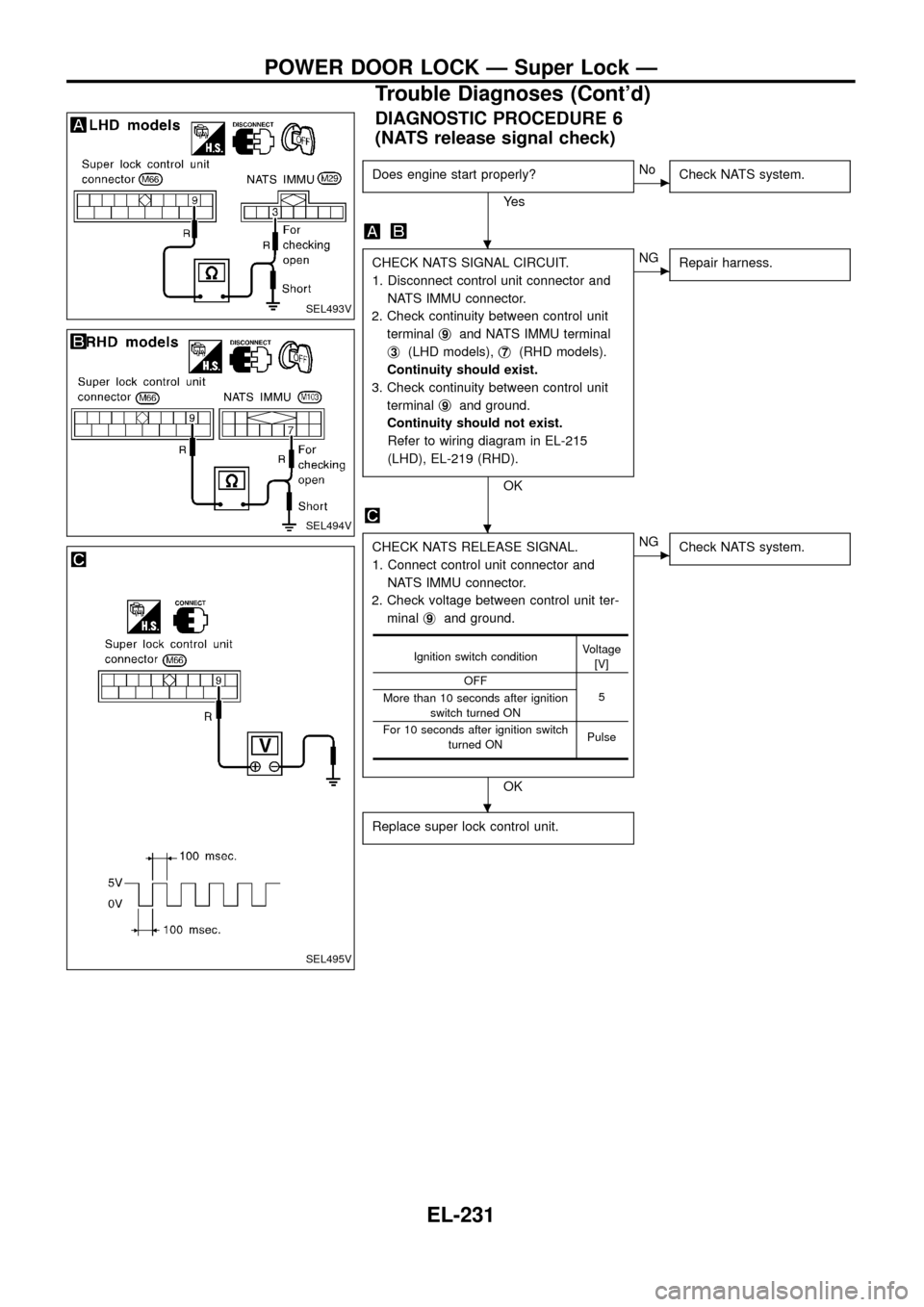
DIAGNOSTIC PROCEDURE 5
(Door switch check)
CHECK DOOR SWITCH INPUT SIGNAL.
Check voltage between control unit termi-
nalj
8and ground.
Refer to wiring diagram in EL-215 (LHD),
EL-219 (RHD).
NG
cOK
Door switch is OK.
CHECK DOOR SWITCH.
1. Disconnect door switch connector.
2. Check continuity between door switch
terminals.
OK
cNG
Replace door switch.
Check the following.
+Door switch ground condition
+Harness for open or short between con-
trol unit and door switch
Condition Voltage [V]
Any door is opened. 0
All doors are closed. Approx. 12
Terminals Condition Continuity
Driver side
door
switchj
2-
groundClosed No
Open Yes
Other door
switchesj
1-
groundClosed No
Open Yes
SEL821UB
SEL822UC
.
.
POWER DOOR LOCK Ð Super Lock Ð
Trouble Diagnoses (Cont'd)
EL-230
Page 235 of 326
DIAGNOSTIC PROCEDURE 6
(NATS release signal check)
Does engine start properly?
Ye s
cNo
Check NATS system.
CHECK NATS SIGNAL CIRCUIT.
1. Disconnect control unit connector and
NATS IMMU connector.
2. Check continuity between control unit
terminalj
9and NATS IMMU terminal
j
3(LHD models),j7(RHD models).
Continuity should exist.
3. Check continuity between control unit
terminalj
9and ground.
Continuity should not exist.
Refer to wiring diagram in EL-215
(LHD), EL-219 (RHD).
OK
cNG
Repair harness.
CHECK NATS RELEASE SIGNAL.
1. Connect control unit connector and
NATS IMMU connector.
2. Check voltage between control unit ter-
minalj
9and ground.
OK
cNG
Check NATS system.
Replace super lock control unit.
Ignition switch conditionVoltage
[V]
OFF
5
More than 10 seconds after ignition
switch turned ON
For 10 seconds after ignition switch
turned ONPulse
SEL493V
SEL494V
SEL495V
.
.
.
POWER DOOR LOCK Ð Super Lock Ð
Trouble Diagnoses (Cont'd)
EL-231
Page 236 of 326
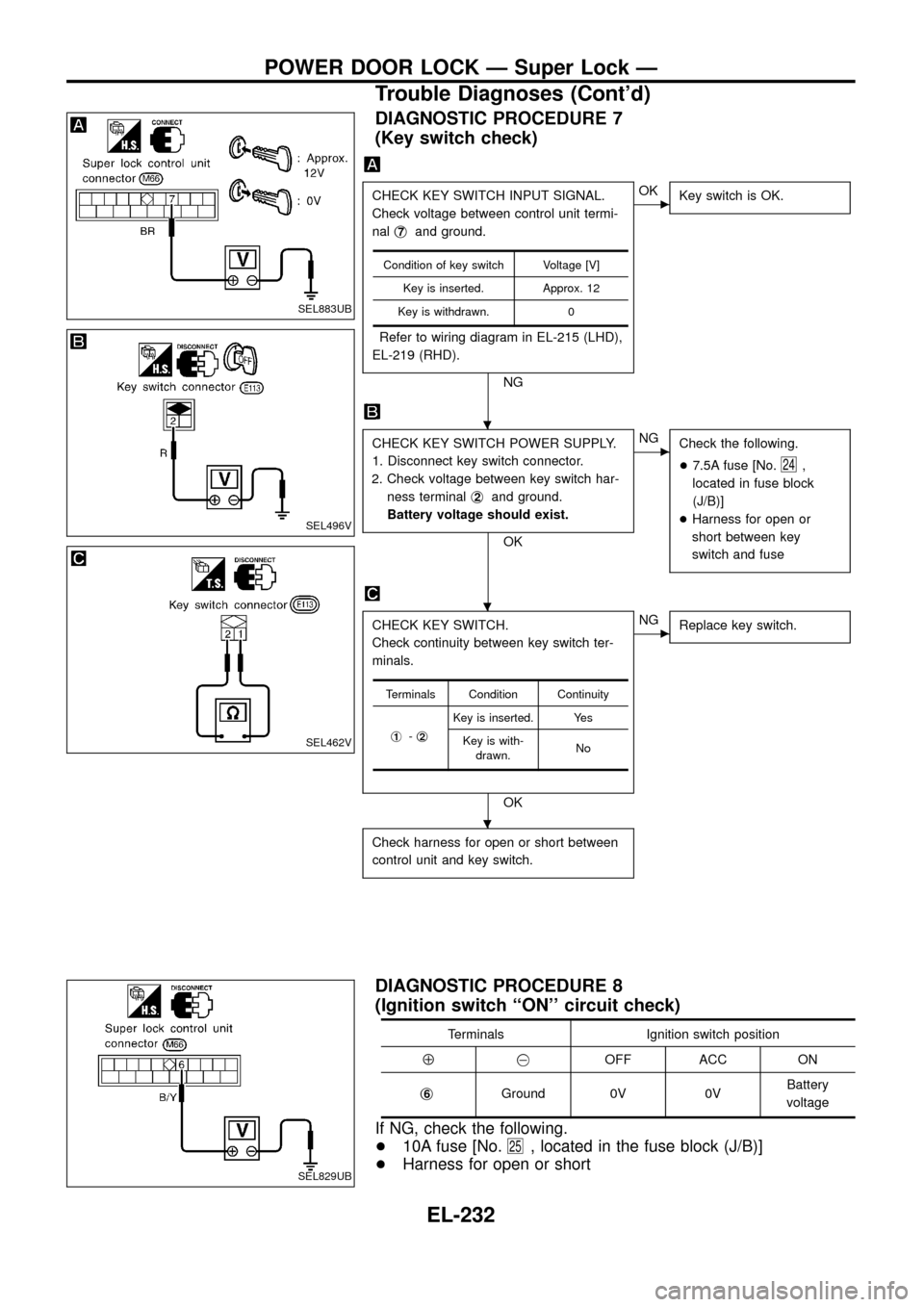
DIAGNOSTIC PROCEDURE 7
(Key switch check)
CHECK KEY SWITCH INPUT SIGNAL.
Check voltage between control unit termi-
nalj
7and ground.
Refer to wiring diagram in EL-215 (LHD),
EL-219 (RHD).
NG
cOK
Key switch is OK.
CHECK KEY SWITCH POWER SUPPLY.
1. Disconnect key switch connector.
2. Check voltage between key switch har-
ness terminalj
2and ground.
Battery voltage should exist.
OK
cNG
Check the following.
+7.5A fuse [No.
24,
located in fuse block
(J/B)]
+Harness for open or
short between key
switch and fuse
CHECK KEY SWITCH.
Check continuity between key switch ter-
minals.
OK
cNG
Replace key switch.
Check harness for open or short between
control unit and key switch.
Condition of key switch Voltage [V]
Key is inserted. Approx. 12
Key is withdrawn. 0
Terminals Condition Continuity
j
1-j2
Key is inserted. Yes
Key is with-
drawn.No
DIAGNOSTIC PROCEDURE 8
(Ignition switch ``ON'' circuit check)
Terminals Ignition switch position
Å@OFF ACC ON
j
6Ground 0V 0VBattery
voltage
If NG, check the following.
+10A fuse [No.
25, located in the fuse block (J/B)]
+Harness for open or short
SEL883UB
SEL496V
SEL462V
SEL829UB
.
.
.
POWER DOOR LOCK Ð Super Lock Ð
Trouble Diagnoses (Cont'd)
EL-232
Page 237 of 326
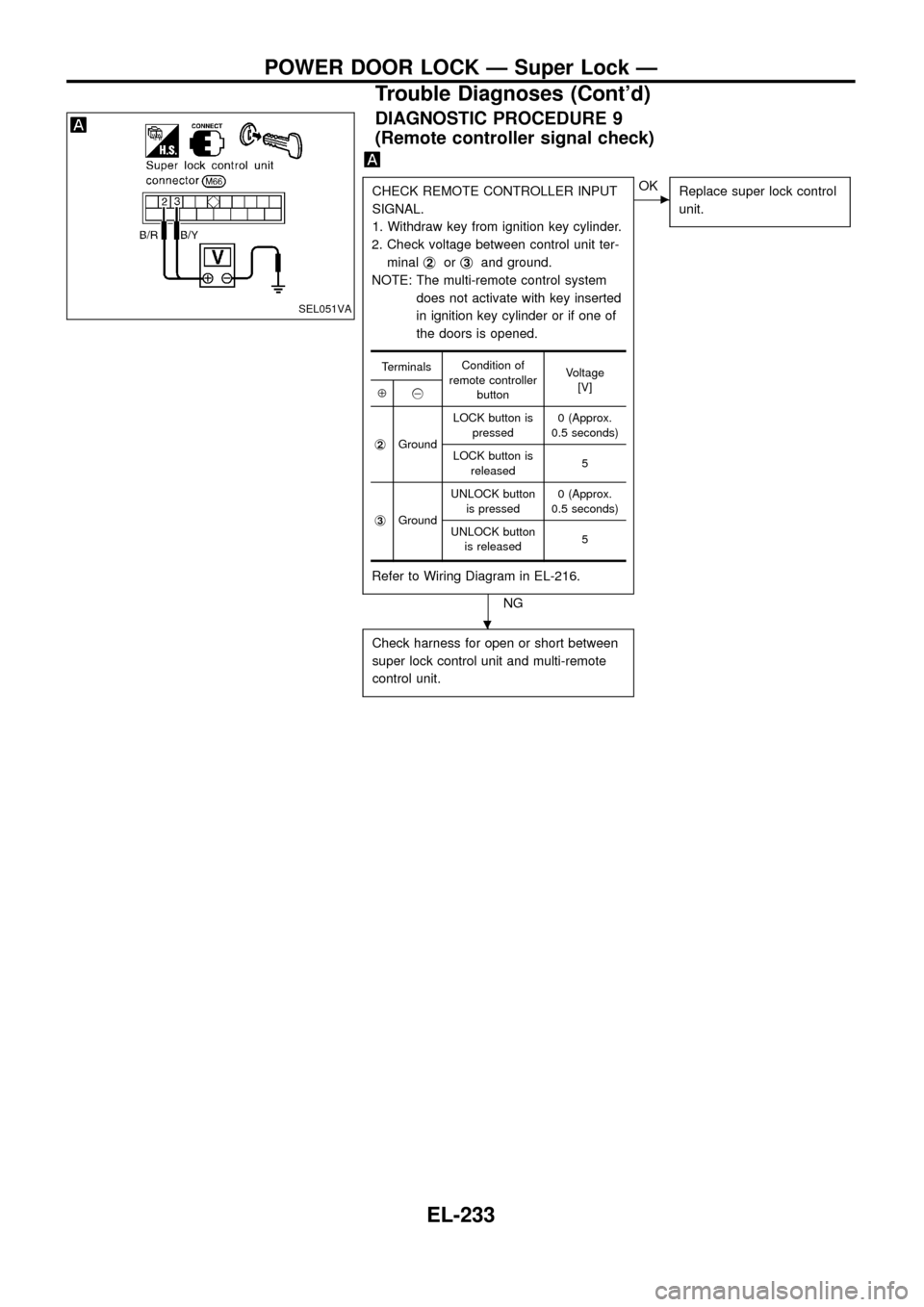
DIAGNOSTIC PROCEDURE 9
(Remote controller signal check)
CHECK REMOTE CONTROLLER INPUT
SIGNAL.
1. Withdraw key from ignition key cylinder.
2. Check voltage between control unit ter-
minalj
2orj3and ground.
NOTE: The multi-remote control system
does not activate with key inserted
in ignition key cylinder or if one of
the doors is opened.
Refer to Wiring Diagram in EL-216.
NG
cOK
Replace super lock control
unit.
Check harness for open or short between
super lock control unit and multi-remote
control unit.
TerminalsCondition of
remote controller
buttonVoltage
[V]
Å@
j
2GroundLOCK button is
pressed0 (Approx.
0.5 seconds)
LOCK button is
released5
j
3GroundUNLOCK button
is pressed0 (Approx.
0.5 seconds)
UNLOCK button
is released5
SEL051VA
.
POWER DOOR LOCK Ð Super Lock Ð
Trouble Diagnoses (Cont'd)
EL-233
Page 241 of 326
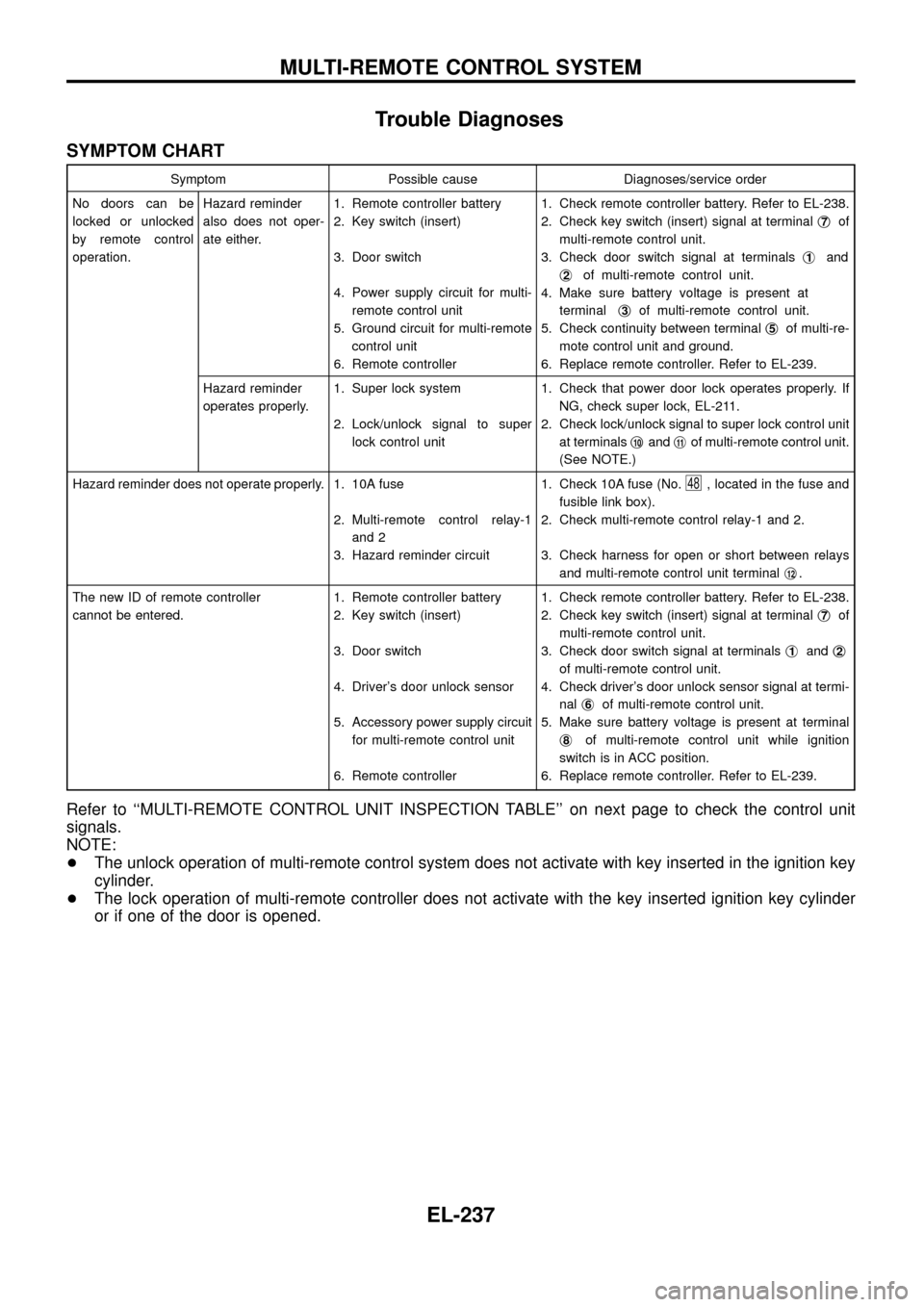
Trouble Diagnoses
SYMPTOM CHART
Symptom Possible cause Diagnoses/service order
No doors can be
locked or unlocked
by remote control
operation.Hazard reminder
also does not oper-
ate either.1. Remote controller battery
2. Key switch (insert)
3. Door switch
4. Power supply circuit for multi-
remote control unit
5. Ground circuit for multi-remote
control unit
6. Remote controller1. Check remote controller battery. Refer to EL-238.
2. Check key switch (insert) signal at terminalj
7of
multi-remote control unit.
3. Check door switch signal at terminalsj
1and
j
2of multi-remote control unit.
4. Make sure battery voltage is present at
terminalj
3of multi-remote control unit.
5. Check continuity between terminalj
5of multi-re-
mote control unit and ground.
6. Replace remote controller. Refer to EL-239.
Hazard reminder
operates properly.1. Super lock system
2. Lock/unlock signal to super
lock control unit1. Check that power door lock operates properly. If
NG, check super lock, EL-211.
2. Check lock/unlock signal to super lock control unit
at terminalsj
10andj11of multi-remote control unit.
(See NOTE.)
Hazard reminder does not operate properly. 1. 10A fuse
2. Multi-remote control relay-1
and 2
3. Hazard reminder circuit1. Check 10A fuse (No.
48, located in the fuse and
fusible link box).
2. Check multi-remote control relay-1 and 2.
3. Check harness for open or short between relays
and multi-remote control unit terminalj
12.
The new ID of remote controller
cannot be entered.1. Remote controller battery
2. Key switch (insert)
3. Door switch
4. Driver's door unlock sensor
5. Accessory power supply circuit
for multi-remote control unit
6. Remote controller1. Check remote controller battery. Refer to EL-238.
2. Check key switch (insert) signal at terminalj
7of
multi-remote control unit.
3. Check door switch signal at terminalsj
1andj2
of multi-remote control unit.
4. Check driver's door unlock sensor signal at termi-
nalj
6of multi-remote control unit.
5. Make sure battery voltage is present at terminal
j
8of multi-remote control unit while ignition
switch is in ACC position.
6. Replace remote controller. Refer to EL-239.
Refer to ``MULTI-REMOTE CONTROL UNIT INSPECTION TABLE'' on next page to check the control unit
signals.
NOTE:
+The unlock operation of multi-remote control system does not activate with key inserted in the ignition key
cylinder.
+The lock operation of multi-remote controller does not activate with the key inserted ignition key cylinder
or if one of the door is opened.
MULTI-REMOTE CONTROL SYSTEM
EL-237
![NISSAN PATROL 1998 Y61 / 5.G Electrical System Workshop Manual DIAGNOSTIC PROCEDURE 4
[Super lock actuator (in door lock actuator assembly)
check]
CHECK OUTPUT SIGNAL FOR SUPER
LOCK ACTUATOR.
Check voltage for super lock actuator.
Put the system in set condition](/manual-img/5/616/w960_616-232.png "NISSAN PATROL 1998 Y61 / 5.G Electrical System Workshop Manual DIAGNOSTIC PROCEDURE 4
[Super lock actuator (in door lock actuator assembly)
check]
CHECK OUTPUT SIGNAL FOR SUPER
LOCK ACTUATOR.
Check voltage for super lock actuator.
Put the system in set condition")