1998 NISSAN FRONTIER lock
[x] Cancel search: lockPage 117 of 224
mud or deep snow. The 4L position pro-
vides maximum power and traction. Avoid
raising vehicle speed excessively, as the
maximum speed in 5th gear is approxi-
mately 30 MPH (48 km/h).
NÐ No wheels are driven. Always keep the
transfer lever out of the N (Neutral) position.
Shift the lever quickly and smoothly when
moving across the N (Neutral) position with
the vehicle stopped.
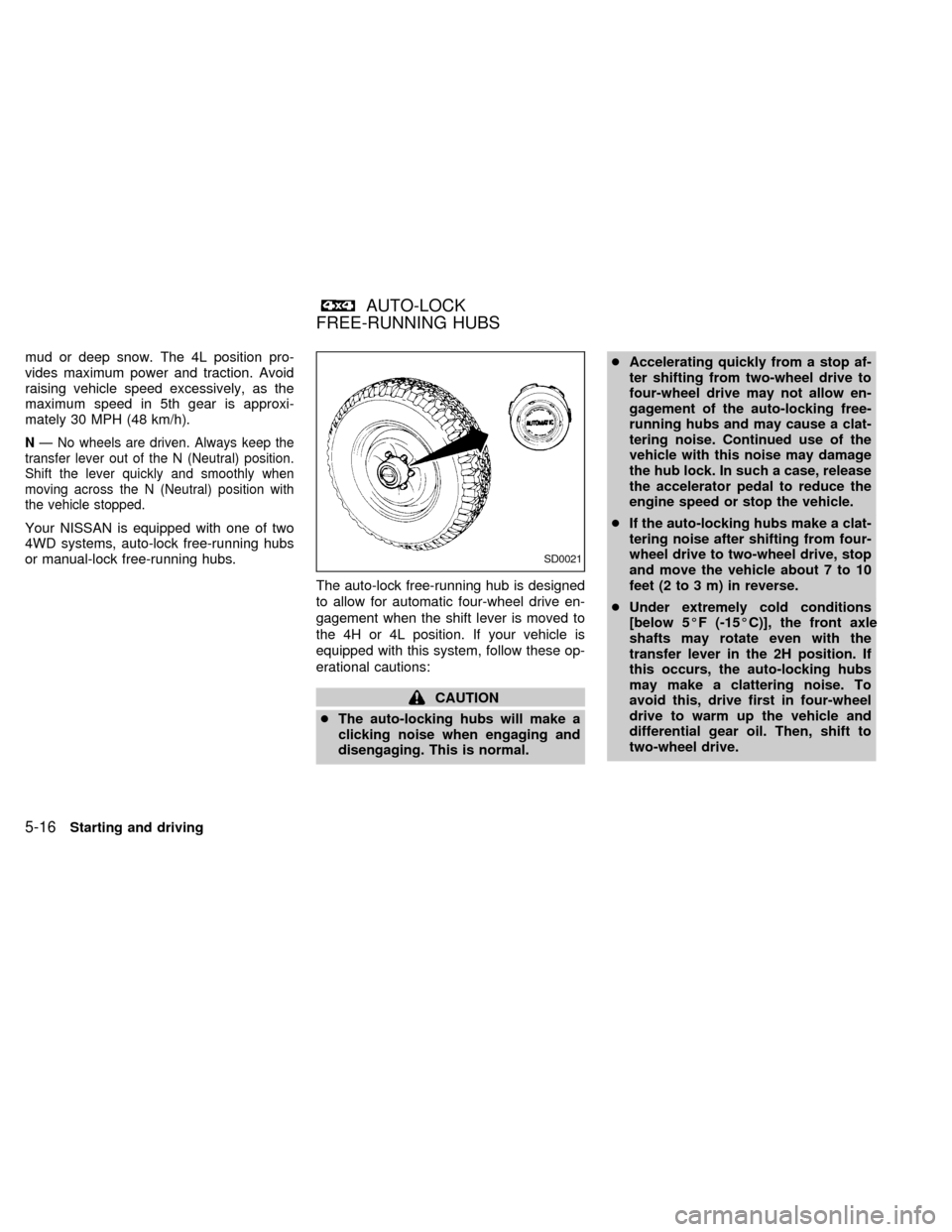
Your NISSAN is equipped with one of two
4WD systems, auto-lock free-running hubs
or manual-lock free-running hubs.
The auto-lock free-running hub is designed
to allow for automatic four-wheel drive en-
gagement when the shift lever is moved to
the 4H or 4L position. If your vehicle is
equipped with this system, follow these op-
erational cautions:
CAUTION
cThe auto-locking hubs will make a
clicking noise when engaging and
disengaging. This is normal.cAccelerating quickly from a stop af-
ter shifting from two-wheel drive to
four-wheel drive may not allow en-
gagement of the auto-locking free-
running hubs and may cause a clat-
tering noise. Continued use of the
vehicle with this noise may damage
the hub lock. In such a case, release
the accelerator pedal to reduce the
engine speed or stop the vehicle.
cIf the auto-locking hubs make a clat-
tering noise after shifting from four-
wheel drive to two-wheel drive, stop
and move the vehicle about 7 to 10
feet (2 to 3 m) in reverse.
cUnder extremely cold conditions
[below 5ÉF (-15ÉC)], the front axle
shafts may rotate even with the
transfer lever in the 2H position. If
this occurs, the auto-locking hubs
may make a clattering noise. To
avoid this, drive first in four-wheel
drive to warm up the vehicle and
differential gear oil. Then, shift to
two-wheel drive.
SD0021
AUTO-LOCK
FREE-RUNNING HUBS
5-16Starting and driving
ZX
Page 118 of 224
cIn cold weather, it may be necessary
to reduce speed or stop the vehicle
in order to shift from two-wheel drive
to four-wheel drive.
cWhen shifting into or out of four-
wheel drive while driving, do not
stop shift lever movement midway.
An incomplete shift may cause a
clattering noise from the auto-
locking hubs. Continued use of the
vehicle with this noise may damage
the hub lock. Drive in four-wheel
drive to stop the noise. Shift to two-
wheel drive as described.
Starting and driving
5-17
ZX
Page 119 of 224

TO SHIFT
TRANSFER CASE:SHIFT PROCEDURE FOR AUTO-LOCK FREE-RUNNING HUBS
From 2H to 4HMove the transfer lever to 4H at speeds below 25 MPH (40 km/h). It is not necessary to depress the clutch pedal. Perform
this operation when driving straight.
From 4H to 2HMove the transfer lever to 2H. This can be done at any speed, and it is not necessary to depress the clutch pedal. Per-
form this operation when driving straight.
NOTE:
For two-wheel drive operation, set the free-running hubs in the disengaged position. AUTO-LOCK hubs will not dis-
engage until the vehicle is moved about 3 feet (1 m) in the opposite direction of travel:
cWhen driving forward, stop and move 3 feet (1 m) in reverse.
cWhen backing up, stop and move 3 feet (1 m) forward, then move the vehicle about 3 feet (1 m) in reverse.
This will allow for better fuel economy, quieter ride and less component wear.
From 4H to 4L or 4L to
4H1. Stop the vehicle.
2. Depress the clutch pedal.
3. Depress the transfer lever and move it to the desired 4L or 4H position.
From 2H to 4L1. Stop the vehicle.
2. Depress the clutch pedal.
3. Depress the transfer lever and move it to 4L. Change gears quickly and smoothly.
From 4L to 2H1. Stop the vehicle.
2. Depress the clutch pedal.
3. Depress the transfer lever and move it to 2H.
NOTE:
Follow the NOTE shown in shifting from 4H to 2H.
5-18Starting and driving
ZX
Page 120 of 224
CAUTION
cNever drive in four-wheel drive (4H
or 4L) with the free-running hubs in
the FREE position.
cDo not drive your vehicle with the
left and right free-running hub set to
different positions.
cFor the first 300 miles (483 km) it is
recommended that you drive in the
2H position with the free-running
hubs set in the LOCK position.cTo ensure proper lubrication of front
drive components, drive in the LOCK
position for at least 10 miles (16 km)
each month.
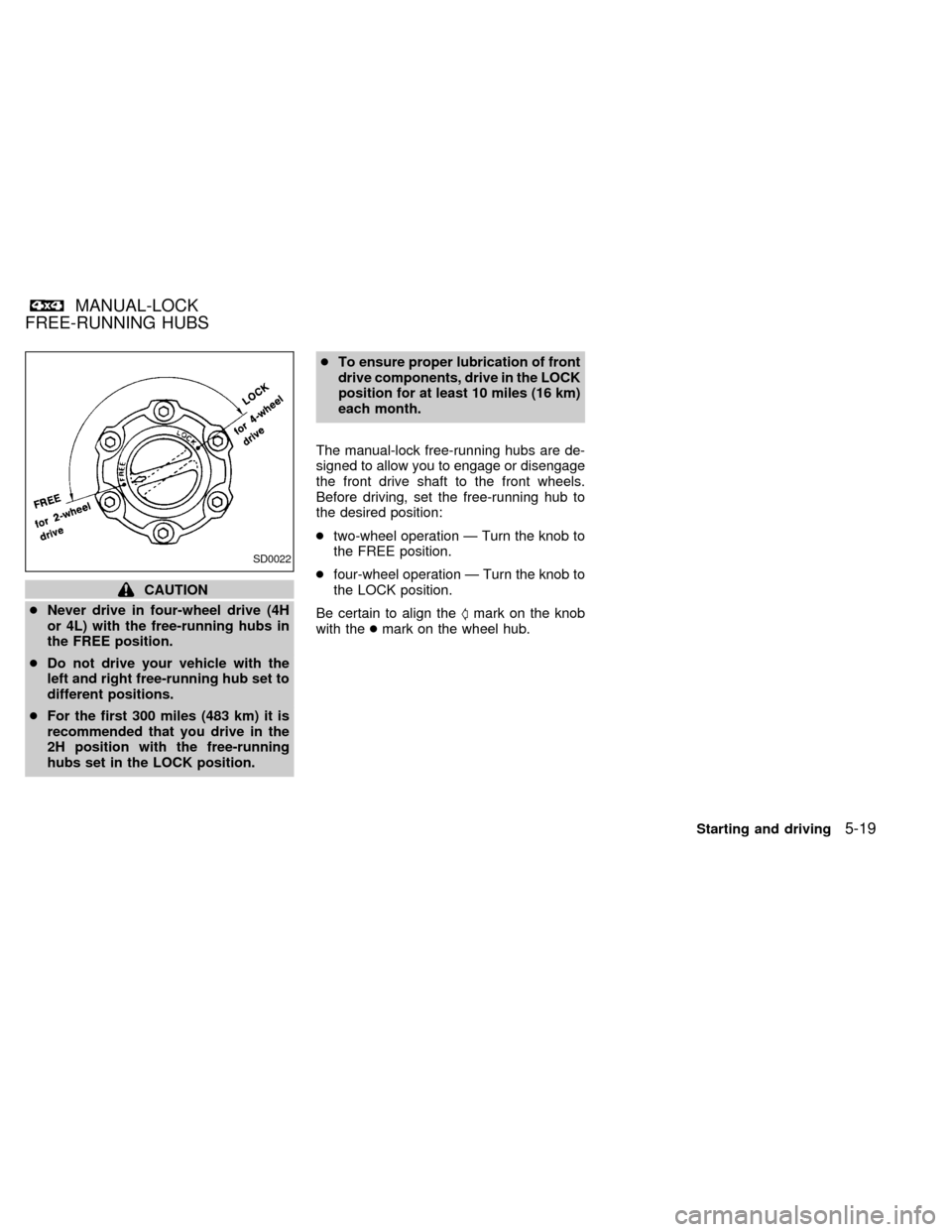
The manual-lock free-running hubs are de-
signed to allow you to engage or disengage
the front drive shaft to the front wheels.
Before driving, set the free-running hub to
the desired position:
ctwo-wheel operation Ð Turn the knob to
the FREE position.
cfour-wheel operation Ð Turn the knob to
the LOCK position.
Be certain to align theSmark on the knob
with thecmark on the wheel hub.
SD0022
MANUAL-LOCK
FREE-RUNNING HUBS
Starting and driving5-19
ZX
Page 121 of 224

TO SHIFT TRANSFER
CASE:SHIFT PROCEDURE FOR MANUAL-LOCK FREE-RUNNING HUBS
From 2H to 4H1. Stop the vehicle.
2. Set free-running hubs in the LOCK position.
3. Move the transfer lever to 4H. It is not necessary to depress the clutch pedal.
From 4H to 2HMove the transfer lever to 2H. This can be done at any speed, and it is not necessary to depress the clutch pedal. Per-
form this operation when driving straight.
NOTE:
For two-wheel drive operation, set the free-running hubs in the FREE position. This will allow for better fuel
economy, quieter ride and less component wear.
From 4H to 4L or 4L to
4H1. Stop the vehicle.
2. Depress the clutch pedal.
3. Depress the transfer lever and move it to the desired 4L or 4H position.
From 2H to 4L1. Stop the vehicle.
2. Set free-running hubs in the LOCK position.
3. Depress the clutch pedal.
4. Depress the transfer lever and move it to 4L. Change gears quickly and smoothly.
From 4L to 2H1. Stop the vehicle.
2. Depress the clutch pedal.
3. Depress the transfer lever and move it to 2H.
NOTE:
Follow the NOTE shown in shifting from 4H to 2H.
5-20Starting and driving
ZX
Page 125 of 224
lever has been pushed as far forward
as it can go and cannot be moved
without depressing the button at the
end of the lever.
cNever leave children unattended in
the vehicle.
c
Do not leave children unattended in-
side the vehicle. They could unknow-
ingly activate switches or controls.
Unattended children could become
involved in serious accidents.
1. Firmly apply the parking brake.
2.Manual transmission models:
Place the gearshift lever in the R (Re-
verse) position. When parking on an up-
hill grade, place the gearshift lever in the
1st position.
Automatic transmission models:
Move the gearshift lever to the P (Park)
position.
3. To help prevent the vehicle from rolling
into the street when parked on an incline,
it is a good practice to turn the wheels as
illustrated.cHEADED DOWNHILL WITH CURB:
s1
Turn the wheels into the curb and move
the vehicle forward until the curb side
wheel gently touches the curb.
cHEADED UPHILL WITH CURB:
s2
Turn the wheels away from the curb and
move the vehicle back until the curb side
wheel gently touches the curb.
cHEADED UPHILL OR DOWNHILL, NO
CURB:
s3
Turn the wheels toward the side of the
road so the vehicle will move away from
the center of the road if it moves.
4. Turn the ignition key to the LOCK posi-
tion and remove the key.The power assisted steering is designed to
use a hydraulic pump, driven by the engine,
to assist steering.
If the engine stops or drive belt breaks, you
will still have control of the vehicle. How-
ever, much greater steering effort is
needed, especially in sharp turns and at low
speeds.
WARNING
If the engine is not running or is turned
off while driving, the power assist for
the steering will not work. Steering will
be much harder to operate.
POWER STEERING SYSTEM
5-24Starting and driving
ZX
Page 126 of 224
The brake system has two separate hydrau-
lic circuits. If one circuit develops a problem,
you will still have braking at two wheels.
Vacuum assisted brakes
The brake booster aids braking by using
engine vacuum. If the engine stops, you can
stop the vehicle by depressing the brake
pedal. However, greater foot pressure on
the brake pedal will be required to stop the
vehicle and stopping distance will be longer.
Wet brakes
When the vehicle is washed or driven
through water, the brakes may get wet. As a
result, your braking distance will be longer
and the vehicle may pull to one side during
braking.
To dry the brakes, drive the vehicle at a safe
speed while lightly pressing the brake pedal
to heat the brakes. Do this until the brakes
return to normal. Avoid driving the vehicle at
high speeds until the brakes function cor-
rectly.Using the brakes
Avoid resting your foot on the brake pedal
while driving. This will overheat the brakes,
wear out the brake linings and pads faster,
and reduce gas mileage.
To help reduce brake wear, and to prevent
the brakes from overheating, reduce speed
and downshift to a lower gear before going
down a slope or long grade.
WARNING
cWhile driving on a slippery surface,
be careful when braking, accelerat-
ing or downshifting. Abrupt braking
actions or sudden acceleration
could cause the wheels to skid and
result in an accident.
cIf the engine is not running or is
turned off while driving, the power
assist for the brakes will not work.
Braking will be harder.
Normal Operation
The anti-lock brake system does not oper-
ate at speeds below 3 to 6 MPH (5 to 10
km/h). (The speeds vary according to road
conditions.)
When driving, the anti-lock brake system
controls the wheels so they will not lock
when braking abruptly or when braking on a
slippery road. Thus, difficult steering and
swerving of the vehicle due to locked
wheels is minimized. The system detects
the wheel rotation rate and electronically
controls the pressure applied to each brake.
Slight vibration on the brake pedal accom-
panied by noise usually occurs while the
ABS system is operating. Such vibration
and noise encountered during abrupt brak-
ing is not a problem, but indicates that the
system is functioning.
Even with the rear anti-lock brake sys-
tem, your front wheels can still lock. If
this happens, release the brake pedal
slightly and then reapply pressure.
Self-test feature
The anti-lock brake system consists of elec-
tronic sensors and hydraulic solenoids con-
trolled by a computer. The computer has a
BRAKE SYSTEM ANTI-LOCK BRAKE SYSTEM
(ABS)
Starting and driving5-25
ZX
Page 127 of 224
built-in diagnostic feature that tests the sys-
tem each time you start the engine and
move the vehicle at a low speed in forward
or reverse. When the self-test occurs, you
may hear a ``clunk'' noise and/or feel a
pulsation in the brake pedal. This is normal
and is not an indication of any malfunction. If
the computer senses any malfunction, it
switches the anti-lock brake system off and
turns on the ABS brake warning light in the
dashboard. The brake system then operates
normally, but without anti-lock assistance.
If an abnormality occurs in the system, the
anti-lock function will cease but the ordinary
brakes will continue to operate normally. The
ABS brake warning light will then come on.
If the light comes on while you are driving,
contact an authorized NISSAN dealer for
repair.
Using the System
Depress the brake pedal and hold it down.
WARNING
Do not pump the brake pedal. Doing so
may result in increased stopping dis-
tances.
WARNING
The anti-lock brake system is a sophis-
ticated device. But it cannot prevent
accidents resulting from careless or
dangerous driving techniques. It can
help maintain vehicle control under
some conditions, but remember that
the stopping distance on slippery sur-
faces will be longer than on normal
surfaces even with ABS. Stopping dis-
tances may also be longer on rough,
gravel, or snow covered roads, or if you
are using tire chains. Always maintain
a safe distance from the vehicle in front
of you. Ultimately, the responsibility for
safety of self and others rests in the
hands of the driver.
Tire type and condition may also affect
braking effectiveness.
cWhen replacing tires, install the
specified size of tires on all four
wheels.
cWhen installing a spare tire, make
sure it is the proper size and type as
specified on the tire placard. See
``Tire placard'' in the ``Technical and
consumer information'' section.Freeing a frozen door lock
To prevent a door lock from freezing, apply
de-icer or glycerin through the key hole. If
the lock becomes frozen, heat the key be-
fore inserting it in the key hole.
Anti-freeze
In the winter when it is anticipated that the
temperature will drop below 32ÉF (0ÉC),
check anti-freeze (ethylene glycol base) to
assure proper winter protection. For details,
see ``Engine cooling system'' in the ``Do-it-
yourself'' section of this manual.
Battery
If the battery is not fully charged during
extremely cold weather conditions, the bat-
tery fluid may freeze and damage the bat-
tery. To maintain maximum efficiency, the
battery should be checked regularly. For
details, see ``Battery'' in the ``Do-it-yourself''
section of this manual.
Draining of coolant water
If the vehicle is to be left outside without
anti-freeze, drain the cooling system by
opening the drain valves located under the
radiator and on the engine block. Refill
COLD WEATHER DRIVING
5-26Starting and driving
ZX