1998 NISSAN ALTIMA audio
[x] Cancel search: audioPage 101 of 217

Station memory operations
Six stations can be set for the AM band. 12
stations can be set for the FM band (six for
FM1, six for FM2).
1. Push
to select AM, FM1, or FM2.The selected band illuminates in the dis-
play.
2. Tune to the desired station.
3. Push the desired station select button for
more than 3 seconds. For example, in
the illustrations ch2 is to be memorized.
The radio mutes when the select button
is pushed.
4. The indicator, ch2, then illuminates in the
display and the sound resumes. Memo-
rizing is now complete.
5. Other station select buttons can be set in
the same manner.
If the battery cable is disconnected, or if the
radio fuse opens, the radio memory is can-
celled. In that case, reset the desired stations.
AHA1009
4-22Heater, air conditioner and audio systems
ZX
Page 102 of 217
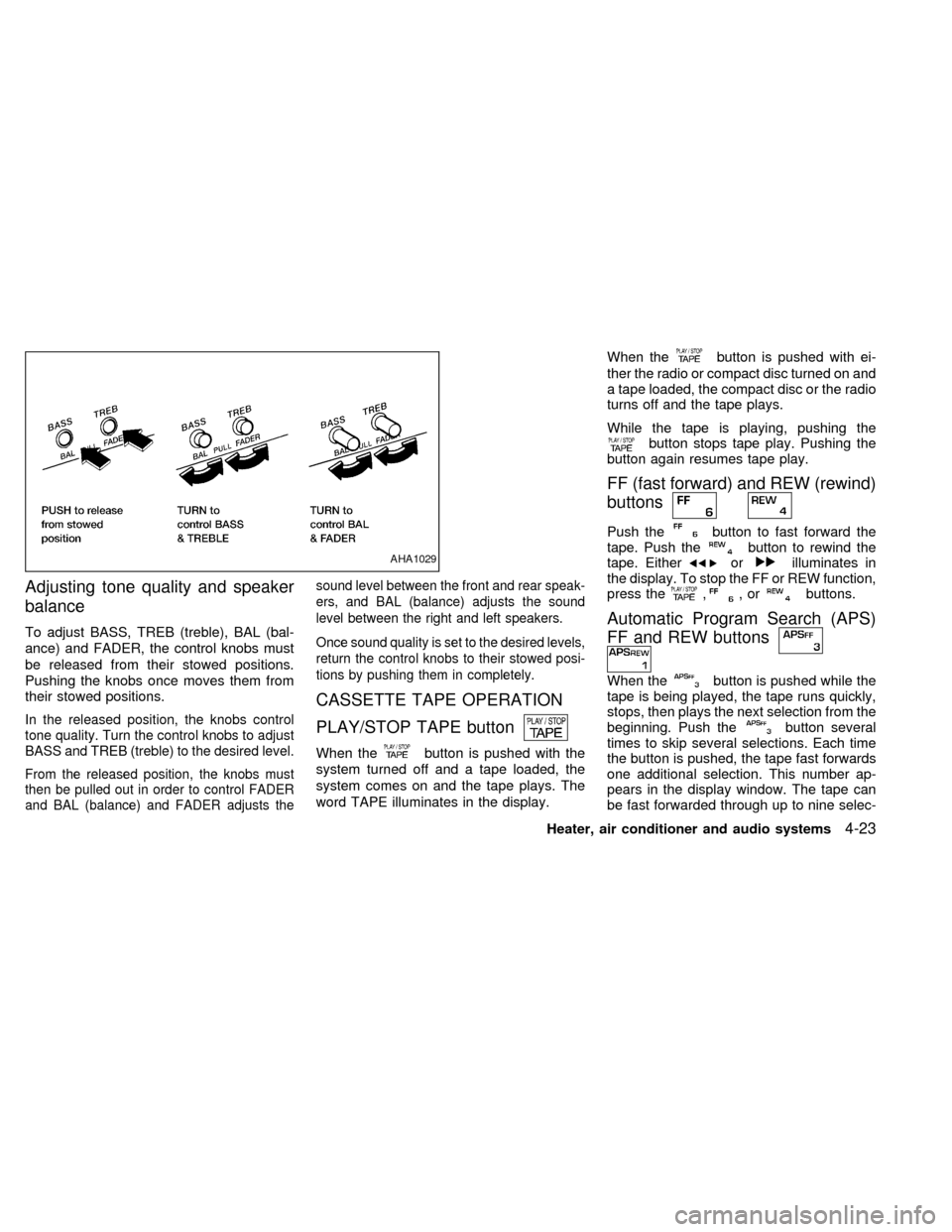
Adjusting tone quality and speaker
balance
To adjust BASS, TREB (treble), BAL (bal-
ance) and FADER, the control knobs must
be released from their stowed positions.
Pushing the knobs once moves them from
their stowed positions.
In the released position, the knobs control
tone quality. Turn the control knobs to adjust
BASS and TREB (treble) to the desired level.
From the released position, the knobs must
then be pulled out in order to control FADER
and BAL (balance) and FADER adjusts thesound level between the front and rear speak-
ers, and BAL (balance) adjusts the sound
level between the right and left speakers.
Once sound quality is set to the desired levels,
return the control knobs to their stowed posi-
tions by pushing them in completely.
CASSETTE TAPE OPERATION
PLAY/STOP TAPE button
When thebutton is pushed with the
system turned off and a tape loaded, the
system comes on and the tape plays. The
word TAPE illuminates in the display.When the
button is pushed with ei-
ther the radio or compact disc turned on and
a tape loaded, the compact disc or the radio
turns off and the tape plays.
While the tape is playing, pushing the
button stops tape play. Pushing the
button again resumes tape play.
FF (fast forward) and REW (rewind)
buttons
Push thebutton to fast forward the
tape. Push thebutton to rewind the
tape. Eitherorilluminates in
the display. To stop the FF or REW function,
press the
,,orbuttons.
Automatic Program Search (APS)
FF and REW buttons
When thebutton is pushed while the
tape is being played, the tape runs quickly,
stops, then plays the next selection from the
beginning. Push the
button several
times to skip several selections. Each time
the button is pushed, the tape fast forwards
one additional selection. This number ap-
pears in the display window. The tape can
be fast forwarded through up to nine selec-
AHA1029
Heater, air conditioner and audio systems4-23
ZX
Page 103 of 217
tions. (for example: 7 in the display indi-
cates that the
button has been
pushed seven times to skip forward through
seven selections).
When thebutton is pushed, the se-
lection being played starts again from the
beginning. Push the
button several
times to rewind several selections. Each
time the
button is pushed, the tape
rewinds back one additional selection. The
number of selections skipped appears in the
display window as a negative number (for
example:27 in the display indicates that the
button has been pushed seven times
to rewind back through seven selections).
Either theorilluminates in the
display when theorbutton is
pushed.
The system searches for the blank intervals
between selections. If there is a blank inter-
val within one selection or there is no inter-
val between selections, the system may not
stop in the desired or expected location.
PROG (Program) button
Push thebutton to change the tape
side while the tape is being played.
The cassette tape automatically changesdirections to play the other side when the
first side is complete.
Dolby NR (noise reduction)
Push thebutton for Dolby NR encoded
tapes to reduce high frequency tape noise.
The
indicator illuminates in the display.
Dolby NR is manufactured under license
from Dolby Laboratories Licensing Corpora-
tion. DOLBY NR and the double-D symbol
are trademarks of Dolby Laboratories Li-
censing Corporation.
Metal or chrome tape usage
The cassette player is automatically set to
high performance play when playing a metal
or chrome cassette tape.
TAPE EJECT button
Push thebutton to eject the cassette
tape.
Precautions on cassette player op-
eration
cTo maintain good quality sound,
NISSAN recommends using cassette
tapes of 60 minutes or shorter in
length.cCassette tapes should be removed
from the player when not in use. Store
cassettes in their protective cases
and away from direct sunlight, heat,
moisture or magnetic sources.
cDirect sunlight can cause the cassette
to become deformed. The use of de-
formed cassettes may cause the cas-
sette to jam in the player.
cDo not use cassettes that have peel-
ing or loose labels. If used, the label
could jam in the player.
cIf a cassette has loose tape, insert a
pencil through one of the cassette
hubs and rewind the tape firmly.
Loose tape may cause jamming and
wavering sound quality.
cOver a period of time, the playback
head, capstan and pinch roller may
collect a tape coating residue as the
tape is played. This residue accumu-
lation can cause a weak or wavering
sound and should be removed peri-
odically with a head cleaning tape. If
the residue is not removed periodi-
cally, the player may need to be dis-
assembled for cleaning.
4-24Heater, air conditioner and audio systems
ZX
Page 104 of 217
COMPACT DISC (CD) PLAYER
OPERATION
Turn the ignition key to the ACC or ON
position, and carefully insert the compact
disc into the slot with the label side up. The
compact disc is automatically pulled into the
slot and starts to play.
If the radio or cassette tape is already
operating, it automatically turns off and the
compact disc begins to play.
CAUTION
Do not force the compact disc into the
slot. This could damage the player.
CD button
When thebutton is pushed with the
compact disc loaded and the tape or the
radio playing, the tape or radio turns off and
compact disc starts to play. Push the
button again to stop compact disc play.
FF (fast forward) REW (rewind)
buttons
When theorbutton is pushed
while the compact disc is playing, the com-pact disc plays at an increased speed while
fast forwarding or rewinding. When the but-
ton is released, the compact disc returns to
normal play speed.
Automatic Program Search (APS)
APS FF, APS REW buttons
When thebutton is pushed while the
compact disc is playing, the selection fol-
lowing the present one starts to play from
the beginning. Push the
button sev-
eral times to skip several selections. Each
time the button is pushed, the CD advances
one additional selection. The number ap-
pears in the display window. (When the last
selection on the compact disc is skipped,
the first selection is played.)
When the
button is pushed, the se-
lection being played returns to the begin-
ning. Push the
button several times
to skip back several selections. Each time
the button is pushed, the CD moves back
one selection.
PROG (program) button
When thebutton is pushed while the
compact disc is playing, the play pattern
changes as follows.
ALL:All selections are played repeatedly in
sequence.
1.The current selection is repeated.
RANDOM:Selections are played at ran-
dom, not following the sequence on the
compact disc. The same program may be
repeated twice.
Blank(no symbol): All selections are played
in sequence, and the compact disc stops
when the last selection is finished.
When a new compact disc is inserted,
the play pattern automatically changes
to ALL.
CD EJECT button
When thebutton is pushed with a com-
pact disc loaded, the compact disc ejects.
When the
button is pushed while the
compact disc is playing, the compact disc
ejects and the system turns off.
Heater, air conditioner and audio systems
4-25
ZX
Page 105 of 217
If the compact disc ejects and is not
removed within 10 seconds, it is pulled
back into the slot.
CD (DISC) indicator light
This light comes on when a compact disc is
loaded into the player.
CAUTION
cDuring cold weather or rainy days,
the player may malfunction due to
the humidity. If this occurs, remove
the CD and dehumidify or ventilate
the player completely.
cThe player may skip while driving on
rough roads.
cThe CD player sometimes cannot
function when the compartment tem-
perature is extremely high. Decrease
the temperature before use.
cDo not expose the CD to direct sun-
light.
Power antenna (if so equipped)
The power antenna automatically extends
when the radio is turned on, and retracts
when the radio is turned off. If the radio is
left on, the antenna retracts and extends
with the ignition key OFF-ON operation.
CAUTION
cBefore turning the radio on, make
sure that there is no one near the
antenna outlet and there is enough
space for it to extend.
cTo prevent damage, be sure that an-
tenna is fully retracted before the
vehicle enters an automated car
wash.
cDirt and other foreign matter on the
power antenna rod may interrupt its
operation. Clean the rod periodically
with a damp cloth. This type of
cleaning is especially important dur-
ing the winter seasons in areas
where road salt and other chemicals
may be spread on road surfaces and
splashed onto the antenna rod.
Manual antenna
The manual antenna cannot be shortened,
but can be removed. When you need to
remove the antenna, turn its base counter-
clockwise.
ANTENNA
4-26Heater, air conditioner and audio systems
ZX
Page 106 of 217
Microphone installed model
If equipped with a genuine cellular phone,
your NISSAN features a non-directional
microphone in the steering column cover,
so it is not necessary to look at or speak
directly into the microphone when calling.
To do so could detract from the driving
operation and cause an accident. See the
manual for car phone operation.
Pre-wired and antenna for phone
installed model
Some models are pre-wired to accept the
genuine NISSAN cellular phone. In addition,
the same model has the phone antenna
built into the rear glass window.
When installing a CB, ham radio or car
phone in your NISSAN, be sure to observe
the following cautions, otherwise the new
equipment may adversely affect the MFI
(Multiport Fuel Injection) system and other
electronic parts.
CAUTION
cKeep the antenna as far as possible
away from the Engine Control Mod-
ule.
cAlso keep the antenna wire more
than 8 inches (20 cm) away from the
MFI harness. Do not route the an-
tenna wire next to any harness.
cAdjust the antenna standing-wave
ratio as recommended by the manu-
facturer.
cConnect the ground wire from the
CB radio chassis to the body.
cFor details, consult an authorized
NISSAN dealer.
CB RADIO OR CAR PHONE
Heater, air conditioner and audio systems4-27
ZX
Page 107 of 217

MEMO
4-28Heater, air conditioner and audio systems
ZX
Page 210 of 217
11 Index
A
Air bag warning light ................. 1-10, 1-12, 2-6
Air cleaner housing filter ............................ 8-16
Air conditioner
Air conditioner operation ........................ 4-5
Air conditioner specification label ....... 10-12
Air conditioner system refrigerant and
lubrication recommendations ................ 10-7
Heater and air conditioner controls ........ 4-3
Heater and air conditioner (manual)....... 4-3
Servicing air conditioner ......................... 4-9
Air flow charts .............................................. 4-6
Alarm system (See theft warning) ............... 2-9
Anchor point locations ............................... 1-32
Antenna
Manual .................................................. 4-26
Power.................................................... 4-26
Anti-lock brake system (ABS).................... 5-17
Anti-lock brake warning light ....................... 2-7
Ashtray (See cigarette lighter and
ashtray) ...................................................... 2-15
Audio system
AM-FM radio with cassette player ........ 4-10
AM-FM radio with compact disc
player .................................................... 4-15
AM-FM radio with cassette player and
compact disc player.............................. 4-20Cassette tape operation ....................... 4-23
Compact disc (CD) player operation .... 4-25
Automatic
Automatic power window switch .......... 2-17
Automatic transmission fluid (ATF) ........ 8-9
Driving with automatic
transmission .................................... 5-4, 5-6
B
Battery........................................................ 8-13
Battery
Charge warning light .............................. 2-5
Battery Replacement (See multi-remote
control system) ............................................ 3-7
Before starting the engine ........................... 5-5
Belts (See drive belts) ...................... 10-8, 8-14
Brake
Anti-lock brake system (ABS) .............. 5-17
Brake booster ....................................... 8-19
Brake fluid............................................. 8-11
Brake pedal .......................................... 8-18
Brake system ........................................ 5-16
Brake warning light ................................. 2-6
Brake wear indicators ................... 2-7, 8-19
Parking brake check ............................. 8-18
Parking brake operation ....................... 5-11
Break-in schedule ...................................... 5-14Bulb check/instrument panel ....................... 2-5
Bulb replacement ....................................... 8-24
C
Capacities and recommended fuel/
lubricants.................................................... 10-2
Cargo (See vehicle loading
information) .............................................. 10-13
Cassette player (See audio system) ......... 4-10
CB radio or car phone ............................... 4-27
Check engine indicator light
(See malfunction indicator light) .................. 2-8
Child restraint with top tether strap ........... 1-31
Child restraints ................................. 1-16, 1-22
Child safety rear door lock .......................... 3-4
Cigarette lighter (accessory) and
ashtray ....................................................... 2-15
Cleaning exterior and interior ...................... 7-2
Clutch
Clutch fluid ............................................ 8-11
Clutch pedal.......................................... 8-20
Cold weather driving .................................. 5-18
Compact disc (CD) player ......................... 4-18
Controls
Heater and air conditioner controls ........ 4-3
ZX